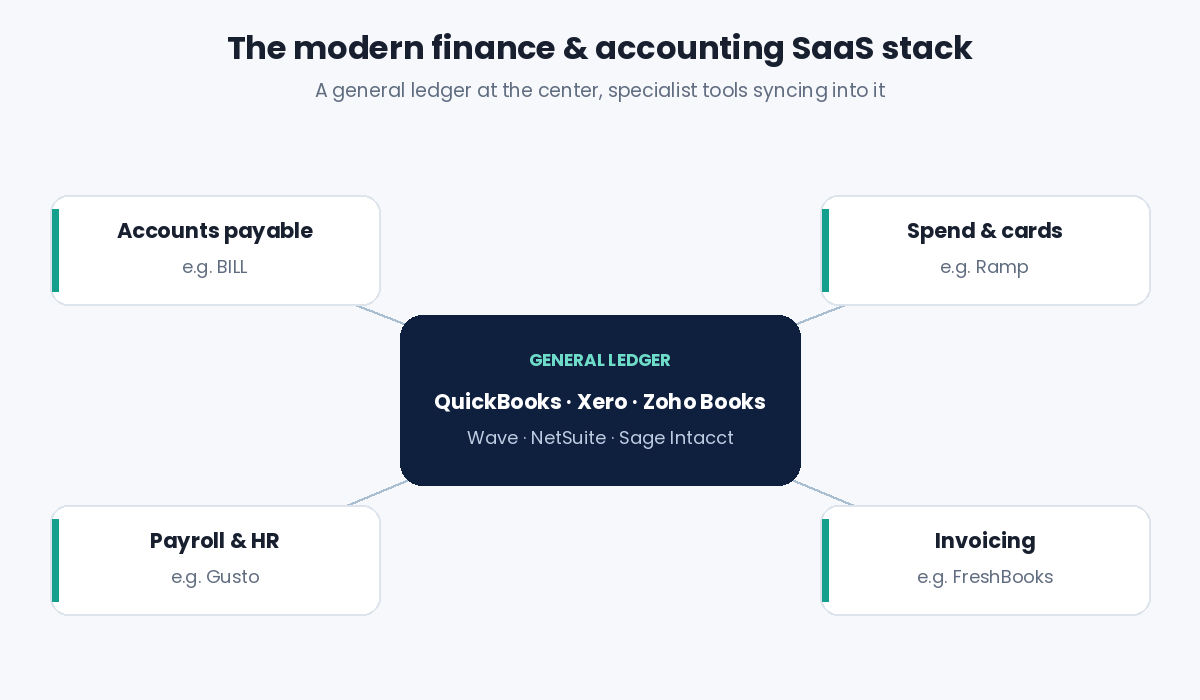
Choosing among the best finance and accounting SaaS tools used to mean picking one bookkeeping app and hoping it would grow with you. In 2026 the picture looks different. Most finance teams now run a small "stack": a general ledger at the center, with specialist apps for bills, company cards, and payroll plugged into it. Picking well saves hours every month-end. Picking badly means messy data, duplicate entry, and a painful migration two years later.
This guide ranks the ten cloud tools we think deserve a spot on your shortlist, from free options for freelancers to full ERPs for multi-entity companies. Pricing was checked against the vendors' published plans and recent third-party trackers in September 2026. SaaS prices change often (several vendors raised them this year), so treat every figure as a starting point and confirm on the vendor's pricing page before you buy.
Quick Answer: The 10 Best Finance & Accounting SaaS Tools at a Glance
- QuickBooks Online – best all-round accounting software for US small businesses
- Xero – best for unlimited users and a huge app marketplace
- Oracle NetSuite – best cloud ERP for scaling, multi-entity companies
- Sage Intacct – best for finance-led mid-market teams and nonprofits
- Zoho Books – best value, with a genuinely useful free plan
- FreshBooks – best for freelancers and service businesses that bill clients
- Wave – best free bookkeeping for solo owners
- BILL – best for automating accounts payable and receivable
- Ramp – best for corporate cards and spend management
- Gusto – best payroll platform for small teams
How We Chose These Tools
We did not rank by brand size alone. Every tool on this list had to be fully cloud-based (true SaaS, not hosted desktop software), have transparent or well-documented pricing, integrate with at least one major general ledger, and serve a clear use case. We then weighed five factors:
- Core accounting depth – double-entry ledger, bank reconciliation, reporting, and tax handling.
- Automation – bank feeds, rules, receipt capture, AI-assisted coding and approvals.
- Scalability – user limits, multi-currency, multi-entity, and how much the price jumps as you grow.
- Ecosystem – integrations with payroll, payments, CRM and e-commerce tools.
- Total cost – not just the headline price, but add-ons, per-user fees and payment processing.
1. QuickBooks Online – Best Overall for Small Businesses
QuickBooks Online remains the default accounting platform for US small businesses, and for good reason: almost every bookkeeper and CPA knows it, and nearly every finance app integrates with it. It covers invoicing, expense tracking, bank feeds with matching rules, sales tax, and a deep library of reports. Higher tiers add project profitability, inventory, class and location tracking, and custom user roles.
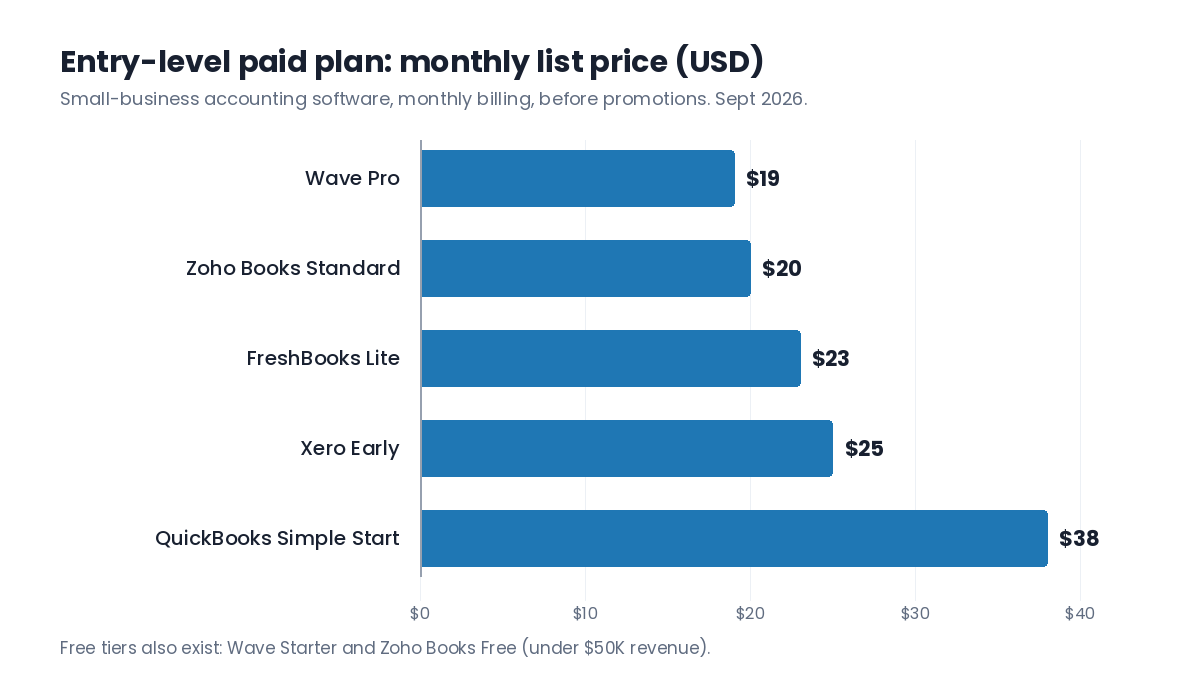
Pricing: Simple Start begins at around $38/month for one user. Intuit raised prices on its higher tiers again in summer 2026, so Essentials, Plus and Advanced now cost noticeably more than they did a year ago. New subscribers are usually offered a steep introductory discount for the first few months.
- Pros: largest accountant network, huge integration ecosystem, strong reporting.
- Cons: annual price increases, user caps on each plan, payroll is an extra cost.
Best for: US small businesses that want the "safe" choice their accountant already supports.
2. Xero – Best for Unlimited Users and Integrations
Xero is QuickBooks' closest rival and is especially popular in the UK, Australia and New Zealand. Its biggest structural advantage is that every plan includes unlimited users, which makes it easy to invite your accountant, a bookkeeper, and team members without paying per seat. The interface is clean, bank reconciliation is fast, and the app marketplace is one of the largest in accounting.
Pricing (US): Early is $25/month but limited to 20 invoices and quotes and 5 bills. Growing ($55/month) removes those caps, and Established ($90/month) adds multi-currency, project tracking and longer cash-flow forecasting. Payroll and advanced inventory are add-ons.
- Pros: unlimited users, strong multi-currency on the top tier, excellent add-on ecosystem.
- Cons: the entry plan is too restrictive for most active businesses; US payroll requires a partner.
Best for: growing teams and international businesses that want collaboration without per-user fees.
3. Oracle NetSuite – Best Cloud ERP for Scaling Companies
When a business outgrows QuickBooks or Xero, usually because of multiple entities, currencies, inventory locations or a need for real-time consolidation, NetSuite is the most common next step. It is a full ERP: general ledger, AP/AR, revenue recognition, inventory, order management, and optional CRM and e-commerce modules, all on one database.
Pricing: quote-based. You pay an annual base license plus per-user fees and any modules you add, and implementation is usually a separate project. Expect a meaningful jump in cost compared with small-business accounting software.
- Pros: handles consolidation and complex operations, highly customizable, scales for years.
- Cons: expensive, long implementation, usually needs a partner or in-house admin.
Best for: fast-growing mid-sized companies with several entities or product lines.
4. Sage Intacct – Best for Finance-Led Mid-Market Teams
Sage Intacct is built specifically for accountants rather than as an all-in-one business suite. Its "dimensions" model lets you tag transactions by department, location, project, grant or any custom field, then slice reports without a sprawling chart of accounts. That makes it a favorite of CFOs, multi-location service firms, and nonprofits that need fund accounting.
Pricing: quote-based, typically licensed annually by module and number of users, sold through Sage or its partners.
- Pros: excellent multi-dimensional reporting, strong audit trail, fast close for multi-entity groups.
- Cons: no public pricing, less suited to inventory-heavy businesses than a full ERP.
Best for: finance teams that care most about reporting, consolidation and a faster month-end close.
5. Zoho Books – Best Value Accounting Software
Zoho Books offers one of the strongest price-to-feature ratios in the category. Even the free plan covers invoices, quotes, expenses, journals, bank reconciliation, recurring invoices, a customer portal and 1099 tracking. It also connects neatly with the rest of the Zoho suite (CRM, Inventory, Expense, Payroll), which is attractive if you already use Zoho apps.
Pricing: the Free plan is available to businesses with under $50K in annual revenue (1 user plus an accountant, up to 1,000 invoices a year). Paid plans start at $20/month (Standard, or $15/month billed annually) and climb to Professional, Premium, Elite and Ultimate for inventory, projects and advanced analytics. Extra users cost about $2.50/user/month on annual billing.
- Pros: very affordable, useful free tier, strong automation (workflows, custom fields).
- Cons: fewer accountants know it well; some features sit behind paid add-ons.
Best for: cost-conscious small businesses and Zoho users.
6. FreshBooks – Best for Freelancers and Service Businesses
FreshBooks started as invoicing software and it shows: sending polished invoices, tracking billable time, managing retainers and chasing late payments is easier here than almost anywhere else. It now includes double-entry accounting reports, expense tracking and project profitability, which makes it a complete system for consultants, agencies and trades.
Pricing: Lite is $23/month (5 billable clients), Plus is $43/month (50 clients) and Premium is $70/month (unlimited clients). Each additional team member costs $11/month, and the Select plan is custom-priced. Promotional discounts are common for new customers.
- Pros: best-in-class invoicing and time tracking, very easy to use, good mobile app.
- Cons: client limits on lower plans, per-user fees add up, weaker for inventory.
Best for: solopreneurs and service firms whose revenue comes from billing clients.
7. Wave – Best Free Bookkeeping for Solo Owners
Wave's Starter plan is free and still includes unlimited invoices, unlimited users and real double-entry bookkeeping, which is rare. The business model relies on payment processing and add-ons rather than subscription fees, so it is ideal for side hustles and very small businesses that just need clean books and professional invoices.
Pricing: Starter is $0. The Pro plan runs about $19/month (less on annual billing) and adds features such as receipt scanning, automatic bank transaction import and lower card-processing rates. Payroll and assisted bookkeeping are paid extras.
- Pros: free core accounting, simple interface, unlimited users.
- Cons: limited automation and reporting, few integrations, not built to scale.
Best for: freelancers and micro-businesses on a tight budget.
8. BILL – Best for Accounts Payable and Receivable Automation
BILL (formerly Bill.com) sits on top of your accounting system and takes over the painful parts of paying and getting paid. Vendors email invoices to a dedicated inbox, AI extracts the details, approvers sign off from their phones, and payments go out by ACH, card or check. Everything syncs back to your ledger, so AP is no longer a manual data-entry job.
Pricing: Essentials is $49/user/month, Team is $65/user/month (adds automatic two-way sync with QuickBooks and Xero plus receivables features), and Corporate is $89/user/month (adds purchase orders and custom approval policies). Enterprise is custom-priced. BILL's separate Spend & Expense product, with corporate cards, is free.
- Pros: saves serious time on AP, strong approval controls, large vendor network.
- Cons: per-user pricing gets expensive for bigger teams; some payment methods carry fees.
Best for: businesses paying dozens or hundreds of vendor bills each month.
9. Ramp – Best for Corporate Cards and Spend Management
Ramp combines corporate cards, expense management, bill pay and procurement in one platform, with a strong focus on automation. Employees snap receipts by text or Slack, spending limits are enforced on the card itself, and transactions are coded and synced to your accounting software with little human effort. For many companies it replaces a separate expense-report tool entirely.
Pricing: the core platform is free, with unlimited physical and virtual cards, expense management, bill pay and QuickBooks or Xero integrations. Ramp Plus costs $15/user/month (plus a platform fee based on team size) and adds AI-driven expense reviews, NetSuite and Sage Intacct integrations, budgets and multi-entity support. Enterprise is custom.
- Pros: powerful free tier, excellent automation, real-time visibility into spend.
- Cons: eligibility requirements apply for the card program; advanced controls need Plus.
Best for: startups and growing companies that want to control spend before it happens.
10. Gusto – Best Payroll Platform for Small Teams
Payroll is where small-business finance most often goes wrong, and Gusto makes it approachable. It runs unlimited payrolls, files federal, state and local payroll taxes automatically, handles W-2s and 1099s, and bundles HR tools such as onboarding, PTO and benefits administration. Payroll journal entries sync to QuickBooks, Xero and other ledgers.
Pricing: Simple is $49/month plus $6 per person, Plus is $80/month plus $12 per person (adds multi-state payroll, time tracking and next-day pay), and Premium is $180/month plus $22 per person. A Contractor Only plan is available for teams without W-2 employees.
- Pros: automated tax filings, friendly employee experience, strong integrations.
- Cons: per-person fees grow quickly with headcount; best features are on higher plans.
Best for: US small businesses with employees or contractors to pay.
Comparison Table: Pricing and Best Use Case
| Tool | Category | Starting price* | Best for |
|---|---|---|---|
| QuickBooks Online | Accounting | ~$38/mo | US small businesses |
| Xero | Accounting | $25/mo | Unlimited users, global teams |
| Oracle NetSuite | Cloud ERP | Custom quote | Multi-entity scale-ups |
| Sage Intacct | Financial management | Custom quote | Mid-market finance teams |
| Zoho Books | Accounting | Free / $20/mo | Best value |
| FreshBooks | Invoicing & accounting | $23/mo | Freelancers, service firms |
| Wave | Bookkeeping | Free / ~$19/mo | Micro-businesses |
| BILL | AP / AR automation | $49/user/mo | High bill volume |
| Ramp | Spend management | Free / $15/user/mo | Cards and expenses |
| Gusto | Payroll & HR | $49/mo + $6/person | Small teams with payroll |
*Regular list prices as published in September 2026, before promotional discounts and taxes. Always confirm on the vendor's website.
How to Choose the Right Finance and Accounting Software
Start with your general ledger
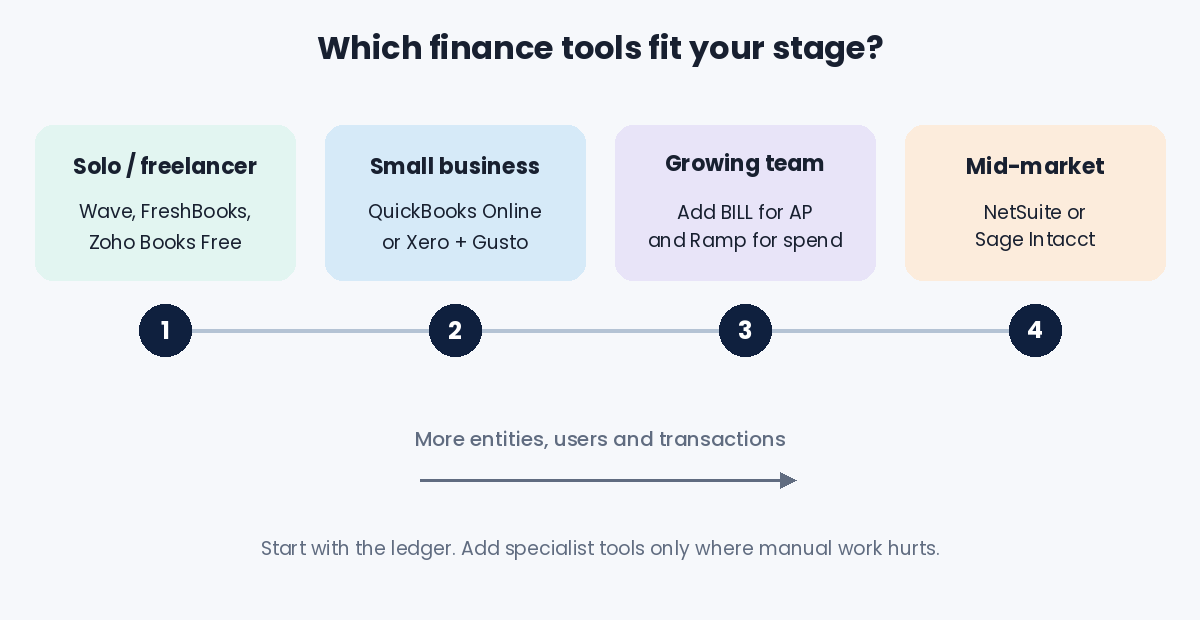
Everything else plugs into your accounting system, so choose it first. Freelancers and micro-businesses can start with Wave, Zoho Books or FreshBooks. Most small and growing businesses land on QuickBooks Online or Xero. Once you have multiple entities, complex revenue recognition or serious inventory, it is time to evaluate NetSuite or Sage Intacct.
Add specialist tools only where the pain is real
If you pay a handful of bills each month, your accounting software's built-in bill pay is probably enough. If AP is eating days of someone's time, add BILL. If employee spending is hard to control, add Ramp. If you have employees, add Gusto or another dedicated payroll provider. Each extra tool should remove manual work, not create another login to maintain.
Check integrations before price
A cheap tool that does not sync cleanly with your ledger will cost more in cleanup time than it saves. Confirm that the integration is two-way, what data it syncs (bills, payments, attachments, classes or departments), and whether it requires a higher-priced plan.
Model the real cost as you grow
Per-user and per-employee pricing can double your bill as the team expands. Map out what you would pay at your current size and at twice your current size before committing.
Involve your accountant
Your bookkeeper or CPA will spend more time in these tools than almost anyone else. Ask which platforms they support. Many accountants also have partner pricing that can lower your subscription cost.
Frequently Asked Questions
What is the best accounting SaaS for a small business?
For most US small businesses, QuickBooks Online is the safest all-round choice because of its accountant network and integrations. Xero is the better pick if you want unlimited users or work across countries, and Zoho Books is the best value for budget-conscious owners.
Is there any free accounting software that is actually good?
Yes. Wave's Starter plan and the Zoho Books Free plan both offer real double-entry bookkeeping, invoicing and bank reconciliation at no cost. Zoho's free tier is limited to businesses under $50K in annual revenue, while Wave makes its money from payment processing and optional add-ons.
When should a company move from QuickBooks or Xero to an ERP?
Consider an ERP such as NetSuite or Sage Intacct when you manage several legal entities, need automated consolidation, run complex inventory or revenue recognition, or when month-end close takes too long because data lives in too many spreadsheets. Growth alone is not a reason to switch.
Do I need separate tools for bills, expenses and payroll?
Not at first. Most accounting platforms handle basic bills and expenses. Specialist tools like BILL, Ramp and Gusto pay off once volume grows, because they automate approvals, receipt capture, tax filings and syncing, which removes hours of manual entry each month.
Is cloud accounting software secure?
Reputable vendors use bank-level encryption, multi-factor authentication, role-based permissions and regular third-party security audits. Your biggest risks are usually on your side, so turn on two-factor authentication, give each person their own login, and limit admin rights to the people who need them.
Final Verdict
There is no single "best" finance tool. There is a best stack for your stage. A freelancer can run a clean business on Wave or FreshBooks. A growing small business is well served by QuickBooks Online or Xero, with BILL, Ramp and Gusto added as bills, spending and headcount grow. When complexity really arrives, NetSuite and Sage Intacct are built to carry the load. Start with the general ledger, add automation where the manual work hurts most, and re-check pricing every year. In finance software, the price you signed up at is rarely the price you keep.

.png)