Research-based comparison, not hands-on testing · Plans, fees and limits checked on circle.so, skool.com and both help centers, October 23, 2026 · Prices in US dollars
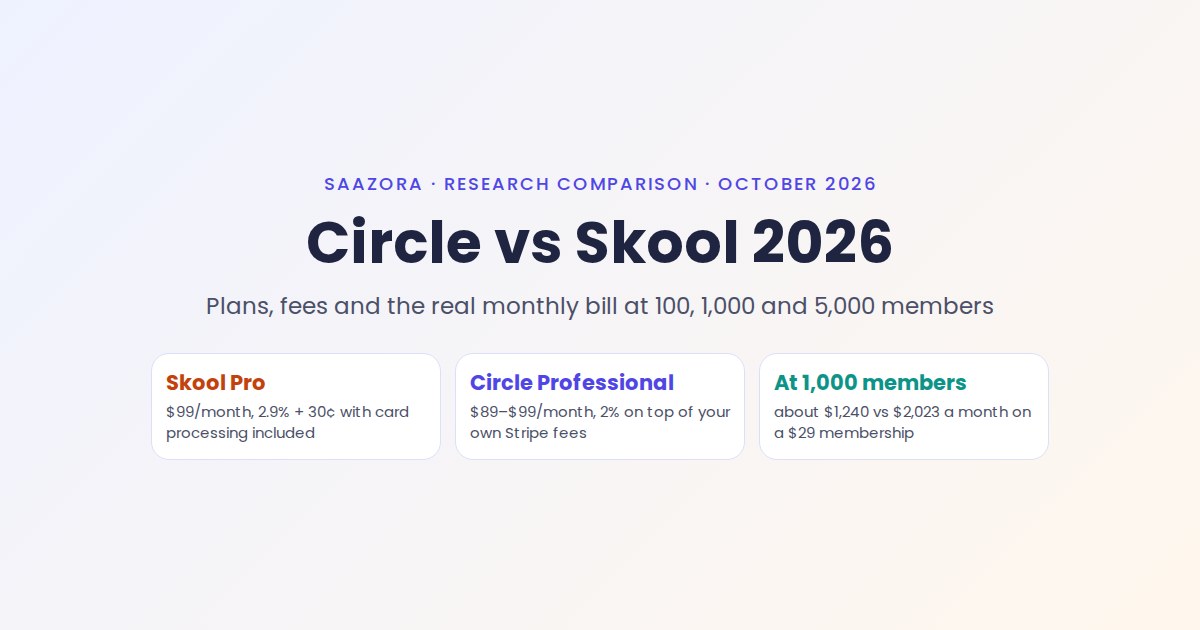
Circle vs Skool comes down to one trade: Skool Pro is the cheaper way to run a paid community at almost any size, and Circle costs more each month because it gives you separate spaces, your own domain, a removable logo and deeper automation. On a $29 monthly membership with 1,000 paying members, our model puts Skool Pro at about $1,240 a month in plan price plus fees and Circle Professional at about $2,023. Whether the extra $783 is worth it depends on how your community is shaped, not on the sticker price.
This page prices both platforms at 100, 1,000 and 5,000 paid members, then walks through courses, live calls, gamification, branding, domains and integrations. If you are already leaning toward Circle, our full Circle review of who it suits covers the plan gates in more depth, and other tools in this niche sit in Saazora's courses and community hub.
Circle vs Skool at a glance
| Question | Skool | Circle |
|---|---|---|
| Plans (monthly billing) | Hobby $9, Pro $99 | Professional $99, Business $219, Scale $419, Circle Plus custom |
| Yearly billing | Hobby $7.50/mo, Pro $82/mo ("2 months free") | Professional $89/mo, Business $199/mo, Scale $419/mo |
| Fee on member payments | Hobby 10% + 30¢; Pro 2.9% + 30¢ (3.9% + 30¢ on charges above $900) | 2% / 1% / 1% / 0.5% by plan, plus Stripe processing on your own account |
| Who processes the card | Skool, as merchant of record; you cannot connect your own Stripe account | Your Stripe account; Circle takes its fee as an application fee |
| Trial and refunds (owner) | 14-day trial; no refunds on billing periods | 14-day trial, no card; 30-day money-back guarantee |
| Community layout | One feed with up to 10 categories, plus Classroom and Calendar tabs | Many spaces (posts, chat, events, courses), 20 to 100 by plan |
| Web address | Custom URL on Pro, still on skool.com | Custom domain on every plan |
| Own branded app | None found | Circle Plus only |
From skool.com/pricing, help.skool.com payment and plan articles, circle.so/pricing and help.circle.so fee articles, checked October 23, 2026 (Circle refund policy checked October 21).
Saazora may earn a commission if you sign up through links on this page; it does not change what you pay. If the Circle column already fits your plans, you can open a 14-day Circle trial with no card (affiliate link) and price your own numbers. Skool links on this page are plain links with no affiliate tag.
Two plans versus four, and two very different fee models
The headline percentages are not comparable, and this is where most Circle vs Skool tables mislead. Skool's percentage already includes card processing. Circle's percentage sits on top of whatever Stripe charges your account.
Skool's payments FAQ spells out the full rate: Pro takes 2.9% plus 30 cents on charges up to $899 and 3.9% plus 30 cents above $900, while Hobby takes 10% plus 30 cents on every charge. Skool runs the payment on its own merchant account, pays you weekly on Wednesdays through a Stripe Express connection, and handles EU VAT because it is the merchant of record. Members always pay in US dollars.
Circle works the other way round. You connect your own Stripe account, and Circle's help center says every paywall payment carries both Stripe's processing fee and Circle's transaction fee. For subscriptions, Circle uses Stripe Billing, which adds 0.7% on top of the 2.9% plus 30 cents card rate. Circle's own example for a Business-plan subscription is 1% + 2.9% + $0.30 + 0.7%.
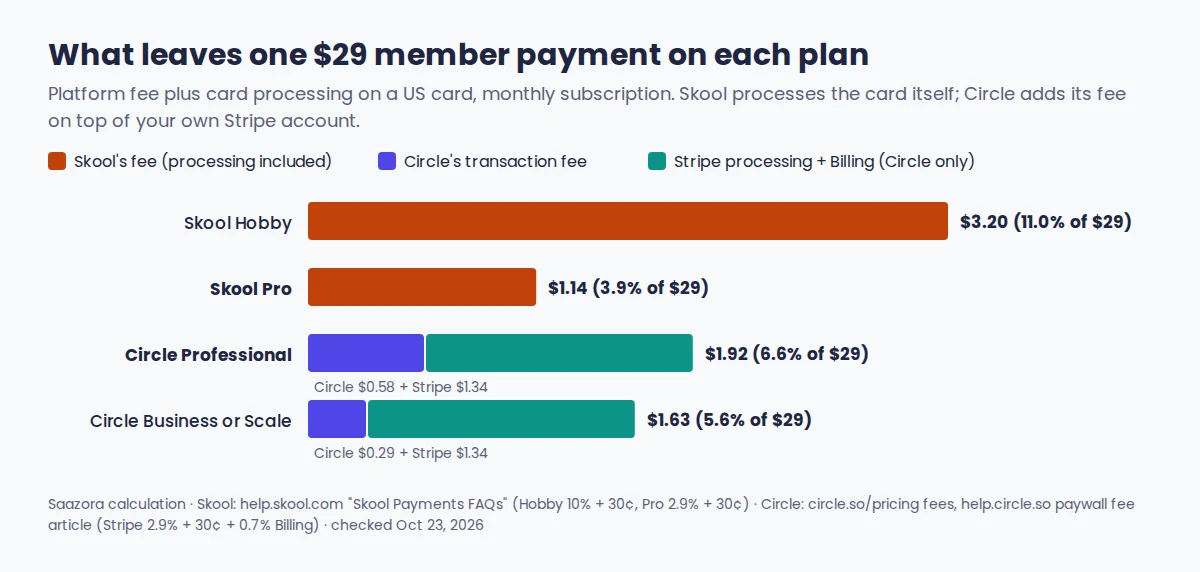
One detail is worth knowing before you read any vendor comparison. Circle's own Circle vs Skool page contrasts its "0.5–2%" with "Skool's 10%". That 10% is the $9 Hobby rate. Against Skool Pro, the platform with the lower percentage on paper takes more from each payment once Stripe is added.
What you pay at 100, 1,000 and 5,000 paid members
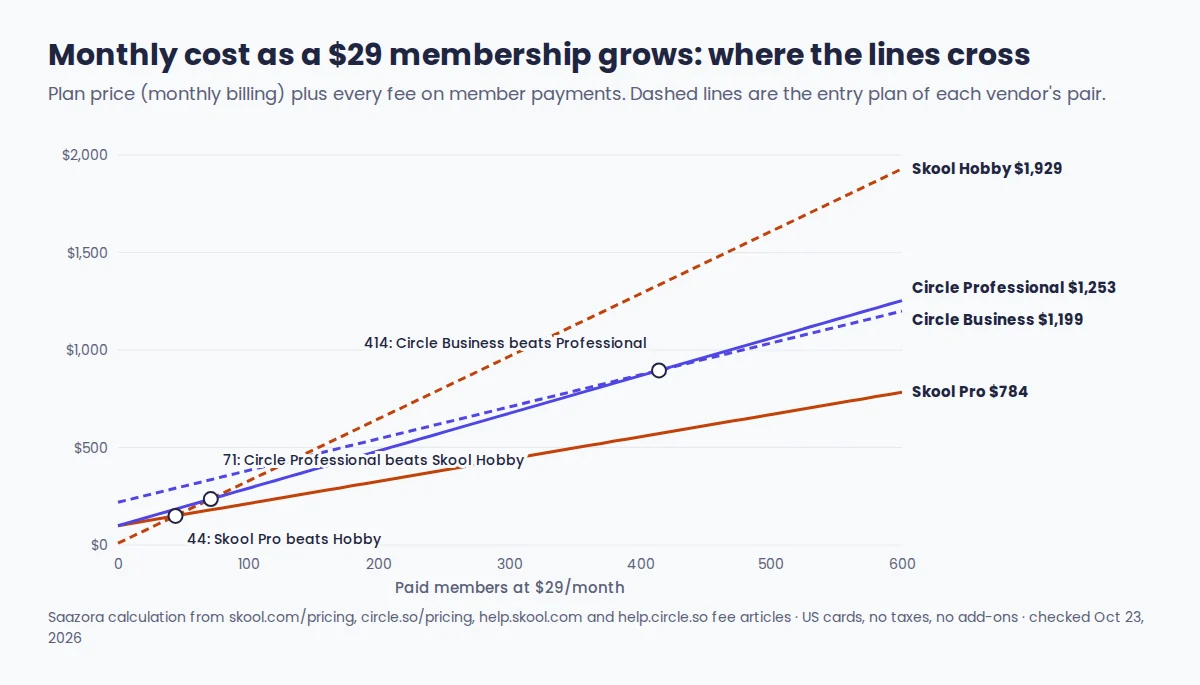
To make the plans comparable we priced one scenario: a $29 monthly membership, every member paying by US card, monthly platform billing, no add-ons and no taxes. The total is the plan price plus every fee on member payments.
| Plan | 100 members ($2,900/mo) | 1,000 members ($29,000/mo) | 5,000 members ($145,000/mo) |
|---|---|---|---|
| Skool Hobby ($9) | $329.00 (11.3%) | $3,209 (11.1%) | $16,009 (11.0%) |
| Skool Pro ($99) | $213.10 (7.3%) | $1,240 (4.3%) | $5,804 (4.0%) |
| Circle Professional ($99) | $291.40 (10.0%) | $2,023 (7.0%) | $9,719 (6.7%) |
| Circle Business ($219) | $382.40 (13.2%) | $1,853 (6.4%) | $8,389 (5.8%) |
| Circle Scale ($419) | $582.40 (20.1%) | $2,053 (7.1%) | $8,589 (5.9%) |
Saazora calculation. Skool: plan price + 2.9% or 10% + $0.30 per charge. Circle: plan price + Circle fee + 2.9% + $0.30 + 0.7% Stripe Billing per charge. Percentage = share of gross member revenue. Rates from skool.com/pricing, help.skool.com "Skool Payments FAQs", circle.so/pricing and help.circle.so "Paywall transaction fees"; checked October 21–23, 2026.
Three things stand out in the table:
- Skool Pro is the cheapest row at every size. The gap to Circle Professional is $78 a month at 100 members, $783 at 1,000 and $3,915 at 5,000. Against Circle Business it is $613 and $2,585 a month at the two larger sizes.
- Hobby stops making sense early. At $29 a month, Skool Pro becomes cheaper than Hobby at 44 paying members, and even Circle Professional undercuts Hobby from 71 members.
- Circle Scale never wins on fees. Business and Scale both charge 1%, so Scale costs $200 more at every size. You buy Scale for AI agents, unlimited workflows and higher limits, not to save money. Circle Business overtakes Professional at about 414 members on this price.
The model leaves out four things that can move the result either way:
- Annual platform billing trims $10 to $20 a month: Skool Pro drops to $82 and Circle Professional to $89. It does not change the ranking.
- International cards. Stripe adds 1.5% on non-US cards, which Circle passes straight through. If a quarter of 1,000 members paid with foreign cards, Circle's bill would rise by about $109 a month. Skool's FAQ presents its flat rate as cheaper than Stripe for exactly this reason.
- Skool's Growth Boost. It is switched on by default. When Skool's own ads or discovery pages bring you a paying member, Skool keeps 30% of that member's recurring charge. If Skool sourced 200 of your 1,000 members, that adds about $1,740 a month. Members you bring yourself pay only the normal fee, and the setting can be turned off under Discovery.
- Tax. Skool collects and remits EU VAT for you. On Circle, tax runs through Stripe Tax, which Circle's help center says carries an extra Stripe fee.
High-ticket sales change the picture a little. A $997 one-time cohort seat costs about $39.18 in fees on Skool Pro (the 3.9% band), about $53.14 on Circle Professional and about $43.17 on Circle Business, using Stripe Invoicing's 0.4% for one-time Circle paywalls. If you want the same fee stack priced for installments and bundles, see our breakdown of how Circle's plan fees and Stripe charges add up.
Courses: Skool's Classroom versus Circle's course spaces
Both platforms host video natively and both let you sell a course inside a community, but they organise lessons differently.
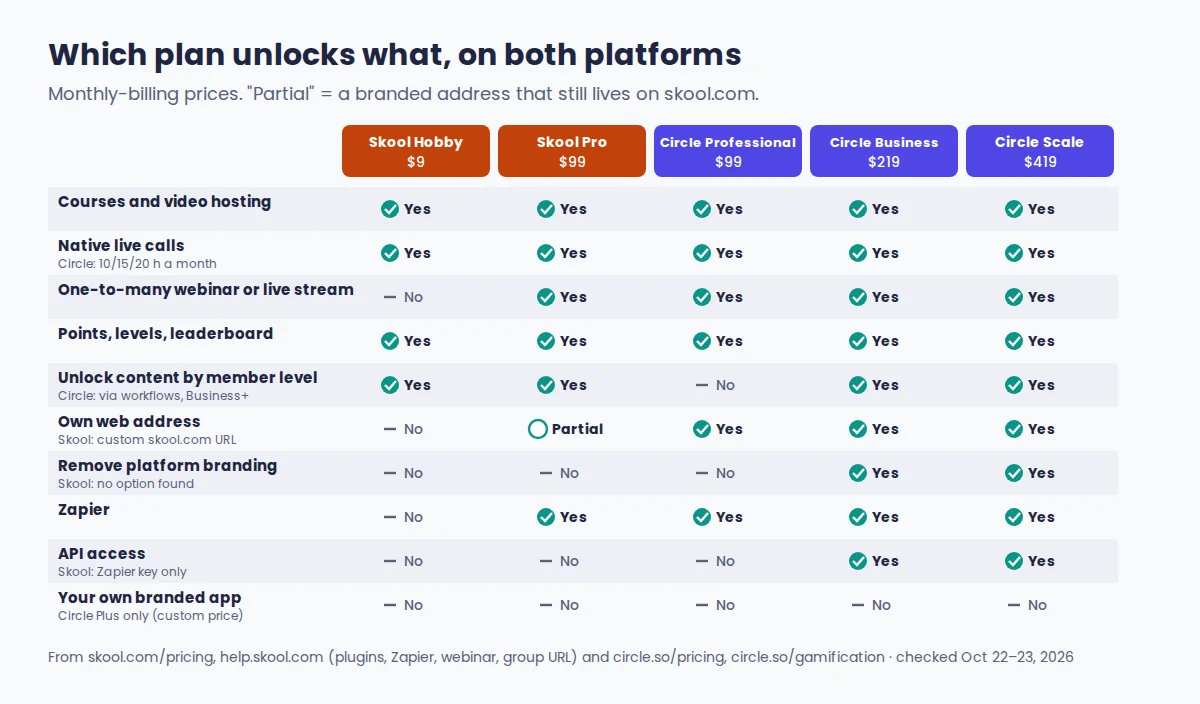
Skool's Classroom is a tab of pages and folders. Each page can hold a video, text, a resource link or file and a transcript, and English captions are generated automatically. Skool allows up to 200 pages per course and unlimited courses on both plans. Drip is set per page, a number of days after a member joins, and a course can be locked until a member reaches a chosen level. Any course can also carry its own one-time "Buy Now" price inside a free or paid group. We found no quiz or assessment feature documented in Skool's help center on October 23, 2026.
Circle's courses are spaces, so each course uses one of your plan's 20, 30 or 100 spaces. In return you get three course types: self-paced, structured (drip after enrolment) and scheduled (sections open on fixed dates for the whole cohort). Drip works per section, not per lesson, and quizzes are multiple choice.
The practical split: a creator with many short evergreen courses and an upsell or two fits Skool's Classroom well. A cohort program where everyone starts on the same Monday, with a quiz at the end of each module, fits Circle better.
Live calls, webinars and events
Neither platform needs Zoom, though both let you use it.
- Skool Call runs live in the browser or the Skool app on both plans. Hosts can share screens, let members share, mute people and record; a recording must be downloaded within 14 days. Events can repeat daily, weekly or monthly and can point at Skool Call, Zoom, Google Meet or a physical address. A one-to-many webinar format is Pro only.
- Circle splits live into streams, where only hosts are on camera, and rooms, where everyone can be. Limits rise by plan: 100, 200 or 500 stream attendees, 15, 20 or 50 room participants, and 10, 15 or 20 live hours a month. Replays come with searchable transcripts and automatic summaries.
Skool's help center does not publish a participant cap for Skool Call or webinars, so check with Skool if you plan large town halls. On Circle, a 5,000-member community that expects more than 500 people on one stream would need Circle Plus or a separate webinar tool.
Points, levels and leaderboards
Gamification is the feature Skool is known for, and it is built into both of its plans. Every like a post or comment receives is one point for its author. Members climb nine levels, from 5 points for level 2 to 33,015 for level 9, and levels are counted per group. Owners and admins are kept off the leaderboard, and plugins can hold back chat or posting until a member reaches a level, which Skool suggests for large groups fighting spam.
Circle has a similar system on every plan, also one point per like, with levels, badges and a leaderboard you can make private or switch off entirely. The difference is what a level can trigger. On Skool, unlocking a course at a level is a setting. On Circle, rewards such as opening a private space for top contributors run through workflows, which start on the $219 Business plan.
Your brand: domain, logo and mobile app
This is Circle's clearest advantage, and the reason many owners pay more for it.
- Web address. Every Circle plan includes a custom domain. Skool's Custom URL is a Pro feature that changes your group's address on skool.com; the first change is free and each later change costs $100. We found no help article on connecting your own domain to a Skool group.
- Platform branding. Circle lets you remove its branding from the Business plan up. We found no equivalent option in Skool's pricing or help center.
- Mobile. Both offer native mobile apps. Circle's apps do not support member sign-up, and iOS users finish paywall checkout in a browser. Your own app in the App Store is available only on Circle Plus, which is sold on custom pricing. We found no branded or white-label app option for Skool.
If your audience finds you through your own site and you want the community to look like part of it, Circle fits. If members will mostly arrive through a link in your social bio and do not mind a Skool address, the branding gap matters less.
Integrations, automation and growth tools
Skool keeps its extras in a short plugin list. Membership questions and level-based chat or posting unlocks work on both plans. AutoDM welcome messages, an onboarding video, a cancellation video, Google Ads tracking and Zapier are Pro only. The Zapier connection offers two triggers (new paid member, membership answers) and two actions (invite a member, unlock a course), which covers sending buyers to a CRM but not much more. Pro also lets members earn referral payouts when you switch affiliates on.
Circle connects to Zapier on every plan. From Business it adds workflows (20 on Business, unlimited from Scale), API access and its MCP server, and Scale adds AI agents trained on your content. Circle's email tool, Email Hub, is a paid add-on that starts at $19 a month on the self-serve plans, so "built-in email" on Circle still has a line item.
Who each platform fits
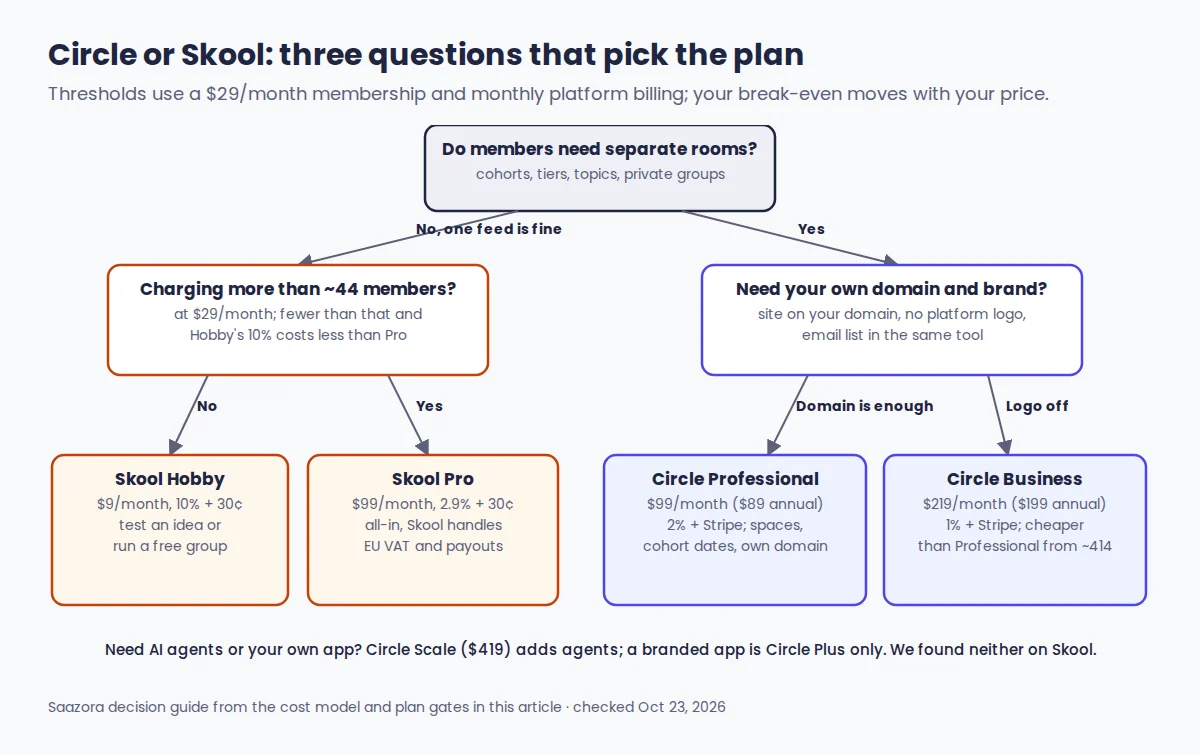
Each fit below comes from the cost model and the plan gates above.
- Skool Hobby fits a free community, or a paid test with fewer than about 44 members at $29. Below that size, its 10% fee costs less than paying $99 for Pro.
- Skool Pro fits a single-topic paid community with one or two courses: a fitness group, a trading room, an agency mastermind. It is the cheapest option at every size we modelled, Skool handles payouts and EU VAT, and the level system keeps members posting.
- Circle Professional fits owners who need several rooms (members-only tiers, cohorts, topic channels), a community on their own domain, or scheduled cohort courses with quizzes. Expect to pay roughly 2.7 percentage points more of revenue than Skool Pro at 1,000 members.
- Circle Business fits communities past about 400 paying members, or anyone who needs workflows, the API or Circle's logo removed.
- Circle Scale or Plus fits larger operations that want AI agents answering member questions or their own app in the stores.
Skip Skool if your offer depends on separate private groups for different tiers, or if you price in a currency other than US dollars. Skip Circle if you just want the lowest monthly bill for one engaged group, or you do not want to manage your own Stripe account and tax setup.
Our verdict
For most solo creators running one paid group, Skool Pro is the better buy in 2026: it is cheaper at 100, 1,000 and 5,000 members, card processing is included, and the gamification comes ready to use. Circle earns its higher bill when the community needs structure Skool does not have, such as separate spaces, cohort start dates, your own domain, and automation from the Business plan up. Pick on the shape of your community first, then use the table above to see what that choice costs at your size.
If Circle is the fit, start a Circle trial (affiliate link) and check the current offers on our Circle coupons and offers page. To check Skool's side, see Skool's own pricing page.
Circle vs Skool FAQ
Is Skool cheaper than Circle?
Yes, on Skool Pro. With a $29 membership, Skool Pro costs about $213 a month at 100 members and $1,240 at 1,000, against $291 and $2,023 on Circle Professional, because Skool's 2.9% includes card processing and Circle's 2% does not. Skool Hobby is cheaper only for very small paid groups.
Does Skool charge transaction fees on the Pro plan?
Yes. Pro charges 2.9% plus 30 cents per charge up to $899 and 3.9% plus 30 cents above $900, with processing included. Skool's FAQ adds that transaction fees are non-refundable, even if you refund the member.
Can I use my own domain with Skool?
Not that we could find. Skool Pro lets you claim a custom URL on skool.com, but we found no option to point your own domain at a Skool group. Every Circle plan includes a custom domain.
Can I move from Skool to Circle later?
Yes, but your payments do not come with you. Skool processes cards on its own merchant account rather than yours, so members would need to subscribe again on your Stripe account in Circle. When you cancel Skool, your group is archived and stays read-only. Circle offers free course and student migration on annual Business plans and above; confirm with Circle what it can move from Skool before you switch.
How we put this comparison together
This Circle vs Skool comparison is research-based. On October 23, 2026 we re-read circle.so/pricing (including its structured price data), Circle's pricing and comparison reference files, skool.com/pricing (rendered in a browser with both the Monthly and Yearly toggles), and the Skool help-center articles listed below on payments, plans, URLs, Classroom, drip, levels, live calls, webinars, plugins and Zapier. Circle's help-center articles and product pages on paywall fees, courses, gamification, events and mobile apps were read on October 21–22 and cross-checked against today's pricing page, which was unchanged. No account was opened on either platform and nothing was tested hands-on; every cost figure is arithmetic on the published rates, and "we found no" means a feature was absent from the vendor's documentation, not tested. More on how Saazora researches and rates software.
Sources: skool.com/pricing; help.skool.com articles "Skool Payments FAQs", "Payment terms and policy", "How to change my group URL?", "How to setup pricing for the group?", "How to set up one time course purchases?", "What is Classroom?", "How to add videos", "How to drip the content?", "How do level-locked courses work?", "How do points and levels work?", "What are member roles in Skool?", "How to go live on Skool", "How to create an event in your group?", "How to create webinar?", "How to use Plugins?", "Zapier Integration", "Growth Tab and Skool Ads"; circle.so/pricing; circle.so/_llms/pricing.md and compare.md; circle.so/compare/vs-skool; circle.so/gamification and /events; help.circle.so "Paywall transaction fees", "Courses overview", "Utilizing the drip feature", "Circle features: desktop vs mobile apps", Stripe Tax article and refund policy; stripe.com/pricing, /billing/pricing and /invoicing/pricing. Checked October 21–23, 2026. Prices and features change; confirm on each vendor's site before you buy.