Last checked October 15, 2026 · Research-based review, not hands-on testing
Saazora may earn a commission if you sign up through some links on this page, at no extra cost to you.
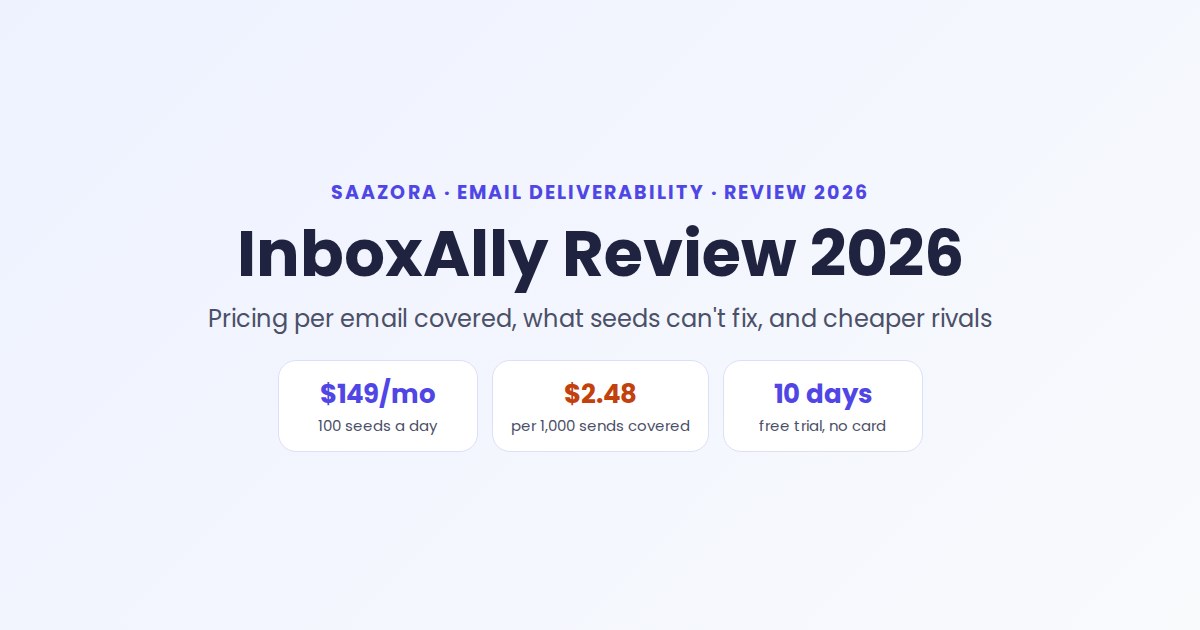
$149 a month buys you 100 email addresses that open, read and rescue your messages. That is the whole InboxAlly product in one line, and this InboxAlly review is about whether those addresses are worth paying for in your situation. Our short answer: InboxAlly makes sense for a newsletter, ecommerce or B2B program sending a few thousand emails a day from a domain whose records already pass but whose placement has slipped. It is poor value for a small cold-email setup, where per-inbox warmup tools cost a fraction of the price, and it does nothing for a domain whose SPF, DKIM or DMARC is broken.
| InboxAlly at a glance | October 2026 |
|---|---|
| What it is | Seed-engagement service: you add its addresses to your real sends, and its network interacts with them |
| Plans | Starter $149, Plus $645, Premium $1,190 per month; Enterprise by quote |
| Billing | Monthly in USD; no yearly price shown |
| Trial | 10 days, no card; limits shown inside the app |
| Access needed | None to your ESP, inboxes or DNS |
| Sizing rule | About 5 seeds per 100 emails, on the domain that needs help |
| Good fit | Senders of roughly 1,000 to 20,000 emails a day with authentication already passing |
If you have not yet worked out why your mail is being filtered, start with our guide to why emails go to spam, which walks through headers, bounce codes and the 2026 Gmail, Yahoo and Outlook rules. This page assumes you have done that and are deciding whether to spend money on the next step.
How InboxAlly works on a real campaign
Unlike most warmup tools, InboxAlly does not connect to your mailbox and send messages on your behalf. The flow, as its knowledge base describes it, is:
- Download a seed list. These are addresses InboxAlly owns, hosted at Gmail, Yahoo, Google Workspace, Hotmail and Outlook.
- Create a sender profile and choose an engagement preset. Some presets favor opens and clicks; others favor moving mail out of Spam for a new or recovering domain.
- Import the seeds into your ESP and include them in the list or segment you already mail. Klaviyo and HubSpot have native integrations; anything else that can mail a list works, including your own SMTP server.
- Send as usual. InboxAlly says most seeds act on a message within 4 hours, starting inside the first hour, through each provider's normal web interface rather than an API.
The actions include opening, scrolling, clicking a link, replying with a generic line, starring or marking as important, and moving the message from Spam, Promotions or Updates to the Primary inbox. InboxAlly's materials put the count at seven signals on one page and up to eight per seed on another. The order of actions is randomized, and the schedule is set each night at midnight in the profile's own time zone.
Beyond the seeds, every plan lists the same toolset: an AI warmup mode (Autowarmup) that writes and sends its own sequence, IA Score and IA Reputation ratings, a placement tester, blacklist monitoring, DMARC reporting, a REST API and an in-app AI assistant. Higher tiers add seed volume, sender profiles and support, not features.
What InboxAlly can and cannot fix
This is the part most buyers get wrong. Seed engagement changes one input that mailbox providers weigh, which is how recipients react. It does not touch the other inputs. InboxAlly itself says it offers "just a temporary fix" for anyone who has not adopted good sending practices first.
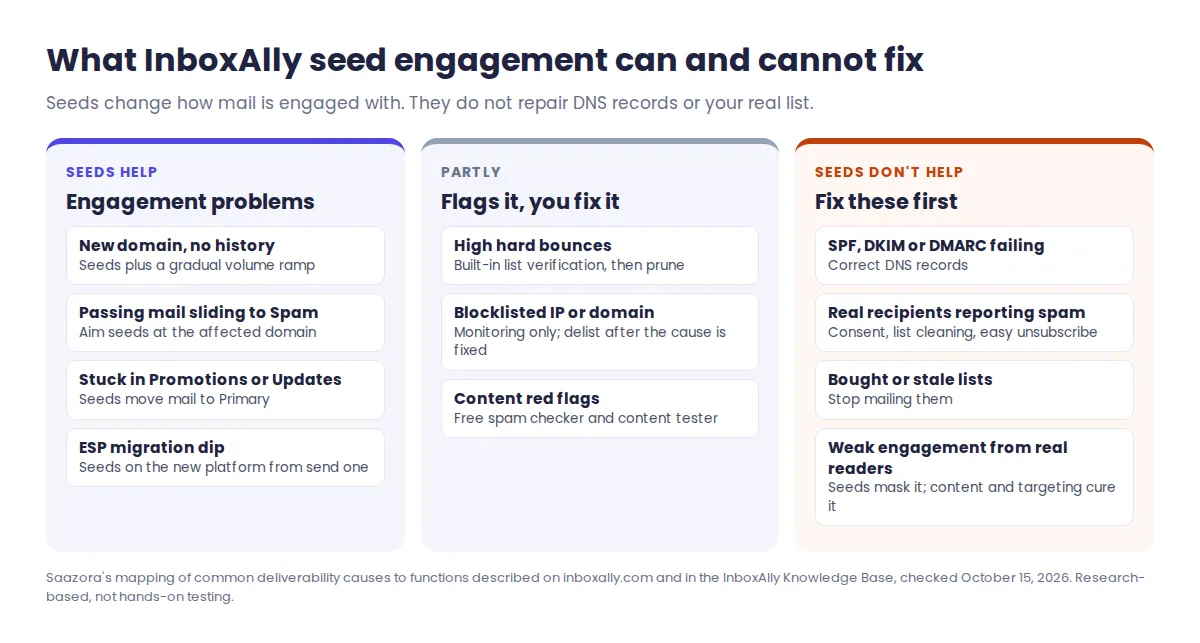
| Problem | Does InboxAlly help? | What actually fixes it |
|---|---|---|
| New domain with no sending history | Yes, its main use | Seeds plus a gradual volume ramp |
| Authenticated mail sliding into Spam or Promotions | Yes | Seeds aimed at that domain, plus mailing engaged contacts first |
| Deliverability drop during an ESP migration | Yes, a listed use case | Seeds on the new platform from the first send |
| SPF, DKIM or DMARC failing | No (it only flags it) | DNS records; InboxAlly's free SPF and DMARC generators can draft them |
| Real recipients reporting spam | No | Consent, list cleaning, easier unsubscribe |
| High hard-bounce rate | Indirectly, via its list verification | Verify and prune the list |
| Sending IP or domain on a blocklist | Monitoring only | Delisting request after fixing the cause |
A practical consequence: the seeds are never your customers. Opens from InboxAlly's network tell Gmail the message is wanted, but your real subscribers still decide whether to read, ignore or report it. If that behavior does not improve, InboxAlly's own seed guide warns that reputation may slide again once you stop, which is why it recommends keeping seeds in your sends permanently. Budget for InboxAlly as a running cost, not a one-month repair.
InboxAlly pricing and the cost per email it covers
All four plans carry the same feature set. What changes is how many seeds you can mail each day, how many sender profiles you can run, and how much human support you get. InboxAlly's plan guide also gives a typical daily volume for each tier, which lets you work out the price per email covered.
| Plan | Price | Seeds/day | Sender profiles | Daily sends it suits* | Per seed message** | Per 1,000 sends covered** |
|---|---|---|---|---|---|---|
| Starter | $149/mo | 100 | 1 | Up to 2,000 | 5.0¢ | $2.48 |
| Plus | $645/mo | 500 | 5 | Up to 10,000 | 4.3¢ | $2.15 |
| Premium | $1,190/mo | 1,000 | 10 | Up to 20,000 | 4.0¢ | $1.98 |
| Enterprise | Quote | Thousands | Unlimited | Custom | Custom | Custom |
*From InboxAlly's "Which plan should I start with?" help article. **Saazora's math over a 30-day month: price ÷ (seeds × 30), and price ÷ (suggested daily sends × 30 ÷ 1,000). Prices checked October 15, 2026.
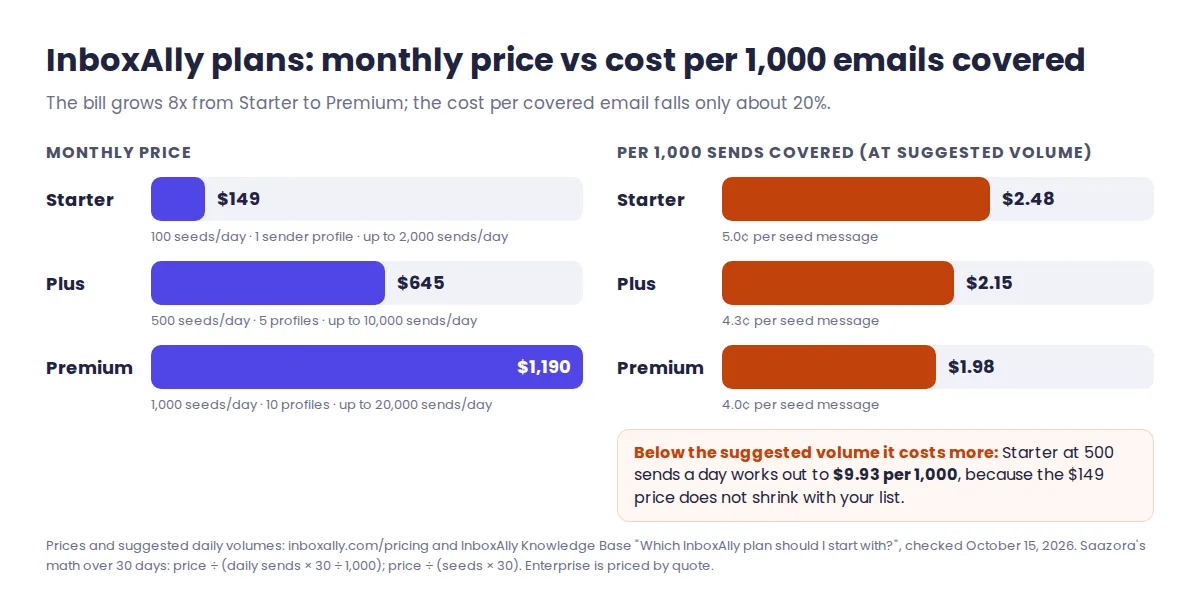
Two things stand out. First, the volume discount is modest: going from Starter to Premium multiplies the bill by eight for ten times the seeds, so the cost per covered email drops only about 20%. Second, the per-email figure only holds if you actually send near each tier's suggested volume. A sender mailing 500 emails a day on Starter pays about $9.93 per 1,000 sends covered, four times the headline rate, because the seed allowance does not shrink with your list.
Support is the other variable. The plan cards list email support on Starter, chat on Plus and phone on Premium, with Premium adding a one-hour setup session plus regular 30-minute reviews (weekly on the pricing page, bi-weekly in the help article). If live help matters, confirm what Starter includes before you pay.
How many seeds does your sending need?
InboxAlly's guideline is roughly 5 seeds for every 100 emails, applied only to the domain or segment that has a problem. Three worked examples show where the plans land:
- A Shopify brand mailing 1,800 subscribers a day from one domain needs about 90 seeds. Starter's 100 covers it with a little headroom, at $149 a month.
- An agency repairing three client domains at 2,500 emails a day each needs about 125 seeds per domain, 375 in total, and three sender profiles. Starter has only one profile, so this is a Plus account at $645, with 125 seeds to spare for a fourth client.
- A founder running cold email from five inboxes at 40 emails a day each sends 200 emails a day and needs about 10 seeds. Starter still costs $149, which works out to roughly $15 per needed seed per month. This is where per-inbox tools win easily, as the next section shows.
If you are not sure which domain is the problem, run the placement tester during the trial and move seeds to the worst performer first. InboxAlly lets you shift seeds between domains as each one recovers.
Per seed or per inbox: InboxAlly vs Warmup Inbox, lemwarm and MailReach
The well-known alternatives work differently. Warmup Inbox, lemwarm and MailReach connect to each mailbox you want to warm and exchange messages with a network of other inboxes, so they bill per mailbox. InboxAlly never touches your mailbox and bills by daily seed volume. That makes the right choice depend on how many inboxes you run and how much you send from each.
| InboxAlly Starter | Warmup Inbox Basic | lemwarm Essential | MailReach | |
|---|---|---|---|---|
| Pricing model | Per account (seed volume) | Per inbox, cheaper with volume | Per email address | Per mailbox, cheaper with volume |
| 1 inbox, monthly | $149 | $15 | $29 | $25 |
| 5 inboxes, monthly | $149 (one sender profile) | $70 | $145* | $125 |
| 20 inboxes, monthly | $149 to $1,190, depending on how many domains | $195 | $580* (custom above 10 users) | $390 |
| Needs mailbox connection | No | Yes | Yes | Yes |
| Works on your real campaigns | Yes, seeds sit in your list | Warmup messages, own templates on Pro | Real templates on Smart ($49) | Warmup messages, plus spam tests |
| Trial | 10 days, no card | 7 days, no card | Free with any lemlist plan | None listed on the pricing page |
Vendors' own pricing pages, monthly billing, October 15, 2026. *Saazora's math at the listed per-address price; lemwarm quotes custom pricing for teams above 10 users. Warmup Inbox and MailReach totals read from their price sliders.
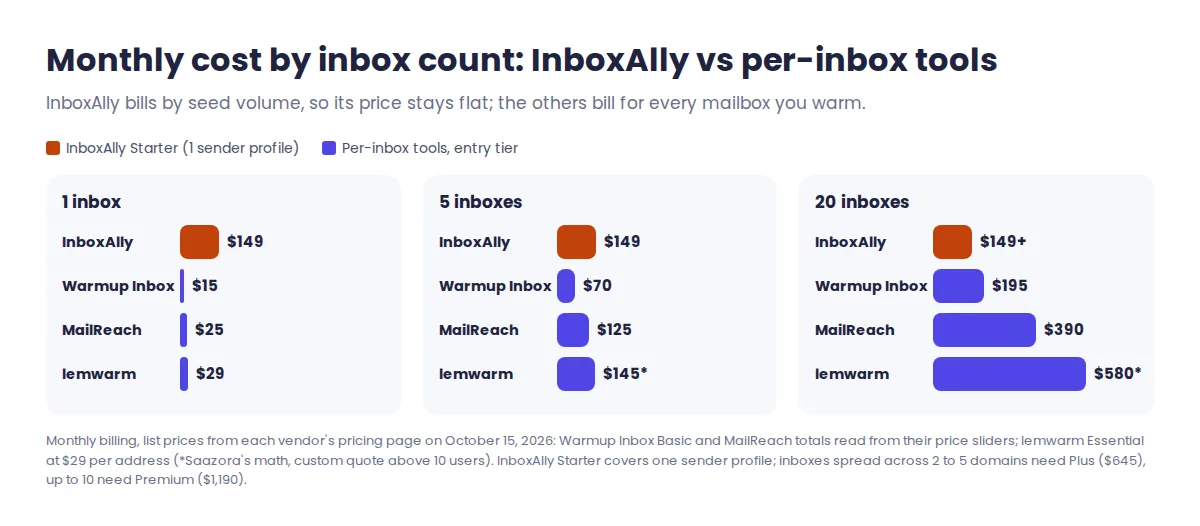
Where each rival wins: Warmup Inbox is the cheapest at every inbox count we checked and offers a 1,000-message-a-day Max tier for $79 per inbox. lemwarm is effectively free if you already pay for lemlist, whose Email plan ($69 a month) includes it. MailReach bundles 20 spam-test credits and SPF, DKIM, DMARC and blacklist health checks into its $25 starting price. InboxAlly's edge only appears with high-volume marketing mail, where adding seeds to the real campaign matters more than warming individual inboxes, and when you cannot or will not grant a vendor access to your mailboxes.
Fine print to read before the trial ends
- Trial limits are not published. The help center says the trial has limited daily volume and profile capacity and that the app shows the current limits. Expect a test drive, not a reduced plan.
- The trial is too short to show a result. InboxAlly quotes different timelines on different pages: "4 to 14 days" in its support FAQ, "one to two weeks" for initial gains in the seed guide, and 2 to 4 weeks (4 to 8 for damaged or new domains) on the pricing page. Plan on paying for at least a month before judging it.
- Microsoft 365 coverage is unclear. The support FAQ lists Gmail, Yahoo, G Suite, Hotmail and Outlook, with AOL and Outlook365 named as future priorities. The seed-shuffle guide, however, suggests raising MS365 share for B2B lists. If most of your buyers sit on corporate Microsoft tenants, ask before you buy.
- Seeds need upkeep. InboxAlly recommends shuffling seeds about once a month, with a 30-day cooldown between shuffles. Unless you use the Klaviyo or HubSpot integration or the API, you re-import the new list into your ESP by hand each time.
- Cancelling is self-service. Use the link on your latest invoice or ask in live chat; access runs to the end of the billing cycle. We found no refund terms in the published Terms and Conditions, and disputes go to binding arbitration under New York law.
- AI output carries no guarantee. The terms say IA Score, the reputation rating and AI-written warmup content may be incomplete or wrong and do not guarantee inbox placement.
Where InboxAlly earns its price, and where it falls short
Strengths
- No mailbox, ESP or DNS credentials leave your hands, which simplifies security reviews for agencies and larger teams.
- Seeds engage with your actual campaign content, links and send times instead of a separate stream of warmup chatter.
- Works with almost any sender: ESPs, CRMs, Google Workspace, Microsoft or your own servers.
- Full toolset on every tier, including API access and placement testing.
- A large, dated help center (92 articles across nine topics when we checked), plus free tools anyone can use.
Weaknesses
- A $149 entry price with no smaller tier and no yearly discount.
- One sender profile on Starter forces multi-domain users onto the $645 plan.
- Engagement comes from InboxAlly's network, not your audience, so it masks rather than cures weak real engagement.
- Results timelines, support levels and action counts differ between InboxAlly's own pages.
- Corporate Microsoft 365 inboxes are not clearly covered.
Who InboxAlly suits, and who should skip it
Choose InboxAlly if you send marketing or transactional email at a steady 1,000 to 20,000 messages a day, your authentication already passes, and placement at Gmail or Yahoo has slipped after a list import, a domain change or an ESP migration. It also suits agencies that need to help client domains without collecting their logins.
Skip it if you run a handful of cold-email inboxes (Warmup Inbox or MailReach costs far less), you already pay for lemlist, your SPF, DKIM or DMARC still fail, or your problem is real recipients complaining. In that last case, list hygiene comes first; a verification tool like the one in our Bouncer review is a cheaper first step than any seed network.
InboxAlly review verdict: is it worth $149 a month?
For the right sender, yes. InboxAlly is one of few tools that works on your real campaigns without asking for access to anything, and at full Starter volume it costs about $2.48 per 1,000 emails it covers. That is reasonable insurance for a list that drives revenue every day. For small senders, the flat price makes it among the most expensive ways to warm a domain, and for anyone with broken authentication or a complaint problem, it is money spent on the wrong layer.
The sensible test is cheap: fix your records, then use the 10-day InboxAlly trial (affiliate link) to confirm it works with your ESP and to run a placement test on your worst domain. Any current offers are collected on our InboxAlly coupon page.
InboxAlly questions buyers ask
Is InboxAlly legit?
Yes, in the sense that it is an established, transparent business: InboxAlly Inc. lists a New York office, phone line and public pricing, says it was founded in 2019, and documents how its seeds work. Whether seed engagement suits you is a separate question, covered above.
Is InboxAlly safe for my domain?
It requires no access to your email accounts, ESP or DNS, so the account-security risk is low. The deliverability risk is that it can hide weak real engagement; InboxAlly itself says it is only a temporary fix for senders with poor practices.
Can I use InboxAlly for cold email?
Yes, any sender that can include the seeds works. On cost, though, low-volume cold outreach is better served by per-inbox tools such as Warmup Inbox ($15 an inbox) or MailReach ($25 a mailbox).
Does InboxAlly have a yearly plan?
Not on its pricing page as of October 15, 2026. Every tier is priced in US dollars per month, and Enterprise pricing is set by sales.
Sources and method behind this InboxAlly review
On October 15, 2026 we read InboxAlly's pricing page and pricing FAQ, features page, support FAQ, Terms and Conditions, and help-center articles on how the service works, seed emails, plan selection, the free trial, cancellation, seed shuffling, ESP compatibility and what sets it apart. Competitor prices come from the Warmup Inbox, lemwarm, lemlist and MailReach pricing pages the same day, with multi-inbox totals read from their price sliders. Cost per seed message, cost per 1,000 sends and the sizing examples are our own calculations. We did not open an InboxAlly account or send test campaigns, so this is a documentation-based assessment. More tools in this space are in Sales Prospecting & CRM, and our review methodology explains how we verify prices.
Sources (checked October 15, 2026): InboxAlly pricing page, features page, support page and Terms and Conditions; InboxAlly Knowledge Base: How does InboxAlly work?, What are seed emails and how do they improve deliverability?, Which InboxAlly plan should I start with?, How does the InboxAlly free trial work?, How do I cancel my InboxAlly subscription?, How do I shuffle my InboxAlly seed emails?, Does InboxAlly work with my email provider?, What makes InboxAlly different from other deliverability tools?; Warmup Inbox, lemwarm, lemlist and MailReach pricing pages.
Research-based review: no vendor paid for or reviewed this article.