Last checked October 15, 2026 · Research-based guide, not hands-on testing
Saazora may earn a commission if you sign up through some links on this page, at no extra cost to you.
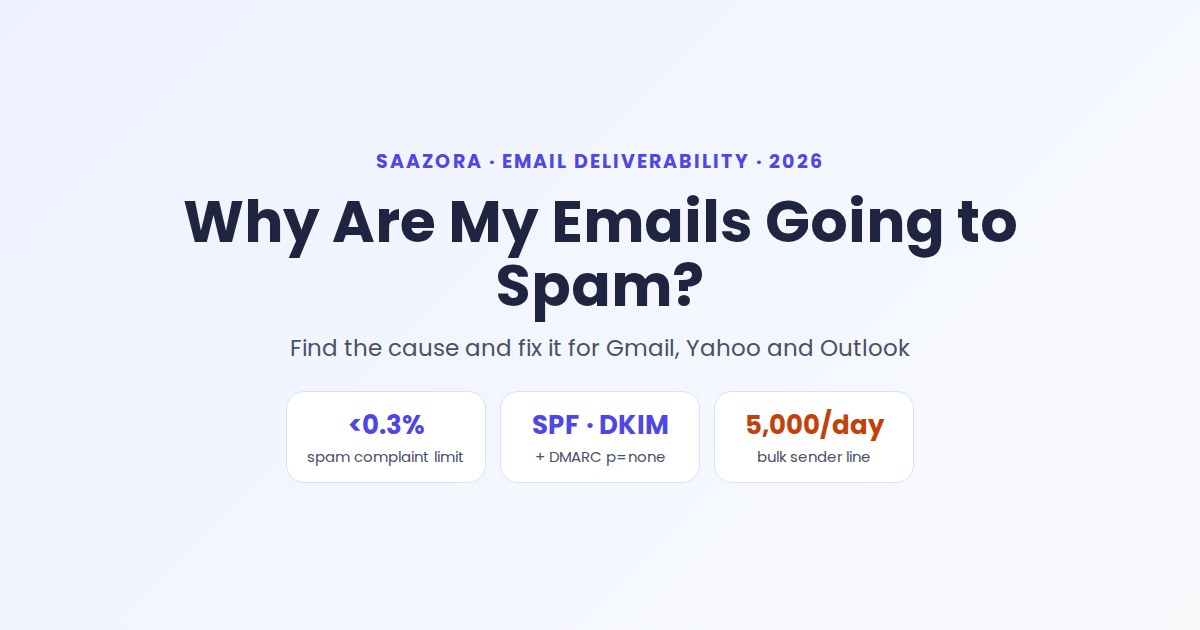
If you are asking "why are my emails going to spam?", the cause is almost always one of three things: the receiving server cannot prove the message came from your domain, too many recipients have marked your mail as spam, or your sending suddenly looks different from your usual pattern. Gmail, Yahoo and Outlook have turned all three into written sender rules, and since November 2025 Gmail has been ramping up enforcement, including temporary and permanent rejections of mail that breaks them.
Each cause leaves evidence you can read in minutes. Below: the diagnosis first, then fixes in order of impact, with every rule taken from the providers' own help pages on October 15, 2026. If the trouble began with a cold outreach campaign, our Sales Prospecting & CRM hub has the tools side of that workflow.
Why are my emails going to spam all of a sudden?
A sudden drop almost always follows a change, so start with what changed in the last week or two. Match it to the table below and run the first check before touching anything else.
| What changed recently | Most likely cause | First check |
|---|---|---|
| You added a new tool that sends as your domain (CRM, sequencer, newsletter app) | The new sender is missing from SPF, has no DKIM key, or pushed SPF past its lookup limit | Open one of its emails in Gmail, use "Show original" and read the SPF, DKIM and DMARC lines |
| You mailed an old, imported or purchased list | Spam complaints and bounces from people who never expected you | Spam rate in Gmail Postmaster Tools; hard bounces in your email platform |
| Your daily volume jumped (new campaign, new domain, product launch) | A burst from a domain with little sending history | Compare this week's daily send count with the last month |
| Only Gmail recipients are affected | You crossed Gmail's bulk-sender line or its 0.3% complaint limit | The Compliance status dashboard in Postmaster Tools |
| Only Outlook.com and Hotmail recipients are affected | Microsoft's high-volume rules, in force since May 5, 2025 | Bounces that mention 550 5.7.515 |
| You rewrote the sender name or subject lines | Display names or subjects that look misleading ("URGENT", fake "Re:") | Compare the new From name and subject with older mail that landed fine |
If nothing changed and only one recipient is affected, see the FAQ at the end.
How can you see why one email landed in spam?
The fastest evidence is the message's own header. In Gmail on a computer, open the email, click the three-dot More menu next to Reply and choose Show original. The summary above the raw header normally lists SPF, DKIM and DMARC results, each marked PASS or FAIL (if it does not, search the header for Authentication-Results).
- All three PASS: look at complaints, content and volume instead.
- SPF or DKIM FAIL: the sending service is not authorized for your domain, or its DKIM key is missing from your DNS.
- Both PASS but DMARC FAIL: an alignment problem. The domain in your From address does not match the domain that SPF or DKIM authenticated, often because a platform signs with its own domain.
Bounce messages are the second clue. When Gmail rate-limits bulk mail that breaks a rule, its FAQ says the temporary error code names the requirement you missed:
| Error code | What Gmail is telling you |
|---|---|
| 4.7.23 | The sending IP has no valid reverse DNS (PTR) record |
| 4.7.27 | SPF did not pass |
| 4.7.29 | The connection did not use TLS |
| 4.7.30 | DKIM did not pass |
| 4.7.31 | The domain has no DMARC record, or the record has no policy |
| 4.7.32 | The From domain is not aligned with the SPF or DKIM domain |
Outlook.com's equivalent is a hard bounce reading 550; 5.7.515 Access denied, sending domain [SendingDomain] does not meet the required authentication level.
What do Gmail, Yahoo and Outlook require from senders in 2026?
The three big consumer inboxes publish nearly the same baseline; they differ on who counts as bulk, unsubscribe deadlines and penalties.
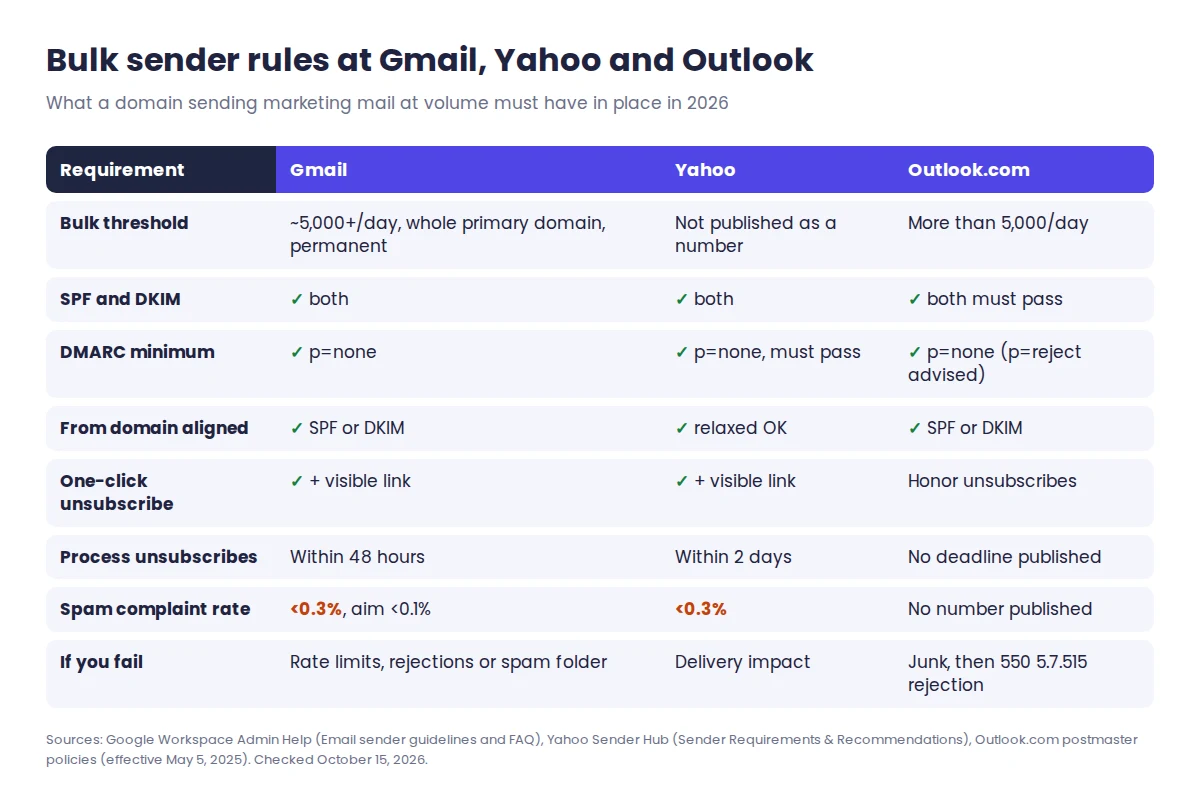
| Rule | Gmail (personal accounts) | Yahoo | Outlook.com |
|---|---|---|---|
| Who counts as bulk | About 5,000+ messages in 24 hours to Gmail, counted across the whole primary domain; the label is permanent | "Bulk senders" (no number published on the requirements page) | Domains sending more than 5,000 emails a day |
| Authentication, all senders | SPF or DKIM, valid PTR, TLS | SPF or DKIM, valid PTR | SPF, DKIM and DMARC strongly recommended |
| Authentication, bulk | SPF and DKIM, DMARC (p=none is enough), From aligned with SPF or DKIM | SPF and DKIM, DMARC at least p=none that passes, relaxed alignment accepted | SPF pass, DKIM pass, DMARC at least p=none aligned with SPF or DKIM (p=reject recommended) |
| Unsubscribe | One-click unsubscribe plus a visible link in marketing mail; Postmaster flags requests not honored within 48 hours | One-click List-Unsubscribe header plus a visible link; honor within 2 days | Marketers must honor unsubscribe requests |
| Spam complaint rate | Below 0.3%, ideally below 0.1% | Below 0.3% | Not a published number |
| If you miss the bar | Rate limits, temporary and permanent rejections, or spam foldering | Negative impact on delivery to Yahoo domains | Junk folder first; unresolved issues may be rejected with 550 5.7.515 |
Two details catch small teams out. First, Google counts every message from the same primary domain, so 2,500 emails a day from yourbrand.com plus 2,500 from mail.yourbrand.com makes you a bulk sender. Second, Google's FAQ says the bulk label never expires, even if your volume later drops.
Is your spam complaint rate too high?
Probably, if authentication passes and mail still lands in spam. Gmail's Postmaster Tools defines spam rate as the share of messages delivered to the inbox that recipients then mark as spam. Google asks senders to stay below 0.1% and never reach 0.3%, and its FAQ says rates above 0.1% already hurt inbox delivery for bulk senders. Yahoo also calculates its 0.3% rate on mail that reached the inbox.
Those percentages sound generous until you turn them into people. Here is how many "Report spam" clicks each threshold allows in a day, by the number of emails that reach the inbox:
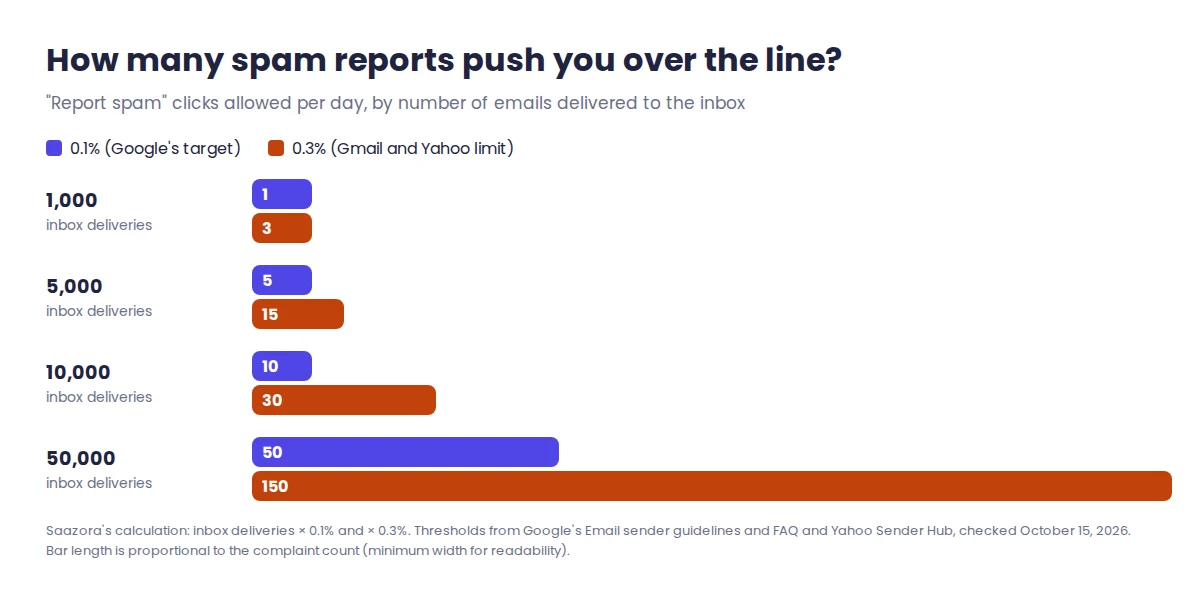
| Emails delivered to the inbox | Complaints at 0.1% (target) | Complaints at 0.3% (limit) |
|---|---|---|
| 1,000 | 1 | 3 |
| 5,000 | 5 | 15 |
| 10,000 | 10 | 30 |
| 50,000 | 50 | 150 |
On a 1,000-person send, three annoyed recipients is all it takes, which is how one campaign to a stale list undoes months of clean sending.
Watch for one trap: a spam rate that looks too good. Google notes that when Gmail is already filtering a lot of your mail, the dashboard can show a very low rate, because fewer people see your messages in their inbox to complain about.
To bring complaints down, Google and Yahoo give the same advice:
- Mail only people who asked for it. Both providers say never to buy lists, and Google warns against opt-in boxes that are checked by default.
- Confirm new sign-ups with a click-to-confirm email, as Yahoo recommends.
- Keep the frequency people signed up for. A weekly list should not suddenly get daily mail.
- Remove hard bounces and long-inactive contacts, and reconfirm inactive subscribers now and then. A verification tool can clean an imported list before the first send; our Bouncer review covers one option.
- Make leaving easier than complaining: one-click unsubscribe in the header and a plain link in the footer.
How do you fix SPF, DKIM and DMARC?
Fix the records in order, because DMARC depends on the other two. Most email platforms show the exact DNS values to paste.
1. Publish one SPF record that lists every sender
SPF is a TXT record on your root domain listing the services allowed to send as you. The SPF standard (RFC 7208) says a domain must not have more than one SPF record, so add new services to the existing record instead of creating a second one. It also caps DNS-querying terms (include, a, mx, ptr, exists and redirect) at 10; go over and SPF returns a permanent error, which receivers treat as a fail. A typical record for a Google Workspace domain plus one marketing platform looks like this, with your platform's own include value in place of the placeholder:
v=spf1 include:_spf.google.com include:spf.your-email-platform.example ~all
2. Turn on DKIM in every platform that sends for you
DKIM adds a cryptographic signature that proves the message was not altered. Each platform gives you its own key to publish in DNS. Yahoo asks for keys of at least 1024 bits. The common miss is a tool that signs with its domain by default; look for a setting called custom domain, branded sending or domain authentication so the signature uses your domain.
3. Add a DMARC record and read its reports
DMARC tells receivers what to do when a message fails SPF and DKIM, and it requires the passing check to match your From domain. Gmail, Yahoo and Outlook.com all accept p=none as the minimum. Publish it as a TXT record at _dmarc.yourdomain.com:
v=DMARC1; p=none; rua=mailto:dmarc-reports@yourdomain.com
The rua address receives aggregate reports from receiving servers, which Yahoo strongly recommends during setup, and they show every service sending as your domain, including ones you forgot about. Once the reports show only legitimate, passing sources, you can tighten the policy toward quarantine or reject; Microsoft names p=reject as its recommended setting.
The PTR and TLS requirements are handled by Google Workspace, Microsoft 365 and mainstream email platforms; they only need attention if you run your own mail server. After any DNS change, give it a day. Google says Postmaster Tools data is usually updated within 24 hours but can take longer, so check the Compliance status dashboard the next day rather than the next minute.
Can the email itself push you into spam?
Yes, but not in the way most "spam trigger word" lists suggest. Google's sender guidelines do not publish banned words. What they do call out is deception and sloppy formatting:
- Misleading subjects. No "Re:" or "Fwd:" unless the message really is a reply or forward.
- Display names used as headlines. Google lists names like "URGENT REQUEST", "Last Chance" and "TIME IS RUNNING OUT (SALE)" as examples to avoid, plus names that include the recipient's name or a fake "(2)" thread count.
- Hidden content. Text hidden with HTML or CSS can get mail marked as spam.
- Unclear links. Recipients should be able to tell where a link goes before they click it.
- Fake badges. No emojis or images beside a brand name to suggest it is verified.
- Mixed message types. No promotions inside receipts or account notices.
Structure matters too. Google recommends one From address per category of mail (receipts, promotions, alerts), and Yahoo recommends separating marketing from transactional and personal mail by IP address or DKIM domain, so a bad campaign does not drag down password resets and invoices. If you are building a list from scratch, our roundup of the best sales prospecting tools for small teams covers where verified contacts come from in the first place.
How long does it take to get out of the spam folder?
Expect weeks, not days. Google gives no fixed timeline; its guidelines say improvements in spam rate can take time to show up in spam classification. InboxAlly, a deliverability vendor, says most domains show measurable gains in 2 to 4 weeks and that new or damaged domains can need 4 to 8; those are the vendor's own estimates. What you control is the order of work:
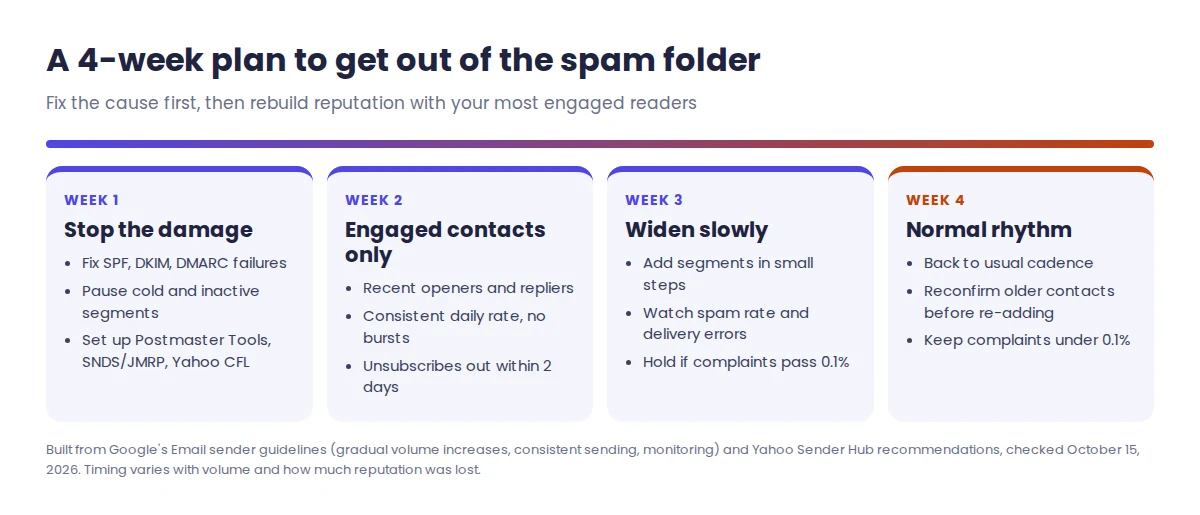
- Week 1, stop the damage. Fix any SPF, DKIM or DMARC failure, pause sends to cold or unengaged segments, and set up monitoring: Gmail Postmaster Tools, Microsoft's Smart Network Data Services (SNDS) and Junk Email Reporting Program (JMRP), and Yahoo's Complaint Feedback Loop for each DKIM domain.
- Week 2, send only to your most engaged contacts. Recent openers and repliers rarely complain. Google notes that when recipients mark a message as not spam, future messages from that sender should reach their inbox.
- Week 3, widen slowly. Google advises raising volume gradually, sending at a consistent rate instead of in bursts, and watching spam rate and delivery errors as you go.
- Week 4, return to your normal rhythm. Keep the complaint rate under 0.1%, keep unsubscribes processed within two days, and re-add older segments only after a reconfirmation email.
When is a warmup tool like InboxAlly worth paying for?
A warmup or seed-engagement tool helps in one situation: your records pass, your list is clean, and placement is still poor because the domain is new or its reputation took a hit. It cannot fix a failing DMARC record or a list that keeps generating complaints, so do the steps above first.
InboxAlly gives you seed addresses to add to your normal sends. Its pricing page says the seeds engage with your mail, for example by pulling it out of the Spam folder or the Promotions tab, and it never needs access to your email account, sending platform or DNS. Its list prices, checked October 15, 2026:
| Plan | Monthly price | Seeds per day | Sender profiles |
|---|---|---|---|
| Starter | $149/mo | 100 | 1 |
| Plus | $645/mo | 500 | 5 |
| Premium | $1,190/mo | 1,000 | 10 |
| Enterprise | Contact sales | Thousands | Unlimited |
Sizing is simpler than the price list suggests. InboxAlly's guideline is roughly 5 seeds per 100 emails, and it says 100 seeds cover more than 2,000 sends a day; you aim them only at the domain in trouble, not at everything you send. The trial lasts 10 days and asks for no card, which is long enough to judge the dashboard but not to see a repair, since InboxAlly puts full recovery at 4 to 8 weeks. Its free tools (spam checker, content tester, list verification, and SPF and DMARC record generators) are worth running first.
You can start InboxAlly's 10-day free trial (affiliate link). Our InboxAlly review looks at each plan in more depth, and current offers are on the InboxAlly deals page.
Quick answers about emails landing in spam
Why are my emails going to spam in Gmail but not in Outlook?
Each provider filters on its own users' feedback and its own rules, so a domain can be fine at Outlook.com and in trouble at Gmail. Check Postmaster Tools' Compliance status and spam rate first.
Why do my emails go to spam when I send them to just one person?
If authentication passes, the recipient's own history is the likely cause: they, or their organization's filter, may have flagged earlier mail from you. Ask them to mark your message as not spam and add you to their contacts; Google says messages from an address in the recipient's contacts are less likely to be marked as spam.
Do the Gmail rules apply if I send from Google Workspace?
Yes, when you send to personal Gmail accounts. Google says the sender requirements apply to Workspace senders mailing personal Gmail addresses, but not to mail sent to other Google Workspace accounts.
Is a DMARC policy of p=none enough?
It meets the minimum at Gmail, Yahoo and Outlook.com in 2026, and it is the safe place to start because it does not block anything. It does not stop spoofing, so move to quarantine or reject once your reports show every legitimate sender passing.
How this guide was researched
On October 15, 2026 we read Google's email sender guidelines, the sender guidelines FAQ and the Postmaster Tools dashboard and setup pages; Yahoo Sender Hub's sender requirements and recommendations; Outlook.com's postmaster policies; Google's help page on viewing full email headers; RFC 7208 (SPF); and InboxAlly's pricing page and FAQ. The complaint counts are our own arithmetic from Google's published thresholds. We did not run sending experiments or test InboxAlly for this guide. Our research and review process explains how we check claims and prices.
Sources (checked October 15, 2026): Google Workspace Admin Help, "Email sender guidelines" (answer 81126) and "Email sender guidelines FAQ" (answer 14229414); Gmail Help, "Postmaster Tools dashboards" and "Set up Postmaster Tools"; Gmail Help, "Trace an email with its full headers"; Yahoo Sender Hub, "Sender Requirements & Recommendations"; Outlook.com postmaster "Policies, Practices, and Guidelines" (high-volume sender requirements effective May 5, 2025); IETF RFC 7208, Sender Policy Framework; InboxAlly pricing page and FAQ.
Research-based guide: no vendor paid for or reviewed this article.