Prices checked on callrail.com/pricing and whatconverts.com/pricing, October 23, 2026 · Research-based comparison built from both vendors' pricing pages and help centers, not hands-on testing · US list prices, local numbers, monthly billing unless noted
Saazora may earn a commission if you sign up for CallRail through links on this page, at no extra cost to you. Links to WhatConverts are plain links with no affiliate tag, and the partner link did not change the verdicts below.
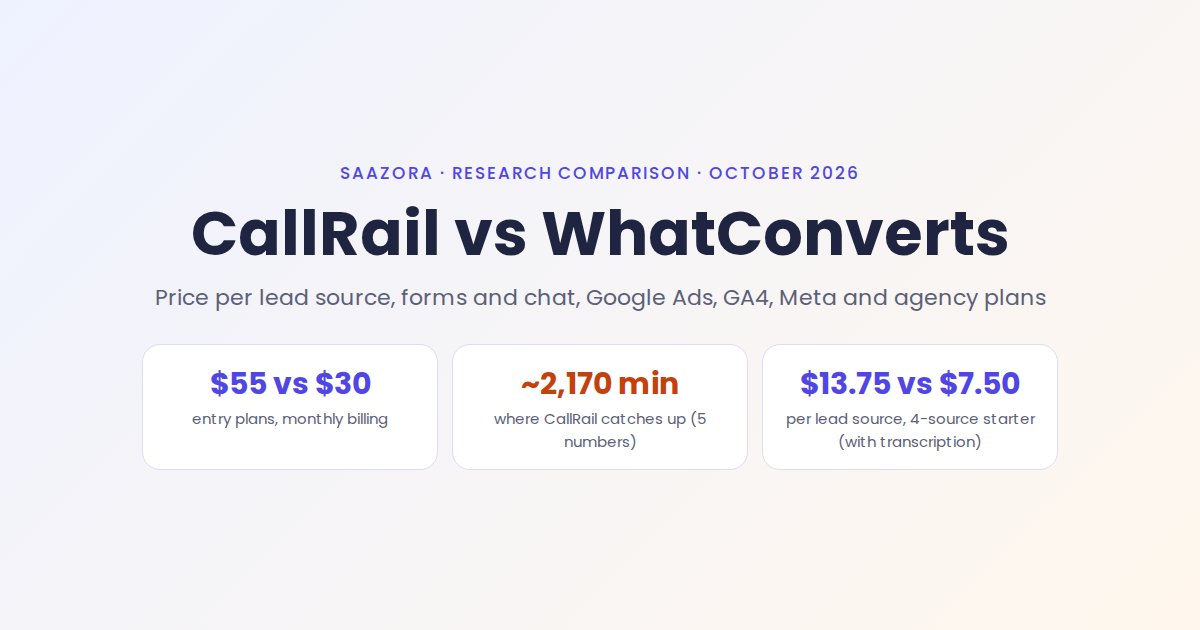
In CallRail vs WhatConverts, WhatConverts costs less per tracked lead source for most small accounts, and CallRail pulls ahead once call volume is high and you want every call transcribed. On October 23, 2026 list prices, a business tracking 4 lead sources pays $30 a month on WhatConverts and $55 on CallRail, or $7.50 against $13.75 per source. WhatConverts gets there with a different billing model: every plan comes with a $30 usage credit that pays for numbers and minutes, while CallRail sells bundles with numbers and minutes already counted in. With 5 numbers and transcription switched on, the two bills meet at about 2,170 minutes a month, and above that CallRail is the cheaper one.
Price is not the whole story, so this page also lines up what each plan tracks besides calls, how leads get back into Google Ads, GA4 and Meta, and what an agency pays for 5, 10 or 20 clients. For CallRail on its own, the CallRail plan-by-plan price list covers every tier and add-on.
CallRail vs WhatConverts at a glance
Each row below is decided only by what the two vendors publish on their pricing pages and help centers. "Edge" means the better deal for a typical local business running ads, not a quality score.
| What you are comparing | CallRail | WhatConverts | Edge |
|---|---|---|---|
| Cheapest plan | Lead Tracking, $55 a month ($50 billed yearly) | Call Tracking, $30 a month, monthly prices only on the page | WhatConverts |
| What the fee includes | 5 local numbers, 250 minutes with transcription, 25 texts | A $30 usage credit spent on numbers ($2.50), minutes (4.5¢) and other leads | Depends on volume |
| Transcription | Included in local minutes | 2¢ a minute on every plan | CallRail |
| Form tracking | Lead Tracking Complete, $105 ($95 yearly), 1,000 forms included | Plus, $60, forms and chats at 10¢ each from the credit | WhatConverts |
| Chat tracking | Not on the pricing page; the chat widget belonged to Lead Center, which CallRail began phasing out on January 27, 2026 | Plus and up, including third-party chat tools | WhatConverts |
| Google Ads and GA4 | Included on all Lead Tracking plans | Help center lists both as available on all plans | Tie |
| Meta (Facebook) conversions | Included on all Lead Tracking plans | Available on all plans | Tie |
| Agency pricing | No agency plan; one account per client in Account Center, white label $65 a month | Agency plans from $500 a month with unlimited accounts | WhatConverts from about 9 clients |
| HIPAA | BAA and "specific Healthcare plans" through sales | HIPAA call, form and chat tracking ticked from Pro ($100) | WhatConverts (published price) |
| Trial and billing terms | 14 days, no card; yearly plans paid up front and nonrefundable | 14 days with a capped usage credit, 30 days if you book an onboarding call | Split |
Sources: CallRail pricing page and its expanded Lead Tracking plan table; WhatConverts pricing page (Individual Business and Agency views) and its feature table; both vendors' help centers. All read October 23, 2026.
Two billing models: bundled minutes vs a usage credit
Most of the price gap comes from how each vendor counts usage, so it is worth understanding before looking at any totals.
CallRail counts usage in bundles. The $55 Lead Tracking plan includes 5 local numbers and 250 local minutes, and CallRail labels those minutes "includes transcription." Its expanded plan table shows three bigger Lead Tracking tiers: $75 with 5 numbers and 750 minutes, $95 with 10 numbers and 1,000 minutes, and $295 with 40 numbers and 4,000 minutes. Past the bundle, you pay $3 a number and 6¢ a minute on the first two tiers, dropping to $2.50 and 5¢ on the 10-number tier and $1.75 and 4.5¢ on the 40-number tier.
WhatConverts counts usage in dollars. Each individual plan carries a $30 monthly credit. Its billing FAQ says the credit covers "Phone numbers, including disabled numbers," incoming minutes, texts and other lead types such as forms and chats, and that usage past the credit "is billed at your plan's standard rates." Unused credit does not roll over. The rates are the same on all four individual plans: $2.50 a local number, 4.5¢ a local minute, 3¢ a text, 10¢ a form or chat lead, plus 2¢ a minute if you want transcripts.
A few details cut the same way for both. Each vendor rounds every call up to the next full minute. WhatConverts adds that busy and no-answer calls that reach the tracking number still count toward usage. CallRail bills extra usage in arrears with the next month's fee and says those charges "are not refundable under any circumstances."
The WhatConverts pricing table also shows "Up to 148" included phone call leads on every individual plan. The page does not explain how that figure is worked out. Because the billing FAQ describes a dollar credit with overage at standard rates, 148 reads as an estimate of what $30 typically buys rather than a hard cap, so budget by numbers and minutes instead of lead counts.
Price per lead source at three business sizes
A lead source here is one channel you want to see on its own line: Google Ads, your Google Business Profile, organic search, a mailer, a radio spot. Offline and listing sources each get one static number. Google Ads gets a small website pool instead, because keyword-level attribution needs a rotating set of numbers on the landing page, and that pool counts as one source.
Both columns below include transcription, since CallRail bundles it. Without transcripts, WhatConverts is cheaper still.
| Business size (Saazora example) | CallRail, calls only | WhatConverts Call Tracking + transcription | CallRail Lead Tracking Complete (calls + forms) | WhatConverts Plus + transcription (calls, forms, chat) |
|---|---|---|---|---|
| Starter: 4 sources, 4 numbers, 250 minutes, 30 forms | $55 ($13.75 per source) | $30 ($7.50) | $105 ($26.25) | $60 ($15.00) |
| Growing: 7 sources (6 static numbers + a 4-number Google Ads pool), 800 minutes, 80 forms | $93 ($13.29) | $77 ($11.00) | $153 ($21.86) | $115 ($16.43) |
| Multi-location: 12 sources (11 static + a 9-number pool), 2,000 minutes, 200 forms | $170 ($14.17) | $180 ($15.00) | $255 ($21.25) | $230 ($19.17) |
Saazora calculation from list prices checked October 23, 2026. CallRail calls-only uses whichever Lead Tracking tier is cheapest at that volume ($55, $75 and $95 tiers respectively). Lead Tracking Complete is $105 with 5 numbers, 250 minutes and 1,000 forms, then $3 and 6¢. WhatConverts: plan fee plus any usage above the $30 credit. Texts, toll-free numbers and tax are left out.
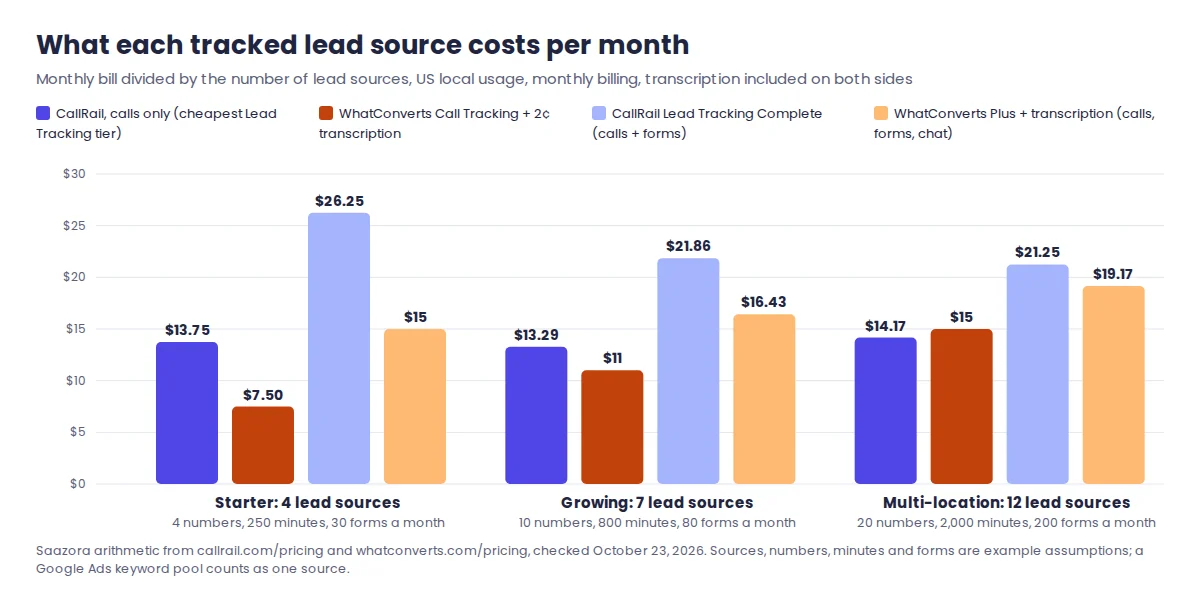
Three patterns stand out. CallRail's cost per source barely moves ($13.29 to $14.17), because its tiers grow with you. WhatConverts starts at roughly half that and climbs as usage eats through the $30 credit. And the gap is widest on form tracking: CallRail moves forms into a separate $105 bundle, while WhatConverts adds forms and chat for $30 more on Plus and then charges 10¢ a lead.
One caution on the multi-location row. CallRail's Complete bundle is priced from its main table at $3 a number and 6¢ a minute; CallRail does not publish volume tiers for Complete the way it does for Lead Tracking, so a sales quote at that size may come in lower.
Where the $30 credit runs out and CallRail catches up
With 5 tracking numbers and transcription on, WhatConverts' credit is used up at about 269 minutes a month: $12.50 goes on numbers and the remaining $17.50 buys 269 minutes at 6.5¢ (4.5¢ for the call plus 2¢ for the transcript). From there every minute costs 6.5¢. CallRail's $55 plan already covers 250 minutes, its $75 tier jumps to 750, and its $95 tier drops the extra-minute rate to 5¢.
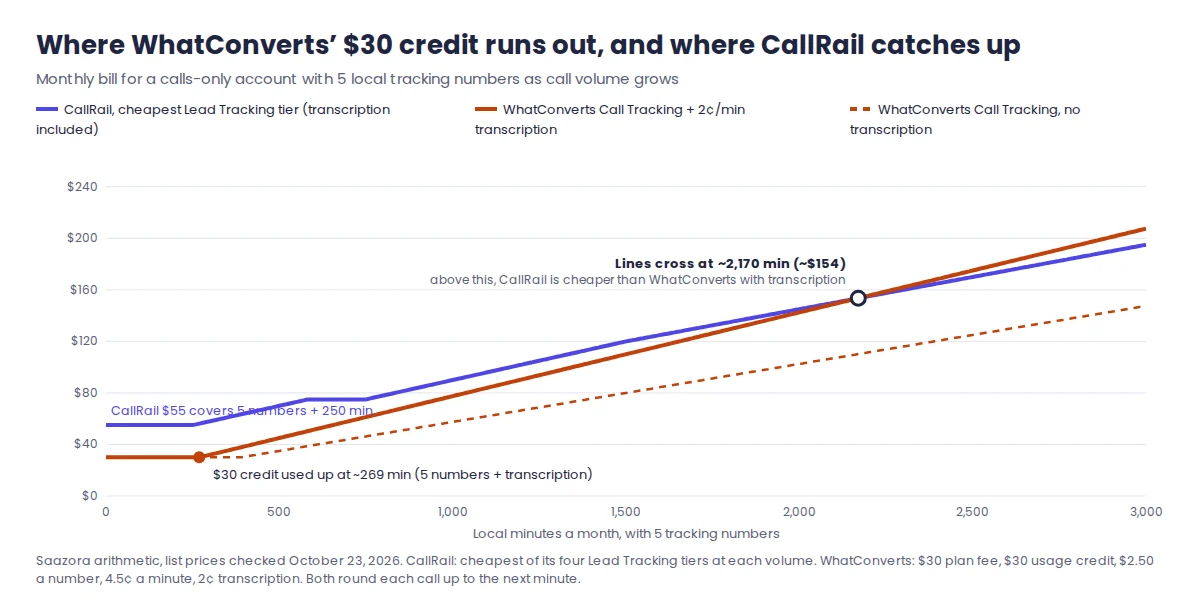
The lines meet at about 2,170 minutes, where both bills come to roughly $154. The crossover moves with the number count: about 2,510 minutes with 3 numbers and about 1,340 minutes with 10. If you can live without transcripts, WhatConverts Call Tracking stays cheaper than CallRail all the way to 6,000 minutes in every case we modeled.
That makes the decision fairly mechanical. Take last month's total talk time from your phone system and count the numbers you need. A home-services company taking 500 minutes of calls on 5 numbers is well inside WhatConverts territory; a 10-number practice taking 2,000 minutes and relying on transcripts to review calls is in CallRail territory.
AI call analysis widens the gap in CallRail's favour. WhatConverts bills its AI analysis by the amount of text processed and estimates "About $0.02 per minute" for a typical call. CallRail's Lead Tracking plan lists "Call transcription and analysis" and AI conversation insights in the base price, and its fuller Premium Conversation Intelligence (summaries, sentiment, coaching) sits in the $165 Lead Conversion bundle with 10,000 analysis minutes included.
Forms, chat and the other leads each plan counts
If phone calls are only part of your lead flow, the two vendors split further apart.
- WhatConverts Call Tracking ($30) tracks calls and texts only. Its feature table marks form, chat and transaction tracking as N/A.
- WhatConverts Plus ($60) adds form tracking (existing forms and "instant" form tracking), chat tracking with full transcripts, and ecommerce transactions, each charged at 10¢ from the credit. The pricing table shows "Up to 300" included forms, chats and transactions. Call flows (IVR, geo-routing, voicemail), the custom report builder and HIPAA tracking start on Pro at $100.
- CallRail Lead Tracking ($55) covers calls and texts. Form tracking needs Lead Tracking Complete, which adds a custom form builder, external form tracking and multi-touch cost-per-lead reporting with 1,000 form submissions included and 2¢ each after that. CallRail's help center notes that multi-page forms are not supported and that form submissions marked as spam are removed from billing.
- Chat on CallRail: the chat widget was part of Lead Center. CallRail's help center says it "announced the sunset of Lead Center" on October 7, 2025, with the phase-out starting January 27, 2026, and the pricing page does not list chat tracking. If chat leads matter, confirm with CallRail what replaces it before you buy.
For a dental office or law firm where most leads arrive as calls and web forms, this is the deciding section: WhatConverts Plus tracks both for $60 plus usage, CallRail for $105 plus usage.
Getting conversions back into Google Ads, GA4 and Meta
Both tools connect to the three ad and analytics platforms a local advertiser uses most, but the help-center fine print is different, and it changes what your Google Ads account will count.
| Platform | CallRail | WhatConverts |
|---|---|---|
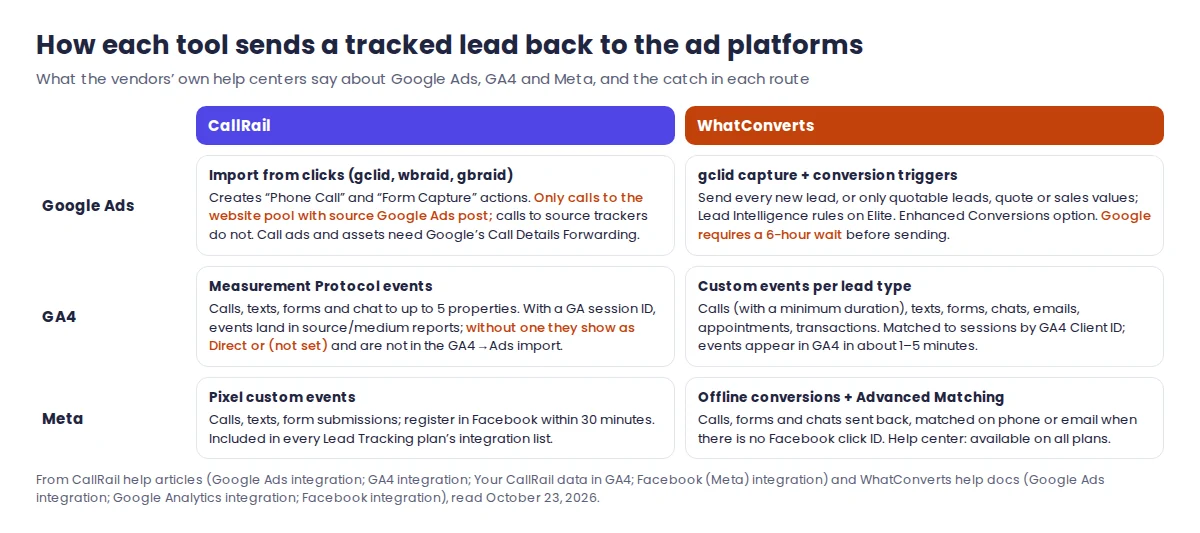
| Google Ads: what is sent | Calls and forms as "Phone Call" and "Form Capture" conversion actions using Google click IDs | Leads tied to a captured gclid; you choose the trigger: every new lead, quotable leads only, or leads with a quote or sales value |
| Google Ads: the catch | "Only calls made to the website pool with a source of 'Google Ads' will report as a conversion"; call ads and call assets need Google's Call Details Forwarding instead | Google requires a 6-hour wait before a conversion is sent; Lead Intelligence rules as triggers are Elite only |
| GA4 | Calls, texts, forms and chat to up to 5 properties; without a GA session ID, events show as Direct or (not set) and are left out of the GA4-to-Google Ads import | Custom events per lead type, with a minimum call duration filter; matched to sessions by GA4 Client ID; events appear in about 1 to 5 minutes |
| Meta | Pixel custom events for calls, texts and forms, registered in Facebook within 30 minutes | Offline conversions for calls, forms and chats, with Advanced Matching on phone or email when there is no Facebook click ID |
| Plan needed | All four on every Lead Tracking plan | Help center: Google Ads, Google Analytics and Facebook integrations "Available on: All Plans" |
Two points deserve a closer look. First, CallRail's Google Ads integration only posts calls from the website pool, so a static number in a call asset or on a listing will not become a Google Ads conversion through it. If those calls matter for bidding, set up Google's own call conversions alongside; our walkthrough of Google Ads call conversions covers that part. WhatConverts' help center lists a separate "Call Conversion" status for call-extension conversions it sends by timestamp, which suggests it handles that case inside the integration.
Second, WhatConverts' plan cards advertise the "Bing, Google Ads & Analytics Integration" under Plus, yet its feature table ticks Google AdWords and Google Analytics for the $30 Call Tracking plan too, and the help center says "Available on: All Plans." We read that as included everywhere, but if you are buying the $30 plan specifically for Google Ads, ask WhatConverts to confirm in writing.
What an agency pays for 5, 10 or 20 clients
The agency setups are where the two vendors differ most. CallRail has no agency plan on its pricing page. Its Account Center groups separate client accounts under one login, and CallRail's agency guide says it lets clients "own and pay for their individual accounts directly" while the agency keeps full access. White labeling is part of the Agency Tools add-on, listed at $65 a month. WhatConverts sells agency plans with unlimited client accounts on one Master Account and one payment method: Agency Plus at $500 with a $250 credit, Agency Pro at $800 with $300 and Agency Elite at $1,250 with $400, all with lower rates ($1.75 a number, 4¢ a minute) and a dedicated account manager.
We priced an agency whose clients each need 5 numbers, 300 minutes and 40 form leads a month.
| Clients | CallRail, calls only, one account each | CallRail Lead Tracking Complete, one account each | WhatConverts Plus, one account each | WhatConverts Agency Plus |
|---|---|---|---|---|
| 5 | $290 | $540 | $300 | $500 |
| 10 | $580 | $1,080 | $600 | $500 |
| 20 | $1,160 | $2,160 | $1,200 | $745 |
Saazora calculation, list prices checked October 23, 2026, monthly billing, white label not included (CallRail $65 a month; WhatConverts $50 a month per Master Account). The calls-only CallRail column does not track forms. Agency Plus usage at 20 clients is $495, so $245 is billed above the $250 credit.
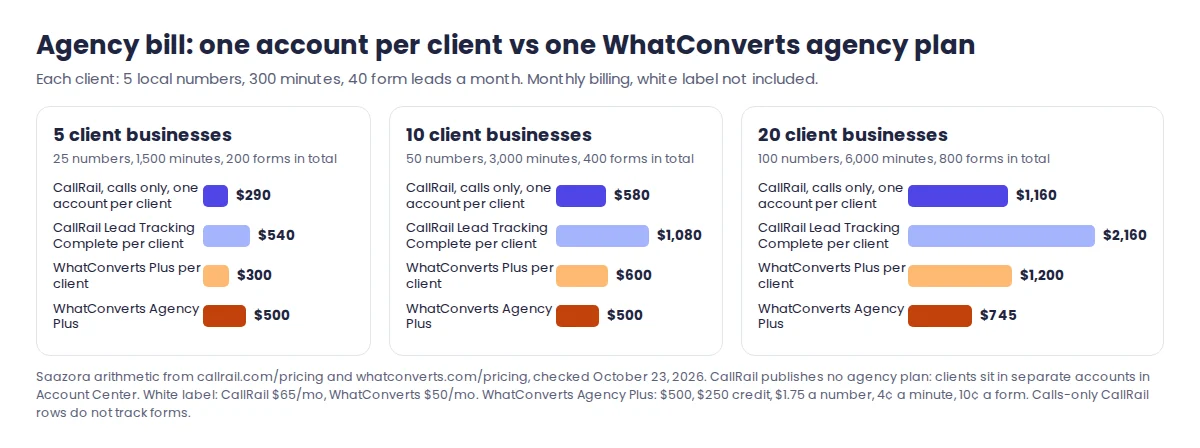
Agency Plus becomes cheaper than CallRail's form-tracking bundle from 5 clients, and cheaper than CallRail calls-only accounts from 9 clients. At 20 clients it is $415 a month below the calls-only CallRail setup and still tracks forms and chat. Below about 9 clients, putting each client on its own WhatConverts Plus or CallRail Lead Tracking account costs less, and WhatConverts' help center describes that setup ("Bill Clients Separately") for agencies that want clients billed directly.
The trade-off is billing ownership. CallRail's Account Center is built around clients paying for their own accounts, which suits agencies that do not want to resell software. A WhatConverts Agency plan puts every client's usage on the agency's card, so you carry the cost and recover it in your retainer. All accounts under an agency plan share one plan level, so on Agency Elite every client gets Customer Journey and multi-click attribution.
Healthcare, contracts and how to try each one
HIPAA. WhatConverts publishes a price: HIPAA call, form and chat tracking is ticked from the $100 Pro plan. CallRail says it signs "a business associate agreement (BAA) with each of our Healthcare clients" and asks you to contact sales about "specific Healthcare plans," so a medical office should expect a quote rather than the $55 list price. CallRail's help center adds that form tracking can support HIPAA under the same policies once the account is set up as a HIPAA account. This is not legal advice; get the BAA in writing before recording patient calls.
Billing terms. CallRail's yearly plans save up to 10% but are paid 12 months up front, and its help center says annual plans "are nonrefundable" and cannot be cancelled before the term ends. WhatConverts' pricing page lists monthly prices only and bills on your signup date each month. Individual WhatConverts accounts can be downgraded, which stops tracking but keeps historical data, and its help center says support can restore a cancelled account's data within 30 days.
Trials. CallRail gives 14 days with no credit card. WhatConverts gives 14 days with a usage credit that has a limit; if you reach it, you add funds to keep tracking. Booking an onboarding call extends the WhatConverts trial to 30 days.
Which one fits your business
The CallRail vs WhatConverts choice usually comes down to call volume, whether you need forms and chat, and who pays the bill.
Pick WhatConverts if you track a handful of sources with modest call volume, want forms and chat in the same report for $60, or run an agency with roughly 9 or more clients that you are happy to bill through one account. It is also the one with a published HIPAA price.
Pick CallRail if you take a lot of calls and want every one transcribed, you want AI call insights without per-minute AI charges, you plan to pay yearly, or your clients prefer to own their accounts. CallRail's base plan also lists native HubSpot, Slack and Zapier connections, and it sells Voice Assist, an AI receptionist for missed calls, from $95 a month on top of Lead Tracking. CallRail's current deals are on the CallRail offers and trial page, or you can start a 14-day CallRail trial without a card (affiliate link).
If neither fits, our roundup of CallRail alternatives prices other options at the same volumes, and the best call tracking software guide ranks the field for local businesses. Agencies comparing a third option can read CallRail against CallTrackingMetrics, which adds a softphone and sub-account reselling to the mix. For a closer look at CallRail's own strengths and weak spots, see our research review of CallRail.
Questions before you choose
Is WhatConverts cheaper than CallRail?
For most small accounts, yes. In our examples it was $25 a month cheaper for a 4-source business and $16 cheaper at 7 sources, with transcription included on both sides. CallRail becomes the cheaper option once a calls-only account with transcription passes about 2,170 minutes a month on 5 numbers, or about 1,340 minutes on 10.
Does WhatConverts charge per lead?
Partly. Calls are billed by number and by minute, not per call. Forms, chats and transactions cost 10¢ each on Plus and above. All of it is paid first from the monthly usage credit ($30 on individual plans), and only the amount above the credit is billed on top of the plan fee.
Can I move my existing numbers?
Both vendors support number porting. CallRail's agency guide links its porting instructions for clients who want to keep their current business numbers, and WhatConverts lists number porting "with no downtime" among its lead tracking features. Neither page gives a porting fee.
How this comparison was researched
For this CallRail vs WhatConverts comparison, on October 23, 2026 Saazora read CallRail's US pricing page in yearly and monthly views and its expanded Lead Tracking plan table, and WhatConverts' pricing page in its Individual Business and Agency views, including the full feature table, parsed plan by plan. We also read CallRail help articles on the Google Ads, GA4 and Facebook (Meta) integrations, form tracking, chat and the Lead Center sunset, white labeling, Account Center, agency resources and annual plans, and WhatConverts help docs on billing, included usage, AI usage rates, plans, agency account structure, client billing, the Google Ads, Google Analytics and Facebook integrations, cancellation and the free trial. All dollar figures are our own arithmetic on those list prices; the source counts, minutes and form volumes are example assumptions. No account was opened with either vendor and no test calls were placed, so this is a documentation-based comparison. Prices exclude tax and can change. More lead-handling tools are in Sales Prospecting & CRM, and our research and review process explains how prices are checked.
Sources (checked October 23, 2026): CallRail pricing and Lead Tracking plan table (callrail.com/pricing); WhatConverts plans and pricing · WhatConverts billing FAQs · WhatConverts agency account structure · CallRail Google Ads integration · Your CallRail data in GA4 · CallRail chat and Lead Center sunset. Review platforms were not used for scoring.