Saazora may earn a commission if you buy through links on this page, at no extra cost to you. · Research-based review · Pricing checked September 30, 2026
Taplio is an AI-powered LinkedIn tool that writes post drafts, schedules them, tracks results and, on the top plan, automates outreach. In this Taplio review we look at what each plan actually unlocks, where the value is, and one risk most reviews skip: some of Taplio's automation features sit squarely inside what LinkedIn says it does not permit.
Taplio review: the short verdict
Taplio is a strong fit for founders, consultants and creators who post on LinkedIn several times a week and want AI help with drafts, hooks and scheduling. The Growth plan is the one to judge it by: the cheaper Starter plan has no AI credits at all, which removes the main reason to pick Taplio.
| Area | Our take |
|---|---|
| AI post writing | Strong: generator, rewrites, carousels and a large inspiration feed (Growth and Pro only) |
| Scheduling and analytics | Strong on every plan |
| Starter plan value | Limited: $39/month for scheduling and analytics without AI |
| Outreach automation (Pro) | Powerful, but conflicts with LinkedIn's rules on automation |
| User feedback | Mixed: positive on AI writing, negative on billing and support in public reviews |
| Best plan for most people | Growth, ideally billed yearly |
If that matches what you need, you can try Taplio free for 7 days with full Pro access and decide before you are billed.
What is Taplio?
Taplio is a LinkedIn-only growth tool. Instead of spreading across every social network like Buffer or Hootsuite, it focuses on one job: helping a person or a small team publish better LinkedIn posts more consistently, then turn attention into conversations.
Taplio's own site describes the product this way (these are the vendor's claims, not our measurements):
- AI writing "trained on 3 million+ posts" that suggests hooks, rewrites drafts and matches your tone
- An inspiration feed built from "60,000+ LinkedIn posts analysed each month"
- "12k+ creators and teams" using the product
- A free Chrome extension that shows stats and saves posts inside LinkedIn, usable without a paid plan
How Taplio works
The workflow runs in four steps, all inside one dashboard:
- Find ideas: browse the inspiration feed or ask the AI for post ideas in your niche.
- Write: draft in the editor, use the AI to generate or improve a post, add formatting, polls or media, or turn content into a carousel.
- Schedule: queue posts on a daily or monthly calendar at the times you set.
- Engage and measure: reply to comments, track post performance and, on higher plans, build contact lists from people who engage.
In 2026 Taplio also added "MCP V2", which lets an AI assistant such as Claude or ChatGPT find posts worth engaging with and draft comments into your Taplio account. Taplio states that nothing posts until you confirm it.
Taplio AI writer
The AI writer is the core of the product and the main reason to choose Taplio over a plain scheduler. On the pricing page it covers a post generator, "help me write a post", "improve my draft", idea generation, repurposing existing content, image generation and a carousel generator.
Two limits matter before you buy:
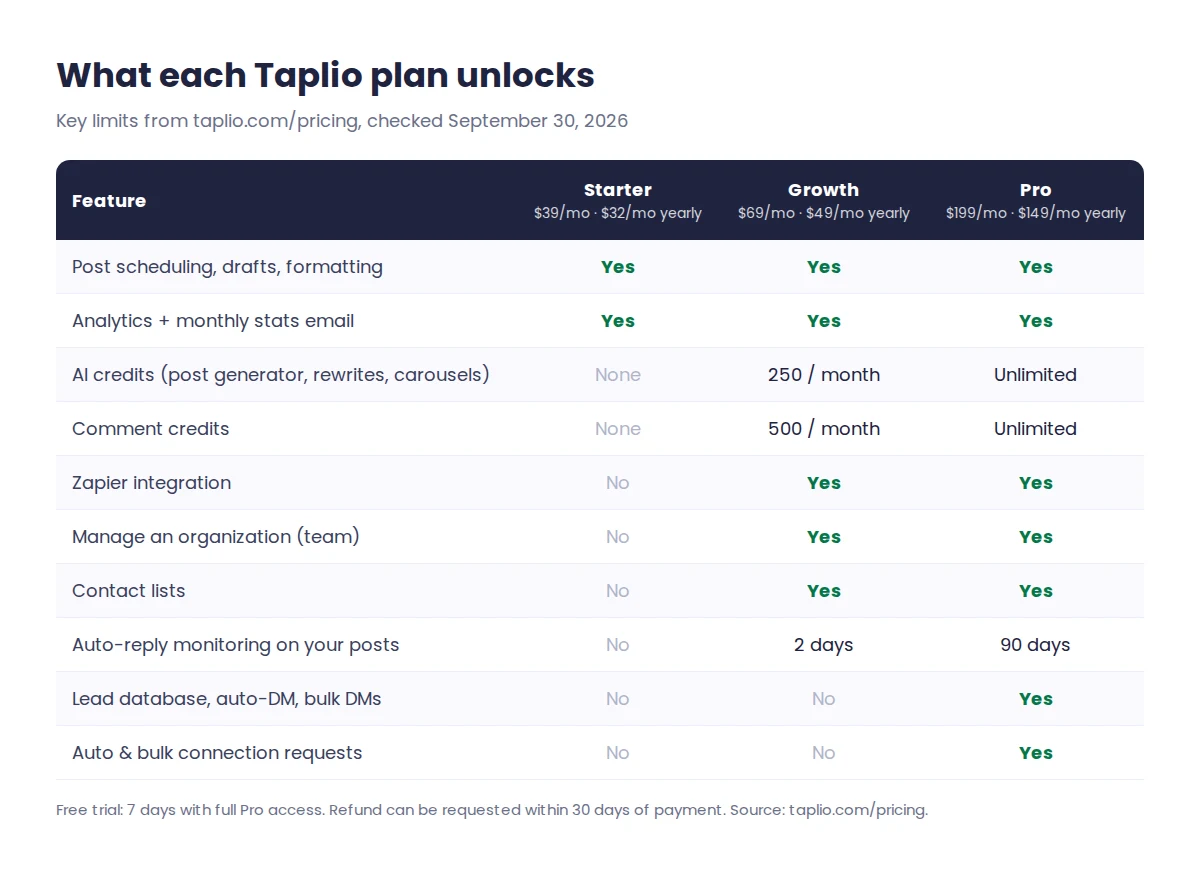
- Starter has no AI credits. None of the AI writing features above are included on the $39/month plan.
- Growth includes 250 AI credits per month. Pro removes the cap. Taplio's pricing page does not state how many credits a single post generation uses, so check this during the trial if you plan to write daily.
Independent reviewers on G2 most often praise this part of the product, describing post writing as quick and easy. The usual caution applies: AI drafts are a starting point, and posts that sound like you still need your own edits and examples.
Viral post inspiration feed
Taplio surfaces a daily feed of high-performing LinkedIn posts ranked for your niche, plus a library of saved posts. It is useful for studying structure: how strong hooks open, how long posts run, and which formats get comments in your field.
Use it for patterns, not copying. Reposting another creator's ideas with light edits tends to read as generic, and it does little for your reputation.
Taplio's LinkedIn scheduler
Scheduling is included on every plan: a drafts board, text formatting, snippets, polls, media assets, and daily or monthly calendars. Growth and Pro add a Zapier integration, which helps if you want to push drafts in from Notion, a spreadsheet or another tool.
If scheduling is the only thing you need, note that LinkedIn now offers its own post scheduling for free, so a paid tool has to earn its place through the AI writing and analytics.
Engagement and lead generation
This is where the plans differ most, and where risk comes in.
- All plans: tagging in posts, replying to comments on your posts, auto-like when replying, and an automatic first comment on your own post.
- Growth: 500 comment credits a month for commenting on curated feeds and leads' posts, contact lists, auto-reply monitoring for 2 days after a post, and adding up to 20 likers or commenters per post to a list.
- Pro: a lead database, auto-DMs and bulk DMs, automatic and bulk connection requests, importing likers from any post, and 90-day auto-reply monitoring.
Is Taplio's automation safe on LinkedIn?
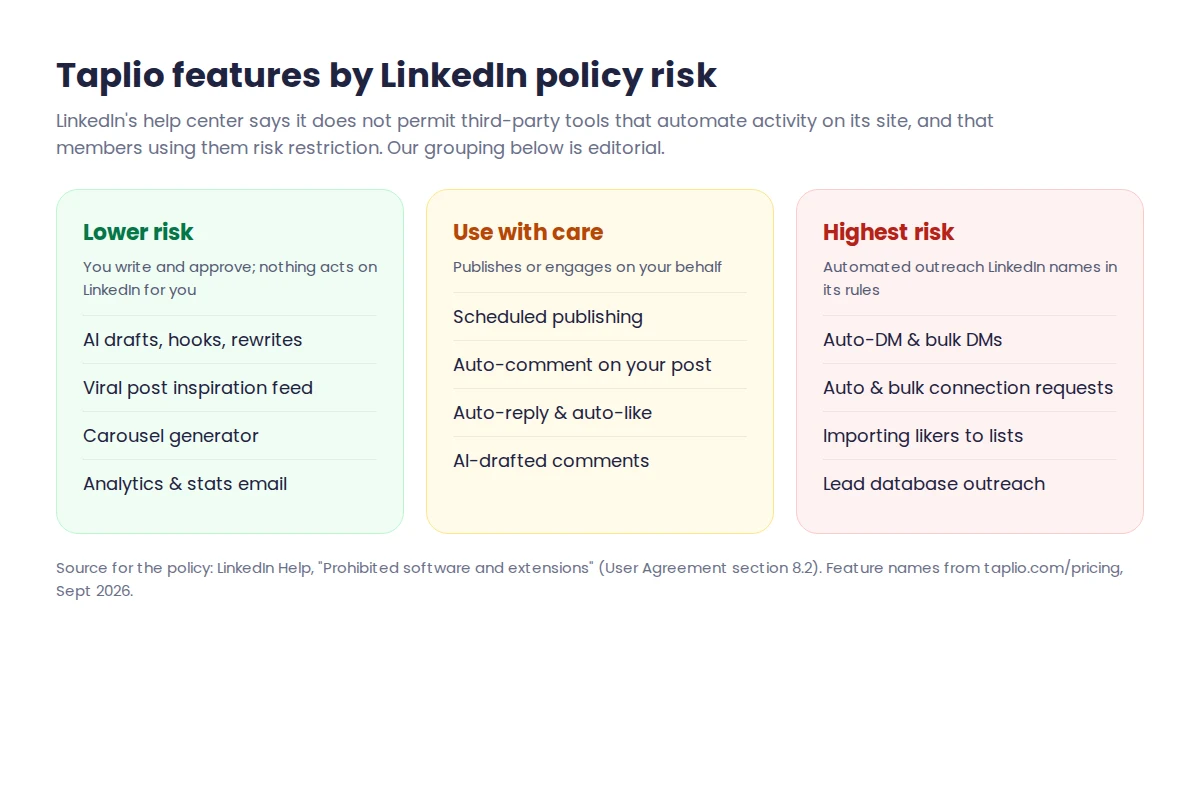
Taplio's FAQ says the tool is safe because it "behaves exactly like a real LinkedIn user would". LinkedIn's own help center takes a stricter line. Its page on prohibited software says LinkedIn does not permit third-party tools that "automate activity on LinkedIn's website", including bots that send messages, add contacts or drive engagement, and that members who use them "risk having their accounts restricted or shut down".
Our reading: AI drafting, analytics and the inspiration feed carry little risk because you stay in control. Scheduled posts and auto-replies are widely used but still act on your behalf. Auto-DMs and automatic connection requests are the features LinkedIn names most directly. One Trustpilot reviewer reported their LinkedIn account being flagged after exceeding daily action limits. If your LinkedIn profile matters to your business, we would not rely on Pro's outreach automation.
Taplio analytics
Every plan includes analytics on your posts and profile, a monthly stats email, and extension features such as your best posts, recent hits in your network and saved posts. This is enough for most solo users to see which topics and formats work. Growth adds organization management if several people or clients share one workspace.
Taplio pricing (checked September 30, 2026)
| Plan | Monthly billing | Yearly billing | Cost per year (yearly) | Yearly saving |
|---|---|---|---|---|
| Starter | $39/month | $32/month | $384 | 18% |
| Growth | $69/month | $49/month | $588 | 29% |
| Pro | $199/month | $149/month | $1,788 | 25% |
The yearly toggle on Taplio's site shows "-25%", but the real saving differs by plan: 18% on Starter, 29% on Growth and 25% on Pro. Growth billed yearly is the best value if you want the AI writer. For the break-even month, cost per post and what changes when the trial ends, see our Taplio pricing breakdown.
The free trial lasts 7 days with full Pro access and unlimited credits. You pick a plan to start it, and you are not charged if you cancel before the trial ends. Taplio says you can request a refund within 30 days of a payment. For current offers, see our Taplio deals page.
Compare Taplio plans on the official pricing page
Every plan starts with a 7-day free trial with full Pro access. Cancel before the trial ends and you pay nothing.
See Taplio pricing & start free trialPros and limitations
| Pros | Limitations |
|---|---|
| AI writing, carousels and ideas in one place, built only for LinkedIn | No AI at all on the $39 Starter plan |
| Scheduling and analytics on every plan | Credit use per AI action is not published |
| Free Chrome extension works without a plan | Pro outreach automation conflicts with LinkedIn's rules |
| 7-day trial with full Pro access | Public reviews report billing, cancellation and weekend-support problems |
| Team and client workspaces on Growth | LinkedIn only: no other social networks |
Public feedback is thin and split. On G2, Taplio held 4.1 out of 5 from 9 reviews when we checked, with praise for AI writing and scheduling and complaints about price and a dated interface. On Trustpilot it scored 2.0 out of 5 from 11 reviews, mostly about charges after trials, cancellation and support. Both samples are small, so treat them as warning signs to check, not verdicts. Set a reminder before your trial ends.
Who should use Taplio?
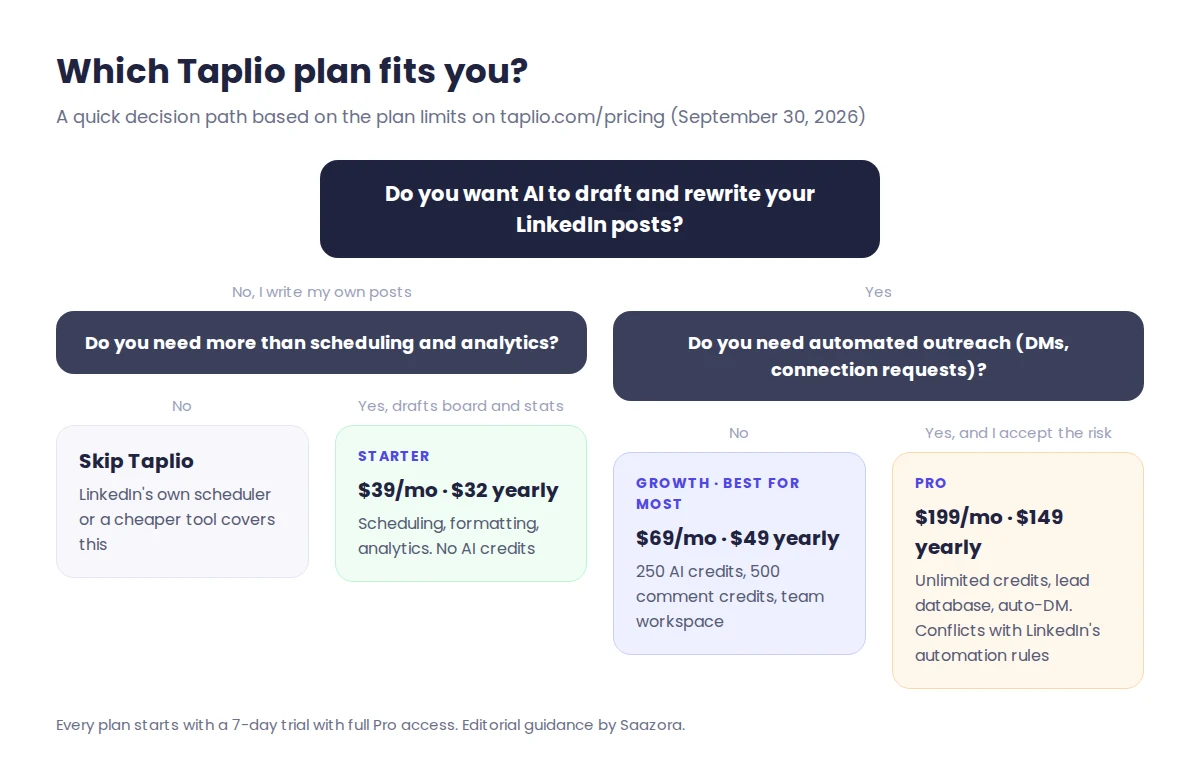
- Founders and consultants who want to post 3 to 5 times a week without starting from a blank page each time.
- Creators building a personal brand who will use the inspiration feed, carousels and analytics together.
- Ghostwriters and small agencies managing several LinkedIn profiles, using Growth's organization and collaboration features.
Who shouldn't use Taplio?
- People who only need scheduling: LinkedIn's built-in scheduler or a cheaper multi-network tool covers that.
- Brands posting across many networks: Taplio does LinkedIn only.
- Sales teams planning mass outreach: the Pro automation features carry the highest risk to your LinkedIn account.
- Anyone on a tight budget who wants AI: the AI writer starts at $49/month billed yearly.
Taplio alternatives
- AuthoredUp: a LinkedIn post editor and analytics tool, a fit if you write your own posts and want better formatting and data.
- Supergrow: an AI-first LinkedIn writing tool aimed at the same creator audience as Taplio.
- Buffer: a multi-network scheduler, a fit if LinkedIn is one channel among several.
Compare current pricing on each vendor's site before deciding; we will cover these in a dedicated comparison.
Taplio review FAQ
Is Taplio worth it in 2026?
Taplio is worth it if you post on LinkedIn several times a week and will use the AI writer, which starts on the Growth plan at $69 a month or $49 a month billed yearly. If you only need scheduling, the $39 Starter plan is hard to justify because it includes no AI credits.
Is Taplio safe to use on LinkedIn?
Writing, analytics and inspiration features are low risk because you stay in control. LinkedIn's rules prohibit third-party tools that automate activity such as messages and connection requests, and say accounts using them risk restriction. Taplio's Pro plan includes auto-DMs and automatic connection requests, so use those with caution.
Does Taplio have a free plan?
Taplio has no free plan. It offers a 7-day free trial with full Pro access and unlimited credits, and you choose a plan to start it. Taplio's Chrome extension is free and works without a subscription, giving you post stats and saved posts inside LinkedIn.
Which Taplio plan includes AI writing?
AI writing starts on the Growth plan, which includes 250 AI credits and 500 comment credits per month. Pro removes both limits. The Starter plan includes scheduling, formatting and analytics but no AI credits, so the post generator, rewrites and carousel generator are not available on it.
Can I cancel Taplio and get a refund?
You can cancel anytime from the Billing tab in Taplio's settings, and you are not charged if you cancel before the 7-day trial ends. Taplio says you can request a refund within 30 days of a payment. Some Trustpilot reviewers reported cancellation problems, so keep your confirmation email.
Final verdict
Taplio is one of the most complete LinkedIn-only tools for writing, scheduling and measuring posts. Choose Growth, bill it yearly if you are sure, and treat Pro's outreach automation with care given LinkedIn's rules. The simplest way to judge fit is the trial: write and schedule a week of posts, then decide.
Start your Taplio free trial · See current Taplio deals · More LinkedIn tools
How we researched this Taplio review
Research label: Research-based. We built this review from Taplio's own pricing and product pages, LinkedIn's published rules and independent user reviews on G2 and Trustpilot, all checked on September 30, 2026. We have not used a paid Taplio account for this review. Read our full review methodology and affiliate disclosure.
Sources: Taplio pricing page · LinkedIn Help: Prohibited software and extensions · G2 and Trustpilot Taplio review pages (September 30, 2026).