LinkedIn documents checked October 23, 2026 · Research-based guide built from LinkedIn's User Agreement, Professional Community Policies and Help pages, not hands-on testing · Not legal advice
No company named on this page pays Saazora for this guide, and it carries no affiliate links.
Is LinkedIn automation safe? It depends on what is being automated, and LinkedIn's own documents draw the line more clearly than most tool vendors admit. Scheduling a post in LinkedIn's built-in scheduler is a LinkedIn feature. Using software that sends connection requests, messages, likes or comments for you, copies profiles, or changes how LinkedIn's website looks is something LinkedIn's User Agreement names as a "Don't", and LinkedIn says members who do it "risk having their accounts restricted or shut down."
Everything below is quoted from LinkedIn's pages as they read on October 23, 2026, with the source next to each claim. Where LinkedIn says nothing (for example, on a "safe" number of invitations per week), we say so rather than fill the gap with someone else's estimate. If you are here because you want to post on a schedule, our guide to scheduling LinkedIn posts for free or with a tool covers the how-to; every LinkedIn guide on the site starts at the LinkedIn tools hub.
Ten common activities, sorted by what LinkedIn says about them
The table reads LinkedIn's wording, not tool marketing. The "risk" column is Saazora's plain-English summary of that wording; LinkedIn itself does not grade activities this way.
| Activity | What LinkedIn's documents say | Saazora reading |
|---|---|---|
| Scheduling your own post in LinkedIn's built-in scheduler | A LinkedIn feature: "You can schedule a post between 10 minutes and 3 months from the current time." (Help a1347212) | Built in. No third party involved. |
| Scheduling Page posts through a LinkedIn Marketing Partner | LinkedIn's partner page lists "Schedule posts" among the "Reasons why customers use a Marketing Partner" | Described by LinkedIn as a partner use case |
| Posting from an app you connect with LinkedIn sign-in (OAuth) | LinkedIn's developer docs describe a permission "Required to create a LinkedIn post on behalf of the authenticated member" | Official route exists; see the API wrinkle below |
| Drafting posts with an AI tool, then reviewing them | "The Services may include content automatically generated and shared using tools offered by LinkedIn or others off LinkedIn" (User Agreement 3.6) | Not banned; you stay responsible for the content |
| Browser extension that adds buttons or panels to LinkedIn | LinkedIn does not permit extensions that "modify the appearance of" its website (Help a1341387); 8.2 bans overlays | Named as prohibited |
| Scraping or exporting profiles and contacts | 8.2: no software "to scrape or copy the Services, including profiles and other data" | Named as prohibited |
| Auto-sending connection requests | 8.2: no bots to "add or download contacts"; Help 4800 may "suspend or restrict" if automation is suspected | Named as prohibited |
| Auto-DMs and bulk message sequences | 8.2: no bots to "send or redirect messages" | Named as prohibited |
| Auto-likes, auto-comments, engagement pods | 8.2: no bots to "create, comment on, like, share, or re-share posts"; the Community Policies say "don't agree with others ahead of time to like or re-share each other's content" | Named as prohibited, with or without software |
| Giving a tool your password or session cookies | 8.2: do not "use or attempt to use another's account (such as sharing log-in credentials or copying cookies)" | Named as prohibited |
Sources: LinkedIn User Agreement (effective November 3, 2025), Professional Community Policies, LinkedIn Help a1341387, a1347212 and 4800, LinkedIn Marketing Partners page, LinkedIn developer documentation. All read October 23, 2026.
The exact words in Section 8.2 of the User Agreement
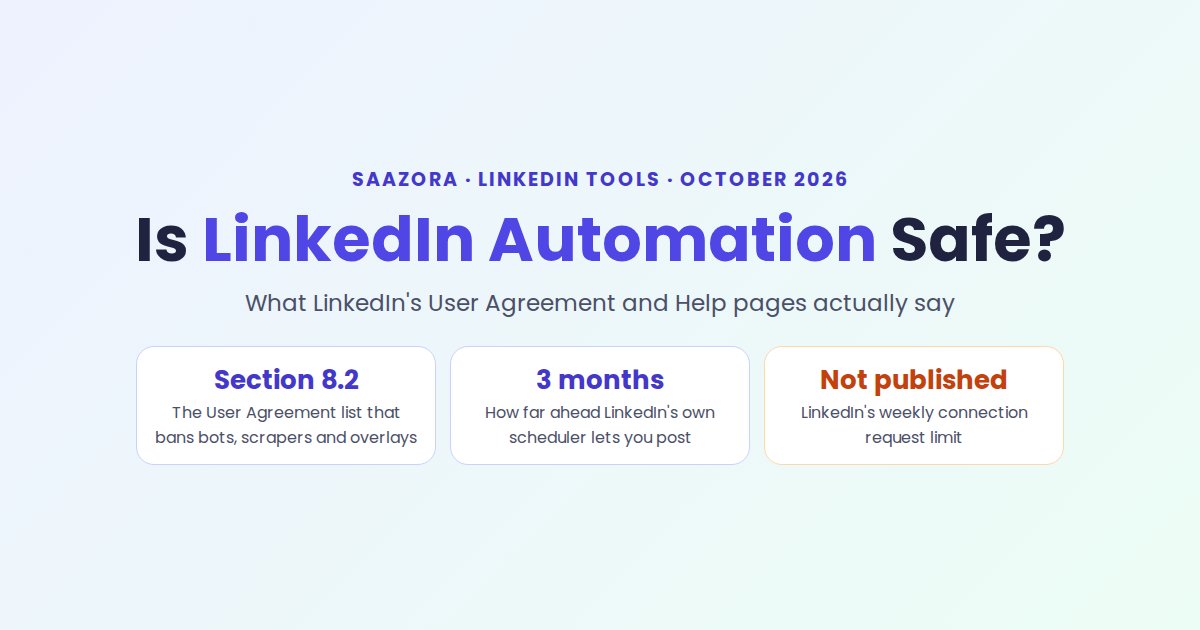
LinkedIn's User Agreement is the contract every member accepts. Section 8.2 is a list of "Don'ts" that begins "You agree that you will not:". Four lines in it cover almost every automation tool on the market:
- "Develop, support or use software, devices, scripts, robots or any other means or processes (such as crawlers, browser plugins and add-ons or any other technology) to scrape or copy the Services, including profiles and other data from the Services;"
- "Use bots or other unauthorized automated methods to access the Services, add or download contacts, send or redirect messages, create, comment on, like, share, or re-share posts, or otherwise drive inauthentic engagement;"
- "Overlay or otherwise modify the Services or their appearance (such as by inserting elements into the Services or removing, covering, or obscuring an advertisement included on the Services);"
- "Override any security feature or bypass or circumvent any access controls or use limits of the Services (such as search results, profiles, or videos);"
Two words in the second line matter. LinkedIn bans "unauthorized automated methods", which implies that authorized ones exist, and it lists the specific actions it means: adding contacts, messaging, posting, commenting, liking and sharing. The same section also bans using someone else's account, "such as sharing log-in credentials or copying cookies", which matters for any tool that asks for your password or session cookie. Section 5 adds that 8.2 survives termination, so the obligations do not end if your account does.
The Help page that names bots, plug-ins and extensions
LinkedIn's Help article on prohibited software and extensions (a1341387, marked "Last updated: 2 years ago") restates the rule in plain language:
"In order to protect our members' data and our website, we don't permit the use of any third party software, including "crawlers", bots, browser plug-ins, or browser extensions that scrape, modify the appearance of, or automate activity on LinkedIn's website. We also don't permit the use of fake accounts or fake engagement on LinkedIn's website, including any tools or services that try to manipulate LinkedIn's content algorithms."
Three things on that page are easy to miss. First, it covers extensions that only change how LinkedIn looks, not just ones that act for you. Second, it warns that a tool can stop working without warning: members "also risk the possibility that any prohibited tools they're using may become non-operational without notice." Third, it names no products. LinkedIn publishes no list of banned or approved tools on that page, so any vendor claim that its tool is "LinkedIn-approved" or "LinkedIn-safe" is the vendor's claim, not LinkedIn's.
What LinkedIn says can happen to your account
LinkedIn describes its responses in four documents, and together they form a ladder. None of them gives a fixed penalty for a first offence.
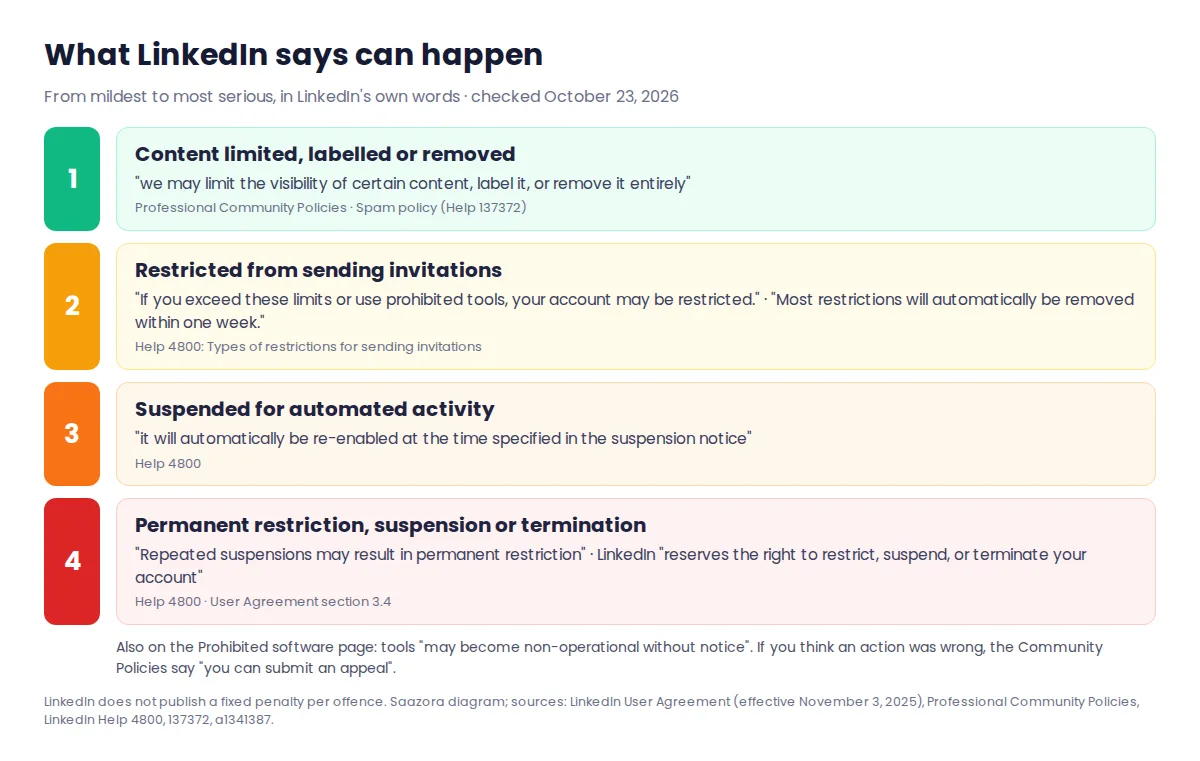
- Content limits. The Professional Community Policies say: "Depending on the severity of violation, we may limit the visibility of certain content, label it, or remove it entirely. Repeated or egregious offenses can result in account restriction." The Spam policy (Help 137372) adds that LinkedIn "may remove or limit the distribution of content designed to artificially increase engagement".
- Invitation restrictions. Help 4800: "If you exceed these limits or use prohibited tools, your account may be restricted." It also says: "If you send an excessive number of invitations and we suspect the use of an automation tool, we may suspend or restrict your account."
- Suspension. The same page: "If your account is suspended for automated activity, it will automatically be re-enabled at the time specified in the suspension notice. Repeated suspensions may result in permanent restriction of your LinkedIn account."
- Restriction or termination. User Agreement 3.4: "LinkedIn reserves the right to restrict, suspend, or terminate your account if you breach this Contract or the law or are misusing the Services (e.g., violating any of the Dos and Don'ts or Professional Community Policies)."
The Community Policies also say that "If you believe action taken on your content or your account was in error, you can submit an appeal." Help 4800 is blunt about what support can do for invitation limits: "LinkedIn won't be able to remove invitation restrictions upon request", and "LinkedIn Support cannot disclose any additional information regarding the type or reason for the invitation restriction on your account."
Scheduling versus bots: three routes into your account
Most people asking whether LinkedIn automation is safe really want to post on a schedule without logging in every morning. LinkedIn's documents treat that very differently from a bot, and the difference is the route the tool takes.
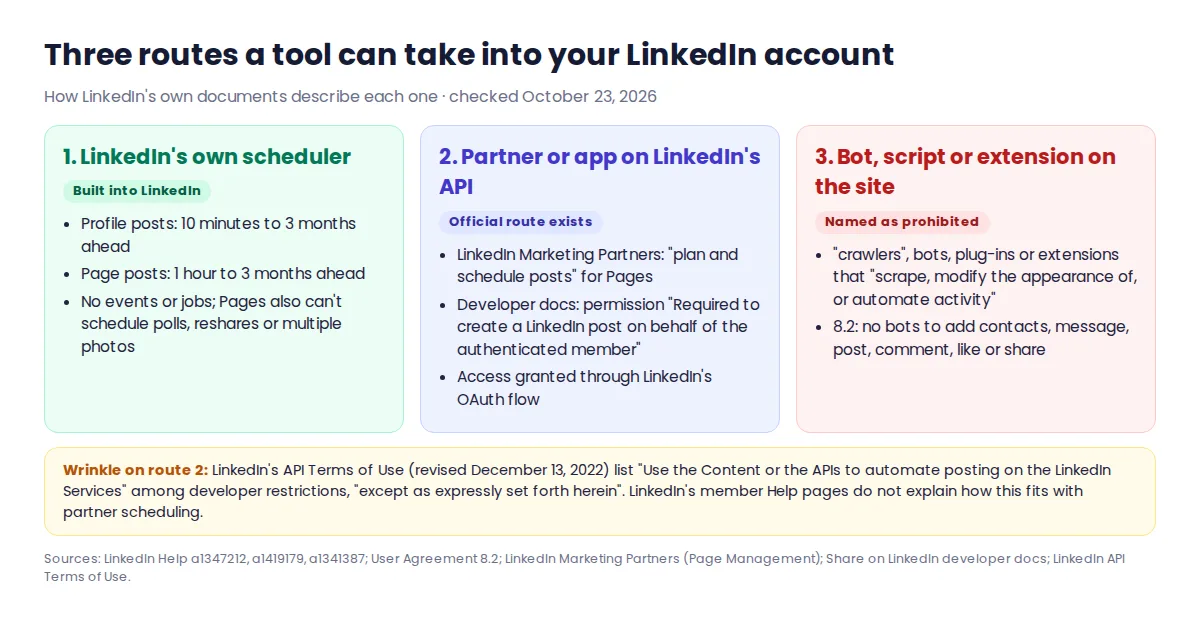
Route 1: LinkedIn's own scheduler. Members can schedule a post "between 10 minutes and 3 months from the current time", though not events or jobs (Help a1347212). Page admins can schedule "anywhere between an hour from the current time to three months in advance", but LinkedIn says "You can't schedule events, multiple photos, reshares, polls, jobs, and service posts for your Page" (Help a1419179). This is the only route with no third party at all.
Route 2: a partner or app that uses LinkedIn's API. LinkedIn runs a Marketing Partner program, and its Page Management page says customers use partners to "manage publishing schedules" and to "plan and schedule posts". It features Brandwatch, Sprout Social and Oktopost as examples. For personal profiles, LinkedIn's developer documentation describes a "Share on LinkedIn" product whose w_member_social permission is "Required to create a LinkedIn post on behalf of the authenticated member". The same docs send apps through LinkedIn's OAuth 2.0 authorization flow to get that permission, rather than asking for your password.
Route 3: a bot, script or extension acting on the website. This is what Section 8.2 and Help a1341387 describe: software that clicks, types, reads or redraws LinkedIn's pages in your browser or on a server logged in as you.
One wrinkle on Route 2. LinkedIn's API Terms of Use (last revised December 13, 2022), the contract for developers, list among general restrictions, "except as expressly set forth herein", that developers may not "Use the Content or the APIs to automate posting on the LinkedIn Services." Those terms bind app developers, not members, and none of LinkedIn's member Help pages checked for this guide explains how that clause sits next to the partner scheduling LinkedIn promotes. We are not going to guess. If a tool's posting route matters to you, ask the vendor which LinkedIn API product it uses and whether it is a LinkedIn Marketing Partner, then check the partner directory yourself.
Is there a safe number of connection requests per week?
Not one that LinkedIn publishes. Help 4800 says "LinkedIn limits the number of invitations you can send" and that limits apply to "All LinkedIn members (Basic and Premium)", but it gives no daily or weekly figure. It lists the triggers instead: "You've sent many invitations within a short amount of time" and "Many of your invitations have been ignored, left pending, or marked as spam by the recipients." The weekly caps quoted around the web come from tool vendors and their customers' experience, not from LinkedIn's pages, and some vendors say so themselves.
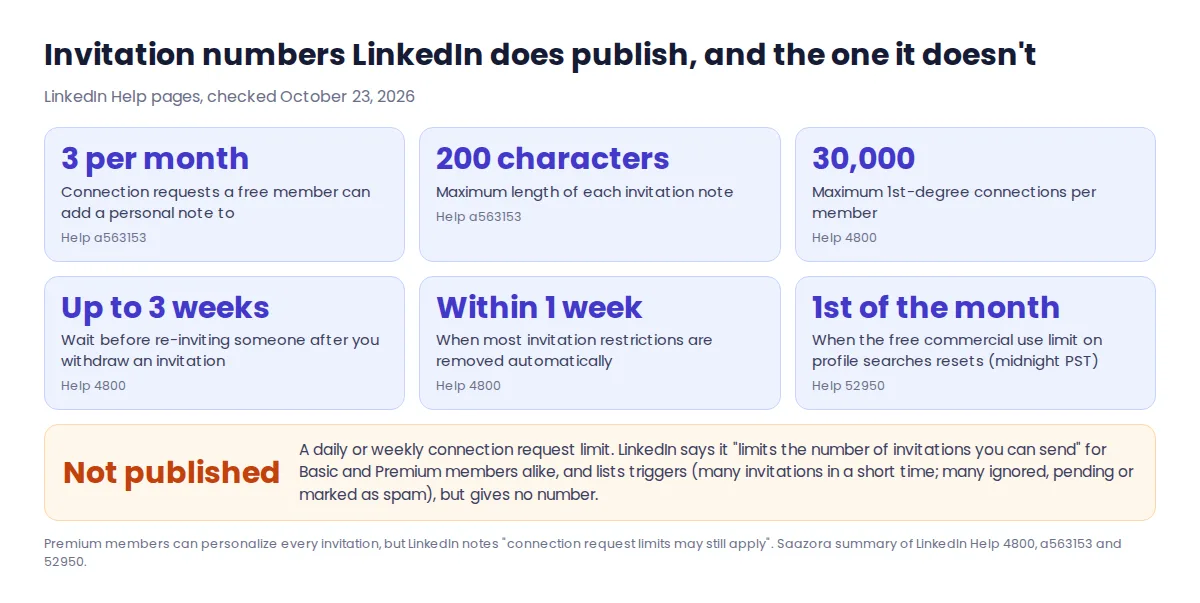
What LinkedIn does put in writing:
- Free members "can add a personalized message to up to three connection requests per month", and "Each message can be up to 200 characters". Premium members can personalize all of them, but "connection request limits may still apply" (Help a563153).
- The network cap is "a maximum of 30,000 1st-degree connections" (Help 4800).
- After you withdraw an invitation, "you won't be able to resend an invite to the same recipient for up to three weeks."
- "Most restrictions will automatically be removed within one week", and "You can't buy or acquire more invitations while you've been restricted, or otherwise."
- Searching and browsing profiles has a separate commercial use limit; LinkedIn says "Your free monthly usage resets at midnight PST on the 1st of each calendar month" and "we also cannot lift the limit upon request" (Help 52950).
This matters when a tool advertises that it stays "within LinkedIn's limits". LinkedIn does not publish the invitation number such a promise would be measured against, and Help 4800 ties restrictions to how recipients react, not only to volume.
Where Taplio fits, and the features we would leave off
Taplio comes up in most searches on this topic, so here is what it says about itself, checked October 23, 2026. Its main job is content: Taplio's own site summary (its llms.txt file) says it helps people "find content ideas, write posts in their own voice, schedule them, engage with the right people, and measure what works." Its help center says you link your account through "Taplio Connect", described as "the free Chrome extension that securely links your LinkedIn account to Taplio", which "lets you post and engage with others from Taplio and gives you advanced analytics on your profile and posts."
Taplio also sells outreach automation. Its site lists "Auto connect" and "Auto DM" post automations, and its Networking help article says "Taplio sends up to 20 invitations per working day" in bulk campaigns and "You can send up to 100 DMs per day". Taplio calls its approach "account-safe" and "No bots, no scraping." Those are Taplio's statements. LinkedIn's Help page names no tools, and we do not rule on any tool's compliance. What we can say is that auto-sent connection requests and messages are activities Section 8.2 names whatever software performs them, so they sit in the "named as prohibited" rows of the table above.
If you want Taplio, use it for what this guide is about: drafting and queuing your own posts. If you use it, keep to its writing and scheduling tools and leave the auto-connect, auto-DM and auto-reply switches off. If you would rather avoid outreach features altogether, our Taplio alternatives scorecard compares writing-first tools, the Supergrow review explains how Supergrow says its Engage feature leaves every click to you, and the AuthoredUp review covers an extension-based tool with its own stated no-automation policy. How analytics tools collect your data under the same rule is in our LinkedIn analytics tools comparison, and current prices are in the LinkedIn tool pricing tracker.
Six questions to ask before you connect any LinkedIn tool
Each question maps to a specific line in LinkedIn's documents, so a "yes" (or a vague answer) tells you which rule is in play.
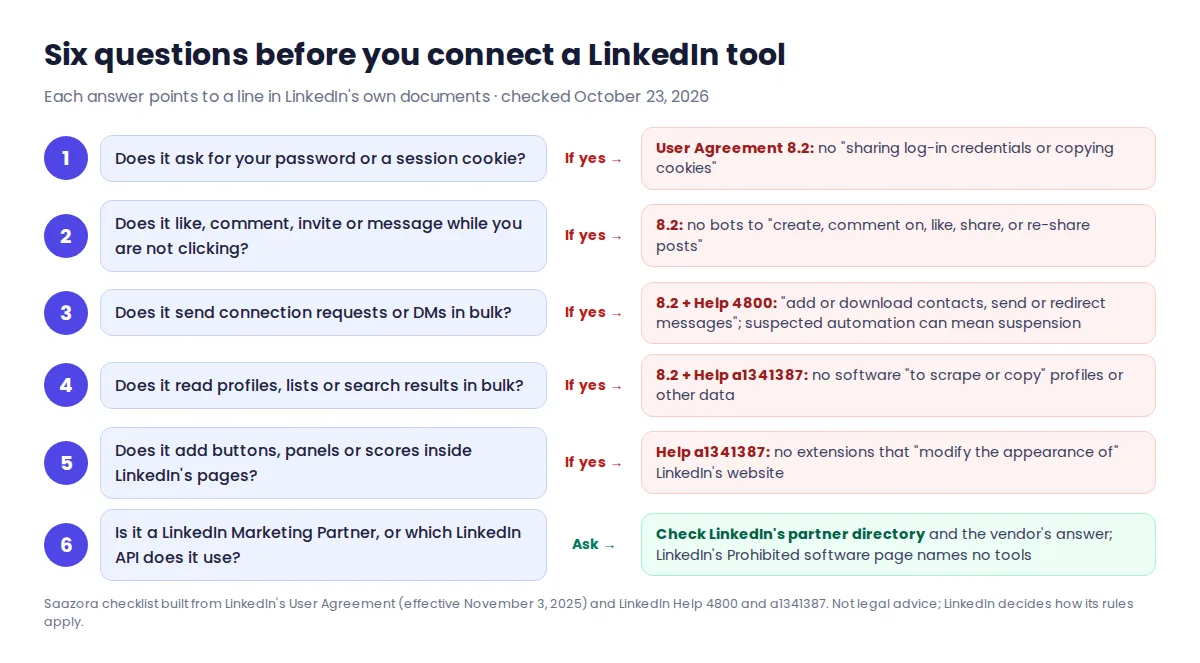
- Does it ask for your LinkedIn password or a session cookie? 8.2 bans "sharing log-in credentials or copying cookies". A LinkedIn sign-in screen asking you to grant permissions is a different thing.
- Does it do anything when you are not clicking? A post you scheduled is one thing; likes, comments, invitations or messages fired on a timer are the actions 8.2 lists.
- Does it send connection requests or messages in bulk? That is "add or download contacts, send or redirect messages", and Help 4800 says suspected automation can lead to suspension.
- Does it read profiles, lists or search results in bulk? That is scraping under 8.2 and Help a1341387, and it can also hit the commercial use limit on searches.
- Does it add buttons, panels or scores inside LinkedIn's pages? Help a1341387 covers extensions that "modify the appearance of" the site.
- Is it a LinkedIn Marketing Partner, or which LinkedIn API does it use? LinkedIn's Marketing Partner directory is where LinkedIn lists the partners it calls "Trusted integrations and services to power marketing".
If LinkedIn has already restricted you
Start with what LinkedIn asks for. Help 4800 says: "If you use any third-party applications or browser extensions that copy data from, automate activity, or otherwise interact with LinkedIn in violation of LinkedIn's User Agreement, we request you to disable it." Removing the extension from your browser is covered in LinkedIn's Help article on uninstalling browser extensions (a1338426); disconnecting the tool inside its own settings is a separate step.
For invitation restrictions, LinkedIn gives timings: after a first restriction, "Wait a few hours, then try again"; after multiple restrictions in a day, "Wait a few days"; and if you have too many outstanding invitations, "Wait for up to one month before attempting to send another invitation." A suspension for automated activity lifts at the time in the notice, and LinkedIn repeats that "Repeated suspensions may result in permanent restriction." If you think the action was a mistake, the Community Policies point to an appeal.
Is LinkedIn automation safe? Quick answers
Does LinkedIn ban scheduling tools?
No LinkedIn page we read bans scheduling as such. LinkedIn has its own scheduler and promotes Marketing Partners for scheduling Page posts. What its rules ban is bots and extensions that automate activity on its website, and specific actions such as auto-adding contacts or auto-messaging.
Can LinkedIn detect automation tools?
LinkedIn does not explain how. Its Prohibited software page says only that "we're constantly working to improve our technical measures and defenses against the operation of scraping, automation, and other tools that abuse LinkedIn's platform."
Is it against LinkedIn's rules to write posts with AI?
Not according to the User Agreement, which acknowledges content "automatically generated and shared using tools offered by LinkedIn or others off LinkedIn". It asks you to "review and edit such content before sharing", and you remain responsible for it under the Community Policies. If you draft elsewhere, check LinkedIn's character limits for posts, headlines and About before you paste.
Is a "cloud-based" automation tool safer than an extension?
LinkedIn's rules do not make that distinction. Section 8.2 covers "software, devices, scripts, robots or any other means or processes", and if a cloud tool logs in with your password or cookies, the 8.2 ban on "sharing log-in credentials or copying cookies" applies as well.
How this guide was researched
To answer whether LinkedIn automation is safe using only LinkedIn's own words, on October 23, 2026 we read and saved LinkedIn's User Agreement (effective November 3, 2025), its Professional Community Policies, its API Terms of Use (last revised December 13, 2022), the Share on LinkedIn developer page, the Marketing Partners Page Management page, and LinkedIn Help articles a1341387 (Prohibited software and extensions), 4800 (Types of restrictions for sending invitations), a563153 (Personalize invitations), 137372 (Spam), 52950 (Commercial use limit), a1347212 and a1419179 (scheduling) and a1338426 (uninstalling extensions). Every quotation above is copied from those saved pages. Taplio's statements come from its homepage, its llms.txt summary, its LinkedIn automation page and two Taplio Help Center articles read the same day. We did not run any automation tool on a LinkedIn account for this guide, and no company reviewed it. This is a research summary of published rules, not legal advice, and LinkedIn can change these pages at any time. More on how Saazora researches software.
Sources (checked October 23, 2026): LinkedIn User Agreement, LinkedIn Professional Community Policies, LinkedIn Help: Prohibited software and extensions, LinkedIn Help: Types of restrictions for sending invitations, LinkedIn Help: Personalize invitations, LinkedIn Help: Spam, LinkedIn Help: Commercial use limit, LinkedIn Help: Schedule posts, LinkedIn Help: Schedule a Page post, LinkedIn Help: Uninstall browser extensions, LinkedIn Marketing Partners: Page Management, LinkedIn developer docs: Share on LinkedIn, LinkedIn API Terms of Use, Taplio Help: Connect your account, Taplio Help: Networking.
Research-based guide: no company paid for, supplied an account for, or reviewed this article. Not legal advice.