Last checked October 15, 2026 · Research-based comparison, not hands-on testing
Saazora may earn a commission if you sign up for Taplio through links on this page, at no extra cost to you. We have no affiliate deal with any other tool named here.
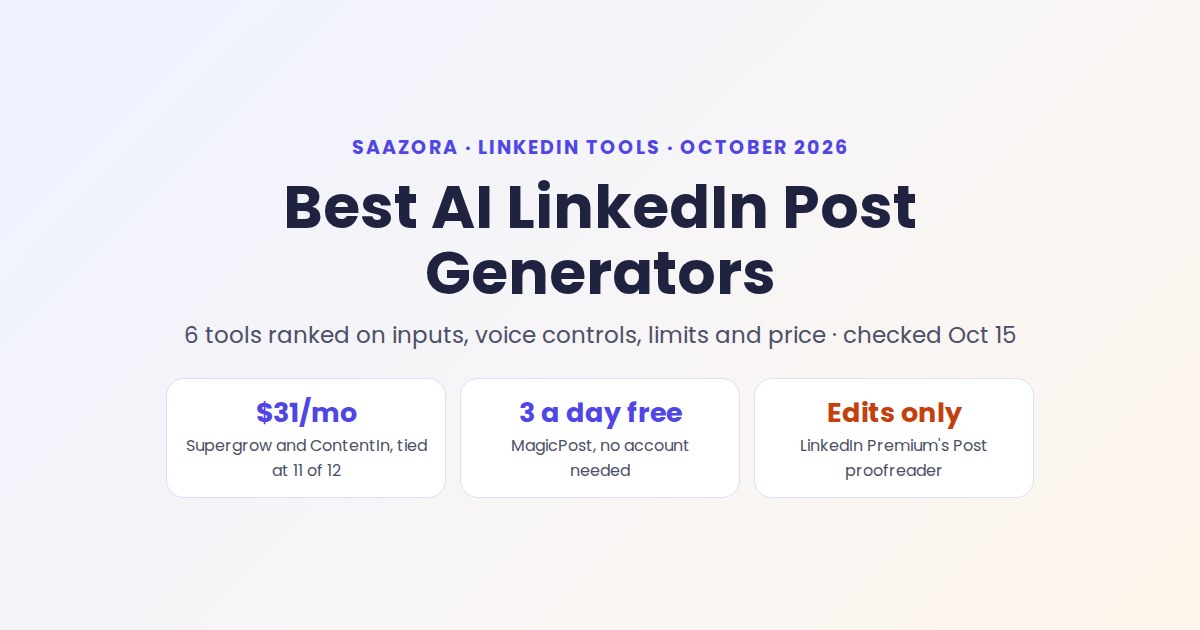
The best AI LinkedIn post generator for most people is a tie between Supergrow Pro and ContentIn Growth, both $31 a month on yearly billing, both trained on your own past posts, and neither listing a monthly cap on drafting. Pick Supergrow if you would rather talk than type: its AI interview turns 10 minutes of conversation into 3 to 5 posts. Pick ContentIn if you want the plan made for you: it drafts 2 posts from your own material every Sunday. If you only want to see what an AI draft of your idea looks like, two free generators do it with no account at all.
This page covers the writing job only: inputs, voice control and real monthly draft limits. Leaving Taplio and comparing schedulers, analytics and team pricing? Our scorecard of six Taplio replacements covers that. More tools are on our LinkedIn tools hub.
Before you pay: LinkedIn's built-in AI now only edits
If you expected LinkedIn Premium to draft posts for you, check what it offers now. LinkedIn's Help Center describes its current Premium writing tool, Post proofreader, in one blunt line: "It doesn't write for you, it edits what you write."
Post proofreader is available to Premium Career and Premium Business subscribers, works on English-language drafts only, and offers three actions, one at a time:
- Review fixes spelling, grammar and punctuation.
- Shorten makes the post more concise while keeping its meaning.
- Clarify makes it easier to read.
Suggestions show inline as tracked changes and apply only when you accept them. There is no version history or undo, and unresolved suggestions vanish if you close the panel.
So LinkedIn covers the last step, cleaning up a draft, but not the first draft. For that you need one of the tools below, or a general chatbot plus the voice brief further down.
Free AI LinkedIn post generators, and where each one stops
Four free options came up in our research. None learns your voice over time, which is what the paid plans sell, but they show whether AI drafting suits you at all.
| Free option | Account needed? | What it does | Where it stops |
|---|---|---|---|
| ContentIn free AI LinkedIn post generator | No login, no card | Topic mode: one draft in about 10 seconds, with a live LinkedIn preview. Profile mode: paste your profile URL and get three drafts written to your recent posts' patterns | Scheduling and posting happen only inside the paid app |
| MagicPost free AI LinkedIn post generator | No account | Drafts from a topic, with an angle picker (tip, rant, personal reflection and more) | 3 posts a day; after that it asks you to create a free account |
| Buffer Free with AI Assistant | Free Buffer account | A general assistant for "creating, refining, and repurposing content", plus scheduling on up to 3 channels | No LinkedIn voice training; no more than 10 queued posts per channel |
| Taplio viral post generator | Asks for an email | Turns two short prompts into a post, with a "cringe level" slider from 0 to 10 | 3 posts, then sign-up; built as a fun tool more than a drafting tool |
ContentIn's profile mode is the only one of the four that tries to match how you already write, so it is the quickest test of voice-matching before you pay.
Ranking the best AI LinkedIn post generators on six public criteria
Each tool is scored on its cheapest plan that includes AI post drafting, for one LinkedIn profile. Points come only from what each vendor's own pages state on October 15, 2026. Draft quality is not scored: it depends on your input and needs a trial to judge.
| Rank | Tool and plan | Per month, yearly billing | Inputs (3) | Voice controls (2) | Monthly drafts (2) | Free way to try (2) | Price (2) | Publishing route (1) | Total (12) |
|---|---|---|---|---|---|---|---|---|---|
| 1= | Supergrow Pro | $31 | 3 | 2 | 2 | 1 | 2 | 1 | 11 |
| 1= | ContentIn Growth | $31 | 3 | 2 | 2 | 1 | 2 | 1 | 11 |
| 3 | MagicPost Creator | $39 | 2 | 2 | 2 | 2 | 1 | 1 | 10 |
| 4= | Kleo | $83.25 | 1 | 2 | 2 | 0 | 0 | 1 | 6 |
| 4= | Buffer Free (AI Assistant) | $0 | 1 | 0 | 1 | 2 | 2 | 0 | 6 |
| 4= | Taplio Growth | $49 | 2 | 0 | 2 | 1 | 1 | 0 | 6 |
The rules, identical for each tool:
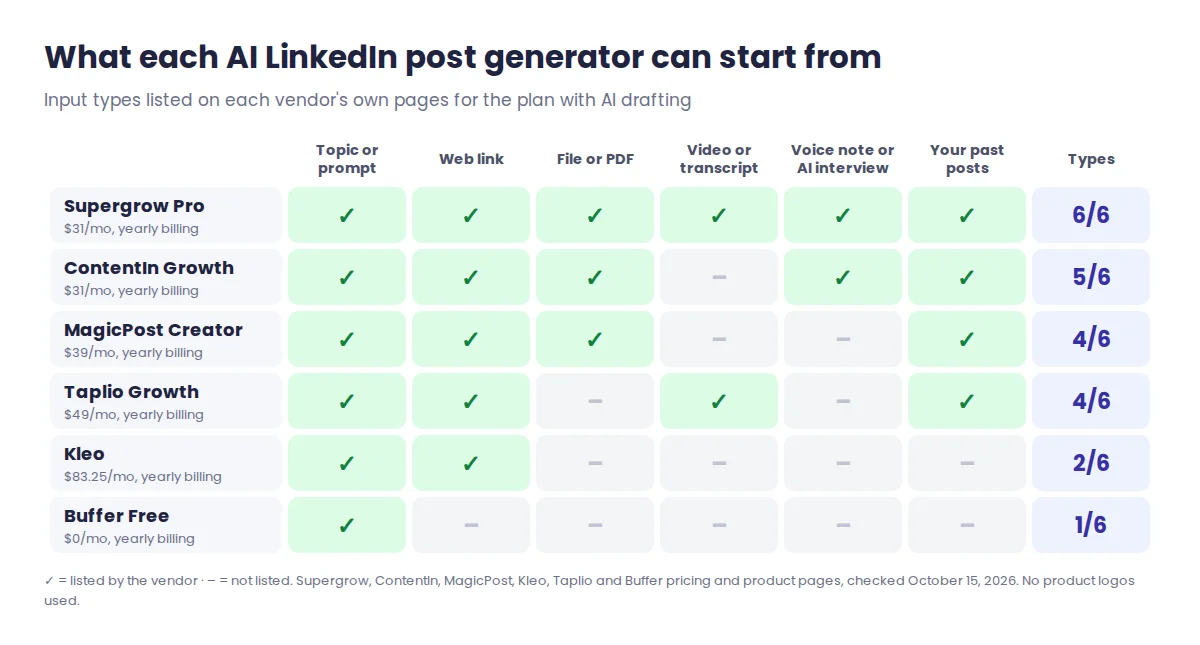
- Inputs (3): how many of six input types the vendor lists: a topic or prompt, a web link, a file or PDF, a video or transcript, a voice note or AI interview, and your own past LinkedIn posts. Five or six earn 3, three or four earn 2, one or two earn 1.
- Voice controls (2): one point for learning from your own posts or writing, one for stored context such as a knowledge base, saved instructions or audience notes.
- Monthly drafts (2): 2 when the plan states unlimited drafting (Supergrow states it as unlimited AI interviews that produce posts, Taplio Growth as unlimited Faster mode after 250 Expert-mode credits), 1 when it states a cap or says nothing, 0 when the plan has no AI drafting.
- Free way to try (2): one point for a free generator or free plan you can use without paying, one for a trial that never bills you automatically. A free plan earns both.
- Price (2): $35 a month or less on yearly billing earns 2, up to $60 earns 1, more earns 0.
- Publishing route (1): the vendor's page says it posts through LinkedIn's official API or does not automate your account.
Ties are left as ties. Supergrow and ContentIn match on every criterion, so the right pick between them depends on how you like to work, covered next. Kleo, Taplio and Buffer share fourth for different reasons: Kleo on price and no trial, Buffer on voice, and Taplio because its pages do not mention training on your own posts and its safety answer says it behaves "exactly like a real LinkedIn user" rather than naming LinkedIn's official API. Taplio does better on other jobs, such as its library of 5M+ viral posts for ideas.
What each generator can turn into a post
Inputs are where generators differ most. A topic-only tool gives you the same opinion-free post it gives everyone; one that takes a voice note, a PDF or your past posts has something specific to work with.
Supergrow Pro: talk instead of type
Supergrow's Pro plan ($39 a month, or $31 yearly) is built around two features. Content DNA stores your role, audience, topics, opinions, tone and vocabulary, learned from your existing LinkedIn posts. Postcast, unlimited on Pro, is an AI interview: Supergrow says a 10-minute session produces 3 to 5 posts. Drafts can also start from a topic, an article or public URL, a PDF, a YouTube video, a transcript or a voice note.
Best for busy executives and founders who have ideas but will not sit down to write, because the interview gets the substance out of them. The 7-day trial ends by pausing the account if you do not choose a plan, with "no surprise charges". There is no free generator to try first.
ContentIn Growth: a model that learns from 20+ of your posts
ContentIn Growth costs $39 a month, or $31 yearly. It learns from a minimum of 20 posts you have already published on LinkedIn, then adds what you give it in a 10-minute onboarding interview, plus documents, links and voice notes. Ghostwriter drafts are unlimited. What it does cap: ideas (50 a month), AI carousels (4) and AI images (20). Pro ($59, or $48 yearly) makes ideas and carousels unlimited under fair use, raises images to 100 a month and adds custom AI instructions for tone and goals.
Best for people with a posting history who want the tool to plan the week: every Sunday it drafts next week's posts from your own material, 2 on Growth and 3 on Pro. The trial needs a card, so check the voice match in the free generator first.
MagicPost Creator: borrow a style, then set the rules
MagicPost puts AI writing on its Creator tier: $39 a month if you pay for the year ($468), $69 month to month. Its cheaper Growth plan has no AI post generation. Creator writes from a topic, a URL or a file, using a writing style imported from real LinkedIn posts: yours, or a creator's you choose. You can store several styles and switch between them, set tone (standard, conversational, engaging or formal) and emoji level, and save instructions that apply to every post, such as "Never open with a question".
Best for people who know exactly what they dislike in AI writing and want rules to stop it. MagicPost also offers a Humanizer, with three levels from "true to your style" to "maximum anti-detection". The free trial needs no card and charges nothing when it ends, but AI generation during the trial comes with "a small allowance", and trial length depends on your country.
Kleo: unlimited drafts plus templates and coaching
Kleo has a single plan: $99 a month, or $999 a year ($83.25 a month). It includes unlimited post generation, a writing style and identity kept in memory, a knowledge base, a Chrome extension for saving inspiration from web pages, 20 graphics a month, 200+ hook templates and weekly live group coaching.
Best for new creators who want templates and coaching as much as a writer. The cost is the catch, and you cannot try before paying: "Kleo does not offer a free trial at the moment." Its inputs are narrower too: chat ideas and saved web inspiration, but no file, video or voice upload.
Buffer Free: a general assistant next to a scheduler
Buffer's free plan pairs a general AI Assistant with scheduling on 3 channels. No voice training, no stated AI limit. Best for people who post one idea to LinkedIn and other networks and want light rewording help, for $0.
Taplio Growth: 250 Expert-mode credits, then Faster mode
Taplio's AI starts on Growth, at $69 a month or $49 yearly; Starter ($39, or $32 yearly) has no AI writing. Growth covers the post generator, hooks, rewrites, carousels, repurposing of articles, YouTube videos and your own top posts, plus Ask Taplio (its AI assistant) and AI Edit. It includes 250 Expert-mode AI credits a month, and once those run out, Taplio's help center says you switch automatically to unlimited Faster mode. Pro ($199, or $149 yearly) makes Expert mode unlimited under fair use.
Best for people who already use Taplio's inspiration library and want drafting in the same place. If you want to see the unlimited tier before committing, Taplio's trial gives 7 days of full Pro access: start a Taplio trial (affiliate link). How far 250 Expert-mode credits go is the next section.
Monthly AI limits: what "250 credits" and "unlimited" really buy
An unlimited plan and a capped plan can look the same on a pricing page. They are not, because on a credit plan every AI action draws from one pool.
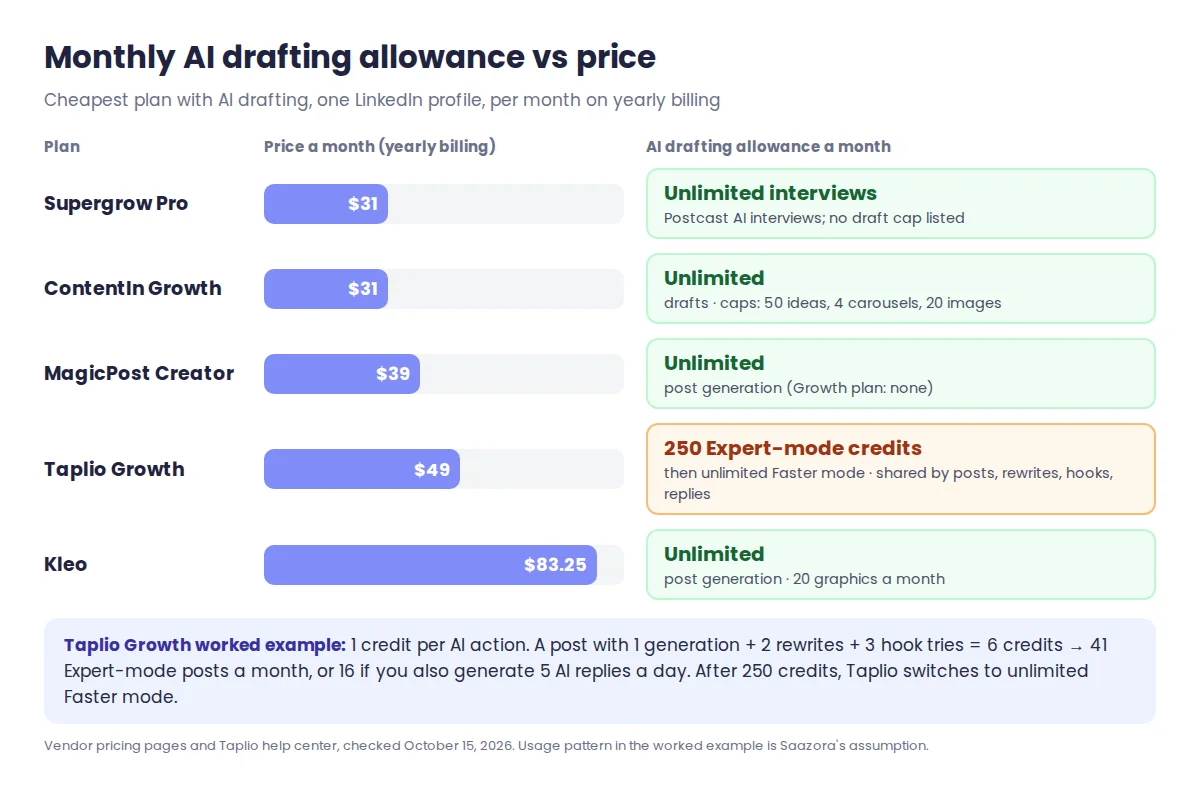
Taplio's help center says each AI action costs 1 Expert-mode credit: rewriting a post, generating a post, generating a hook, sending one message to Ask Taplio or AI Edit, or generating a reply. Here is how far 250 credits go, using our own assumptions about a typical writing session:
| How you use Taplio Growth's AI | Credits per post | Expert-mode posts a month from 250 credits |
|---|---|---|
| Generate once and post as-is | 1 | 250 |
| Generate, 2 rewrites, 3 hook tries | 6 | 41 |
| Same, plus 5 AI replies a day (150 credits a month) | 6 | 16 |
For someone posting three times a week, about 13 posts a month, even the heaviest row covers it. Past 250 credits you are not cut off: Taplio moves you to Faster mode, which it calls unlimited. Its help pages do not say how Faster-mode drafts differ from Expert mode, so judge that during the trial. Reply credits (500 a month on Growth) are a separate pool, used when you reply to other people's posts. For a deeper look at the credit system by plan, see what each Taplio plan includes in credits.
On the unlimited plans, the limits move elsewhere. ContentIn Growth caps ideas, carousels and images rather than drafts. Kleo caps graphics at 20 a month. MagicPost's only stated drafting limit is during its trial. Plan tiers and prices across these tools are recorded every month in our monthly pricing log for LinkedIn tools, so you can see when a cap or price changes.
A voice brief you can paste into any generator
Every paid tool above sells the same thing in a different wrapper: context about you that a blank chatbot does not have. You can supply that context yourself. Fill in this brief once, then paste it ahead of your topic in a free generator or a general chatbot, or into a paid tool's saved instructions or knowledge base:
WHO I AM: [role] at [company type], writing for [audience] who care about [one problem].
WHAT I BELIEVE: [one opinion most people in my field disagree with].
PROOF I CAN USE: [a number, a client result or a mistake, with the real detail].
HOW I WRITE: sentences under [15] words. [No / few] emojis. I never use: [3 phrases you hate].
SHAPE: hook under [12] words, one idea, end with a question or a plain takeaway.
TODAY'S RAW MATERIAL: [paste notes, a transcript or a link summary].
WRITE: 2 versions with different hooks. Do not invent numbers or stories.
The last line matters most. A generator fills gaps with plausible results you never had, and your name is on the post. The "proof" line gives it something real instead.
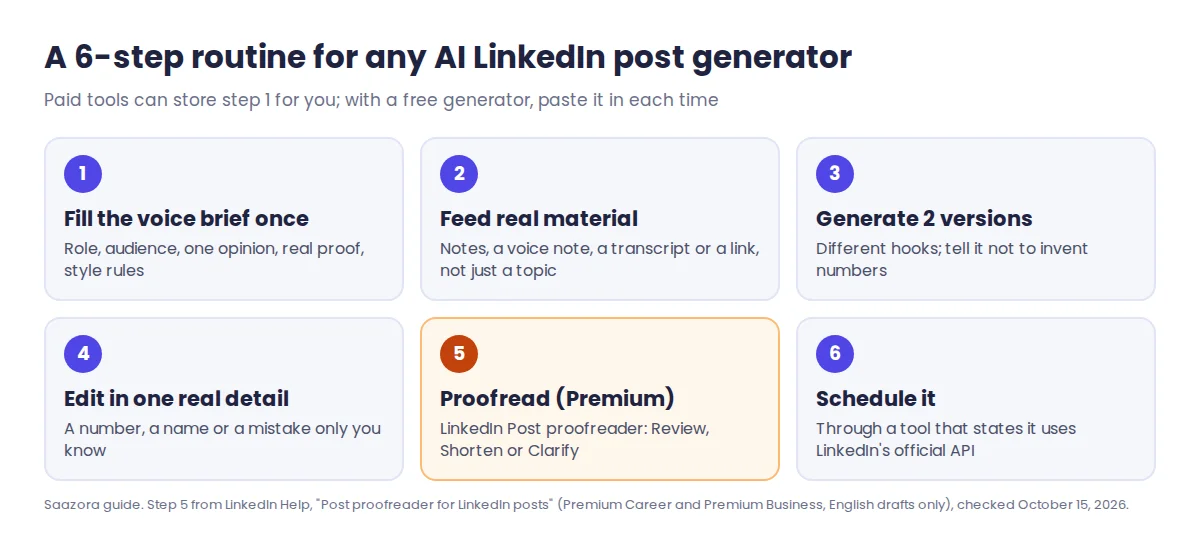
On paid tools, the "How I write" and "Shape" lines belong in MagicPost's saved instructions or ContentIn Pro's custom instructions; "Who I am" and "What I believe" belong in Supergrow's Content DNA or Kleo's knowledge base. If you write every word yourself and only want formatting and analytics, an AI generator is the wrong tool; our Taplio and AuthoredUp comparison covers that route.
Questions people ask about AI LinkedIn post generators
Can LinkedIn Premium write posts for me?
No, not anymore. LinkedIn's current Premium tool, Post proofreader, reviews, shortens or clarifies a draft you have written, and its Help page says it "doesn't write for you". You need a separate generator for the first draft.
Is there a completely free AI LinkedIn post generator?
Yes, for occasional use. ContentIn's free generator needs no login and can write three drafts from your own profile. MagicPost's allows 3 posts a day with no account. Neither learns from your edits or schedules posts; that is the paid part.
How many posts do Taplio's 250 AI credits cover?
Up to 250 single generations in Expert mode, since each AI action costs 1 credit. Rewrites, hooks and AI replies draw on the same pool, so a careful writer who also uses daily AI replies might get about 16 Expert-mode posts a month. After that, Taplio switches you to unlimited Faster mode rather than stopping.
How this comparison was put together
For this ranking of the best AI LinkedIn post generators, every price, limit, input type and trial term was read on October 15, 2026 from each vendor's own pricing page, product page, FAQ or help center, plus LinkedIn's Help Center. Where a page hides yearly prices behind a switch, we used the figures the switch displays. The credit table is our own arithmetic on Taplio's stated credit costs, with the usage pattern marked as an assumption. This is a research-based comparison of published information; we did not run the tools or rate their drafts. EasyGen was left out because its pricing page returned an error and its homepage lists no prices, and AuthoredUp because its AI writer, Coauthor, is still in closed beta. Read Saazora's research method.
Sources (checked October 15, 2026): Supergrow pricing, ContentIn pricing, ContentIn free generator, MagicPost pricing, MagicPost post generator, Kleo pricing, Buffer pricing, LinkedIn Help: Post proofreader. Taplio plan prices are from Taplio's pricing page, and credit costs from the "Credits explained" article in Taplio's help center.
Research-based comparison: no vendor paid for, supplied an account for, or reviewed this article.