Prices and help pages checked October 20, 2026 · Research-based comparison from each vendor's own pricing and help pages and LinkedIn Help, not hands-on testing
Saazora may earn a commission if you sign up for Taplio through a link on this page, at no extra cost to you. We have no affiliate deal with any other tool named here, so those links earn us nothing.
Most people shopping for LinkedIn analytics tools already own a decent one: LinkedIn itself. Every member gets post, content and audience analytics with a date range of up to 365 days and an Excel export, and every Page admin gets content, visitor, follower and competitor reports for free. What LinkedIn does not give you is a long memory, one view across several people, or a single report that puts a personal profile next to a company Page. That is the real job of a paid tool, and the tools differ most on exactly those three points: how far back they can see, whose accounts they roll up, and how they get the data in the first place.
This guide starts with what LinkedIn's own analytics show and where they stop, then compares seven tools by what they measure, how much history they can load, what a year costs and who each one suits. For prices of LinkedIn writing and scheduling tools in general, see the monthly LinkedIn tool pricing tracker; for every LinkedIn guide on the site, start at Saazora's LinkedIn tools hub.
Six situations, and the tool that fits each
| Your situation | Start with | Why (sources checked October 20, 2026) |
|---|---|---|
| One profile, you just want to know which posts worked | LinkedIn's free analytics | 365-day date range, top posts by impressions or engagements, XLSX export, follower demographics. Costs nothing. |
| One profile, you want years of post history and deeper per-post stats | AuthoredUp Individual | Its pricing page says the extension loads past posts "going back years" and adds saves, sends, reach and followers gained; $199.50 a year |
| You write, schedule and measure in one app and also want lead tools | Taplio Starter or Growth | Analytics on every plan plus a monthly stats email; note that tracking starts on the day you sign up |
| A company Page plus one or two profiles, on a small budget | Buffer or Metricool | Both import past Page data when you connect (Buffer six months, Metricool 12 months); Buffer's per-channel price starts at $60 a year |
| Five or more employees posting, and marketing needs one report | Supergrow Teams or AuthoredUp Business | Both roll every member into one dashboard; AuthoredUp is about a third of the price, Supergrow adds weekly coaching and program metrics |
| LinkedIn is one network among many in an agency or a large team | Sprout Social or DemandBird | Cross-network reporting; Sprout adds competitor and paid insights, DemandBird bundles accounts instead of charging per seat |
What LinkedIn's free analytics already show you
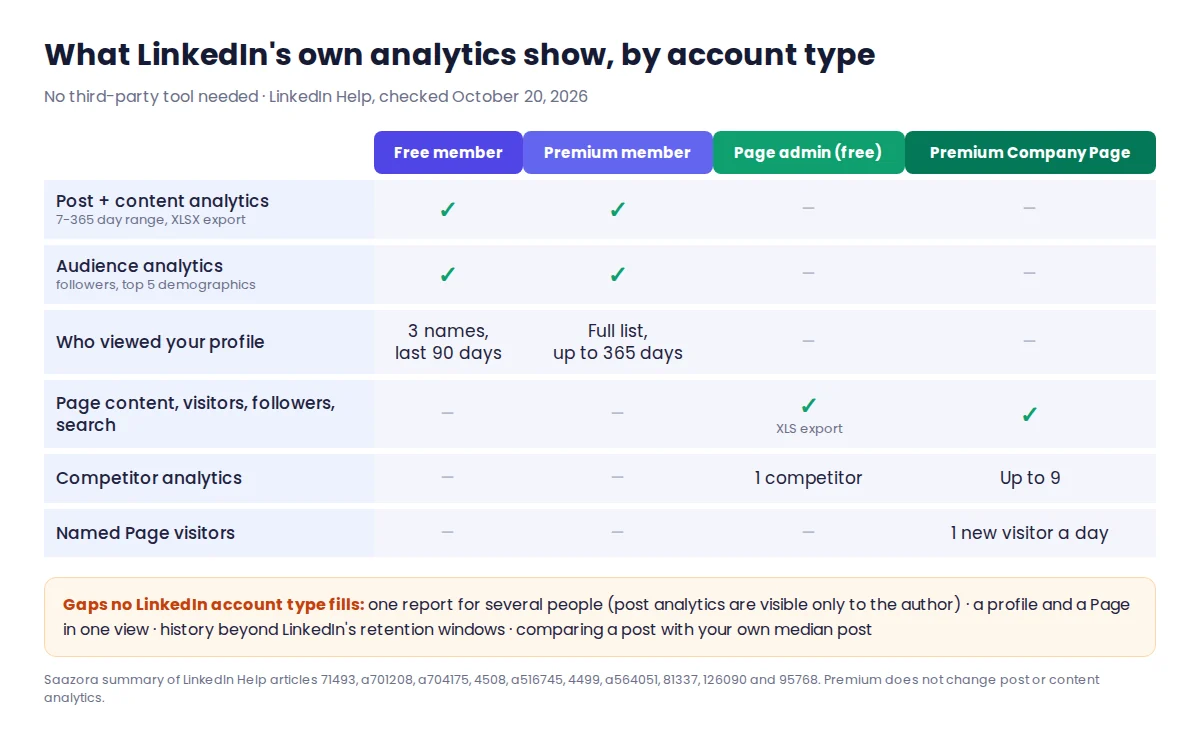
LinkedIn splits personal analytics into three places, all free for every member. Knowing what each one holds tells you whether a paid tool would add anything.
- Post analytics (one post at a time). Open any post and click its impressions count. You see discovery numbers (impressions, members reached), engagement (reactions, comments, reposts, saves, sends) and, for most post types, viewer demographics. LinkedIn notes two quirks: "Only you can view your post analytics", and your own views, saves and sends count toward your totals.
- Content analytics (all posts over time). Under Analytics & tools you can pick a range "from the past seven days up to the past 365 days", switch between impressions and engagements, see your top posts, and export the whole tab to an XLSX file. The trend graph only fills in "up to yesterday". A newer "Most recent posts performance" table with lifetime totals per post is still rolling out on desktop only.
- Audience analytics. Total followers, new followers over the selected range, and follower demographics by job title, location, industry, seniority, company size or company. Only the top five values in each breakdown are shown.
Profile views sit in a fourth place. On a free account, LinkedIn's help center says you see viewer data for the last 90 days but only "three most recent viewers" by name, with counts, where viewers work and how they found you.
Company Pages get more, and again at no charge: "Analytics are available for all Page admin roles." The admin view has tabs for Content, Visitors, Followers, Search Appearances, Leads, Newsletters, Competitors and Employer Brand. Content analytics add clicks, click-through rate and an engagement rate per post, and LinkedIn warns that most metrics can take 48 hours to settle. Any of the Content, Visitors, Followers and Competitors tabs can be exported as an XLS file for a time frame you pick.
What Premium and Premium Company Page add
Paying LinkedIn does not change post or content analytics. It changes two things: who looked at you, and how you compare.
Premium (Career and Business) turns profile views into a full list. LinkedIn's comparison page says Premium shows "up to 365 days of viewer data" with filters by date range, company and industry, a weekly viewer trend graph, and the sections of your profile that matched the viewer's search. If what you want to measure is who is checking you out before a sales call or an interview, this is the only place that data lives; no third-party tool on this page claims to show named profile viewers.
Premium Company Page adds a "Who's visited your Page" list, but narrowly: an admin "can see up to one new visitor's details each day". It also widens competitor analytics. A free Page can track one competitor's followers, organic posts and trending posts from the past 30 days; LinkedIn's comparison table gives a Premium Company Page "Data for upto 9 competitors" and trending posts for up to three. Premium Pages also see how many followers came from Premium features such as auto-invites.
LinkedIn's help pages do not list a price for either subscription, so we have not quoted one here.
Where native analytics run out: LinkedIn's retention clock
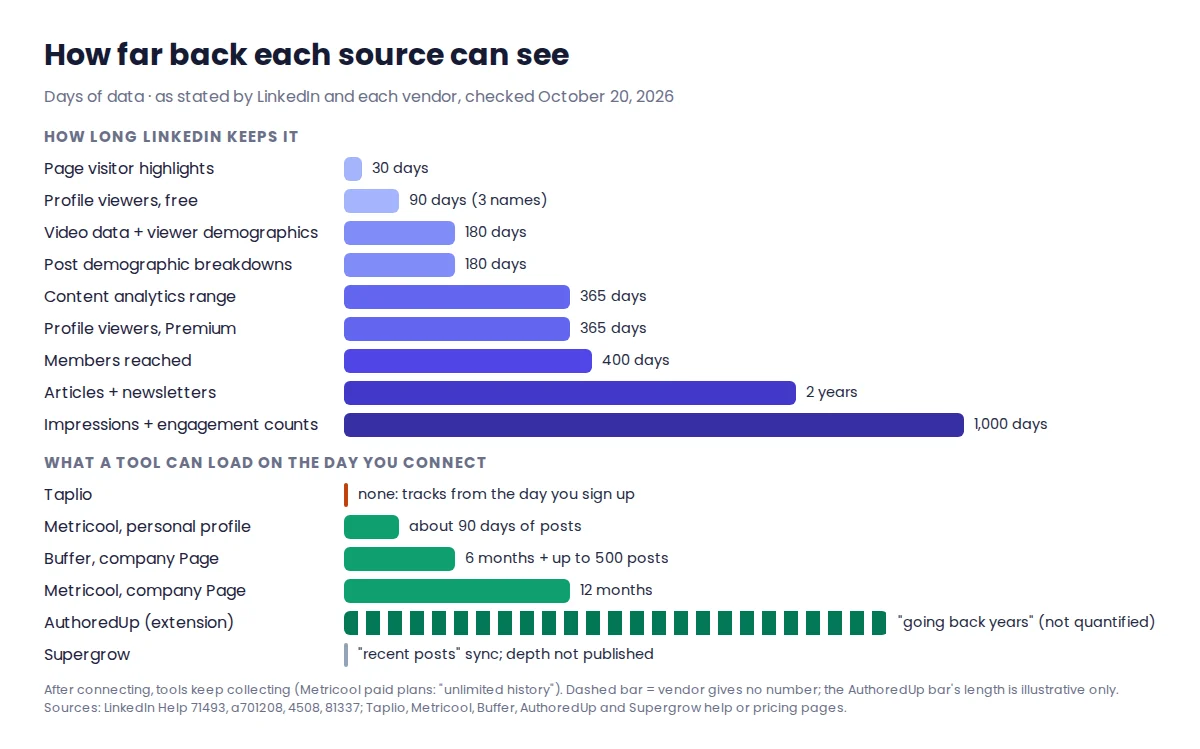
The biggest limit of LinkedIn's own analytics is not missing metrics. It is time. LinkedIn's help article on post analytics lists how long each kind of data is kept, and the windows are shorter than most people assume:
| Data | How long LinkedIn keeps it |
|---|---|
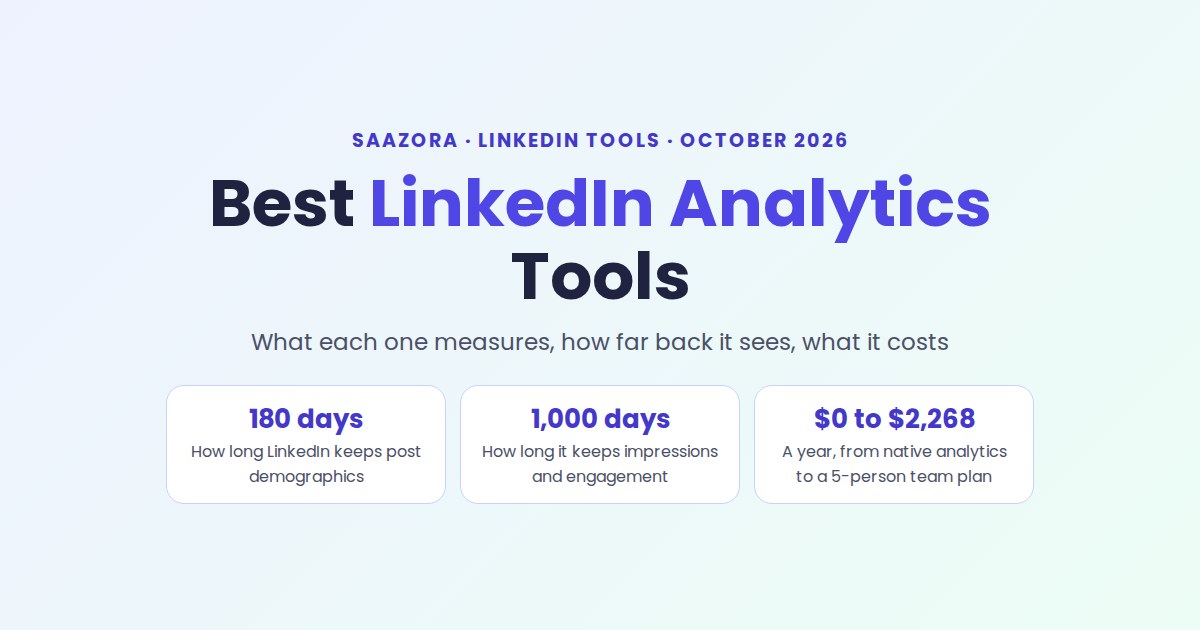
| Video performance and video viewer demographics | 180 days |
| Demographic breakdowns for other posts | 180 days |
| Members reached | 400 days |
| Impressions and engagement counts (discovery and social engagement) | 1,000 days |
| Articles, article viewers and newsletter analytics | Two years |
| Content analytics date range (all posts) | Up to 365 days |
| Profile viewers | 90 days free, up to 365 days on Premium |
| Page visitor highlights | Last 30 days (detailed metrics filterable by range) |
Source: LinkedIn Help articles 71493, a701208, 4508 and 81337, read October 20, 2026.
So a video posted in early April has lost its viewer data by October, and who saw a text post from last year is gone even though its like count survives. Beyond the clock, five gaps come up again and again:
- No team view. Personal analytics are visible only to the profile owner, so a marketing lead cannot see five employees' numbers in one place.
- No profile-plus-Page report. Personal and Page analytics live in separate screens with separate exports.
- Shallow demographics. Top five per category, and no demographic data at all for posts shared only with connections or in Groups.
- No benchmarks against your own past. You can compare date ranges, but not "this post versus my median post".
- Manual exports. Keeping history means downloading files on a schedule; nothing archives itself.
Every LinkedIn analytics tool below exists to fix some of those five. None of them can recover what LinkedIn itself no longer serves, which is why history depth matters so much when you compare them.
LinkedIn analytics tools compared: what each measures, how far back, what it costs
| Tool | Profiles or Pages | What it adds to native analytics | History it can load | Lowest price for 1 profile (as of Oct 20, 2026) |
|---|---|---|---|---|
| AuthoredUp | Profiles, plus every Page you admin at no extra charge | Saves, sends, reach, profile views and followers gained per post; best type, day, length and readability; post-vs-post comparison; CSV and API | "Going back years" through its extension; or a LinkedIn data export with reactions and comments only | $16.63/mo yearly ($199.50), $19.95 monthly |
| Taplio | Profiles; team plan shares analytics across accounts | Post stats, top posts by metric, monthly stats email, quick stats inside LinkedIn via extension | From the day you sign up; up to 9 days during the trial | $32/mo yearly ($384), $39 monthly |
| Supergrow | Profiles; Page analytics for posts published through Supergrow | Comparison with each person's own history, Sunday report with advice, team and program metrics incl. estimated earned media value | "Recent posts sync" via LinkedIn's API; depth not published | $31/mo yearly ($372), $39 monthly |
| Metricool | Profile or Page per brand (not both in one brand) | Cross-network dashboards, PDF and PPT reports, competitor tracking, CSV export | Personal: about 90 days before you connect. Pages: 12 months. Then "unlimited history" | $20/mo yearly ($240), $25 monthly, for up to 5 brands |
| Buffer | Pages fully; profiles get likes and comments only | Followers, impressions, clicks, shares, engagement rate and page views for Pages; reports on paid plans | Pages: last six months and up to 500 previous posts | $5 per channel/mo yearly ($60); free plan with 30-day history |
| DemandBird | Profiles on every plan; Company Pages from Business | Cross-platform analytics and "opportunity detection", content archive | Not published | $29.25/mo yearly ($351) for 5 accounts, $39 monthly |
| Sprout Social | Up to 5 social profiles on Essentials, across networks | Profile and post-level reporting; competitor, tag and paid insights from Professional; Premium Analytics add-on | Not stated on its pricing page | $79 per seat/mo yearly ($948), $99 monthly |
Sources: each vendor's pricing page and the help articles named in the tool notes below, read October 20, 2026 (Supergrow help articles October 19). Prices in US dollars before tax. "History it can load" means data available when you first connect, not data collected afterwards.
Tool by tool: who each analytics tool fits
AuthoredUp: the deepest per-post history for one writer
AuthoredUp is an editor and scheduler first, but its analytics list is the longest on this page for a single profile. Its pricing page describes a performance snapshot that shows "total, average and median" for any period against the previous one, a breakdown of your best post type, day, length and readability, and per-post saves, sends, reach, profile views and followers gained. History comes from its browser extension, which "pulls in all your past LinkedIn posts with their analytics, going back years", or, without the extension, from LinkedIn's own data export, which carries reaction and comment counts only. CSV export and a personal API key are on every plan, and company Pages you admin are included at no extra charge.
Price: Individual $19.95 a month or $199.50 a year; Business $14.95 per profile a month or $149.50 per profile a year, minimum three profiles. No card needed for the trial. Fits: a creator or consultant who wants to learn from years of their own posts. Watch: the history import depends on the extension (see the rules section below). Our AuthoredUp review covers the editor and plan limits.
Taplio: analytics inside an all-in-one growth app
Taplio lists "Track core metrics with analytics" on its cheapest plan, along with a monthly email that summarizes your stats and quick analytics in an extension tab inside LinkedIn. Its help center explains the catch plainly: "The platform begins tracking data from the date you sign up, so any data prior to your signup is unavailable", and a trial shows up to 9 days. The same article says the analytics section "is being entirely revamped", and a second article says the dashboard relies on the Taplio Connect Chrome extension, which works best if you open LinkedIn with it installed at least once a day.
Price: Starter $39 a month or $32 on yearly billing ($384 a year), Growth $69 or $49 ($588), Pro $199 or $149 ($1,788). Teams and agencies can get a multi-seat discount of "up to 30%" with shared analytics across accounts. 7-day trial and a 30-day money-back guarantee. Fits: someone who wants writing, scheduling, engagement and lead tools in one subscription and is happy to measure from today forward. If that is you, you can test Taplio's analytics on its 7-day trial (affiliate link). Our full Taplio review covers the rest of the app, and current Taplio deals on Saazora lists any active offer.
Supergrow: analytics for employee advocacy programs
Supergrow frames its analytics around teams. Each employee "connects their own profile through LinkedIn's official API", and posts are compared with that person's own history rather than with a generic benchmark. Every Sunday a report covers publishing, impressions, engagement and follower growth, names the strongest post and suggests what to repeat. On Teams, an organisation view adds program adoption, participation, member performance and an estimated earned media value. Company Page analytics need admin access, and the post-by-post table covers only posts published through Supergrow.
Price: Pro $39 a month or $31 yearly for one account; Teams $199 or $189 for five accounts; 7-day trial. Fits: marketing teams that run an executive or employee posting program and need to report on it. Our Supergrow review covers plans and fine print.
Metricool: cheap, long-running history for Pages
Metricool is a cross-network scheduler whose LinkedIn analytics come "directly from the official LinkedIn API". Its help center is unusually precise about limits: for a personal profile, "LinkedIn only lets us retrieve posts from approximately the last 3 months (around 90 days) before you connect", follower data starts on the day you connect, and "The 12-month history is only available for LinkedIn company pages." Once connected, paid plans keep "Analytics with unlimited history". It also warns that some API metrics may not match what LinkedIn's interface shows. One brand can hold either a personal profile or a Page, not both, and LinkedIn is not available on the free plan.
Price (USD): Starter from $20 a month on annual billing or $25 monthly for up to five brands; Advanced, which adds team and client management, from $53 or $67. Fits: a small business that mainly reports on its company Page and wants that history kept indefinitely for little money.
Buffer: the cheapest Page reporting, light on profiles
Buffer charges per connected channel. When you connect a LinkedIn Page, Buffer says "you will get the page data for the last six months and post data for up to 500 previous posts", with followers, impressions, clicks, shares, engagement rate and page views. Personal profiles get far less: likes and comments only. The free plan connects up to three channels with a 30-day analytics history; paid plans add unlimited history, reports and custom UTM parameters.
Price: Essentials $5 per channel a month billed yearly ($60 a year per channel); Team $10 ($120); 14-day trial. Fits: a Page you already schedule with Buffer. Not a good choice if your personal profile is the account you need to measure.
DemandBird: five accounts for one flat fee
The old inlytics.io address now redirects to DemandBird, which describes itself as a social media management platform with "cross-platform analytics" on every plan. Pricing is a flat plan fee with a block of accounts and, in its words, "no per-seat or per-workspace fees". Pro includes five connected accounts and up to 20 team members; LinkedIn Company Pages start on Business. Its pricing page does not say how much LinkedIn history it imports or how it connects to LinkedIn, so ask before you rely on it for past data.
Price: Pro $39 a month or $29.25 yearly ($351 a year), Business $69 or $51.75 ($621), Agency $189 or $141.75 ($1,701); 7-day trial with a card required. Fits: a small team covering a few profiles across several networks on one budget line.
Sprout Social: enterprise reporting where LinkedIn is one channel
Sprout sells per seat on annual billing, with a 30-day trial and no card. Essentials connects up to five social profiles with profile and post-level reporting; Professional adds "Extensive competitor, tag and paid insights"; Premium Analytics is an add-on from Standard up. Its pricing page does not say how much LinkedIn history it imports. Price: Essentials $79 per seat a month ($99 monthly billing), Standard $199, Professional $299, Advanced $399, Enterprise custom. Fits: a social team that has to report on LinkedIn alongside other networks and paid campaigns. Overkill for a single creator.
A note on Shield Analytics
Shield is one of the best-known LinkedIn-only analytics tools, so readers expect to see it here. When we checked on October 20, 2026, both shieldapp.ai and its pricing page returned a hosting error ("DEPLOYMENT_DISABLED") instead of a website, so we could not confirm a single current price or feature. We have left it out of the tables. If you are an existing Shield customer, export your data now, and confirm the service is running before you pay for a renewal.
What a year of analytics costs in three common setups
List prices on yearly billing, before tax, for the plan in each tool that covers the setup. Where a tool cannot cover it on its own pages, we say so instead of guessing.
| Tool and plan | 1 personal profile | 1 profile + 1 company Page | 5 people's profiles in one report |
|---|---|---|---|
| LinkedIn (free) | $0 | $0, in two separate screens | Not possible: each person sees only their own analytics |
| Buffer Essentials / Team | $60 (likes and comments only) | $120 (2 channels) | $600 on Team (5 channels × $120), profile metrics still limited |
| AuthoredUp Individual / Business | $199.50 | $199.50 (Pages free) | $747.50 (5 × $149.50) |
| Metricool Starter / Advanced | $240 | $240 (2 brands) | $636 on Advanced for team management (up to 15 brands) |
| DemandBird Pro / Business | $351 (5 accounts included) | $621 (Pages need Business) | $351 on Pro (5 accounts) |
| Supergrow Pro / Teams | $372 | $372 (Page post table covers posts published via Supergrow) | $2,268 on Teams |
| Taplio Starter | $384 | Page analytics not listed on its pricing page | $1,920 at list (5 × $384), before a team discount of up to 30% |
| Sprout Social Essentials / Standard | $948 (1 seat) | $948 (1 seat) | $948 for 1 seat managing 5 profiles; $2,388 per seat on Standard |
Saazora arithmetic from list prices on each vendor's pricing page, October 20, 2026. Annual totals = yearly-billing monthly price × 12. Team discounts, taxes and add-ons not included.
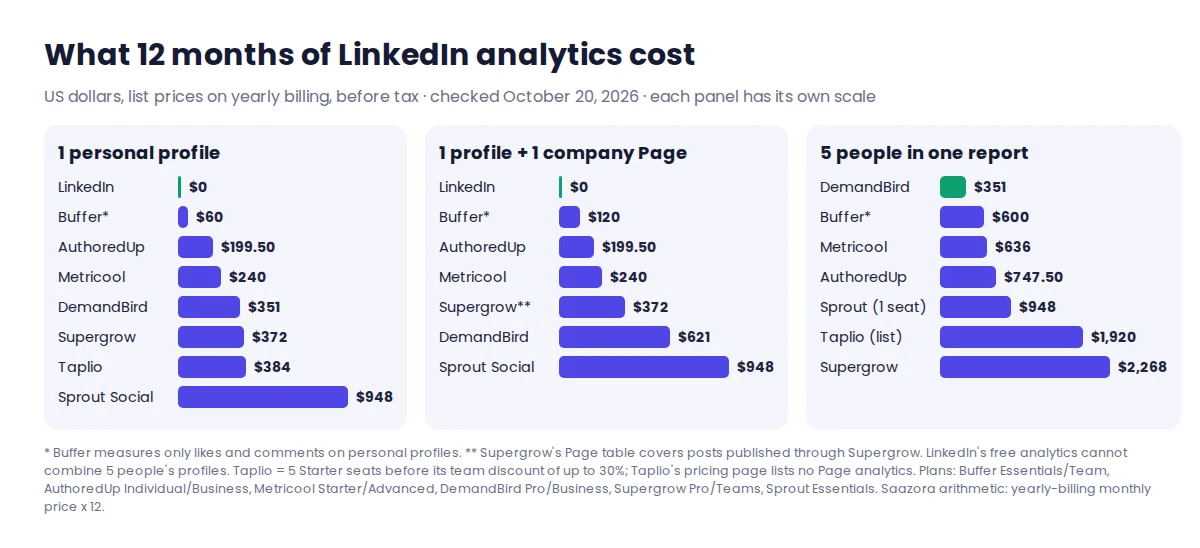
Two patterns stand out. For one person, the cheapest serious upgrade over native analytics costs about $200 a year, and the price gap between the writing-first tools (AuthoredUp, Supergrow, Taplio) is small; pick on history and workflow, not price. For five people, prices spread by more than six times, from $351 to $2,268, because some tools bundle accounts and others charge for the coaching and program layer on top.
How each tool gets your data, and what LinkedIn's rules say
There are three ways a tool can read your LinkedIn numbers, and they behave differently:
| Method | Tools on this page (as each vendor describes it) | What it means for you |
|---|---|---|
| LinkedIn's API | Supergrow ("LinkedIn's official API"), Metricool ("official LinkedIn API"), Buffer (its LinkedIn page refers to what "the LinkedIn API" allows) | Works without your browser open; history is limited to what the API returns (about 90 days of personal posts per Metricool, 12 months for Pages) |
| Browser extension | AuthoredUp (history import and fuller analytics), Taplio (Taplio Connect fetches analytics) | Can load more of your own past, but syncs when you open LinkedIn in that browser |
| Your own export file | LinkedIn's XLSX/XLS exports; AuthoredUp accepts LinkedIn's data export | No third party touches your account; you do the work on a schedule |
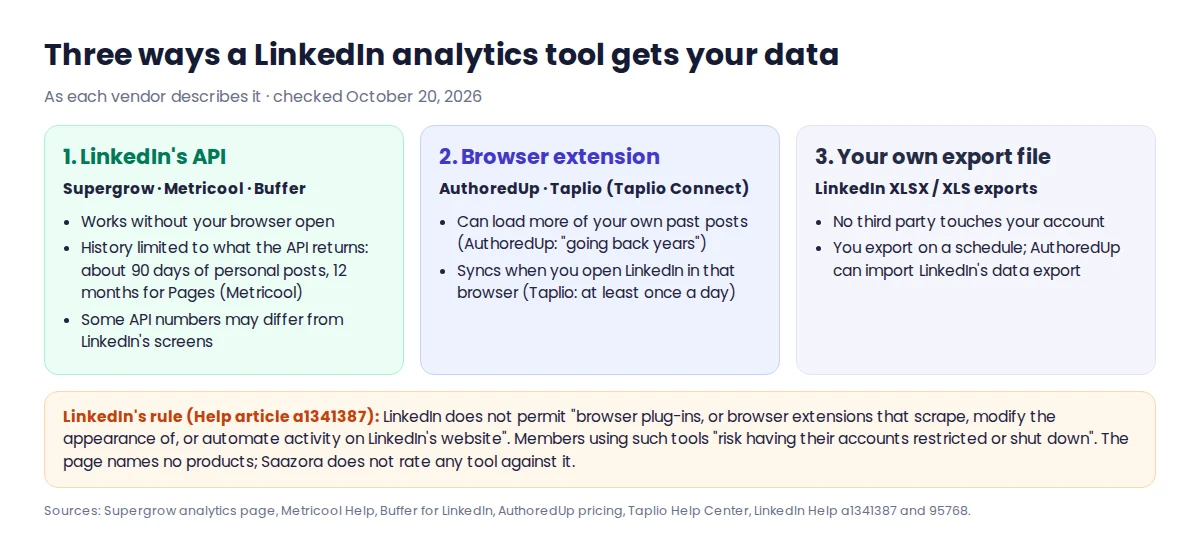
LinkedIn's Prohibited software and extensions page is the rule to read before you install anything. It says LinkedIn does not permit "browser plug-ins, or browser extensions that scrape, modify the appearance of, or automate activity on LinkedIn's website", and that members who use such tools "risk having their accounts restricted or shut down". It does not name approved or banned products, and we do not judge any tool here against it. Vendors describe their own behaviour: Taplio's pricing page, for example, lists auto-DMs and automatic connection requests on its Pro plan and says its new MCP comment drafts wait in a queue ("Nothing posts until you confirm"), while Supergrow and Metricool stress the official API. If account risk worries you, an API-based tool or LinkedIn's own exports are the conservative route. For the scheduling side of the same question, see how to schedule LinkedIn posts with the native scheduler or a tool.
A routine that keeps your LinkedIn history before it expires
Whatever you buy, a tool can only load what LinkedIn still holds on the day you connect. This routine, built on the retention windows above, keeps a full record for free:
- Every quarter, export content analytics for the past 365 days (Analytics & tools, Content analytics, Export). Post demographics and video viewer data expire after 180 days, so a quarterly habit gives you two chances to save each window. Open the first file to see which fields it holds: LinkedIn's help pages do not list the export columns.
- Export audience analytics on the same day, so follower growth and top demographics line up with the content file.
- If you admin a Page, export Content, Followers, Visitors and Competitors as XLS files for the same quarter.
- Before you connect a new tool, check its import limit. Connecting Metricool to a personal profile today brings in about three months of posts; connecting Taplio brings in none. If you plan to switch tools, connect the new one early so it starts collecting.
- Keep the files in one folder, named by date. When you later move to AuthoredUp or a similar tool, LinkedIn's data export can be imported, and your quarterly files fill the gaps it leaves.
Questions about LinkedIn analytics
Is LinkedIn analytics free?
Yes. Post, content and audience analytics are free for every member, and Page analytics are free for every Page admin. Premium adds a full 365-day list of profile viewers; Premium Company Page adds one named Page visitor a day and deeper competitor data.
Can I see LinkedIn analytics for more than 365 days?
Not in one view. Content analytics go back up to 365 days, while impressions and engagement counts on individual posts are kept for 1,000 days. To see longer trends, keep your own exports or use a tool that stores history after you connect it, such as Metricool's "unlimited history" on paid plans.
Why do a tool's numbers differ from LinkedIn's?
Partly timing (LinkedIn's graphs stop at yesterday and Page metrics can take 48 hours) and partly the API. Metricool's help center notes that LinkedIn's own documentation says impressions, members reached, reshares, reactions and comments from the API are not yet consistent with the interface.
Can my manager see my LinkedIn post analytics?
Not through LinkedIn: post analytics are visible only to the author. A manager sees them only if you connect your profile to a team tool such as Supergrow Teams or AuthoredUp Business.
How this comparison was researched
This comparison of LinkedIn analytics tools is based on published information. On October 20, 2026 we read 12 LinkedIn Help articles on member, Premium and Page analytics and LinkedIn's Prohibited software page, and the pricing pages of Taplio, AuthoredUp, Supergrow, Metricool, Buffer, DemandBird and Sprout Social, plus the analytics help or feature pages each vendor publishes. Supergrow's company-Page help article was read on October 19. Copies of every page are kept on file. Yearly totals are our arithmetic on list prices before tax. We did not run these tools for this article, had no vendor accounts, and no vendor reviewed it. Tools are ordered by fit for a situation, not by commission. Hootsuite was left out because its plan cards showed no prices in the copy we saved (only a price range in its FAQ), and Shield because its website was down. More on how Saazora researches software.
Sources (checked October 20, 2026): LinkedIn Help: Post analytics, LinkedIn Help: Combined post analytics, LinkedIn Help: Creator analytics, LinkedIn Help: Profile viewers, Basic vs Premium, LinkedIn Help: Page content analytics, LinkedIn Help: Page visitor analytics, LinkedIn Help: Competitor analytics, LinkedIn Help: Export Page analytics, AuthoredUp pricing, Taplio Help: Analytics, Supergrow analytics, Supergrow pricing, Metricool pricing, Metricool Help: LinkedIn profile metrics, Buffer pricing, Buffer for LinkedIn, DemandBird pricing, Sprout Social pricing. Taplio prices are from Taplio's pricing page.
Research-based comparison: no vendor paid for, supplied an account for, or reviewed this article.