Research-based review, not hands-on testing: we did not open a Checkr account or order checks · Prices and terms checked on Checkr's pages and Services Agreement, October 18, 2026 · Not legal advice
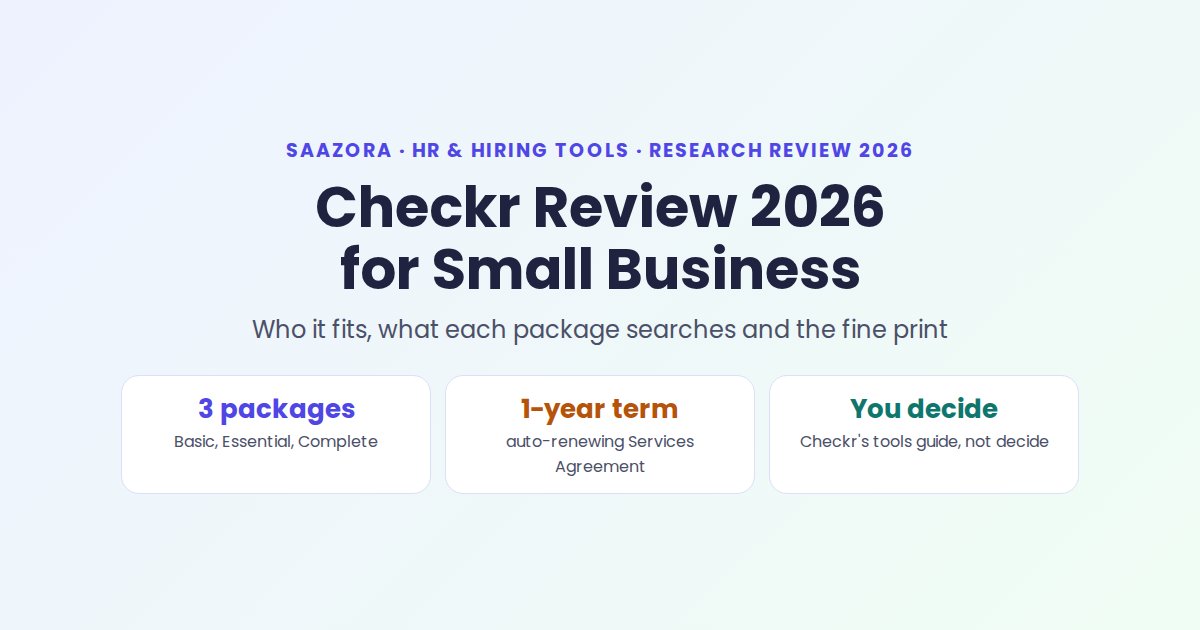
Our Checkr review in one line: for a US small business that hires a few people a month and wants to order checks online without a sales call, Checkr is one of the easiest providers to start with, as long as you read two things first. One is the fee structure: the $29.99 to $94.99 package price is a floor, not a final price. The other is the Services Agreement you accept when you create an account, which runs for a year and renews on its own, even though Checkr's marketing says "no contracts or minimums". Both are manageable once you know about them.
This page is the decision guide: who Checkr suits and who it does not, what each package actually searches, which compliance tools come built in, how Checkr describes setup and ordering, the account terms, honest drawbacks and the alternatives. For cost per hire with court and DMV fees, see our separate Checkr pricing breakdown with passthrough fees. Other screening and hiring guides are on the Saazora HR and hiring tools hub.
Checkr at a glance
| Question | Short answer (checked October 18, 2026) |
|---|---|
| What it is | An online background check company (a consumer reporting agency) for employers, founded in 2014 by Daniel Yanisse and Jonathan Perichon. Checkr says it has more than 140,000 customers. |
| Pricing model | Pay per report. Workforce packages from $29.99, $59.99 and $94.99, plus court, DMV and database fees passed through at cost. |
| Minimums | None for self-serve accounts, per Checkr's small business page. |
| Account terms | Credentialing approval before your first order; a card or ACH on file; a one-year Services Agreement that renews automatically. |
| Compliance tools | Disclosure and authorization forms sent to candidates, an adverse action workflow with an audit log, candidate stories, adjudication rules, optional continuous monitoring. |
| AI features | Charge classification, plain-language charge explanations, and Checkr Assistant for package recommendations. Checkr says the Assistant "guides. It doesn't decide." |
| Best for | US employers hiring regularly, especially hourly, driving or multi-state roles, and teams already on Gusto, Rippling, BambooHR, QuickBooks or Greenhouse. |
| Look elsewhere if | You need a fixed all-in price per check, mainly hire outside the US, or want a checker for people who have not consented. |
Who Checkr fits, and who should look elsewhere
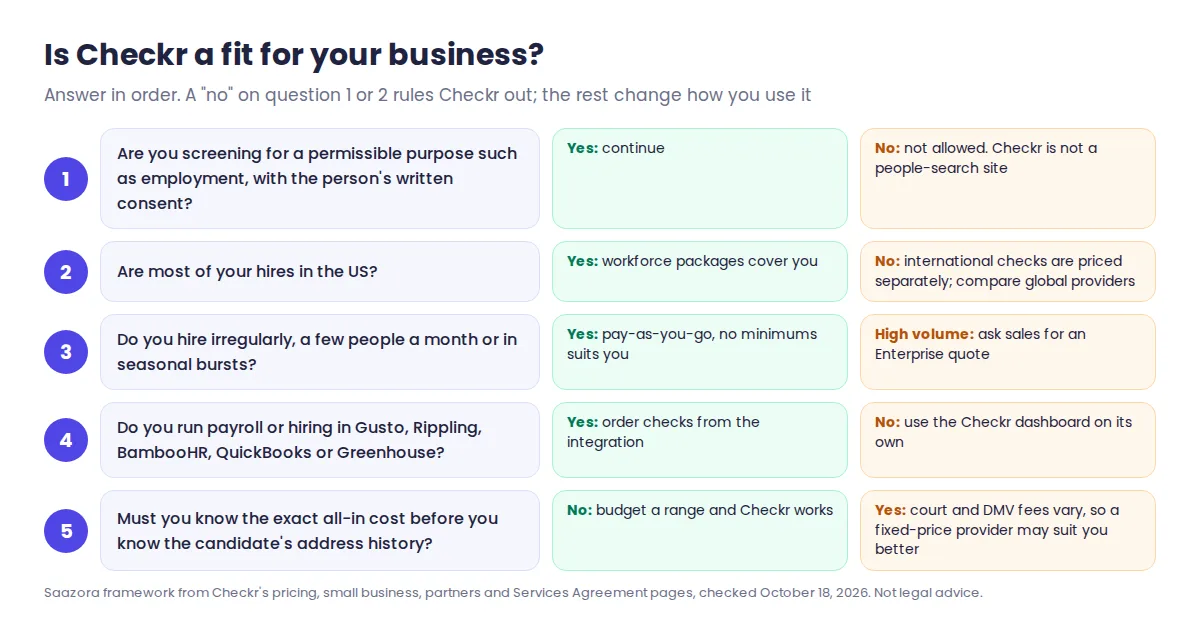
Checkr suits employers who want self-serve ordering, a mobile-friendly experience for candidates and room to grow. It is a weaker fit when budget certainty matters more than anything else, or when the use case is not covered by the FCRA's permissible purposes.
Good fits.
- Owners who hire in bursts. With pay-as-you-go pricing, a quiet quarter costs nothing. Checkr's small business page says costs "scale with your hiring needs—from a few checks a month to busy spikes."
- Teams that hire drivers or field staff. MVR checks, drug tests and continuous driving-record monitoring sit in the same account as criminal checks.
- Businesses already using a payroll or HR tool. Checkr lists ready-made integrations with Gusto, Rippling, BambooHR, Intuit QuickBooks and Greenhouse, so checks can start from the tool you already use.
- First-time employers. Checkr Assistant's "Help me choose" option recommends a package for your industry and role, and the platform sends the FCRA disclosure and consent forms for you.
Weaker fits.
- Anyone who needs a fixed price. County, state and DMV fees depend on where the candidate has lived. If you must quote a cost before you know the address history, budget a range.
- Mainly international hiring. Checkr does run international checks, but they are priced separately and are not part of the US packages this review covers.
- Curiosity checks. Checkr is not a people-search site. Its Services Agreement requires a permissible purpose and the person's written authorization before every report. If you only want to see your own record, Checkr Personal lets you check yourself.
What each Checkr package searches
The three self-serve packages build on each other. The table below shows what each one includes and, just as useful, what none of them include.
| Search | Basic (from $29.99) | Essential (from $59.99) | Complete (from $94.99) |
|---|---|---|---|
| SSN trace (finds past names and addresses) | Yes | Yes | Yes |
| Sex offender registry | Yes | Yes | Yes |
| Global watchlist | Yes | Yes | Yes |
| National criminal database | Yes | Yes | Yes |
| Identity verification | No | Yes | Yes |
| County criminal records | No | Unlimited counties | Unlimited counties |
| Statewide criminal records | No | No | Unlimited states |
| Federal criminal records | No | No | Yes |
| Driving record, drug test, employment or education verification | Not in any package: add-ons ordered per candidate | ||
One change worth knowing before you order: Checkr now runs identity verification before the rest of an Essential or Complete check. Candidates confirm a government ID with a live selfie on their phone, and per Checkr's identity verification page, "failed or incomplete verifications prevent a background check from starting" (candidates get up to three tries). Checked October 22, 2026.
Package contents and "starting from" prices from checkr.com/pricing, checked October 18, 2026; unchanged from our October 10 and 16 checks. Court, DMV and database fees are extra.
Three points the package names do not make obvious:
- Basic is a database search. National databases are a starting point. Checkr's own Services Agreement "recommends" screening at the county, federal and multi-state levels and says Checkr is not liable for records missed by searches you chose not to run.
- Essential is where county court records begin. Checkr labels it "most popular". "Unlimited" means every county found in the candidate's address history, and each county can add its own court fee.
- Complete adds state and federal searches. Choose it when your written policy or industry rules call for them. It is not automatically the safest choice for every role.
Checkr also has tenant screening packages for landlords and a personal check for individuals who want to see their own record. Neither is a substitute for workforce packages when you are hiring.
Compliance tools: what Checkr handles and what stays your job
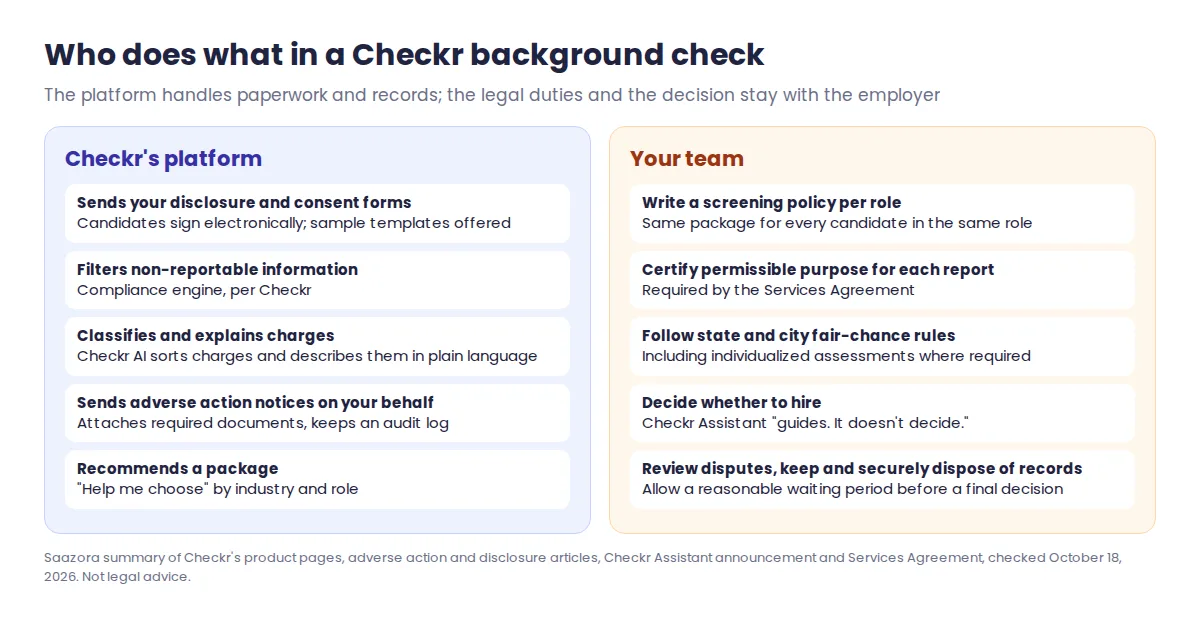
Checkr's tools take care of paperwork and record-keeping, but the legal duties under the Fair Credit Reporting Act stay with you as the employer, and so does every hiring decision.
| Tool | What Checkr says it does | What you still do |
|---|---|---|
| Disclosure and authorization | Sends your disclosure and authorization forms to candidates to sign electronically; offers sample templates | Approve the wording and add state-specific disclosures (Checkr names California as an example) |
| Compliance engine | Filters out information that is not legally reportable | Follow state and city fair-chance rules on when you may ask about records |
| Adverse action workflow | Sends pre-adverse and final notices on your behalf, attaches the required documents, lets you pick the record(s) involved and the timing, and keeps an audit log | Decide whether to take adverse action and allow a reasonable waiting period (Checkr's guide says 7 calendar days is "generally considered" adequate, and some places require longer) |
| Candidate stories | Lets you ask a candidate for context about a record | Carry out the individualized assessment, which Checkr notes is legally required in places such as Los Angeles and New York City |
| Charge classifier and explainer (Checkr AI) | Sorts charges into categories and explains unfamiliar charges in plain language | Review the record and apply your own policy |
| Adjudication rules (Checkr Assess) | Applies rules you set to sort reports for review | Write fair, job-related rules and apply them consistently |
| Continuous Checks | Optional subscription that alerts you to new criminal or driving-record changes for current workers | Get consent where required and decide what to do with each alert |
Checkr is clear about where its AI stops. Its Checkr Assistant announcement says: "Every hiring decision stays with you." The FTC's guidance says the same thing from the other side: an adverse action notice must state that the company that supplied the report "did not make the decision". Checkr's platform can prepare and send the paperwork, but a person on your team decides.
This is not legal advice. The FTC's guide "Using Consumer Reports: What Employers Need to Know" sets out the federal steps; ask an employment lawyer about state and city rules where you hire.
How setup and ordering work, as Checkr documents it
We did not open an account, so this flow comes from Checkr's own pages: its signup page, Services Agreement, Checkr Assistant announcement and candidate portal page.
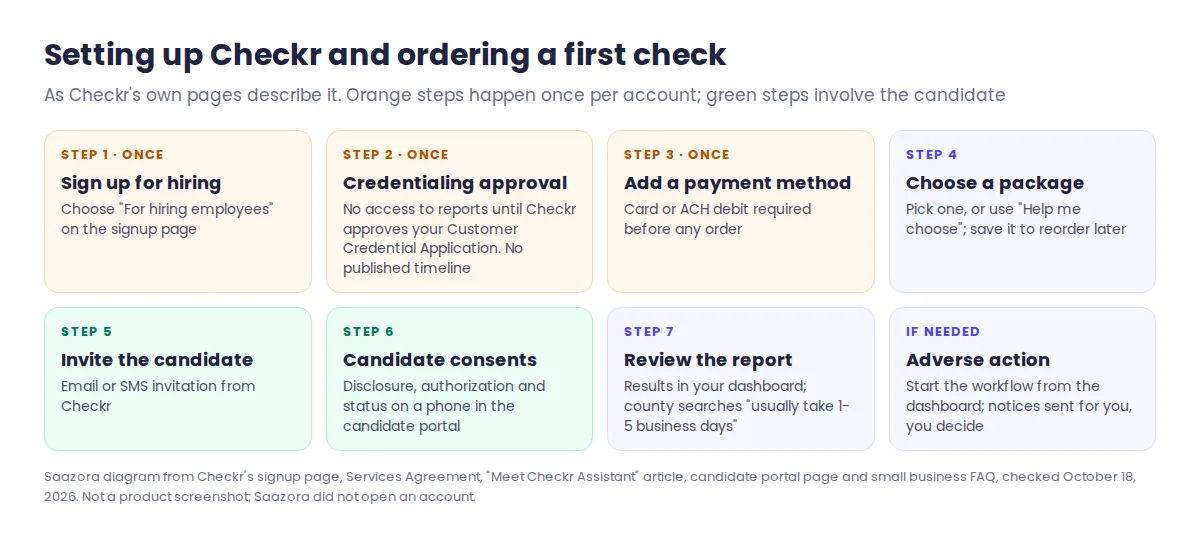
- Sign up for hiring. The signup page asks whether the account is for hiring employees, personal use or screening tenants. Pick hiring.
- Pass credentialing. The Services Agreement says you get no access to the platform or reports until Checkr approves your Customer Credential Application. Checkr does not publish how long this takes, so do it before you need your first check.
- Add a payment method. You must add a card or ACH debit before you can order any report.
- Choose a package. Pick one yourself, or select "Help me choose" on the Order Background Check page and answer questions about your industry and the role. You can save a package and reorder it later.
- Invite the candidate. Checkr sends the candidate an email or SMS invitation to start the check.
- The candidate consents. Forms, disclosures, authorizations and disputes all work on a phone in Checkr's candidate portal, and candidates can see the report's estimated completion date.
- Review the report. Results arrive in your dashboard. If something may lead you not to hire, start the adverse action workflow from there.
On timing, Checkr's small business FAQ says county criminal searches "usually take 1-5 business days but can take longer" where courts process records slowly or by hand. Plan start dates with that in mind.
Saazora may earn a commission if you sign up through the links below, at no extra cost to you.
If the flow suits you, you can start Checkr's free account setup (affiliate link) now so credentialing is done before your next hire.
Contract terms: pay as you go, but read the Services Agreement
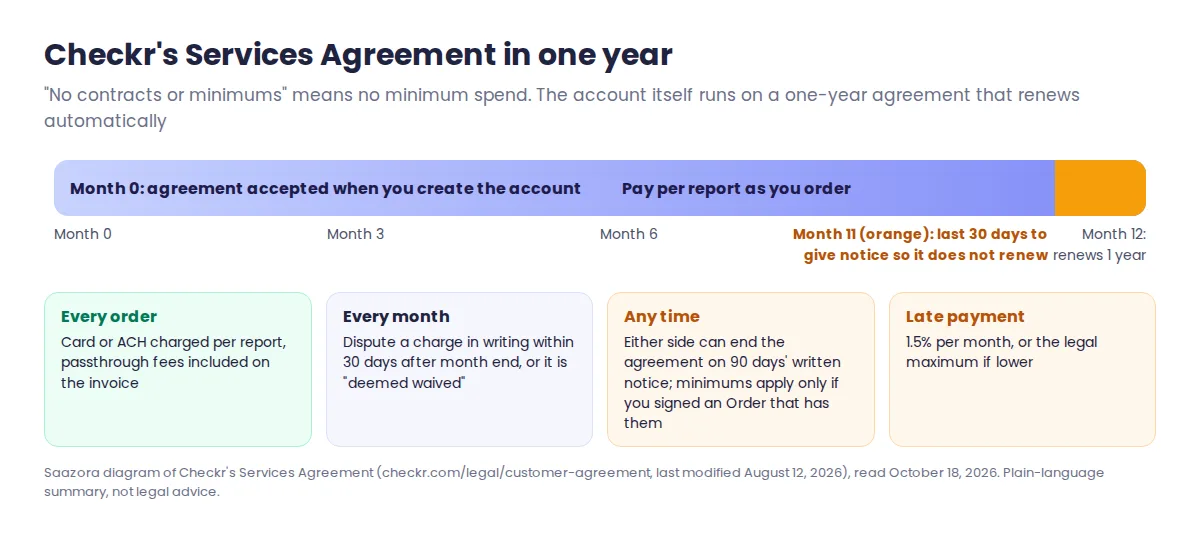
Checkr's small business page promises "pay-as-you-go screenings with no contracts or minimums". That is accurate for what you pay: self-serve accounts have no minimum spend, and Checkr's Square signup page says there are "no sign-up fees". But creating an account still means accepting Checkr's Services Agreement, and few reviews mention what it says.
| Term | What the Services Agreement says | What it means for a small business |
|---|---|---|
| Length | "Effective for one (1) year" and "automatically renews for additional one (1) year periods" unless either side gives 30 days' notice before the term ends | The account stays open year to year. With no minimums, an open account costs nothing until you order. |
| Leaving early | Either party may end it "on ninety (90) days' written notice … for any reason"; minimum commitments or platform fees in a signed Order become due | Self-serve accounts have no such commitments, but give notice in writing and keep a copy. |
| How you are charged | Customers without a signed Order are charged "on a per-Report basis"; signed-Order customers get a monthly invoice | Your card or bank account is charged as you order. |
| Passthrough fees | Included "in Your invoice"; taxes on fees are yours | Expect the total charged to be above the package price. |
| Fee disputes | Must be raised in writing within 30 days after the end of the month the fees were earned, or they are "deemed waived" | Check each month's charges promptly. |
| Late payment | 1.5% per month, or the legal maximum if lower | Keep the payment method current. |
| Your certifications | Permissible purpose and the consumer's written authorization before every report; one login per user, no credential sharing | Give each person who orders checks their own login. |
Quotes from Checkr's Services Agreement at checkr.com/legal/customer-agreement (page last modified August 12, 2026), read October 18, 2026. Plain-language readings are Saazora's, not legal advice.
None of this is unusual for a screening provider, and none of it costs a pay-as-you-go customer anything by itself. It just means "no contract" refers to spend, not to the absence of terms.
Checkr strengths and drawbacks
| Strengths | Drawbacks |
|---|---|
| Prices posted publicly, with no minimums for self-serve accounts | Package prices are floors; court, DMV and database fees vary by candidate |
| Packages are easy to compare, and county searches cover every county in the address history | Basic leaves out county court records, which Checkr's own criminal check page calls "often the most complete source of criminal histories" |
| Disclosure forms and adverse action notices are built into the workflow, with an audit log | The FCRA duties and every hiring decision stay with you; the tools do not replace a policy or a lawyer |
| Mobile candidate portal with status and estimated completion date | Credentialing must be approved before the first order, and Checkr publishes no timeline for it |
| Ready-made integrations with common small business payroll and HR tools | The one-year auto-renewing agreement is not mentioned on the marketing pages |
| Driving, drug, verification and monitoring checks in one account | Continuous monitoring is a separate subscription, and MVR monitoring is priced per driver per month |
One point we left out on purpose: the speed and satisfaction percentages on Checkr's own pages come from Checkr's surveys and marketing. We cannot verify them, so they are not in this review. Testimonials on Checkr's site are Checkr's sales material, not independent reviews.
Checkr alternatives, and why GoodHire is not really one
Before you compare, know that one of the best-known "Checkr alternatives" belongs to Checkr. GoodHire's company page says "Checkr Is Our Parent Company": Checkr acquired Inflection, GoodHire's parent, in April 2022. On October 18, 2026, GoodHire's pricing page listed the same three package names, the same contents and the same starting prices as Checkr. Comparing the two is closer to choosing between two storefronts than choosing between two providers.
| Provider | Relationship to Checkr | Pricing model (checked October 18, 2026) | Consider it if |
|---|---|---|---|
| GoodHire | Owned by Checkr since April 2022 | Same posted packages as Checkr for under 50 checks a year; custom quote above that | You prefer its interface or already have an account there |
| Certn | Independent | Self-serve US packages with posted prices; county searches added where applicable; Canadian checks too | You hire in both the US and Canada |
| BackgroundChecks.com | Independent | Posted self-serve pricing, advertised as "No contracts. No minimums." | You want a second self-serve quote to compare packages |
| HireRight | Independent | "Customized pricing quote"; no figures posted | You hire at high volume or in many countries |
Package contents differ between providers, so compare the searches included, not just the headline price. Our guide to background check costs for small businesses puts posted prices from several providers side by side.
Final verdict: should a small business use Checkr?
The bottom line of this Checkr review: yes, if you hire in the US, at least a few times a year, and want to order checks online with the compliance paperwork built in. Start with the smallest package your written policy needs, usually Essential when county records matter, and add MVR or drug tests only for roles that need them. Get credentialed before you have a candidate waiting.
Think twice if you need a guaranteed all-in price per check, hire mostly abroad, or are uneasy with an agreement that renews every year. If you only want to compare Checkr with GoodHire, remember they are the same company.
For a short list of current Checkr setup terms and package prices, see our Checkr store page. When you are ready, create a Checkr account for your business (affiliate link).
Checkr review questions
Is Checkr legitimate?
Yes. Checkr is a US consumer reporting agency founded in 2014, and its reports fall under the Fair Credit Reporting Act. That also means employers must follow the FCRA's disclosure, consent and adverse action steps when they use it.
Does Checkr's AI decide whether to hire someone?
No. Checkr's AI classifies charges, explains them and recommends packages, but Checkr says the Assistant "guides. It doesn't decide." The hiring decision is always made by a person at the employer.
Is there a Checkr coupon code?
No. We found no public coupon code on October 18, 2026. The savings are free account setup, pay-as-you-go ordering and choosing the smallest package that fits the role.
How we researched this review
This Checkr review is based on reading, not testing. On October 18, 2026, we read Checkr's pricing, small business, signup, technology, AI, candidate portal, continuous checks and partner pages, its passthrough fee page, its articles on Checkr Assistant, adverse action and disclosure forms, and its full Services Agreement. We also checked GoodHire's pricing and company pages, Certn's US pricing page, the BackgroundChecks.com homepage and HireRight's pricing page. We did not open a Checkr account, order a background check or use the product, so this is a research-based review, not a test, and we do not rate Checkr's speed or accuracy. Older reviews still list outdated package names and prices (TechRadar's December 2025 review lists a $54.99 Essential plan); every price here was checked on Checkr's site the same day. More on our process: how Saazora researches and reviews software.
Sources (checked October 18, 2026): Checkr pricing page, passthrough access fees page, small business and use-case pages, signup page, Our Technology and Checkr AI pages, Continuous Checks and candidate portal pages, partners page, "Meet Checkr Assistant" (September 10, 2026), "The Basics of Adverse Action", "Understanding Disclosure and Authorization Requirements", Checkr Services Agreement; GoodHire company and pricing pages; Certn US pricing page; BackgroundChecks.com homepage; HireRight pricing page; FTC, "Using Consumer Reports: What Employers Need to Know".
Research-based review, not hands-on testing and not legal advice. Checkr did not pay for or review this article.