
n8n Cloud prices read on n8n.io/pricing October 31, 2026 (both billing views and the Pro execution selector) · Hostinger n8n VPS prices read on hostinger.com/self-hosted-n8n October 31, 2026 · Research-based cost comparison from vendor pages and n8n's own documentation; Saazora did not run either setup · US list prices before tax
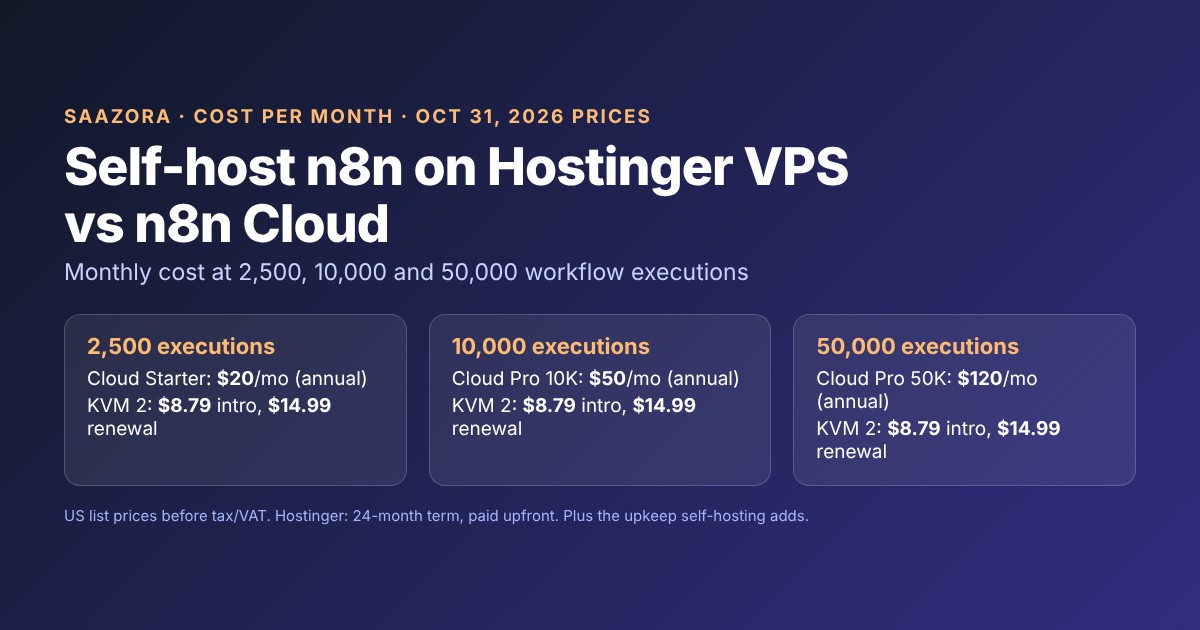
If you self-host n8n on Hostinger, the server bill stays flat while n8n Cloud's bill climbs with your workflow executions: at 2,500 executions a month n8n Cloud Starter is $20 a month billed annually against $8.79 for a Hostinger KVM 2 VPS on its 24-month intro price ($14.99 at renewal), and at 50,000 executions it is $120 for Cloud Pro against the same $8.79 or $14.99. What the VPS price leaves out is the work n8n Cloud does for you: n8n's documentation tells self-hosters to update "at least once a month", to keep their own backups including the credential encryption key, to set up SSL and other security controls, and to stay inside the Community edition's license, which does not let clients build workflows on your instance. Below are the costs at three usage levels, what each RAM tier is meant for according to Hostinger's own tutorials, and the point at which the saving stops being worth your time.
Disclosure: the Hostinger links on this page are affiliate links, and Saazora may be paid if you buy through them, at no extra cost to you. The n8n links are plain links; Saazora has no paid relationship with n8n.
Ready to compare plans on Hostinger's side? See Hostinger's VPS plans (referral link). Current Hostinger deals and the referral discount are collected on the Hostinger coupons and promo codes page. For what Hostinger's shared and cloud plans cost after the intro term, see our Hostinger pricing breakdown.
Self-host n8n on Hostinger or pay n8n Cloud: monthly cost at 2,500, 10,000 and 50,000 executions
n8n prices its Cloud plans by workflow executions. Its pricing page defines one as "a single run of your entire workflow" and adds: "It doesn't matter how many steps are in the workflow or how much data it processes." Hostinger's n8n VPS plans are priced by server size instead; its plan cards list "Unlimited workflows" and "Unlimited concurrent executions" on every tier, so the practical cap is the CPU and RAM you rent.
The three levels below line up with n8n's own plan steps: 2,500 executions is the Starter allowance, 10,000 is the smaller Pro option and 50,000 is the larger Pro option in the pricing page's execution selector.
| Executions per month | n8n Cloud plan | n8n Cloud, billed annually | n8n Cloud, billed monthly | Hostinger KVM 2, intro / renewal | Hostinger KVM 4, intro / renewal |
|---|---|---|---|---|---|
| 2,500 | Starter | $20/mo | $24/mo | $8.79 / $14.99 | $12.99 / $28.99 |
| 10,000 | Pro, 10K option | $50/mo | $60/mo | $8.79 / $14.99 | $12.99 / $28.99 |
| 50,000 | Pro, 50K option | $120/mo | $144/mo | $8.79 / $14.99 | $12.99 / $28.99 |
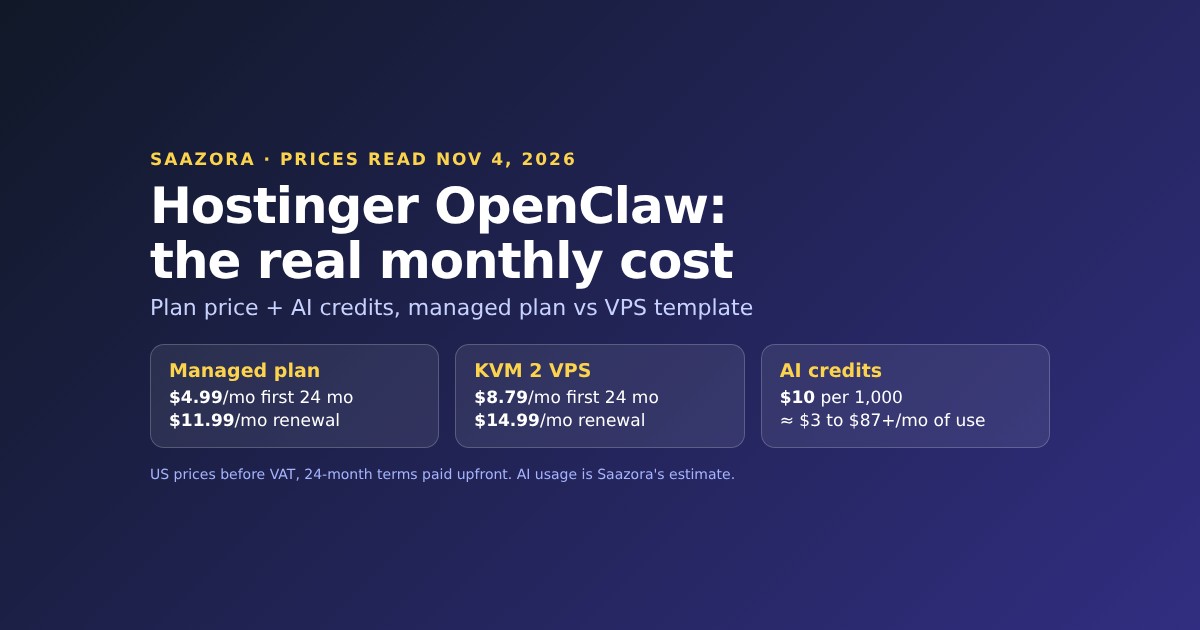
Two things in that table need the fine print. First, Hostinger's intro prices are averages of a payment made upfront: the KVM 2 card reads "Today you pay $210.96 for 24 months. Renews at $14.99/mo for the same term. Cancel anytime." and the page notes, "All plans are paid upfront. The monthly rate reflects the total plan price divided by the number of months in your plan." Second, the Hostinger page was running a Black Friday sale when Saazora read it, so the intro column may move before or after the sale ends. The renewal column is the one to budget on after month 24.
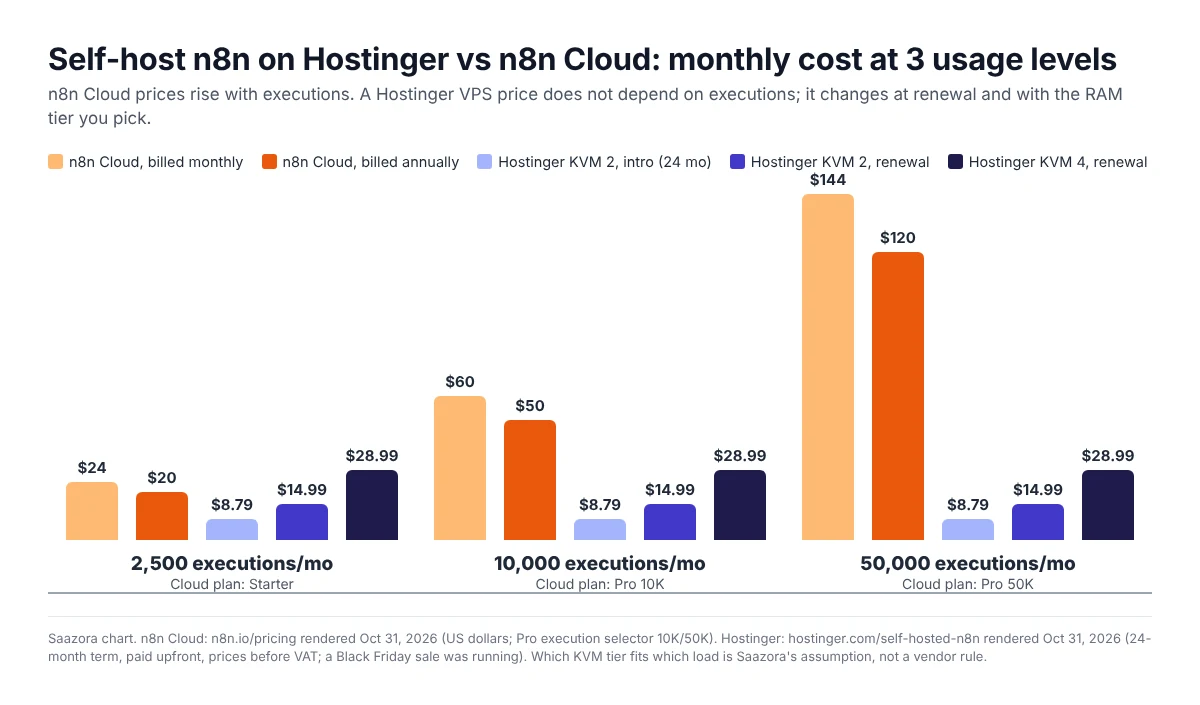
Seen per 1,000 executions, the gap widens as usage grows. Cloud Starter works out to $8.00 per 1,000 executions billed annually, Pro 10K to $5.00 and Pro 50K to $2.40. A KVM 2 at its $14.99 renewal price costs about $6.00 per 1,000 executions if you only run 2,500 a month, $1.50 at 10,000 and $0.30 at 50,000. At low volume the two are close; at high volume the VPS is a fraction of the Cloud bill, before you count your own time.
What one Hostinger VPS costs over four years
Hostinger's renewal line says the plan "Renews at $14.99/mo for the same term", so a KVM 2 bought today costs $210.96 for months 1 to 24 and, if renewed at that rate for another 24-month term, $359.76 for months 25 to 48: $570.72 in total, or $11.89 a month on average. The same 48 months on n8n Cloud billed annually add up to $960 on Starter, $2,400 on Pro 10K and $5,760 on Pro 50K.
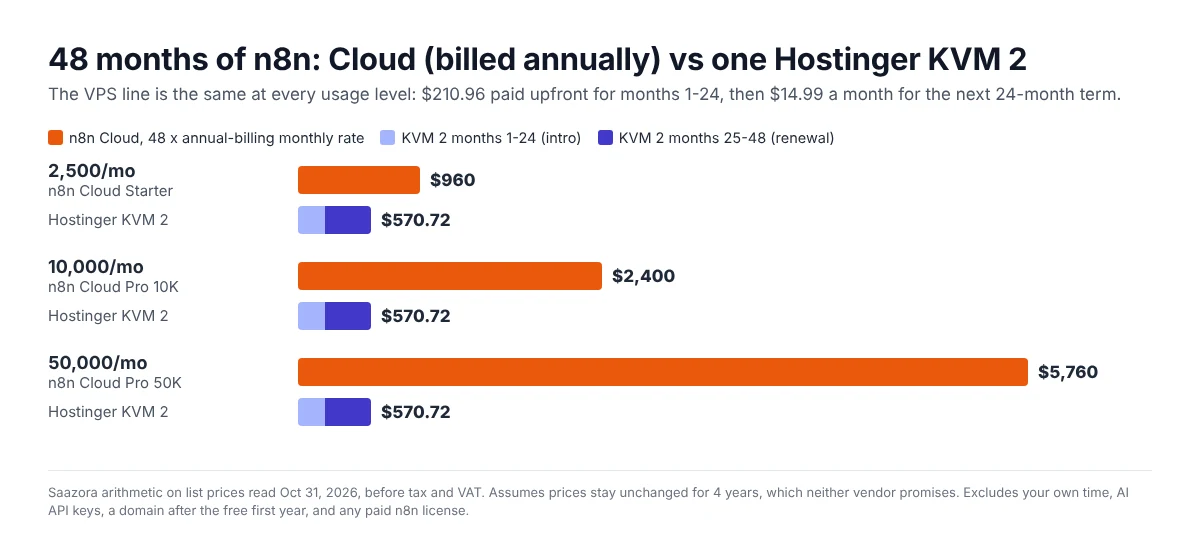
These totals assume one VPS does the job for four years, which is a big assumption at the top level. If 50,000 monthly executions include webhook bursts or heavy file processing and you move to KVM 4, the 48-month VPS total becomes $1,007.52 ($311.76 upfront, then $28.99 a month). That is still well under the Cloud Pro 50K total, but the gap at 2,500 executions narrows sharply: KVM 4 at renewal ($28.99) costs more per month than Cloud Starter billed monthly ($24).
Not in either total: tax and VAT (Hostinger says "Prices are listed without VAT"), a domain after the first year (Hostinger includes a free .cloud or .tech domain for the first year "with any 12-month or longer VPS plan"), and AI model costs. n8n's Cloud Starter card lists "AI models without API keys" and an Assistant credit allowance, while on self-hosted n8n the pricing FAQ says "You bring your own key (BYOK)", so any AI calls are billed by your model provider.
Which Hostinger RAM tier fits which load
Neither vendor publishes a table that maps execution counts to server sizes, so the tier choices above are Saazora's assumption. What the sources do say:
- Minimum and recommended specs. Hostinger's tutorial on n8n VPS requirements (August 7, 2026) says: "Your server requires at least 1 vCPU core, 2 GB of RAM, and 20 GB of SSD storage to run n8n", and "For production or business-related use, we recommend a VPS with 2-4 vCPU cores, 4-8 GB of RAM, and 40-80 GB of NVMe SSD storage."
- KVM 1 for personal or test setups. The same tutorial calls KVM 1 (1 vCPU, 4 GB RAM) "a solid foundation" for personal and testing use, which sits below its 2-vCPU production recommendation.
- KVM 2 as the default. Hostinger's n8n benchmark article says: "If you're unsure which Hostinger VPS plan best fits your requirements, start with KVM 2". In that test, an idle n8n used 860 MB of RAM and three simple executions at once peaked at 27% CPU and 912 MB. The author adds that the test data sample is small and may not hold at scale.
- More cores for traffic. The requirements tutorial says high-traffic webhook setups should "opt for a plan with at least 4 vCPU cores", and for agency or high-volume use suggests "8+ vCPU cores and 16+ GB of RAM – like Hostinger's KVM 8 plan".
- When to move up. Its rule of thumb: start at 4 GB, watch usage, and "If you notice memory usage consistently spiking above 75-80%, it's time to upgrade."
Both articles are Hostinger's own content about its own plans, so read them as the seller's guidance. Saazora's reading for the cost table: 50,000 executions a month averages about 69 an hour, which is light work if runs are spread out, so KVM 2 is the baseline at all three levels and KVM 4 is the headroom option for bursty webhooks, AI agents or large files. Execution count alone does not decide the tier. A short workflow that loops through thousands of records can, in Hostinger's words, "consume more resources than a long one that only processes a single item at a time."
The hidden work of self-hosting n8n
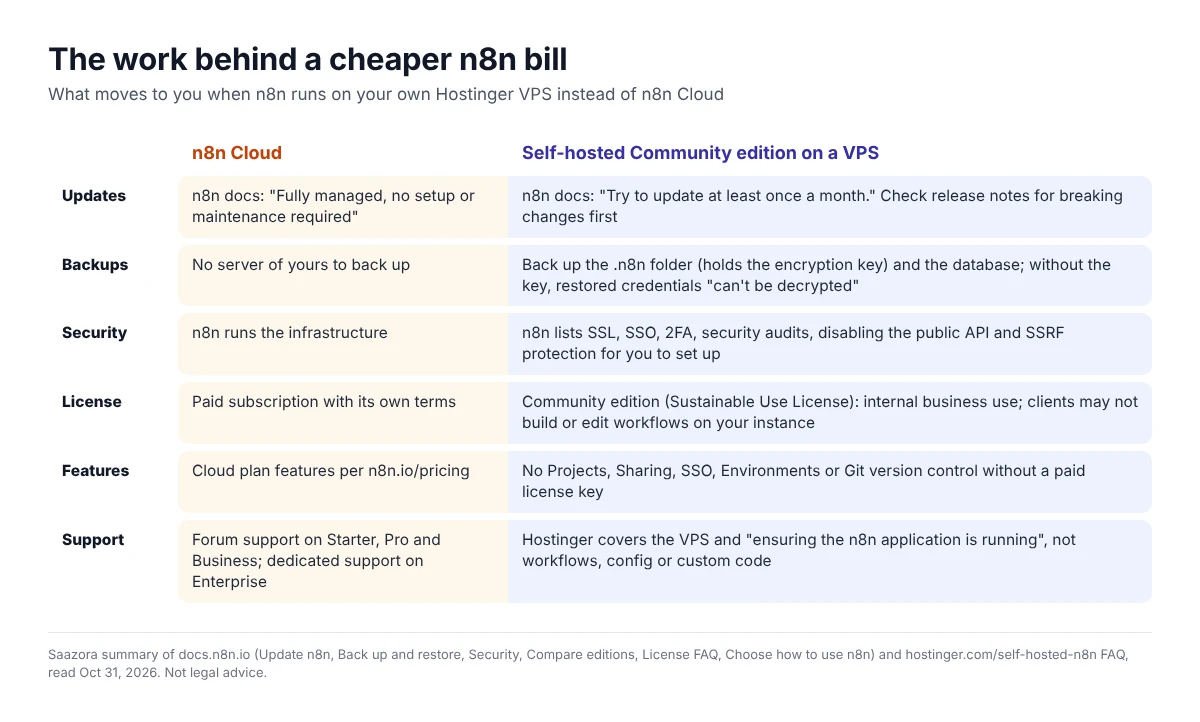
n8n's own "Choose how to use n8n" page puts it plainly: self-hosting means "You must provide and manage infrastructure", maintenance is "Your responsibility", and n8n Cloud is "Fully managed, no setup or maintenance required." Here is what that responsibility covers, in n8n's documentation.
Updates, about once a month
n8n's update page advises: "Update frequently: this avoids having to jump multiple versions at once, reducing the risk of a disruptive update. Try to update at least once a month." It also says to check the release notes for breaking changes and to test updates on a separate instance first, using Environments, which the Community edition does not include.
Backups that include the encryption key
n8n's backup and restore page lists what a full backup needs: the .n8n user folder, which "holds the config file, which stores the credential encryption key", plus the database (with the default SQLite setup, the database file sits in that folder). It warns that "Without the encryption key from the config file, or a custom N8N_ENCRYPTION_KEY, a restored database or encrypted credential export can't be decrypted." With SQLite, n8n says to stop n8n before copying the folder, because copying the file mid-write "can produce an inconsistent backup." Hostinger's n8n page mentions creating backups and snapshots through its AI agent, but a VPS snapshot is only useful if you have checked that it captures the volume where .n8n lives.
Security you configure yourself
n8n's security docs say you can protect a self-hosted instance if you "run a security audit, set up SSL and SSO, restrict nodes and the public API, and redact execution data", and list options such as two-factor authentication, SSRF protection and opting out of telemetry. Hostinger's FAQ calls its n8n VPS hosting "fully secure" in the sense that you keep "full control of your data"; the hardening steps are still yours.
Support stops at the server
Hostinger's n8n FAQ draws the line: "our support scope covers the VPS environment itself, including installation and ensuring the n8n application is running. As n8n is self-hosted, we do not provide technical support or troubleshooting for internal n8n workflows, configuration, or custom code." For workflow problems you are on the n8n community forum.
How much of your time the saving buys
A simple way to price the upkeep is to divide the monthly saving by your hourly rate. Against a KVM 2 at its $14.99 renewal price, Cloud billed annually costs $5.01 a month more at 2,500 executions, $35.01 more at 10,000 and $105.01 more at 50,000. At $50 an hour, that buys about 6 minutes, 42 minutes and 126 minutes of maintenance a month. If one monthly update, a backup check and the odd fix take you longer than that, Cloud is the cheaper option in practice; the hourly rate is your input, not a figure from either vendor.
If the numbers work for you, start with a Hostinger n8n VPS (referral link); Hostinger's page lists a 30-day money-back guarantee.
What the Community edition license allows
The n8n you install on a VPS runs as the Community edition unless you add a paid license key. It is free, under n8n's Sustainable Use License, which says: "You may use or modify the software only for your own internal business purposes or for non-commercial or personal use." and "You may distribute the software or provide it to others only if you do so free of charge for non-commercial purposes."
n8n's license FAQ turns that into examples. Allowed: "Build automations for your clients on your instance, as long as your clients do not have the possibility to create or edit them", "Charge your customers for workflow creation, setup, and maintenance services", and "Run several instances of n8n community version". Not allowed: "Host n8n as a service and allow your clients to build workflows", "White-label n8n by removing our branding and offering n8n as is", and "Use enterprise features that ask for a license key without an Enterprise license." For an agency, that means a Hostinger VPS can run client automations, but giving clients their own logins to build workflows needs a commercial agreement with n8n. This is a summary, not legal advice; n8n points unclear cases to license@n8n.io.
Features are the second limit. n8n's "Compare editions" page says the Community edition "includes almost the complete feature set of n8n" but does not include custom variables, Environments, external secrets, external storage for binary data, log streaming, multi-main mode, Projects, SSO, Sharing ("Only the instance owner and the user who creates them can access workflows and credentials") or version control using Git. Registering the instance with an email unlocks folders, debug in editor and custom execution data for free. Queue mode is included in the Community edition, and Hostinger offers an n8n template with it preinstalled.
Limits on n8n Cloud that the price hides
Cloud has its own constraints, listed in the comparison table on n8n.io/pricing as read on October 31, 2026:
- Concurrency. Starter runs 5 concurrent executions and Pro "Up to 50"; the comparison table shows "20 / 50" for Pro. A self-hosted instance has no plan cap, only hardware limits.
- Run time. The maximum execution duration is 5 minutes on Starter and 40 minutes on Pro. Long scraping or AI jobs can hit that on Starter.
- Saved history. Max saved executions are 2.5K on Starter and 25K on Pro, with log retention of 7 days and 30 days.
- Going over. n8n's help center says Starter users upgrade to Pro for more executions; on the monthly 50,000-execution Pro option you can add extra executions up to 500,000 in total, "paying an extra 2€/$/£ (or 12.5R$) plus sales tax per 1,000 extra monthly executions." On the annual 50K option, self-serve top-ups are not available.
- Resets. Executions reset "on the 1st day of each calendar month, regardless of your actual billing date."
In return, Cloud includes what a VPS does not: a managed instance that n8n describes as needing "no setup or maintenance", and AI model access without your own API keys on Starter. n8n's Business plan, which adds SSO, environments and Git, is $800 a month billed annually for 40,000 executions on the pricing page and is "Self-hosted only", so even that route needs a server like a Hostinger VPS.
Who should pick which
- Stay on n8n Cloud if you run a few thousand executions a month, have no one comfortable with Docker, SSH and backups, or need n8n to answer for uptime. At 2,500 executions the saving from a VPS is $5 to $11 a month, which rarely pays for the upkeep.
- Self-host on a Hostinger VPS if you run 10,000 or more executions a month, have long-running or highly parallel workflows that bump into Cloud's duration and concurrency limits, and someone on the team will update and back up the instance monthly. From 10,000 executions the list-price saving is $35 to $111 a month on KVM 2.
- Check the license first if you are an agency: client-facing workflow building is outside the Community edition license on any server.
For other no-code automation options, Saazora's MindStudio vs Gumloop comparison covers two hosted agent builders, and more AI agent guides are in the AI Agents and Claude Code section. Hosting guides sit in Saazora's web hosting posts.
FAQ
Is self-hosting n8n on Hostinger free?
The n8n Community edition is free under the Sustainable Use License, and Hostinger's FAQ says that with its n8n VPS hosting "you can self-host n8n and only pay for your VPS." You pay for the server: from $6.49 a month on KVM 1 for a 24-month term paid upfront ($155.76), renewing at $11.99 a month, as listed on October 31, 2026.
How many executions can a Hostinger n8n VPS run?
Hostinger does not set an execution limit; its plan cards list unlimited workflows and unlimited concurrent executions. The real limit is CPU and RAM. Hostinger's own tutorials suggest KVM 2 as the starting point and upgrading when memory use stays above 75 to 80%.
Is n8n Cloud cheaper than a VPS at low volume?
Not on list price: Cloud Starter is $20 a month billed annually against $8.79 (intro) or $14.99 (renewal) for a KVM 2. The gap is $5 to $11 a month, so for most small setups the deciding factor is whether you want to handle updates, backups and security yourself.
Can I move my workflows from n8n Cloud to a Hostinger VPS?
Hostinger's FAQ says you can export workflows from n8n Cloud and other hosts and migrate them to its VPS. Credentials are encrypted, so plan to re-enter them or follow n8n's backup and restore guidance on encryption keys.
Do I need a paid n8n license on my own server?
Not for internal business use or personal projects. You need one for paid features such as SSO, environments, projects and Git version control, or if your clients will build or edit workflows on your instance.
Hostinger lists KVM 1 to KVM 8 with n8n preinstalled; compare the n8n VPS tiers on Hostinger (referral link) and check the current term and renewal price on the plan card before you pay.
How we researched this
On October 31, 2026, Saazora rendered n8n.io/pricing in a browser in both "Monthly" and "Annually" views and read every option in the Pro and Business execution selectors, plus the plan comparison table and FAQ. Hostinger's n8n VPS page (hostinger.com/vps/n8n-hosting, which opened as hostinger.com/self-hosted-n8n) was read the same day, including its plan cards, renewal lines and expanded FAQ. n8n's documentation pages on updating, backup and restore, security, editions, choosing Cloud or self-hosting, the Community license and its FAQ, and n8n's help center article on adding executions were read on October 31, 2026, along with Hostinger's tutorials on n8n VPS requirements and its n8n benchmark. All costs, per-1,000 figures, four-year totals and time break-even figures are Saazora's arithmetic on list prices; the tier-to-load mapping is Saazora's assumption. Saazora did not install n8n or buy either service for this article. The Saazora research and review process explains how prices are checked.
Sources: n8n Plans and Pricing (n8n.io/pricing); n8n Help Center, "How can I add more workflow executions?" (support.n8n.io/article/can-i-add-more-executions); n8n Docs: Update n8n, Back up and restore, Security, Compare editions, Choose how to use n8n, Community license, License FAQ (docs.n8n.io); Hostinger self-hosted n8n VPS page and FAQ (hostinger.com/self-hosted-n8n); Hostinger Tutorials, "What are the VPS requirements for n8n?" (hostinger.com/tutorials/n8n-vps-requirements, August 7, 2026) and "n8n benchmark" (hostinger.com/tutorials/n8n-benchmark).