Saazora may earn a commission if you sign up through some links on this page, at no extra cost to you. · Tools and prices checked October 2, 2026
Quick answer: you can see which companies visit your website for free with Leadfeeder's free Lite plan, which shows up to 100 companies a month from the last 7 days. Install its tracking script, wait a day for data, and check the list weekly. Google Analytics 4 cannot do this, and Clearbit's free visitor tools shut down in 2025, so most older guides on this topic no longer work.
This guide covers how visitor identification works, the free options that still exist in 2026, and a setup you can finish in about 15 minutes.
How website visitor identification works
When someone visits your site from an office network, their connection comes from an IP address registered to their employer. Visitor identification tools look that address up in a database of company networks and show you the company name, industry, size and the pages its employees viewed. This is called reverse IP lookup, and it identifies companies, not people.
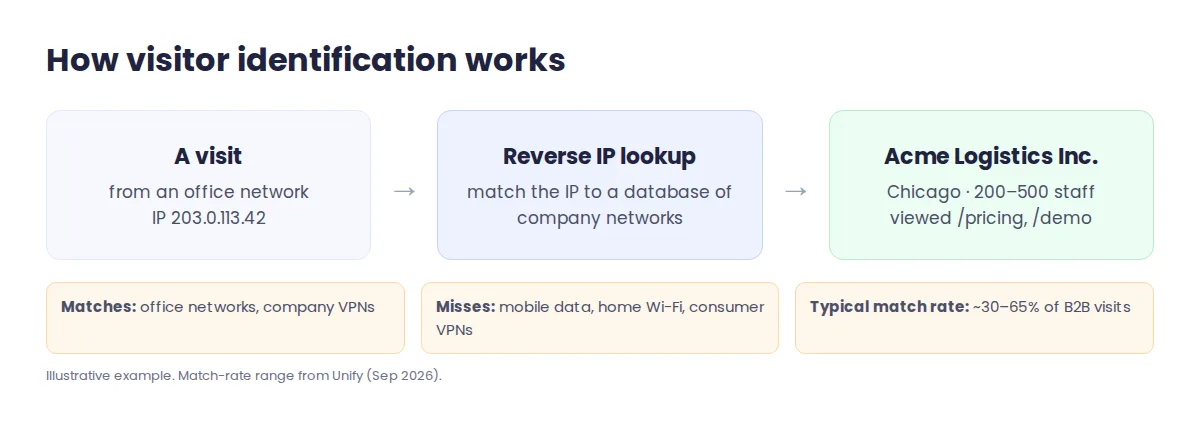
It does not catch everyone. Visitors on mobile data, home internet, VPNs or public Wi-Fi cannot be matched to a company. One 2026 industry analysis puts typical company-level match rates at roughly 30% to 65% of B2B traffic, and person-level matches at 5% to 20%. With more people working from home, expect the lower end on a small site.
Free ways to see visiting companies in 2026
| Option | Cost | What you get | Limits |
|---|---|---|---|
| Leadfeeder Lite | Free forever | Company names, pages viewed, visit timeline | Last 7 days, up to 100 companies a month |
| RB2B Free | Free | Company-level matches, 150 credits a month | No names, emails or LinkedIn profiles since January 2026 |
| Paid tools with trials | Trial, then roughly $60 to $100 a month | Snitcher, Albacross, Happierleads | 14-day trials; no permanent free plan |
| Google Analytics 4 | Free | Traffic, sources, locations, conversions | Cannot show company names at all |
For a small business, Leadfeeder Lite is the most useful free option because it shows real company names and which pages they read. Leadfeeder briefly operated under the Dealfront name and switched back to Leadfeeder in March 2026; prices and the free plan did not change.
Set it up in 15 minutes
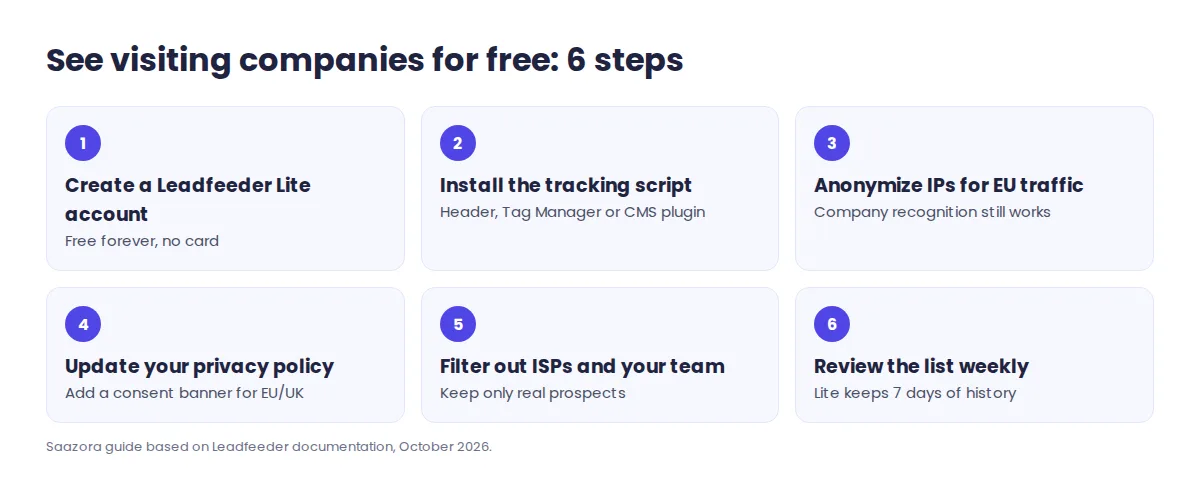
- Create a free Leadfeeder account. Sign up for Leadfeeder Lite; no credit card is needed and you can add unlimited users.
- Install the tracking script. Paste it into your site's header, add it through Google Tag Manager, or use a CMS plugin. Connecting Google Analytics is optional and no longer required.
- Turn on IP anonymization if you have EU visitors. Leadfeeder can drop the last part of each IP address, and it says this does not reduce company recognition.
- Update your privacy policy. Mention that you use a visitor identification tool. Add a consent banner if you receive traffic from the EU or UK.
- Filter out noise. Exclude internet providers and your own company so the list shows real prospects.
- Review the list every week. Lite keeps only 7 days of history, so a weekly check catches every company before it drops off.
What no longer works
- Google Analytics "network domain" reports. Google removed the Service Provider and Network Domain data in February 2020, and GA4 never had them. Any guide that tells you to find company names in Analytics is out of date.
- Clearbit's free tools. HubSpot ended Clearbit's free platform, Weekly Visitor Report and free Slack integration on April 30, 2025. Its replacement, Breeze Intelligence, needs a paid HubSpot plan.
- Free person-level data from RB2B. RB2B's free plan has shown company-level results only since January 22, 2026. Names and LinkedIn profiles now need its Pro plan, from $149 a month.
When to upgrade, and to what
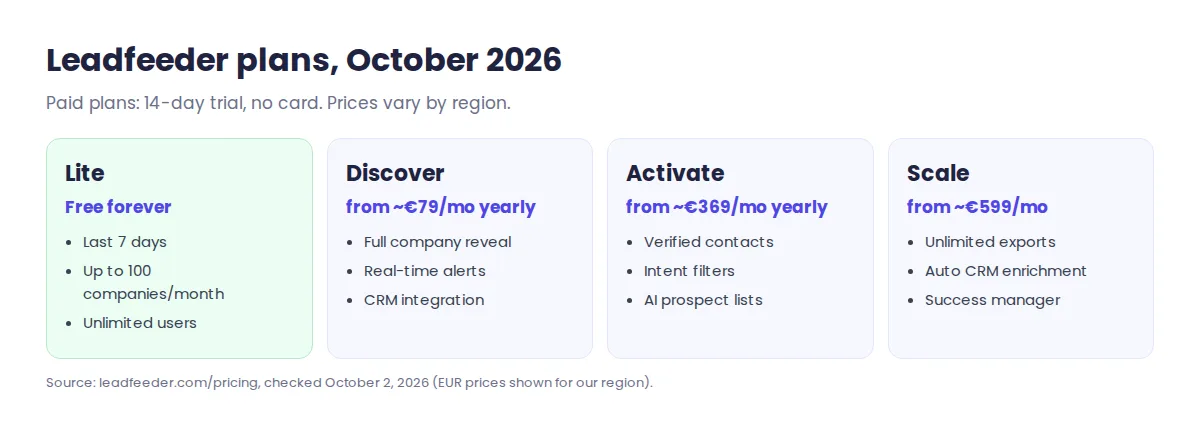
Lite is enough to answer one question: does your traffic include companies worth selling to? If the answer is yes and you want more than 100 companies a month, longer history, CRM sync or alerts, Leadfeeder's paid plans start with Discover, followed by Activate, which adds verified contacts at those companies. Every paid plan has a 14-day trial with no card. Leadfeeder lists prices in euros for some regions, from about €79 a month billed yearly for Discover, so check the price shown for your location.
If you are deciding whether to pay, our Leadfeeder deals page shows the current annual discount. Once you know which companies visit, a contact finder such as RocketReach or FullEnrich can find the right person to email.
FAQ
Can I see exactly who visited my website?
Usually not. Visitor identification shows the company behind a visit, not the person. Person-level tools exist, mainly for US traffic, but they are paid and raise more privacy questions.
Is website visitor identification legal?
Company-level identification is widely used in the US. IP addresses can count as personal information under laws such as the GDPR and California's privacy law, so disclose the tool in your privacy policy and use consent banners where required.
Does Google Analytics show company names?
No. GA4 shows where traffic comes from, which pages people view and what they convert on, but not which companies visit.
How long until I see data in Leadfeeder?
Usually within a day of installing the tracking script, depending on how much business traffic your site gets.
How we checked this
We reviewed Leadfeeder's pricing page, its rebrand announcement and tracker documentation, RB2B's plan documentation, Clearbit's shutdown notice and Google's analytics documentation on October 2, 2026. Prices for Snitcher, Albacross and Happierleads come from third-party pricing pages and may differ by region. More tools are in Sales & CRM; see how we review software.
Research-based guide: no vendor paid for or reviewed this article.