Last checked October 10, 2026 · Research-based guide
Saazora may earn a commission if you sign up through some links on this page, at no extra cost to you.
Google Ads call tracking is free and built in, but it only sees calls that pass through a Google forwarding number. Turn on call reporting, add a call asset, and Google can count calls from your ads as conversions. Add a Google tag and a phone snippet to your site, and it can also count people who clicked an ad, landed on your page and then dialed. What Google cannot do on its own is tell you which of those calls turned into paying customers, or track calls from anything other than its own ads. For that you either import results from your CRM or connect a call tracking tool such as CallRail.
This guide walks through each setup in the order most advertisers need them, using Google's own help pages and CallRail's documentation as of October 10, 2026.
Google Ads call tracking: the five conversion types
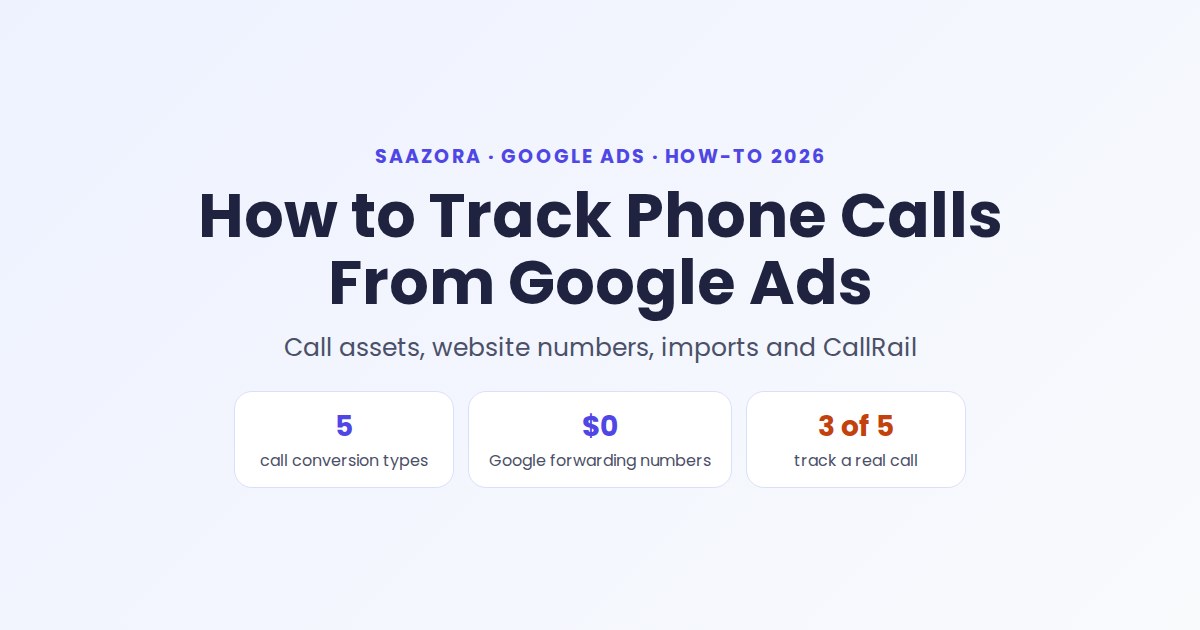
Google lists five ways to turn a phone call into a conversion. They measure different moments, and only three of them track an actual call:
| Conversion type | What it counts | Real call tracked? | Needs a Google forwarding number? |
|---|---|---|---|
| Calls from ads | Calls from call assets, location assets and call-only ads | Yes | Yes |
| Calls to a number on your website | Visitors who clicked an ad, then dialed the number on your site | Yes | Yes (swapped in by a snippet) |
| Clicks on a number on your mobile site | Taps on a phone link or button | No, only the tap | No |
| Clicks on call ads and assets | Taps on the call button, scored by Google's estimate | No, an estimate | No |
| Imported call conversions | Calls your CRM or call tool marked as sales or leads | Yes | Yes |
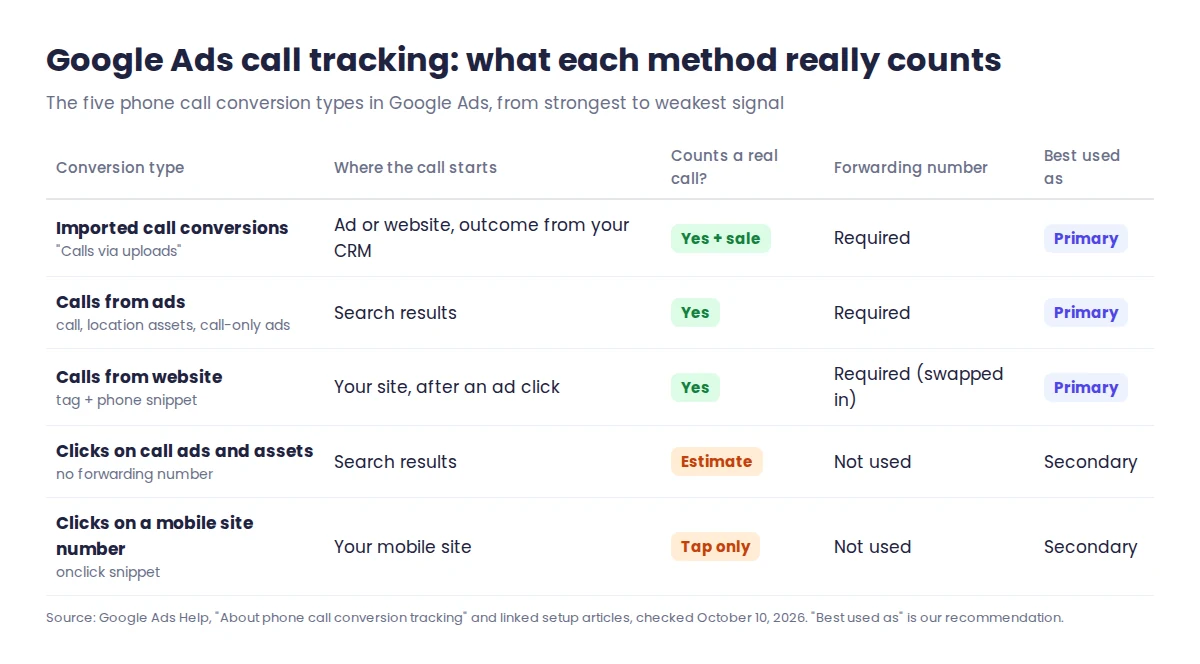
If you only take one thing from the table: a tap on a phone link is not a phone call. Someone can tap and hang up before it rings. Use tap tracking as a backup signal, not as the conversion your bids chase.
Three settings to check before you build anything
- Call reporting is on. It lives in Admin, then Account settings, under Call reporting. When it is on, Google shows a forwarding number in your ads and logs each call's start time, duration and, for calls over 15 seconds, the caller's phone number. When it is off, your own number shows and Google cannot count calls at all.
- Your number qualifies. Forwarding numbers work in the United States and 29 other countries, including Canada and the UK. Vanity, premium and fax numbers are not accepted in call assets, and Google wants the number in strict E.164 format, such as +12345678900, visible in your site's source code, unless you verify your domain through Search Console.
- You know where calls really start. If most people call after reading your landing page, website call tracking matters more than call assets. If they call straight from the search results, start with call assets.
One more thing changed this year. Google now turns call recording on by default so its AI can judge whether a call was a real lead, filtering out robocalls, spam and misdials. Recording works only when both phones are in the US or Canada, and it stays off for accounts Google classifies as healthcare or financial services. You can switch it off in Account settings under Call ads.
Step-by-step: count calls straight from your ads
This is the quickest win, because it needs no website changes.
- In Google Ads, open Campaigns, then Assets, select the plus icon and choose Call.
- Pick the level. Call assets can sit on the account, a campaign or an ad group, and the most specific one wins.
- Enter your business number. If call reporting is not on yet, the form offers to turn it on.
- Optional but useful: schedule the asset to show only during the hours someone answers the phone.
- Go to Goals, then Summary, choose Create conversion action, then Conversions from phone calls, and select Calls from ads.
- Choose how a call qualifies: Google's AI review of the recording, or a minimum call length in seconds. Calls that cannot be recorded fall back to the length rule.
- Mark the action as Primary if you want Smart Bidding to optimize for it.
As soon as call reporting is on, Google also creates a default action called "Calls from ads" and adds it to your Conversions column. If you build your own action, check that you are not counting the same call twice.
Cost note: a tap on the call button costs the same as a headline click, a standard CPC. Google does not charge when someone reads the forwarding number and dials it by hand.
Step-by-step: track calls from your website
Most callers visit your site first. To credit those calls to the ad that brought them, Google swaps your number for a forwarding number, only for visitors who came from an ad. Google provides those numbers at no cost.
- Create a conversion action as above, but select Calls from website and then Someone calls a number shown on my website. Enter the number exactly as it appears on the page.
- Install the Google tag on every page, ideally directly in the HTML rather than through a tag manager, because Google can verify your domain only from a tag in the raw source.
- Add the phone snippet Google gives you. Its
phone_conversion_numbervalue must match your on-page number exactly, and the optionalphone_conversion_css_classsetting replaces every element with that class. - On mobile pages, use the callback version of the snippet so both the displayed number and the
tel:link change. - Test it: search for your ad, click it (you pay for that click) and check that the number on your page changes. Delete the "gwcc" cookie before repeating the test.
Two limits catch people out. The default snippet tracks only one number per page, and the Google Tag Manager version is not recommended if your site already uses dynamic number insertion from a call tracking tool. If you run more than one location or more than one number, a dedicated tool usually handles it more cleanly.
Tracking taps on a mobile phone number
If you cannot edit code to swap numbers, you can at least record taps. Choose Someone makes a call by clicking a number on my website when creating the action, then add the onclick snippet Google provides to your phone link or button. Google's help is clear that this counts clicks only, not calls, so set it as a secondary action.
When Google's free call tracking is not enough
- You need to know which calls became sales, not just how long they lasted
- You market outside Google Ads and want every channel's calls in one place
- CallRail: Lead Tracking $50 a month billed yearly or $55 monthly, 14-day trial with no credit card
Where Google's free tracking stops
Built-in Google Ads call tracking answers "which ad made the phone ring?" well. They fall short in four common situations:
- You need to know which calls became sales. Call length and AI scoring are proxies. A five-minute call can be a wrong number; a one-minute call can be a booking.
- You market outside Google Ads. Forwarding numbers belong to Google, can be reassigned, and must not be printed on flyers, used in Microsoft Ads or listed in directories.
- You run Display campaigns. Call assets on the Display Network do not support forwarding numbers or call conversions.
- Your phone system plays early media. Google warns that phone trees that use early media are incompatible and can make calls show as missed.
There are two ways around this: import outcomes yourself, or let a call tracking platform send them for you.
Google Ads call tracking with CallRail
A call tracking tool gives each website visitor a unique number through dynamic number insertion, ties the call to the Google click ID (gclid) and posts the conversion back to Google Ads. CallRail's documentation describes this setup:
- Install CallRail's JavaScript snippet and create a website pool, which CallRail calls visitor tracking. Its help center says you need a website pool to report call conversions on your keywords; single source numbers will not report to Google Ads.
- Turn on auto-tagging in Google Ads so every click carries a gclid.
- In CallRail, open Integrations, then Google Ads, choose the company and select Authorize. Sign in to the right Google Ads account first.
- Choose one conversion for all calls, or separate actions for first-time and repeat callers, tick Calls and Forms as needed, and select Activate. Google Ads then shows "Phone Call" and "Form Capture" actions with the source "Import from clicks". Do not rename them, or CallRail stops sending data.
- Add
?keyword={keyword}to your tracking template so the search keyword shows in CallRail's call log. - Optional: switch on "Send a call's value to Google Ads" and pick a delay between 4 hours and 30 days, so your team has time to tag the call's value before it goes to Google.
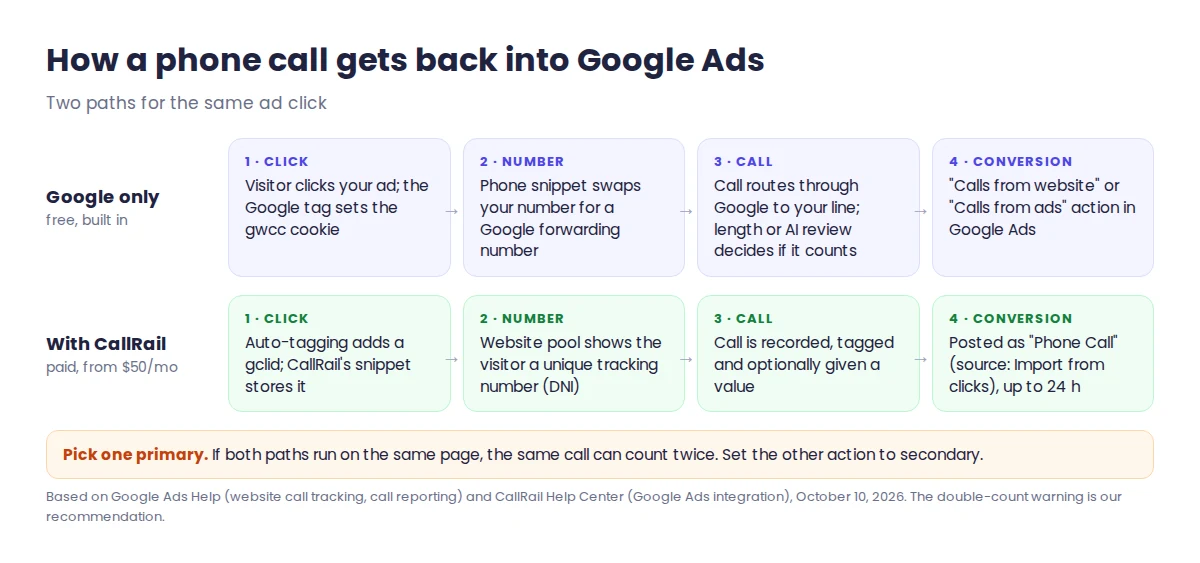
For call assets, CallRail uses a separate Google feature called Call Details Forwarding. In Google Ads, go to Admin, Account settings, Call reporting, set "Send Google Ads data to a Call Reporting provider" to On and pick CallRail. Calls must last at least 15 seconds for the keyword data to come through, and Google, not CallRail, counts those calls as conversions under your own call settings.
CallRail's entry plan, Lead Tracking, is $50 a month billed yearly or $55 month to month, with 5 numbers and 250 minutes included. The full breakdown of tiers, overages and add-ons is in our CallRail pricing guide. If you want to see real call data from your own campaigns first, CallRail's 14-day trial needs no credit card, and our CallRail deals page tracks the current yearly saving.
If you are choosing between call tracking vendors for Google Ads, our CallRail vs CallTrackingMetrics comparison sets their costs, DNI, Google Ads and GA4 features and HIPAA wording side by side.
Importing calls that turned into sales
If you already log calls in a CRM, Google lets you upload outcomes instead. Your system must record the caller's phone number and the call start time, so Google can match each row to a call through its forwarding number. You then create a conversion action with Calls via uploads; note that this option is not offered under the "Phone call lead" category. Calls that come straight from ads can only be matched on mobile, not desktop or tablet.
This route works best when sales calls are rare but valuable. If you do not have a CRM yet, our list of free CRMs for small business covers plans that cost nothing to start.
How long each part takes to show data
Most "it isn't working" panic comes from checking too soon. These are the waiting times the help pages give:
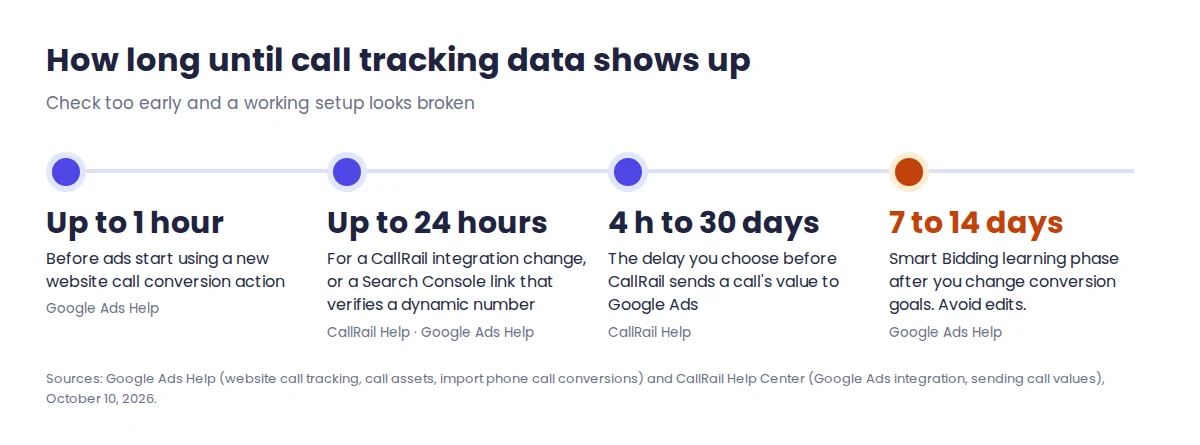
- Up to 1 hour: before your ads start using a new website call conversion action.
- Up to 24 hours: for a CallRail integration change, or for a Search Console link that verifies a dynamic number on your site. Resubmit your call assets after linking.
- Not retroactive: CallRail sends only calls that happen after you activate the integration.
- 7 to 14 days: the Smart Bidding learning phase after you change conversion goals. Avoid editing budgets or targets during that window.
New phone call actions often show "Unverified" or "Inactive" at first. Google says that is normal until the first real conversion or test event arrives.
Common call tracking questions
Is Google Ads call tracking free?
Yes. Call reporting, Google forwarding numbers and phone call conversion actions cost nothing extra. You pay only the normal cost per click when someone taps your call button. Google does not charge when a person dials the forwarding number by hand. Third-party tools such as CallRail are paid.
Can Google Ads track calls from my website?
Yes, for visitors who arrived from an ad. Install the Google tag and the phone snippet, and Google swaps your number for a forwarding number for those visitors only. The default snippet tracks one number per page, and Google takes up to an hour to start using the new action.
Why are my call conversions not showing?
Check that call reporting is on, the conversion action is primary, and your minimum call length is not too long. If you use CallRail, auto-tagging must be on, calls must reach a website pool number, and changes can take 24 hours. Unverified status is normal before the first conversion.
Do I need CallRail if I only run Google Ads?
Not always. Google's tools are enough to count calls from ads and website visits. A call tracking tool helps when you need multiple numbers per page, calls from other channels, recordings tagged by sale value, or one report across Google, Microsoft Ads, social and offline campaigns.
What we checked and when
On October 10, 2026 we read Google Ads Help articles on phone call conversion tracking, calls from ads, website call tracking, mobile number clicks, call assets, call reporting, Google forwarding numbers, AI-qualified call leads and call conversion imports, plus CallRail's help articles on its Google Ads integration, call conversions, Call Details Forwarding, call values and tracking types, and CallRail's pricing page. Every step here comes from that documentation rather than from a campaign we ran ourselves. If you are still choosing a number to advertise, our guide to getting a virtual US phone number covers that first step. More sales and lead tools are in Sales Prospecting & CRM, and the way we research tools is set out on our review methodology page.
Sources (checked October 10, 2026): Google Ads Help (About phone call conversion tracking; Measure calls from ads; Set up tracking calls to a phone number on a website; Measure phone number clicks on a mobile website; About call assets; About call reporting; Google forwarding number; About AI-qualified call leads; Import phone call conversions), CallRail Help Center (Google Ads integration; Call conversions in Google Ads; Google Ads Call Details Forwarding; Sending call values to Google Ads; Types of call tracking), CallRail pricing page.
Research-based guide: no vendor paid for or reviewed this article.