Prices checked October 19, 2026 · Research-based review from Supergrow's own pricing page, terms and help center, not hands-on testing
Saazora may earn a commission if you sign up for Taplio through a link on this page, at no extra cost to you. We have no affiliate deal with Supergrow, so the Supergrow links here earn us nothing.
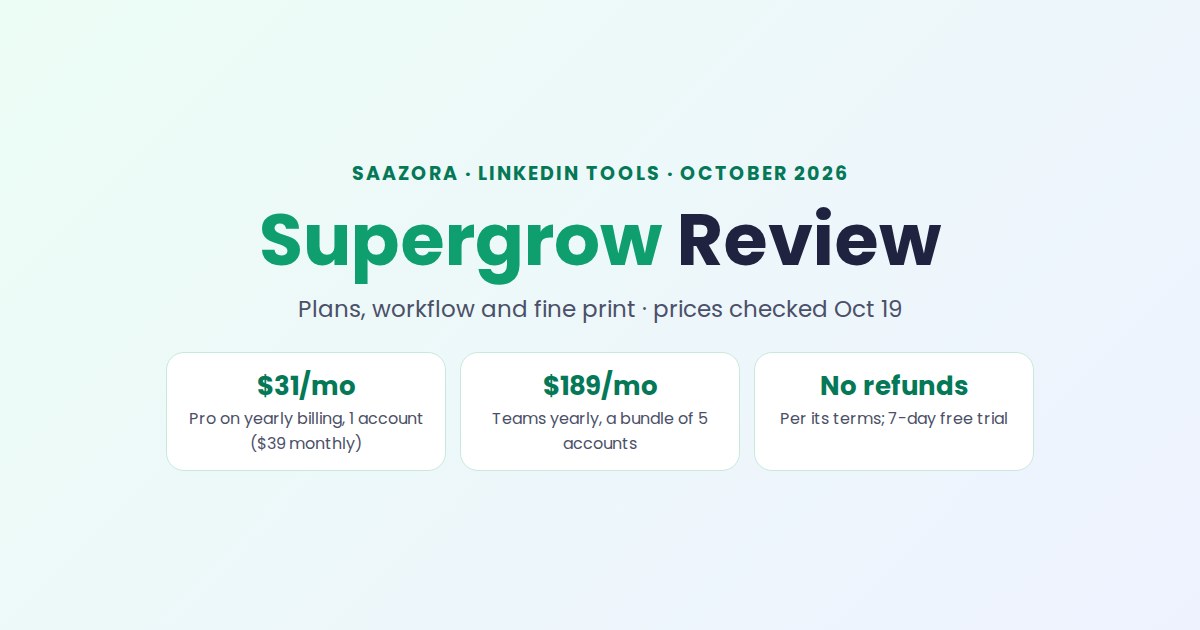
This Supergrow review starts with the one idea the product is built on: you talk, and it writes. Supergrow interviews you with an AI host, learns your voice from at least 10 of your own posts, turns the result into LinkedIn drafts, and moves each draft through a review board to a scheduled slot. As of October 19, 2026, Pro costs $39 a month for one LinkedIn account ($31 on yearly billing) and Teams costs $199 a month for five ($189 yearly). It suits founders, executives and marketing teams running employee advocacy. It suits buyers who want lead lists, a viral post library or a refund much less well: Supergrow's pricing page lists none of the three.
This page looks at Supergrow on its own: what each plan includes, the workflow its help center lays out, the fine print, and who should pick something else. If you are comparing it directly with Taplio, read the Taplio vs Supergrow cost-by-profiles breakdown; for the wider field, see Saazora's LinkedIn tools hub.
Supergrow review: does your situation match the buyer it was designed for?
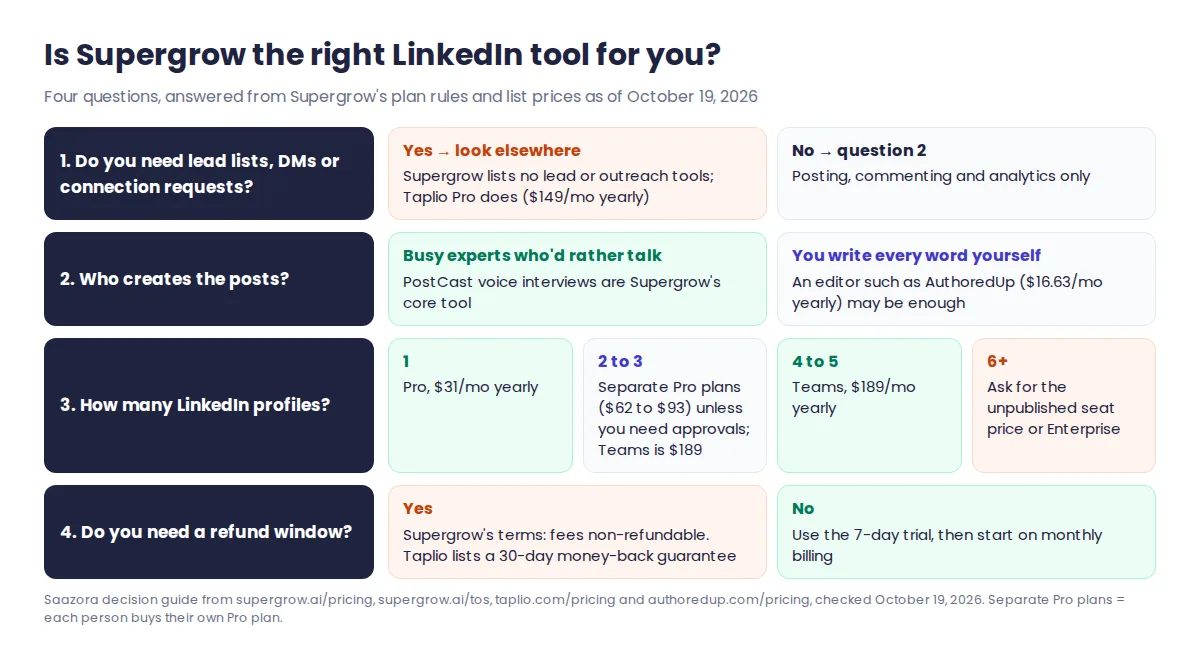
Supergrow's own overview guide for organization owners is unusually direct about fit. It says the product "is built for teams, not solo creators" and is "not built for" mass automation, "Viral hacks" or "One-off posting experiments". Read against its pricing page and help center, that gives a quick test:
| Signal | Fit? | Why, from Supergrow's pages (October 19, 2026) |
|---|---|---|
| Executives or experts have ideas but won't sit down and write | Strong fit | PostCast is a guided voice (or voice + video) interview with an AI host called Alex; the transcript becomes drafts, quotes and post ideas |
| Marketing needs to approve what 2 to 5 people post | Strong fit, on Teams | Kanban stages Draft, In Review, Changes Needed, Approved, Scheduled, Published; reviewers get an email link and their feedback stays on the card |
| An agency or ghostwriter handles several client profiles | Good fit | One workspace per LinkedIn profile; clients can connect through a public link without signing up or sharing a password |
| You post alone and already write well | Partial fit | Pro covers one account, but the team layer you'd be skipping is where much of the product's depth sits |
| You want LinkedIn to feed a sales pipeline (lead lists, DMs) | Poor fit | No lead database, messaging or connection tools are listed on any plan |
| You want a way out if it doesn't work | Poor fit | Terms of service: "All fees are non-refundable except where required by applicable law" |
Pro, Teams and Enterprise: what each plan includes (as of October 19, 2026)
Supergrow sells three plans. Prices are in US dollars before tax; its terms say fees "are exclusive of applicable taxes", and the billing page can also show prices in Indian rupees.
| Plan | Monthly billing | Yearly billing | LinkedIn accounts | What the plan adds |
|---|---|---|---|---|
| Pro | $39 a month | $31 a month ($372 a year) | 1 | Content DNA, unlimited PostCast interviews, repurposing from YouTube, articles and PDFs, calendar and Kanban, auto first comment, carousel maker, Engage, MCP connector, profile analytics, weekly report |
| Teams | $199 a month | $189 a month ($2,268 a year) | 5 | Everything in Pro plus Content DNA per member, feedback and approval workflows, an organisation dashboard, one calendar across members, pushing content and interviews to member workspaces, publishing on a member's behalf, team analytics, challenges and leaderboard, Slack notifications |
| Enterprise | Custom quote; invoice billing | Custom | Custom integrations and API access, SLA, custom onboarding and reporting, volume pricing | |
Source: supergrow.ai/pricing, both billing toggles and the "Compare plans" table, read October 19, 2026. Help center chat support is listed on every plan, and so is "priority support".
Three plan rules matter more than the feature list:
- Accounts are seats, counted across all workspaces. Supergrow's help center gives the example of four seats spread over three workspaces: once four profiles are connected anywhere, a fifth is blocked until you buy a seat or disconnect one. Extra seats can be bought from the Billing page "at the per-account monthly rate"; Supergrow publishes no figure for it, so get a quote before you plan around extra seats.
- The Enterprise threshold is stated two ways. The pricing page says Enterprise is for organisations "with more than 5 executives"; the billing help article says to book a demo for "10+ accounts". If you plan for 6 to 9 people, ask which applies before you commit.
- Only the organisation owner sees Billing. Team members and workspace owners don't, so whoever starts the trial should be the person who will hold the subscription.
What a year costs, and what the Teams layer really costs
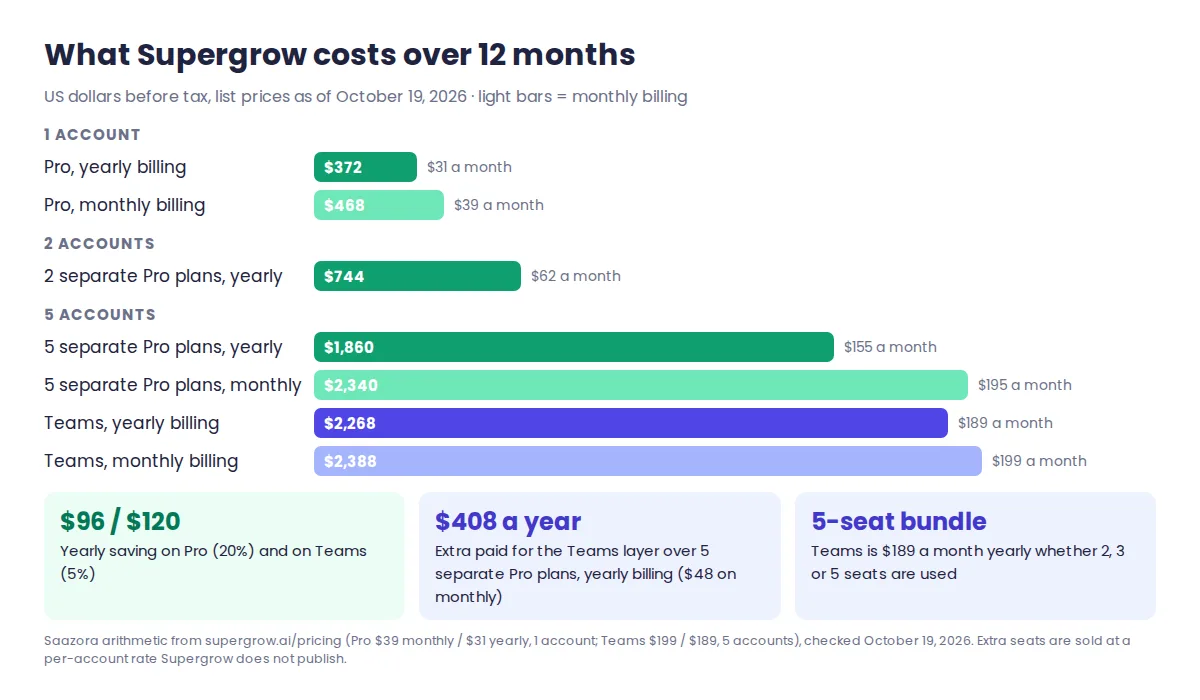
Yearly billing saves $96 a year on Pro ($372 instead of $468) and $120 on Teams ($2,268 instead of $2,388). That is 20% on Pro but only 5% on Teams, so on Teams the case for paying a year up front is weak, especially with no refunds.
The more useful sum compares Teams with each person buying their own Pro plan. Five separate Pro plans cost $155 a month on yearly billing, against $189 for Teams; on monthly billing it's $195 against $199. In other words, Teams is never the cheaper way to cover five profiles. What you pay for is the team layer: approvals, the shared calendar, team analytics and admin control. That layer costs $34 a month ($408 a year) on yearly billing and $4 a month on monthly billing. With only two or three people, the gap is larger: two Pro plans are $62 a month yearly, and Teams still costs $189 because the five seats come as a bundle. For how Supergrow's prices have moved, see the monthly LinkedIn tool pricing tracker.
The Supergrow workflow, step by step as its help center documents it
Supergrow's help center describes one pipeline, from connecting an account to reading a weekly report. Here it is in order, with the limits each step carries.
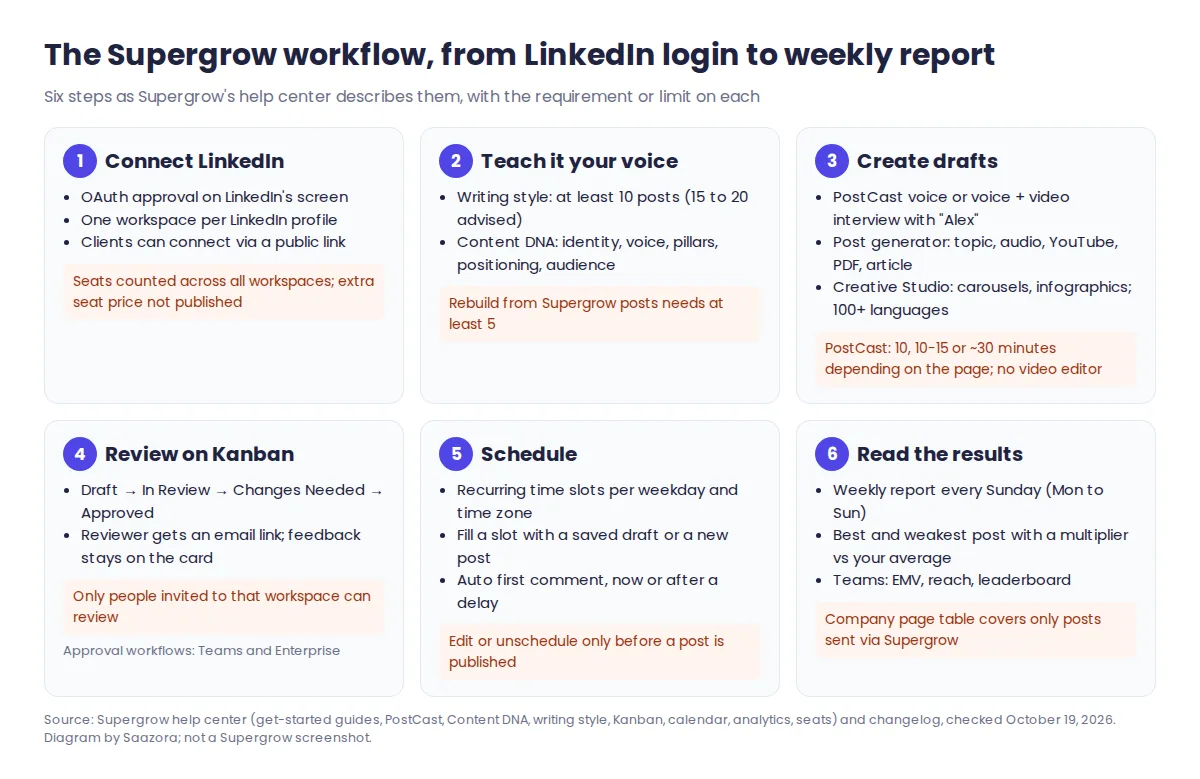
- Connect LinkedIn. Each person approves access on LinkedIn's own OAuth screen; Supergrow calls itself a "LinkedIn® Verified Partner" and says there is no password to hand over and no browser extension to install. If posts stop publishing, the fix the help center gives is to reconnect the account.
- Teach it your voice. A writing style needs "at least 10 posts" pasted in or picked from your Supergrow drafts (15 to 20 is recommended), and takes about 30 seconds to process. Content DNA then maps five layers: identity, voice, content pillars, positioning and audience. If LinkedIn can't return a member's history, a September 28, 2026 changelog entry says Content DNA can be rebuilt from posts published through Supergrow, as long as there are at least five.
- Create drafts. PostCast is the signature tool: pick a topic, answer Alex's questions by voice, and get insights, content ideas, generated posts and a full transcript. The post generator works from a topic, an audio recording, a YouTube link, a PDF or an article. Creative Studio builds carousels, infographics and images and exports PNG, ZIP or PDF; output can be set to more than 100 languages.
- Review. Drafts move across the Kanban board. Moving a card to In Review prompts you to pick a reviewer, who gets an email and either approves or sends it back with comments. Review access is per workspace: only people invited to that workspace can draft, review or approve its posts.
- Schedule. You set recurring time slots per weekday and time zone, then fill empty slots with a saved draft or a new post. A saved first comment can go out with the post, immediately or after a delay you choose. Posts can also be published from a company page you admin.
- Read the results. A weekly report arrives every Sunday covering Monday to Sunday: your best post and weakest post (each with a multiplier against your average), a suggested article to react to with a "Hot Take Score", and a post-by-post table. On Teams, owners also get a program dashboard: total reach, an estimated "Earned Media Value", a leaderboard of members and a "Participation Health" split from Champions to Dormant.
Two newer extras sit beside this pipeline. Supergrow's MCP connector lets Claude, ChatGPT and other AI assistants draft, queue and pull analytics from your workspace; the help center notes that you need a paid plan of the AI tool, and the MCP page says nothing goes live without your approval. Bulk import takes a CSV or Excel file of up to 10MB and drops every row in as a draft.
Engage and account safety: what Supergrow says it does and doesn't automate
Engage is the feature closest to the line LinkedIn draws, so here it is exactly as Supergrow describes it. You build lists of people and company pages (by profile URL, CSV upload, a post's commenters, or a "Find voices" directory added on September 29, 2026). Engage then shows their recent posts in a "Focus Mode" queue, one post at a time, filtered to today, today and yesterday, or the last 7 days. From there you react, comment (text, an image or a GIF), repost or skip, and AI can suggest a comment written in your Content DNA voice.
Supergrow's position is that every action is manual: "Nothing is sent until the employee chooses the action and clicks," and the feature page lists "No pods, bots, auto-reactions, reposts, or comments running in the background." It also asks for confirmation before a second comment on a post the same workspace has already commented on. Engage is included from Pro up.
For context, LinkedIn's Prohibited software page bans tools that use "bots or other unauthorized automated methods" to "create, comment on, like, share, or re-share posts". We can't tell you how LinkedIn will judge any particular tool. Based on Supergrow's own description, Engage keeps a person clicking every action through LinkedIn's official API, which is a different design from the auto-DM and auto-connect tools some rivals sell. One wording slip is worth knowing: the help article on connecting an account says Supergrow can "Publish and schedule posts on your behalf" and, a few lines later, that it "does not post anything on your behalf". The intended meaning seems to be that nothing goes out unless you schedule or publish it.
Fine print the plan cards leave out
Several things a buyer should know appear only in Supergrow's terms of service (last updated March 23, 2026) or deep in its help center. A few of them contradict the pricing page.
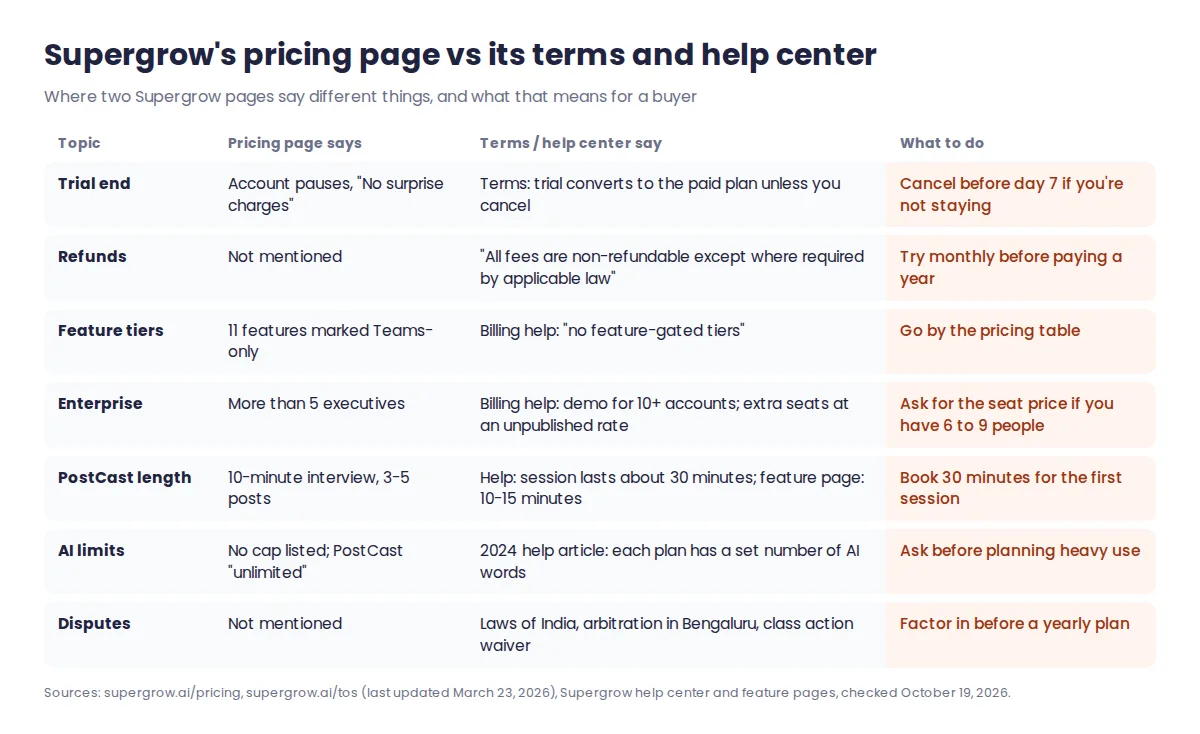
- The end of the trial is described two ways. The pricing FAQ says that if you don't pick a plan "your account pauses" with "No surprise charges". The terms say the trial will "automatically convert to the selected paid plan" unless you cancel. If you start a trial with a card on file and don't want to continue, cancel before day 7 rather than relying on the pause.
- No refunds. Paid fees are non-refundable unless the law says otherwise. If you think you were charged incorrectly, you have to raise it within 30 days. Cancelling stops the next renewal and keeps access until the end of the paid period.
- Disputes go to India. The terms are governed by the laws of India, with binding arbitration in Bengaluru before a single arbitrator and a class action waiver. That matters for US buyers on a yearly plan.
- Data after you leave. After termination, Supergrow "may delete your account data after a reasonable retention period (typically 30 days)". Deleting a workspace removes its data permanently straight away. Export what you need first.
- Price changes need notice. Existing subscribers get at least 30 days' notice, and a new price starts with the next billing cycle.
- AI output isn't exclusive. The terms say "similar or identical Output may be generated for other users" and that you are responsible for reviewing everything before it's published.
- "All features in every plan" vs. a Teams-only list. The billing help article says there are "no feature-gated tiers", but the pricing page marks 11 features as Teams-only. Go by the pricing page.
- PostCast length depends on which page you read. The pricing page cites a 10-minute interview for 3-5 posts, and the post generator page says 10-15 minutes. The PostCast help article tells you the "Session will last approximately 30 minutes". Supergrow doesn't include a video editor, so video recordings have to be cut in another tool.
- AI limits. The pricing page lists no word or credit cap and calls PostCast "unlimited". The only article that mentions "a specific number of AI-generated words" dates from January 1, 2024.
- Analytics are still being fixed. On September 22, 2026 Supergrow removed its "vs. prev. period" badges because they "didn't compare against the previous period". Company page post tables only cover posts published through Supergrow.
Where Supergrow is strong, and where it falls short
| Strengths | Weaknesses |
|---|---|
| PostCast turns a spoken interview into drafts, quotes and a transcript, which suits people who won't write | No refunds, and the trial-end rules differ between the pricing FAQ and the terms |
| A real approval pipeline with reviewers, feedback on the card and email links, on Teams | Teams is a 5-seat bundle: two or three people pay the full $189 a month on yearly billing |
| Official LinkedIn API and OAuth; clients connect by link without sharing a password | No lead database, messaging or prospecting tools listed on any plan |
| A voice profile per person (Content DNA), so one campaign can be adapted into several people's posts | Add-on seat price and AI limits aren't published |
| Frequent releases: the changelog shows eight dated entries between September 21 and October 3, 2026 | Help pages contradict each other in places (Enterprise threshold, PostCast length, feature tiers) |
| MCP access from Claude or ChatGPT, with publishing still requiring approval | US buyers accept Indian law and arbitration in Bengaluru |
Supergrow alternatives, and when each one makes more sense
If the fit test or the fine print rules Supergrow out, these are the closest options, with prices read on each vendor's own page on October 19, 2026.
| If you need… | Look at | Price (yearly / monthly billing) | Trade-off against Supergrow |
|---|---|---|---|
| AI writing plus lead tools, or a refund window | Taplio | Starter $32 / $39 (no AI), Growth $49 / $69, Pro $149 / $199 per account | Viral post library, 250 AI credits a month on Growth, lead database and outreach on Pro; 30-day money-back guarantee |
| A better editor for posts you write yourself, at a lower price | AuthoredUp | Individual $16.63 / $19.95; Business $14.95 per profile, minimum 3 | Formatting, previews and deep stats; its AI writer is still a closed beta |
| Only scheduling | LinkedIn's built-in scheduler | Free | No drafts pipeline, approvals or voice profile |
Taplio is the alternative most Supergrow shoppers weigh. It is the better pick if LinkedIn has to produce leads as well as posts, or if you want the option of getting your money back. Our full Taplio review goes through its AI writer and outreach features. To try it, start a Taplio free trial (affiliate link; Saazora may earn a commission), and check current Taplio deals on Saazora first. For writers who want an editor rather than an AI ghostwriter, our AuthoredUp review covers its plans and limits.
Questions people ask about Supergrow
Does Supergrow have a free plan?
No. Pro and Teams each come with a 7-day free trial, and Enterprise is quoted on request. The billing help says there is no charge until the trial ends.
Can Supergrow write in languages other than English?
Yes. AI output can be set per workspace to any of 100+ languages under Settings, Language.
Does Supergrow work with Claude or ChatGPT?
Yes, through its MCP connector, which is listed on every plan. Since September 24, 2026, Claude and ChatGPT connect by signing in to Supergrow rather than pasting an API key URL. You need a paid plan of the AI tool.
Can I manage a company page?
Yes. If your profile has admin access, you can publish and schedule as the page and see its analytics, but the post-by-post table only covers posts published through Supergrow.
How this Supergrow review was researched
This Supergrow review is based on published information. On October 19, 2026 we read Supergrow's pricing page (both billing toggles and the plan comparison table), its terms of service, its feature pages for engagement, scheduling, post generation, analytics and MCP, its changelog, and 62 articles in its help center. Copies of every page are kept on file. Taplio and AuthoredUp prices were read the same day on their own pricing pages, and LinkedIn's Prohibited software page was re-checked. The 12-month totals and the Teams-versus-separate-Pro comparison are our arithmetic on list prices, before tax. We did not run Supergrow for this article, had no vendor account, and Supergrow did not review it. Where Supergrow's pages disagree, we report both versions. More on how Saazora researches software.
Sources (checked October 19, 2026): Supergrow pricing, Supergrow terms of service, Supergrow Engage, Supergrow changelog, Supergrow: Overview guide, Supergrow: Seats across workspaces, Supergrow: PostCast, Supergrow: Content writing style, Supergrow: Analytics, LinkedIn Help: Prohibited software, AuthoredUp pricing. Taplio prices are from Taplio's pricing page.
Research-based review: Supergrow did not pay for, supply an account for, or review this article.