Prices checked October 18, 2026 · Research-based review from AuthoredUp's own pages, not hands-on testing
Saazora may earn a commission if you sign up for Taplio through a link on this page, at no extra cost to you. We have no affiliate deal with AuthoredUp, so links to AuthoredUp earn us nothing.
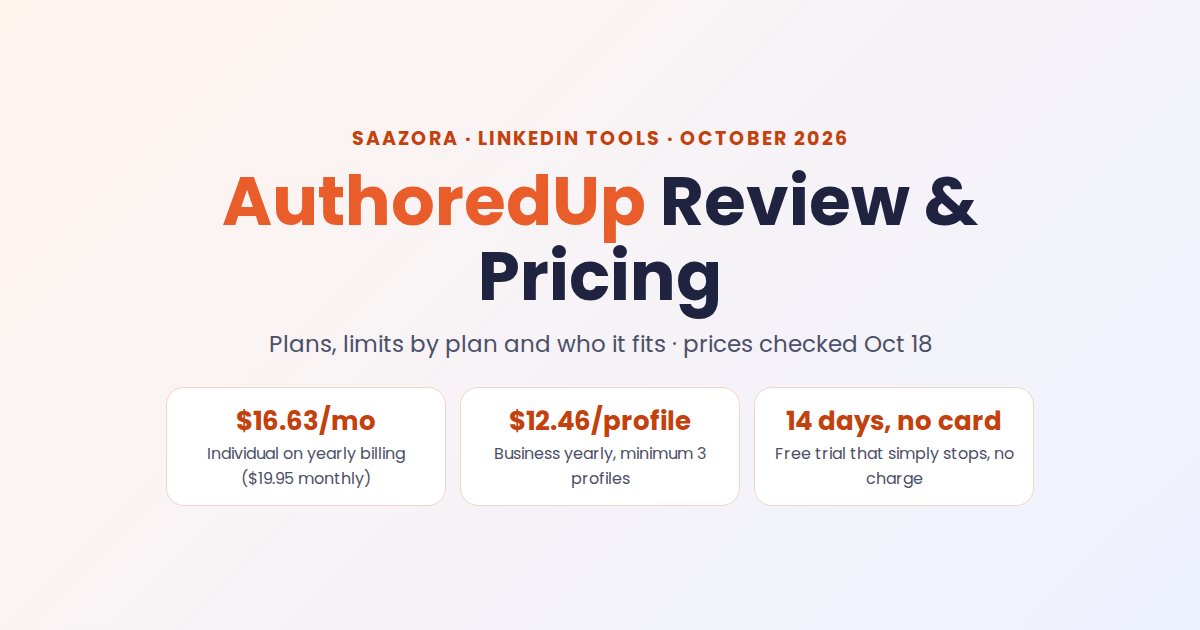
This AuthoredUp review has a short answer: it is a good buy for people who write their own LinkedIn posts and want a better editor and deeper stats, and the wrong buy for anyone who wants AI to write for them. As of October 18, 2026 it costs $19.95 a month for one profile ($16.63 on yearly billing) or $14.95 per profile on the Business plan, with a minimum of 3. The trial runs 14 days, asks for no card and simply stops at the end. The catches sit outside the plan cards: scheduling is LinkedIn's own scheduler, post stats refresh only when you look at your posts, and paid fees are not refunded.
This page is the single-tool review: what each plan includes, the limits that apply on every plan, and who it suits. If you are still picking a category of tool, start with all the LinkedIn tools Saazora compares.
The verdict in a table: who should buy AuthoredUp
| If you… | AuthoredUp? | Reason (from AuthoredUp's pages, October 18, 2026) |
|---|---|---|
| Write every post yourself and want formatting, previews and hooks | Yes, Individual | Editor with bold, italic and lists, a 1-to-14 readability grade, desktop/mobile/dark-mode preview, hooks and endings library, from $16.63 a month yearly |
| Want to know which of your posts worked and why | Yes | Imports your post history, adds saves, sends, reach and followers gained per post, best time to post from your own data, CSV and API export on every plan |
| Run 3 or more profiles (agency, ghostwriter, employee advocacy) | Yes, Business | $14.95 per connected profile; managers and ghostwriters who don't connect a profile are free; shared drafts, team calendar and team analytics |
| Want AI to draft posts for you today | No | Its AI writer, Coauthor, is listed as a closed beta |
| Want automated comments, DMs or lead lists | No | "No automation. No cookies." is its stated policy |
| Post mostly from a phone, Safari or Firefox | Not a good fit | The extension runs on desktop Chrome and other Chromium browsers; mobile gets a web app for drafts and analytics only |
AuthoredUp pricing as of October 18, 2026
AuthoredUp sells three plans, and every price is per connected LinkedIn profile, not per user. Yearly billing is advertised as "2 months off": you pay 10 months' price for 12.
| Plan | Monthly billing | Yearly billing | Profiles | Who it is for |
|---|---|---|---|---|
| Individual | $19.95 a month | $16.63 a month ($199.50 a year) | 1 | Solo creators writing for themselves |
| Business | $14.95 per profile a month ($44.85 minimum) | $12.46 per profile a month ($149.50 per profile a year) | 3 or more | Teams, agencies, ghostwriters, employee advocacy |
| Custom Growth | Not offered | Custom quote, billed yearly | 10 or more | Larger teams wanting onboarding, training and invoicing |
US dollars before tax; AuthoredUp's terms say fees are "exclusive of any and all taxes". Eligible nonprofits and public libraries can ask for 30% off.
Company pages cost nothing extra on any plan: if you admin ten pages from one profile, you still pay for one profile. The same LinkedIn profile connected by two people (say, a client and their ghostwriter) is billed once. Payment goes through Stripe by card; only Custom Growth gets invoicing and bank transfer.
What 1 to 10 profiles cost next to Taplio and Supergrow
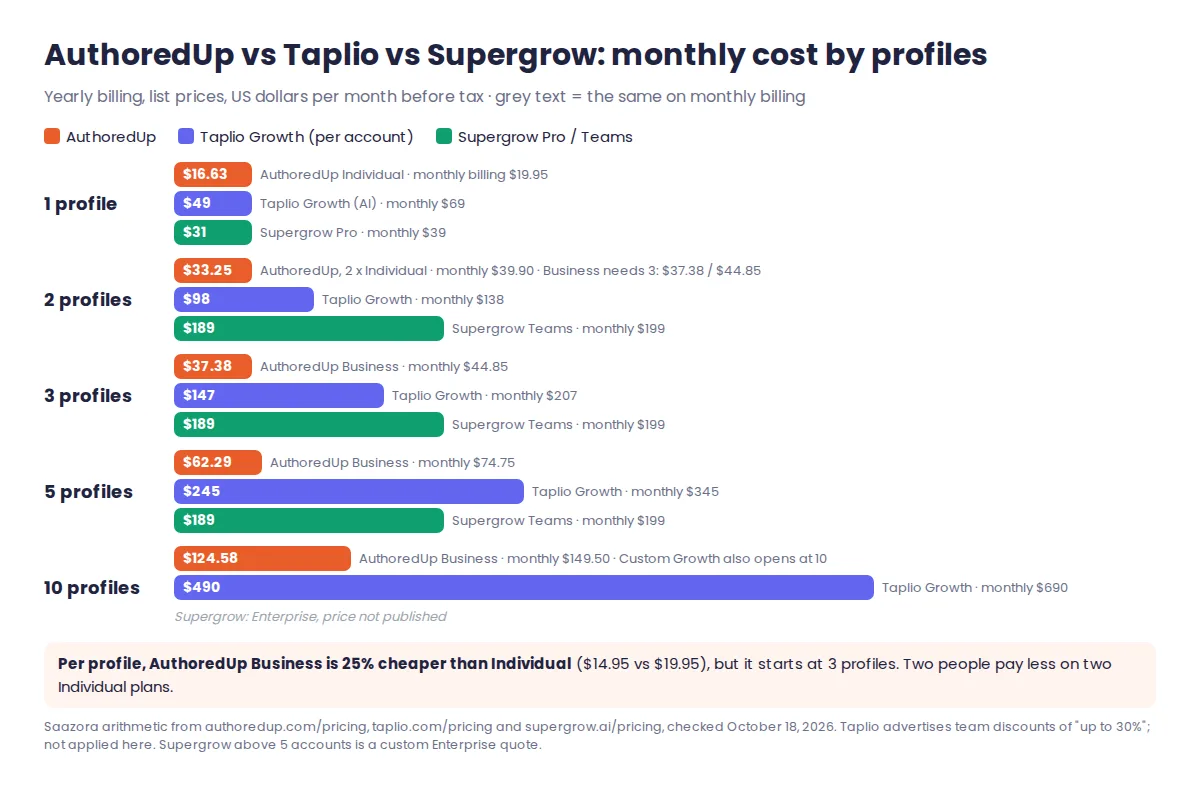
Three numbers stand out. First, the Business rate is 25% below the Individual rate per profile, but it only starts at 3 profiles, so a pair of people pays less on two Individual plans ($39.90 a month) than on the Business minimum ($44.85). Pay the extra $4.95 only if you need shared drafts and team analytics. Second, at 5 profiles AuthoredUp Business on yearly billing is $747.50 a year, against $2,268 for Supergrow Teams and $2,940 for five Taplio Growth accounts at list price. Third, those rivals include AI writing that AuthoredUp does not sell yet, so the gap is partly a gap in features, not just in price. Our AuthoredUp price history in the LinkedIn tool pricing tracker records any change month to month.
Yearly billing pays off only if you stay 10 months
Because yearly costs 10 months' price, it beats monthly once you keep the tool for 10 months or more. The terms matter here: after you cancel, the service runs to the end of the paid period, and "no refund is possible" for the time left; elsewhere the terms say "Paid fees are non-refundable". Quit after 3 months on yearly and you have paid $199.50 for what would have cost $59.85 monthly. Use the 14-day trial and at least one month of monthly billing before committing to a year.
What Business and Custom Growth add over Individual
Individual is not a cut-down plan. Every writing, drafting, scheduling and analytics feature on the comparison table is on it. Business adds the team layer; Custom Growth adds service.
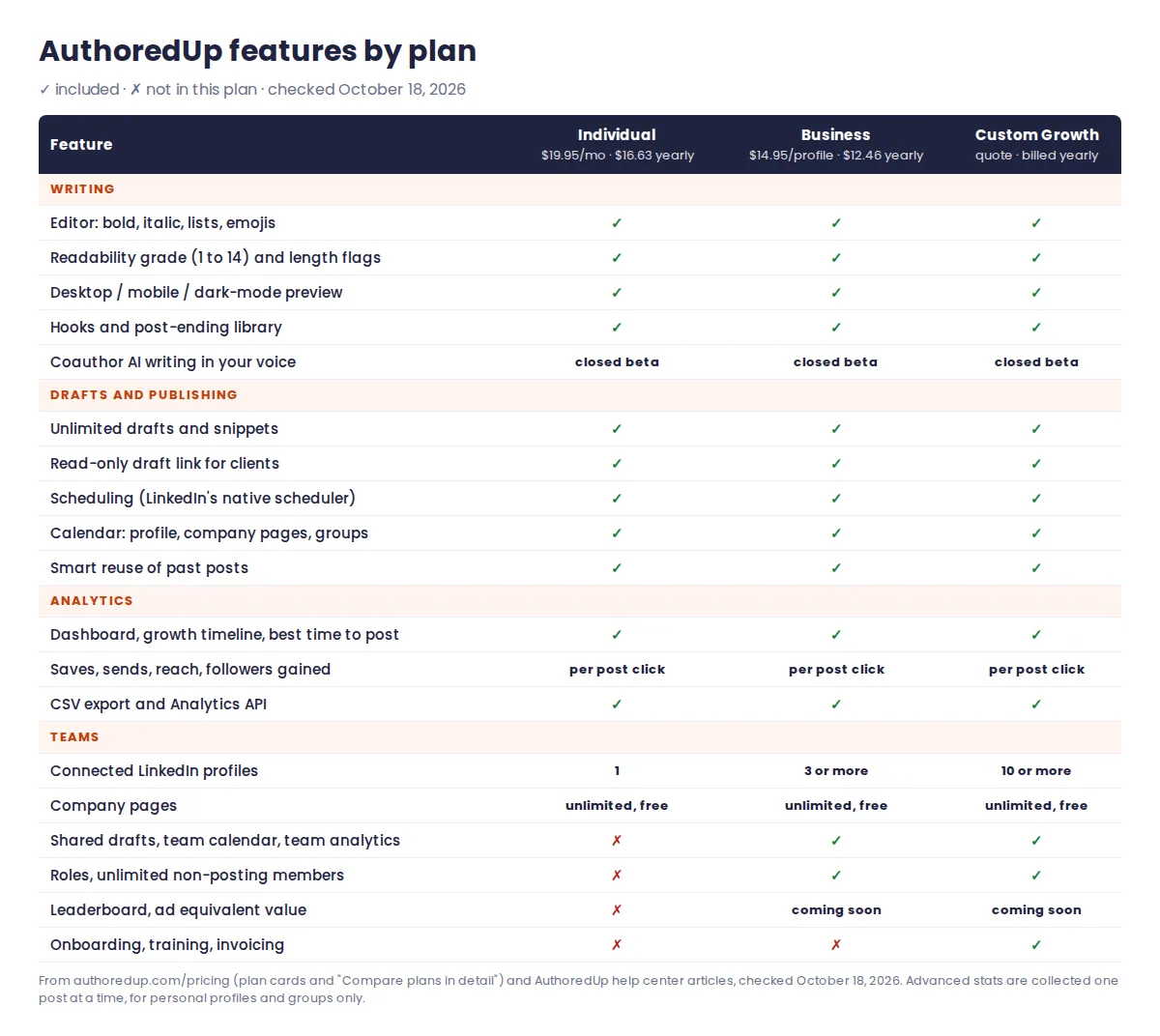
- On every plan: the editor with formatting and readability grade, multi-device preview, a hooks library (the plan card says 300+ hooks and post endings; the comparison table splits that into 200+ opening lines and 150+ closing lines and calls to action), unlimited drafts and snippets, a read-only draft link for clients who don't use AuthoredUp, a calendar covering your profile, company pages and groups, posting reminders, a best-time heatmap from a model trained on your own posts, and "smart reuse", which suggests three past posts worth republishing.
- Analytics on every plan: a dashboard, follower growth timeline, period-over-period snapshot, a breakdown of your best post type, day, length and readability, side-by-side post comparison, import of your full posting history (or your LinkedIn data export), CSV export and a personal API key. AuthoredUp also offers an MCP connector so an AI assistant can read your posts and manage drafts.
- Business only: several profiles in one organization, shared drafts assigned to the right profile (with a warning if you are about to publish from the wrong account), one team calendar, team analytics across profiles and pages, Admin/Manager/Member roles, and unlimited members who don't connect a profile. A leaderboard and an "ad equivalent value" metric are marked "coming soon".
- Custom Growth only: personalized onboarding, training, an official offer and bank-transfer invoicing, for teams of 10 or more profiles.
Coauthor, the AI assistant that "learns your voice from your own posts", is listed on every plan with included credits and a paid add-on for more, but it is labelled closed beta.
Limits that apply on every plan
None of these appear on the plan cards. They come from AuthoredUp's help center, and they shape day-to-day use more than the price does.
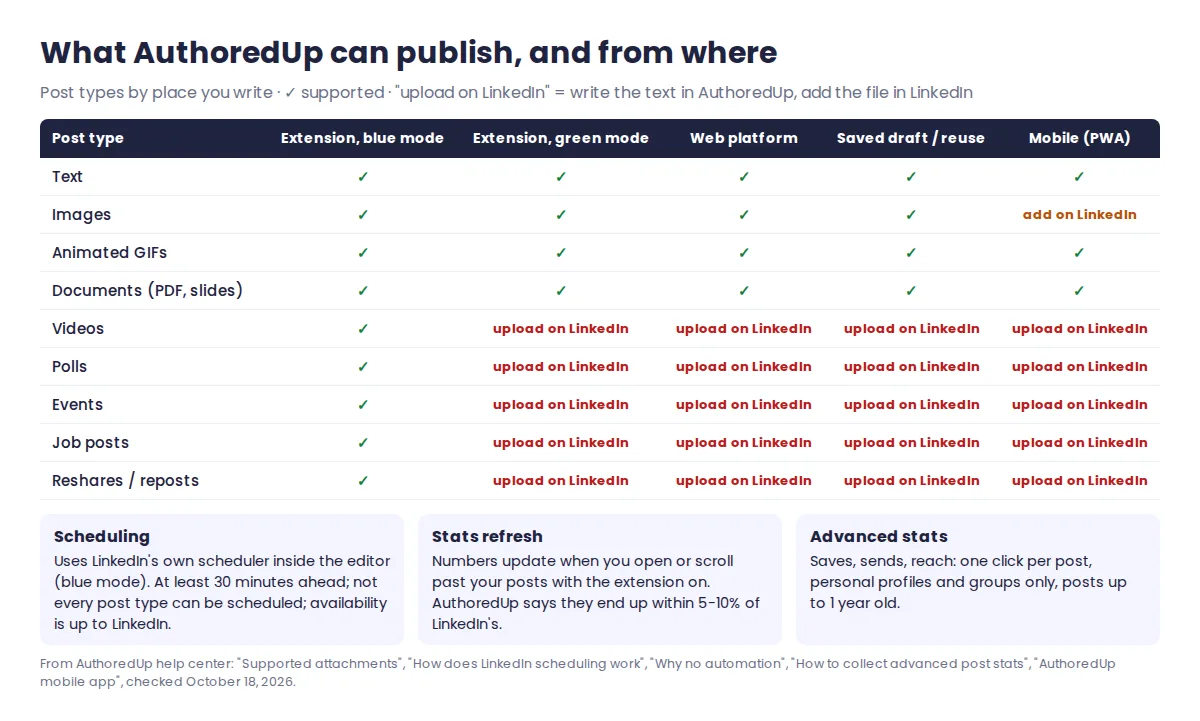
- Scheduling is LinkedIn's, not AuthoredUp's. The help center says it plainly: "AuthoredUp doesn't have its own scheduling system." The editor exposes LinkedIn's native scheduler, so you need that feature on your account, a post must be set at least 30 minutes ahead, and not every post type can be scheduled. There is no queue of recurring time slots as in Taplio or Supergrow. For the free route without any tool, see LinkedIn's free built-in scheduler, step by step.
- Videos, polls, events, job posts and reshares only work in "blue mode", meaning the extension attached to LinkedIn's own composer. Write them on the web platform, in a saved draft or in a reused post and the attachment is dropped; you add it on LinkedIn before posting. Text, images, GIFs and PDF documents work everywhere, except that images can't be passed to LinkedIn from mobile.
- Stats refresh only when you look. AuthoredUp doesn't take your LinkedIn cookie or crawl in the background, so it mirrors numbers when you scroll past or open your posts with the extension on. Its own estimate is that figures land "within 5-10 percent" of LinkedIn's. Advanced stats (saves, sends, reach, profile views, followers gained) need one click per post, work for personal profiles and groups but not company pages, and only for posts up to 1 year old.
- Desktop Chromium only for the full product. The extension is supported on Chrome and installs on Edge, Brave and Opera. On a phone you can install AuthoredUp as a web app for drafts, previews, hooks and analytics, but not the extension.
- Team admins work through LinkedIn logins. A social media manager linking a client's profile to their own AuthoredUp account "must have access to their clients' LinkedIn login credentials", per the plan help article. Each person connecting their own profile avoids that.
- Billing exits are narrow. Downgrades take effect from the next billing period, and once a Business plan is paid, moving down to Individual is not possible in the app; you have to ask support.
Pros and cons of AuthoredUp
| Pros | Cons |
|---|---|
| Lowest paid entry price among the LinkedIn writing tools Saazora tracks: $16.63 a month yearly | No AI drafting you can buy today; Coauthor is a closed beta |
| 14-day trial with no card that ends on its own, with no charge | Paid fees are non-refundable, including the unused part of a year |
| No automation and no cookie access, which keeps it clear of the activities LinkedIn's rules prohibit | Scheduling depends on LinkedIn's native scheduler: 30-minute minimum, no slot queue, not all post types |
| Company pages free on every plan; billing per profile, not per person | Stats update only when you view posts; advanced stats need a click per post and skip company pages |
| Deep analytics on the cheapest plan, with CSV, API and MCP access | Full features need a desktop Chromium browser |
| Business at $12.46 per profile yearly is far cheaper than per-seat AI tools for teams of 3 to 10 | Business starts at 3 profiles, and paid Business plans can't be downgraded in the app |
Who AuthoredUp fits, and who should look elsewhere
Good fit: a consultant or founder who already writes their own posts and wants them to look right before publishing; a ghostwriter who drafts for clients and needs a review link and the client's numbers in one place; a marketing team running employee advocacy for 3 to 10 people on a small budget, where managers who never post are free.
Poor fit: anyone whose bottleneck is getting a first draft at all, people who want posts going out from a set of weekly slots without opening LinkedIn, sales teams that want LinkedIn to feed a lead list, and anyone working mainly from a phone. For a side-by-side with the best-known AI growth tool, read where AuthoredUp and Taplio split on AI and automation.
AuthoredUp alternatives for AI drafts or a slot queue
If the limits above rule AuthoredUp out, these are the closest swaps, priced on October 18, 2026:
| Need AuthoredUp doesn't cover | Alternative | Price (yearly / monthly billing) | Trade-off |
|---|---|---|---|
| AI drafting plus a scheduling queue, and lead tools later | Taplio Growth | $49 / $69 a month per account; Starter (no AI) $32 / $39 | About 3 times AuthoredUp's price; 250 AI credits a month on Growth; outreach automation on Pro |
| AI drafting in your voice for one profile | Supergrow Pro | $31 / $39 a month | Teams is a flat bundle of 5 accounts ($189 / $199) |
| Only scheduling, nothing else | LinkedIn's built-in scheduler | Free | No analytics beyond LinkedIn's own, no drafts library |
Taplio is the alternative most AuthoredUp shoppers weigh: it gives AI drafts, a viral post library and a posting queue, and its pricing page lists a 7-day free trial and a 30-day money-back guarantee, the refund AuthoredUp doesn't offer. If that trade suits you, try Taplio free for 7 days (affiliate link; Saazora may earn a commission). Before paying, see what each Taplio plan costs per month and per year. For a wider field scored on the same public criteria, see six Taplio alternatives scored side by side, and if AI writing is the deciding feature, AI LinkedIn post generators ranked by input and price.
Questions about AuthoredUp
Is AuthoredUp free?
No. There is no free plan, only a 14-day trial with every feature and no card. When it ends, the account stops working and nothing is charged.
Is AuthoredUp safe for my LinkedIn account?
It is built to avoid automation: it doesn't take your LinkedIn cookie, can't act in your name, and only reads data while you browse LinkedIn yourself. No tool can promise how LinkedIn treats every extension, but AuthoredUp avoids the automated messaging, commenting and scraping that LinkedIn's help center lists as prohibited.
Does AuthoredUp work with company pages?
Yes, at no extra cost: you can post and schedule as a page you admin, and each page gets its own dashboard and post analytics. Advanced per-post stats (saves, sends, reach) are not collected for company pages.
Can I get a refund from AuthoredUp?
Not under its published terms, which say paid fees are non-refundable and that cancelling stops renewal without refunding the rest of the period. The one exception in the terms is a pro-rated refund if AuthoredUp itself discontinues the service.
How this AuthoredUp review was researched
This AuthoredUp review is based on published information. On October 18, 2026 we read AuthoredUp's pricing page (both billing toggles and the "Compare plans in detail" table), its terms and conditions, and 32 articles in its help center covering trials, billing, scheduling, attachments, data collection, mobile, the API and nonprofit pricing; copies are kept on file. Taplio and Supergrow prices were read the same day on their own pricing pages. The cost-by-profiles chart, the yearly break-even and the 12-month totals are our arithmetic on those list prices, before tax. We did not run AuthoredUp for this article, had no vendor account, and AuthoredUp did not review it. Where AuthoredUp's own pages disagree (300+ versus 200+ hooks), we report both. More on how Saazora researches software.
Sources (checked October 18, 2026): AuthoredUp pricing, AuthoredUp terms and conditions, AuthoredUp: Individual vs Business plan, AuthoredUp: How scheduling works, AuthoredUp: Supported attachments, AuthoredUp: Why no automation, AuthoredUp: Advanced post stats, AuthoredUp: Trial, Supergrow pricing, LinkedIn Help: Prohibited software. Taplio prices are from Taplio's pricing page.
Research-based review: AuthoredUp did not pay for, supply an account for, or review this article.