Prices checked October 17, 2026 · Research-based comparison, not hands-on testing
Saazora may earn a commission if you sign up for Taplio through links on this page, at no extra cost to you. We have no affiliate deal with Supergrow.
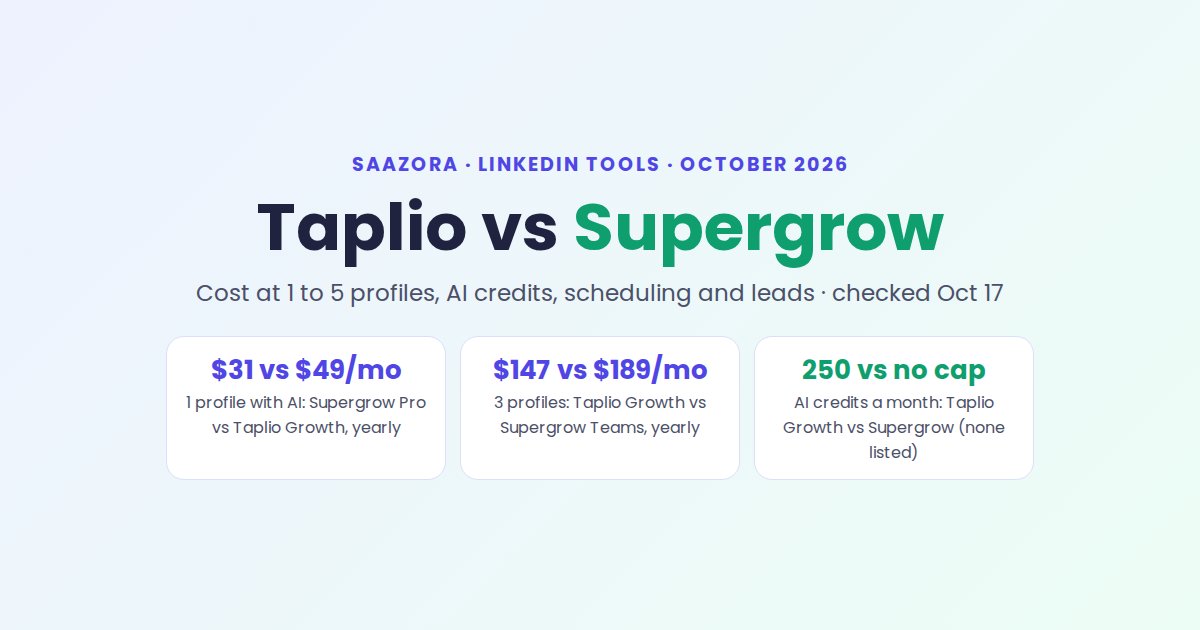
Taplio vs Supergrow comes down to how many LinkedIn profiles you run and whether you want leads or just posts. For one profile, Supergrow Pro is the cheaper way to get AI writing and scheduling ($31 a month billed yearly, against $49 for Taplio Growth). For two or three profiles, Taplio Growth costs less than Supergrow's 5-account Teams bundle. From four profiles, Supergrow Teams wins on price. Taplio is the only one of the two with a lead database and outreach tools, and the only one that offers refunds.
Every number below was read on the vendors' own pricing and help pages on October 17, 2026. If you are still choosing between more than two tools, start with every LinkedIn creator tool we track; this page is the head-to-head.
Taplio or Supergrow? The pick for each situation
| Your situation | Pick | Why (public facts, October 17, 2026) |
|---|---|---|
| One profile, you want AI drafts and scheduling | Supergrow Pro | $31/mo yearly with AI writing included; Taplio's cheapest plan with AI is Growth at $49 |
| One profile, you write every post yourself | Either; Supergrow is $1 cheaper | Supergrow Pro $31 vs Taplio Starter $32 (yearly). Starter has no AI, but it does include Taplio's viral post library |
| Two or three profiles, AI for everyone | Taplio Growth | $98 or $147/mo on yearly list prices, vs $189 for Supergrow Teams |
| Four or five profiles, or execs who need approvals | Supergrow Teams | Flat $189/mo yearly for 5 accounts, with approval workflows and team analytics |
| You use LinkedIn to find and contact leads | Taplio Pro | Lead database of 3M+ profiles, contact lists, auto-DMs; Supergrow lists no outreach tools |
| You want to be able to get your money back | Taplio | 30-day money-back guarantee on the first payment; Supergrow's help center says it does not offer refunds |
Both tools give 7 days free. If the lead-finding side is what draws you to Taplio, you can start Taplio's 7-day trial (affiliate link) and test the Pro features before your plan starts. The rest of this page shows the math behind each row.
What one, three and five profiles cost (as of October 17, 2026)
The two vendors price teams in opposite ways. Taplio charges per account and takes 10% off each license once an Organization has 2 seats. Supergrow sells one account on Pro, then jumps to a Teams bundle of 5 accounts at a flat price. That makes the cheaper tool flip as you add people.
| Profiles | Taplio Growth, yearly billing (list) | Taplio Growth, monthly billing with team discount | Supergrow, yearly billing | Supergrow, monthly billing |
|---|---|---|---|---|
| 1 | $49 | $69 | $31 (Pro) | $39 (Pro) |
| 2 | $98 | $124.20 | $189 (Teams) | $199 (Teams) |
| 3 | $147 | $186.30 | $189 (Teams) | $199 (Teams) |
| 4 | $196 | $248.40 | $189 (Teams) | $199 (Teams) |
| 5 | $245 | $310.50 | $189 (Teams) | $199 (Teams) |
Monthly cost in US dollars, before tax. Taplio's help center gives the 10% team price as $62.10 per Growth license on monthly billing. It does not say whether the team discount also applies on top of yearly prices, and it states that team discounts "can't be combined with other discounts", so the yearly column uses list prices.
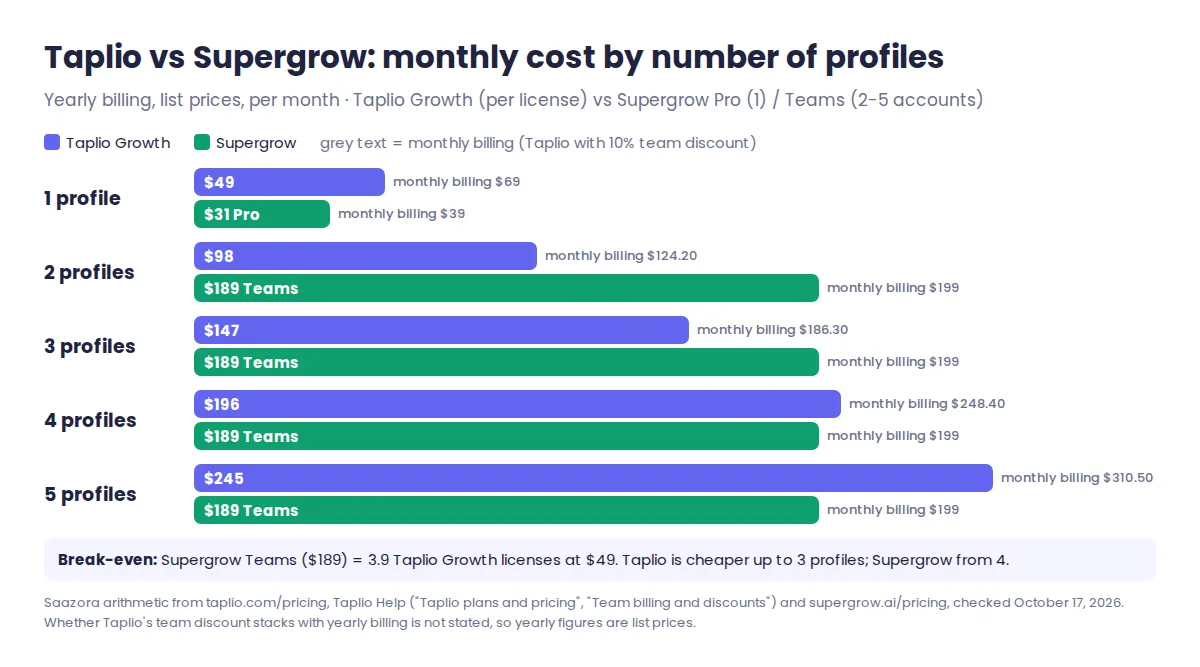
The break-even sits between three and four profiles. Supergrow Teams costs $189 a month, which equals 3.9 Taplio Growth licenses at $49; on monthly billing it equals 3.2 discounted licenses at $62.10. So at three profiles Taplio is cheaper on either billing cycle, and at four Supergrow is.
Two cheaper routes exist if not everyone needs AI. On Taplio, Organizations are only available on Growth and Pro, but each person can buy Starter and share access with you; three Starter accounts cost $96 a month on yearly billing ($1,152 a year), with no AI writing. On Supergrow, an owner can add accounts "on top of your base plan at the per-account monthly rate", but that rate is not printed on the pricing page, so ask before planning around it. Over 12 months on yearly billing, three profiles cost $1,764 on Taplio Growth and $2,268 on Supergrow Teams; five profiles flip that to $2,940 and $2,268. Our price history for Taplio, Supergrow and other LinkedIn tools logs any change each month.
250 AI credits vs no published cap: what that means each month
Taplio meters its AI; Supergrow's pricing page does not. On Taplio Growth you get 250 Expert-mode AI credits a month. Generating a post, rewriting one, writing a hook, one message to Ask Taplio and one AI reply each cost 1 credit. When the 250 run out, Taplio says you "automatically switch to unlimited Faster mode credits", so AI keeps working at a lower tier until credits renew on the 1st. Starter has no AI writing; Pro is unlimited, under fair use.
Growth also gives 500 reply credits a month, used when you comment on other people's posts (not when you answer comments on your own). That works out to about 22 comments per working day.
How far 250 credits go depends on your habits. Assuming each post takes one generation plus two AI rewrites (3 credits), and each AI-written reply takes 1:
| Monthly habit (about 22 working days) | Expert credits used | Fits in Growth's 250? |
|---|---|---|
| 3 posts a week, no AI replies | 13 posts × 3 = 39 | Yes, 211 left |
| 5 posts a week + 5 AI replies a day | 66 + 110 = 176 | Yes, 74 left |
| 5 posts a week + 10 AI replies a day | 66 + 220 = 286 | No, last days run in Faster mode |
| 7 posts a week + 10 AI replies a day | 90 + 220 = 310 | No, 60 over |
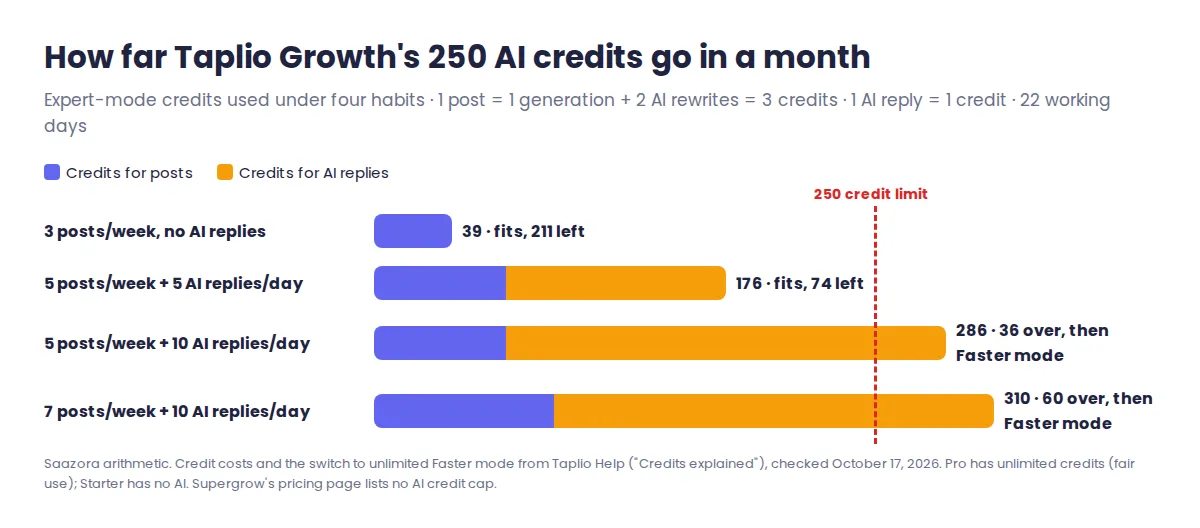
The AI-reply habit, not posting, is what drains credits. Writers who mostly post land well inside the limit.
Supergrow's pricing page lists no credit or word counter for any plan, and labels its Postcast AI interviews "unlimited"; one 10-minute interview "generates 3-5 posts", it says. Its billing help says "all features are included in every plan". One older help article, dated January 1, 2024, does say each plan "includes a specific number of AI-generated words", with more available by email. Treat "no published cap" as not the same as "no cap", and ask Supergrow if you plan heavy use. For how both writers compare with other AI tools, see our comparison of AI LinkedIn post generators.
One trial detail matters here. Taplio's trial includes "every Pro feature" with "limited AI usage", and your paid plan starts early "the moment you reach the trial's AI limit". Heavy AI testing in week one can mean an earlier first charge.
Scheduling side by side: queue, calendar, first comment, Pages
Both schedule LinkedIn posts on every plan, and both work as a queue: you set recurring time slots once, then drop posts into them.
- Queue. Taplio's queue has Re-queue (closes gaps between scheduled posts) and Shuffle (mixes up posts on the same topic). Supergrow sets slots per weekday in "Time Slot Settings" and lets you "Pick a saved post" for any empty slot.
- Calendar and drafts. Both have a calendar view and a Kanban board for drafts. Supergrow Teams adds one calendar across all members.
- First comment. Supergrow's "Auto-plug" comment posts a saved first comment immediately or after a delay you choose. Taplio's "Auto-comment on my post" is triggered from a keyword and is on all three plans.
- Company Pages. Both publish from a LinkedIn Page you admin, chosen from the composer. Neither pricing page says whether a Page counts as one of your paid accounts.
- Polls. Taplio lists poll insertion on every plan. Supergrow's pricing page does not mention polls.
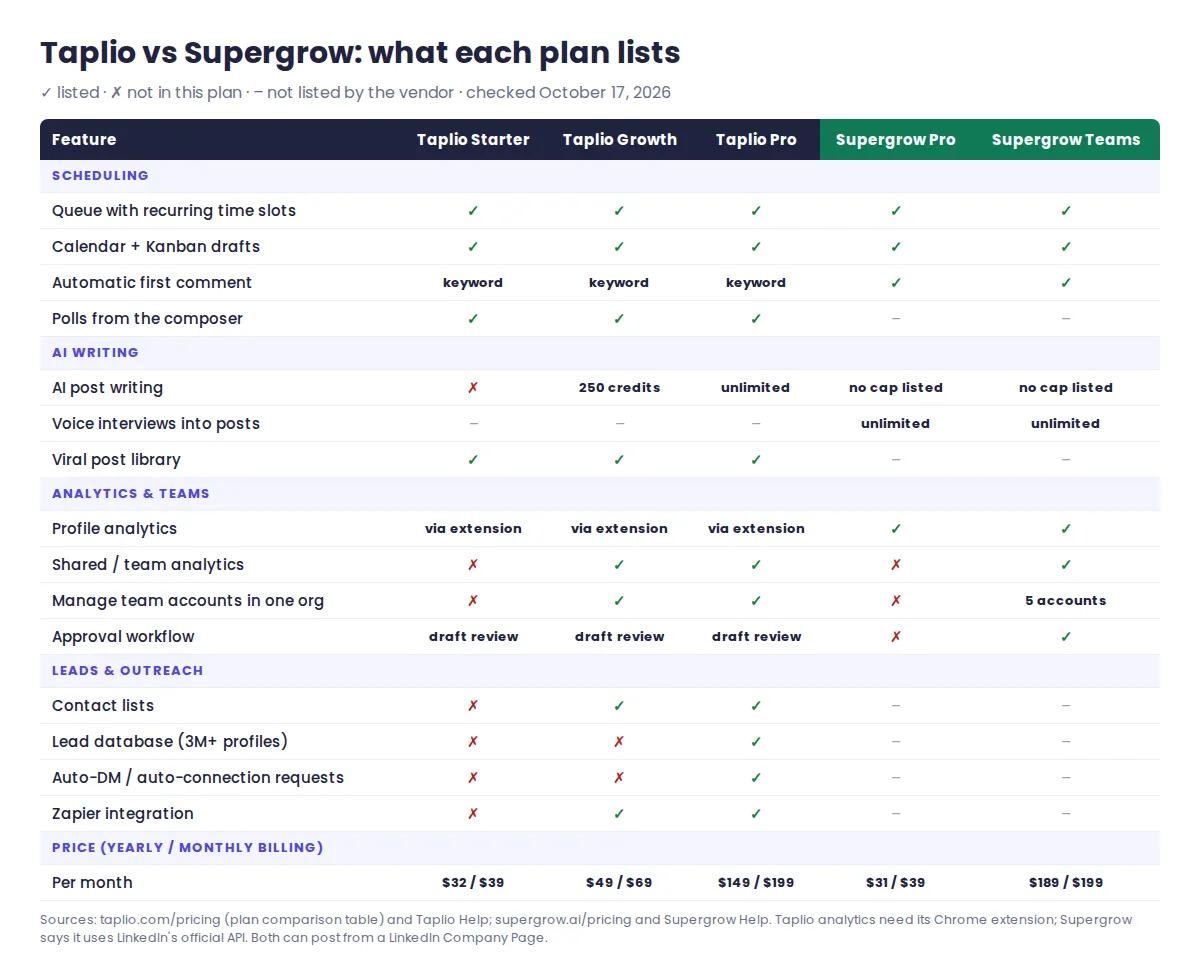
If all you need is a calendar, LinkedIn's own scheduler is free and both tools are more than you need. Paying starts to make sense for the queue, the first comment and AI drafts.
Analytics: extension-based stats vs API-based reports
The two collect data differently, and that changes what you see. Taplio's analytics help says the Chrome extension must be "properly installed on your browser" for LinkedIn data to reach Taplio, that trial accounts may see "up to 9 days of data", and that the section "is being entirely revamped". Every Taplio plan includes analytics and a monthly stats email; teams on Growth or Pro get shared analytics across accounts.
Supergrow says it connects "through LinkedIn's official API". Pro includes profile analytics and a weekly report that picks your best and weakest post. Company Pages get follower change and a post-by-post breakdown, but only "for all posts published via Supergrow". Teams adds an organisation view with reach, engagement rate, an "Earned Media Value" estimate and "Program Adoption" (active members out of seats), which suits a manager tracking whether executives actually post.
Leads and outreach: Taplio's CRM side, and the account-safety trade
This is the widest gap. Taplio Growth adds contact lists you engage with from the app; Pro adds a lead database of "more than 3 million enriched LinkedIn profiles" with filters such as what people post about, plus importing a post's likers or commenters, auto-DMs, bulk DMs and auto-connection requests, with leads pushed to lemlist. Supergrow lists none of these. Its Engage mode is about commenting on posts, not prospecting.
The trade is risk. LinkedIn's Prohibited software page bans automated methods to "send or redirect messages, create, comment on, like, share, or re-share posts", and says members who use such tools "risk having their accounts restricted or shut down". Taplio's FAQ says it "behaves exactly like a real LinkedIn user would". We can't tell you how LinkedIn treats any one tool. What we can say is that Taplio Pro's auto-DM and auto-connect features fall in the categories LinkedIn names, while Supergrow says it uses the official API and doesn't offer them. Our Taplio review covering its AI writer and lead tools looks at those features in more depth.
Trial, refund and cancellation terms compared
| Term (checked October 17, 2026) | Taplio | Supergrow |
|---|---|---|
| Free trial | 7 days, every Pro feature, limited AI | 7 days on every plan |
| Payment method at start | Yes, added before the trial | "No charge until the 7-day trial ends" |
| When the first charge happens | End of day 7, or earlier if you hit the trial AI limit; yearly plans charge the full year then | After the trial, if you pick a plan; otherwise "your account pauses" |
| Refunds | 30-day money-back guarantee on the first payment | "Supergrow currently does not offer refunds" (billing errors reviewed by email) |
| Changing plans | Upgrade, downgrade or cancel in Settings, Billing | Upgrades prorated; downgrades apply at the next billing date |
| Yearly saving | 18% to 29% by plan (Starter $32 vs $39, Growth $49 vs $69) | 20% on Pro ($31 vs $39); 5% on Teams ($189 vs $199) |
Supergrow's trial is gentler, since nothing is charged if you walk away. Taplio's refund window is the better safety net after you pay, especially on a yearly plan, where the full amount is billed at once. Before paying yearly, check Taplio's yearly vs monthly break-even math, and the Taplio offers currently listed on Saazora.
Questions about Taplio vs Supergrow
Is Supergrow cheaper than Taplio?
For one profile, yes: Supergrow Pro is $31 a month on yearly billing, against $32 for Taplio Starter (no AI) and $49 for Taplio Growth (with AI). For two or three profiles, Taplio Growth is cheaper. From four profiles, Supergrow Teams is.
Does Supergrow have a free plan?
No. Its pricing page lists Pro, Teams and custom Enterprise, each with a 7-day free trial. Taplio has no free plan either, though its Chrome extension installs for free.
Can I switch from Taplio to Supergrow without losing posts?
Supergrow's help center has guides to bulk-import content and drafts from a CSV file. Neither vendor documents a direct Taplio-to-Supergrow import, so plan to export your drafts first. Our ranked shortlist of Taplio replacements covers what else to check before leaving.
How this comparison was researched
This Taplio vs Supergrow comparison is research-based. On October 17, 2026 we read Taplio's pricing page (including its plan comparison table) and ten Taplio help center articles, Supergrow's pricing page and ten Supergrow help center articles, and LinkedIn's Prohibited software page. Copies of each page are kept on file. The cost-by-profiles table, break-even point and credit scenarios are our own arithmetic on those numbers, with the assumptions stated next to them. We did not run either tool for this article, had no vendor account, and neither vendor reviewed it. Where a page did not state something (Supergrow's add-on seat price, whether a Company Page uses a seat, Supergrow's current AI limits), we say so rather than guess. More on Saazora's research method.
Sources (checked October 17, 2026): Supergrow pricing, Supergrow: How billing works, Supergrow: How to get a refund, Supergrow: AI words, Supergrow: Analytics page, LinkedIn Help: Prohibited software. Taplio figures are from Taplio's pricing page and its help center articles "Taplio plans and pricing", "Credits explained", "Understanding Team billing and discounts", "How Taplio free trial works" and "Understanding how to use analytics in Taplio".
Research-based comparison: no vendor paid for, supplied an account for, or reviewed this article.