Last checked October 19, 2026 · Research-based review from CallRail's pricing page, FAQ and help center, not hands-on testing · US list prices
Saazora may earn a commission if you sign up through some links on this page, at no extra cost to you. It did not change the verdict or the drawbacks listed below.
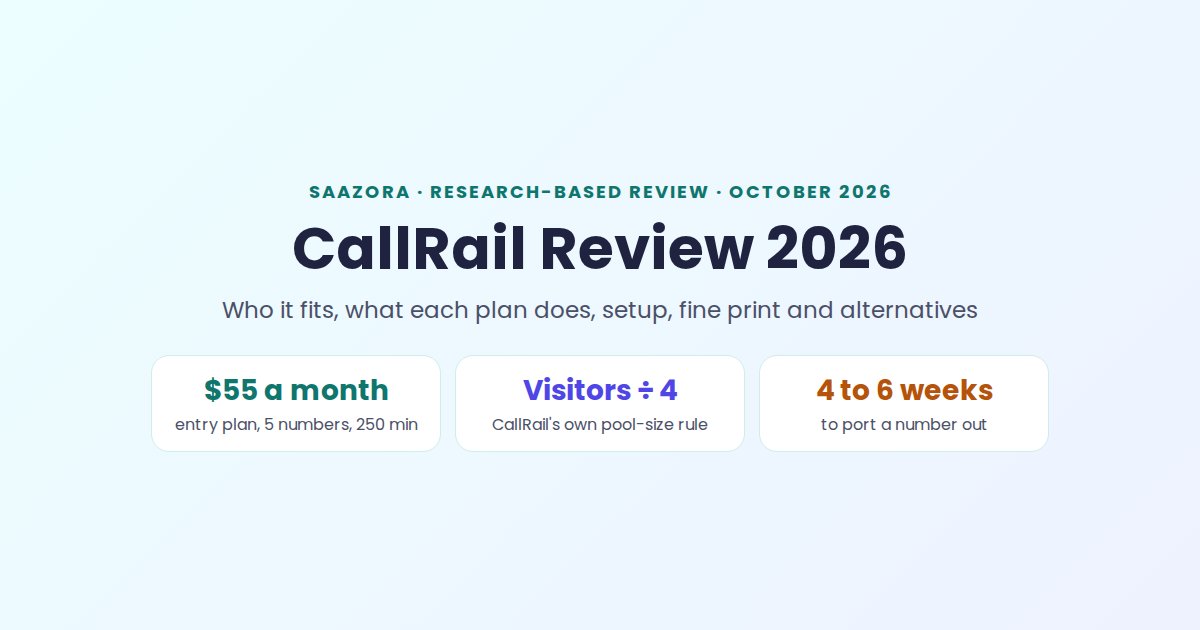
This CallRail review comes down to one question: do most of your new customers phone you after seeing an ad, a listing or your website? If yes, CallRail is a well-documented way for a local business or a small agency to see which campaign made the phone ring, starting at $55 a month with 5 tracking numbers and 250 minutes included. If you only run Google Ads, run a seasonal business, want a vanity number, or operate outside the United States, Canada, the UK and Australia, the documentation shows real friction you should know about before the trial starts.
Everything below comes from CallRail's own pages, read on October 19, 2026: the US pricing page and its expanded Lead Tracking table, the public FAQ, and ten help-center articles on setup, website number pools, annual plans, closing an account, porting and texting registration. No CallRail account was opened and no calls were placed for this review. If you already know you want CallRail and only need the numbers, the plan-by-plan CallRail price breakdown with sample bills goes deeper on cost than this page does.
CallRail review in brief: the verdict for phone-lead businesses
CallRail suits a business that pays for clicks or listings and closes deals by phone: dentists, clinics, law offices, HVAC and plumbing companies, roofers, home cleaners and the agencies that run their ads. Its entry plan already includes visitor-level website tracking, call recording, transcription and the Google Ads, Google Analytics, Facebook, Microsoft Ads and HubSpot integrations; CTM, for one, keeps HubSpot, Zapier and API access for its higher tiers. The weak spots are on the account side rather than the product side: numbers are released when you cancel, yearly plans cannot be cancelled mid-term, and usage is billed on top of every plan.
| Question | Short answer from CallRail's documentation |
|---|---|
| Lowest monthly price | $55 billed monthly, or $50 a month billed yearly ($600 up front) |
| What the entry plan includes | 5 local numbers, 250 local minutes with transcription, 25 texts, unlimited users |
| Free trial | 14 days, no credit card |
| Contract | None on monthly billing; yearly billing locks you in for 12 months, nonrefundable |
| Countries | United States, Canada, United Kingdom, Australia |
| Healthcare | In CallRail's words, it will "sign a business associate agreement (BAA) with each of our Healthcare clients"; Healthcare plans through sales |
| Best for | Local businesses and agencies whose leads arrive as phone calls from several ad channels |
| Skip it if | You only need Google Ads call counts, you close for part of the year, or you need a dialer |
Sources: callrail.com/pricing, callrail.com/faq and CallRail help articles listed at the end, checked October 19, 2026.
Who CallRail fits, and who should skip it
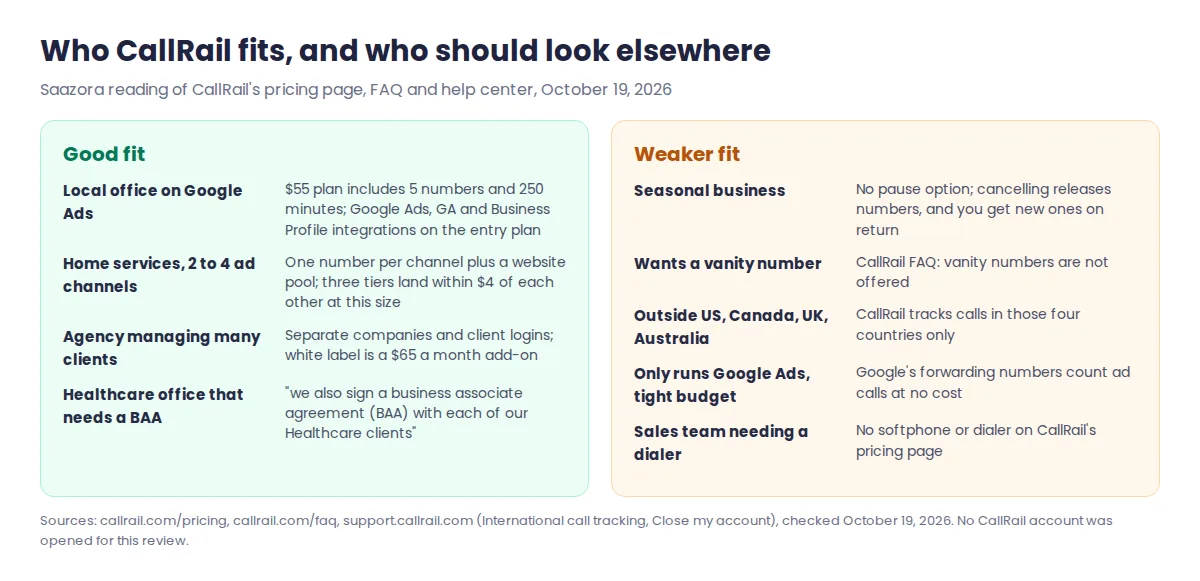
The fit question matters more than the feature list, because CallRail's strengths and its fine print land on different kinds of businesses. The matrix below sorts common reader types by what CallRail's own pages say about them.
Strong fit: the multi-channel local business
A plumbing company that runs Google Ads, a Google Business Profile, Facebook ads, a truck wrap and a mailer has five places a call can come from. CallRail's model is built for that: one tracking number per offline source, plus a pool of website numbers that swap in for each visitor so a call can be tied to the keyword or ad that brought them. The entry plan's 5 numbers cover a small version of that setup, and extra local numbers cost $3 each a month on the entry tier.
Strong fit: the agency with many clients
CallRail's FAQ says you can create separate companies and client logins inside one account, and each client sees only its own call data. User roles include Manager, Reporting and Notifications, and Reporting users cannot create or change tracking numbers. White label branding is a $65 a month add-on.
Conditional fit: medical and dental offices
CallRail's pricing FAQ answers the HIPAA question in these words: "We take HIPAA compliance seriously; that's why we've not only created an end-to-end solution for health care providers, but we also sign a business associate agreement (BAA) with each of our Healthcare clients. Contact us today to get your BAA set up and learn about our specific Healthcare plans." The page does not list a price for those Healthcare plans, so a clinic should expect a sales conversation rather than a self-serve signup at the $55 rate.
Weak fit: seasonal, vanity-number and Google-only businesses
The FAQ is blunt that an account cannot be paused: "It's not possible to temporarily disable an account." Cancelling for the off season means your tracking numbers are disabled and you get different ones when you come back, so any number printed on signs or flyers stops working. CallRail also says it does not offer vanity numbers. And if Google Ads is your only paid channel, Google's own forwarding numbers can count calls from your ads "without any cost to you", which our walkthrough of Google's built-in call conversions covers step by step.
What each CallRail plan does in practice, per its own docs
CallRail sells four bundles on its pricing page, and each one is a combination of three products described in its help article on plan types: Call Tracking Intelligence (the base), Form Tracking, and Premium Conversation Intelligence. A fourth product, Voice Assist, is sold on top.
| Bundle | Monthly / yearly-billed price | Products inside | What it adds in practice |
|---|---|---|---|
| Lead Tracking | $55 / $50 | Call Tracking | Tracking numbers, dynamic number insertion, recording, call flows, texting, integrations, API |
| Lead Tracking Complete | $105 / $95 | Call Tracking + Form Tracking | 1,000 form submissions a month ($0.02 each after), custom form builder, multi-touch cost-per-lead reports |
| Lead Conversion | $165 / $150 | Call Tracking + Premium Conversation Intelligence | 10,000 analysis minutes ($0.05 each after), AI call summaries, sentiment, automatic conversion tagging, coaching tools |
| Lead Conversion Complete | $215 / $195 | All three | Everything above in one bill |
| Voice Assist (add-on product) | From $95 a month plus Lead Tracking | AI answering | Answers calls your team misses and collects caller details; $1 per call after 50 calls over 15 seconds |
Prices as of October 19, 2026 from callrail.com/pricing; product descriptions from CallRail's "CallRail's Plan Types" help article (updated September 22, 2026). All four bundles include 5 local numbers, 250 local minutes and 25 texts.
Call Tracking: the part every plan shares
CallRail describes the base product as unique phone numbers "for all of your marketing campaigns to identify where calls are coming from." In daily use that means three things. First, a call log that ties each call to its marketing source, down to the keyword when website tracking is on (keyword-level attribution is listed on every Lead Tracking tier). Second, call flows: CallRail's help center says they "help you create paths callers can take using your tracking numbers," which covers business-hours schedules, voicemail routing and department menus. Third, recordings and transcripts: the pricing page labels the included usage "Local Minutes (includes transcription)", with a note that additional fees may apply. The expanded plan table also lists custom reporting, call scoring, custom tags, WordPress and Wix plugins, a Google Data Studio connector and API and webhook access on every Lead Tracking tier.
Form Tracking: for offices that get web forms as well as calls
Form Tracking, sold inside the two "Complete" bundles, captures website form submissions and sends their contents to your team by phone, text or email, so calls and forms land in one report with the same source data. It only pays off if forms make up a real share of your leads; a roofer who gets nine calls for every form may never need it.
Premium Conversation Intelligence: the AI layer
The two "Lead Conversion" bundles add what CallRail calls "extra insight and analysis tools for lead conversion, call sentiment, and internal coaching." The help article lists AI call summaries, sentiment, transcript export, self-reported attribution, Conversion Signals and Convert Assist. Usage is measured in analysis minutes, with 10,000 included. This is the tier for an office manager who wants to know which calls were real appointment requests without listening to every recording.
Add-ons that change the bill
Three add-ons appear under the expanded plan table: white label at $65 a month, advanced call flows at $15 a month per company, and premium integrations at $80 a month, which is how Salesforce, Marketo, Marin, Kenshoo, Acquisio and Optimizely X connect. Heavy API use is billed in tiers: free up to 1,500 calls a month, $80 a month up to 12,000, and $200 a month up to 300,000.
Plan prices as of October 19, 2026
CallRail's four bundles cost $55, $105, $165 and $215 a month on monthly billing, or $50, $95, $150 and $195 a month billed yearly. Behind the "See all Lead Tracking plans" link the base product comes in four usage tiers, and those tiers matter more for a growing business than the bundle names do:
| Lead Tracking tier | Monthly | Yearly-billed | Local numbers included | Local minutes included | Extra number / minute |
|---|---|---|---|---|---|
| Entry | $55 | $50 | 5 | 250 | $3.00 / $0.06 |
| More minutes | $75 | $68 | 5 | 750 | $3.00 / $0.06 |
| 10 numbers | $95 | $85 | 10 | 1,000 | $2.50 / $0.05 |
| 40 numbers | $295 | $265 | 40 | 4,000 | $1.75 / $0.045 |
Source: expanded Lead Tracking table on callrail.com/pricing, checked October 19, 2026. Toll-free numbers cost $3 to $5 each depending on tier; texts are $0.03 each after the 25 included.
Sample bills at different volumes are in the pricing breakdown linked at the top of this review. Current offers and the trial link are kept on the CallRail offer page.
Setting up CallRail: the documented path to a first tracked call
CallRail's "Getting started with call tracking" article lays out six steps from signup to a working number. None of them needs special hardware: the FAQ says CallRail "does not require any special training, equipment, or up-front investment," because tracking numbers simply forward to the line you already answer.
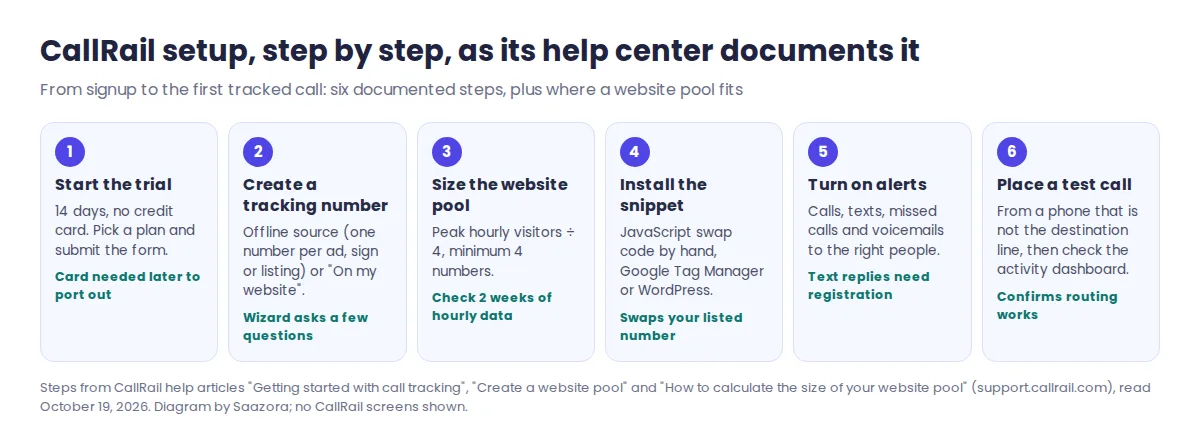
- Start the trial. Every account begins with a 14-day trial, and CallRail says it won't bill you until the trial is over.
- Create your first tracking number. The setup wizard asks what the number is for. CallRail notes you "can create numbers for many specific online and offline purposes": one per print ad, vehicle, directory listing or campaign, or a set that lives on your website.
- Build a website pool if you want visitor-level tracking. In the number wizard you choose "On my website," then "Calls, keywords, & web sessions," enter the destination line, pick the sources and set the pool size. CallRail assigns each visitor a number from the pool and frees it again when that visitor is done browsing.
- Install the JavaScript snippet. It swaps the phone number printed on your site for a tracking number, and can go in by hand, through Google Tag Manager or through the WordPress plugin. If your number appears inside an image or as a vanity word, CallRail has separate help articles for those swap cases.
- Set up notifications for calls, texts, missed calls and voicemails, so the right person hears about a lead quickly.
- Place a test call from a phone other than the destination line, then check that it appears in the activity dashboard.
Connecting Google Ads, Google Analytics or a CRM comes after these six steps and is handled in CallRail's integrations settings; the Google side of that setup is in our Google Ads guide linked above.
Sizing a website number pool with CallRail's own formula
Pool size is the setting most likely to skew attribution, and CallRail publishes a simple rule for it: "The number of peak hourly visitors divided by four equals the size of your pool," with a minimum of four numbers. Its example: 100 visitors in your busiest hour means a pool of 25. The help article suggests charting hourly visitors over the previous two weeks, or over peak season if your business is seasonal, and warns that a pool that is too small lets two visitors see the same number, which misattributes calls.
Each pool number is a tracking number on your bill, drawn from the same allowance as your offline numbers when you pick local area codes, so the formula decides which Lead Tracking tier is cheapest. We applied it to four typical traffic levels:
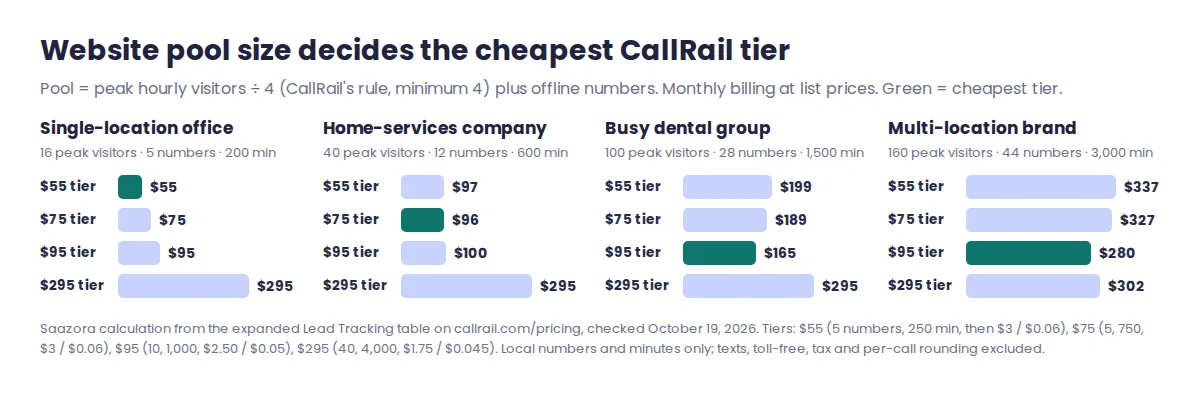
| Business | Peak visitors in busiest hour | Pool + offline numbers | Minutes a month | Cheapest tier, monthly | Same, billed yearly |
|---|---|---|---|---|---|
| Single-location office | 16 | 4 + 1 = 5 | 200 | $55 entry tier | $50 |
| Home-services company | 40 | 10 + 2 = 12 | 600 | $96 on the $75 tier | $89 |
| Busy dental group | 100 | 25 + 3 = 28 | 1,500 | $165 on the $95 tier | $155 |
| Multi-location brand | 160 | 40 + 4 = 44 | 3,000 | $280 on the $95 tier | $270 |
Saazora calculation. Local numbers and minutes only; texts, toll-free numbers, tax and per-call rounding are excluded. Formula and inputs available on request.
Two things stand out. At home-services size, three tiers land within $4 of each other ($96, $97 and $100), so the choice should follow expected growth rather than today's bill. And the 40-number tier is not automatically the right one for a 44-number account: at 3,000 minutes the $95 tier with paid extras came out $22 a month cheaper than the $295 tier, because at 44 numbers the bigger tier only wins once usage passes about 3,440 minutes a month. Treat that as a reason to model your own traffic before upgrading, not as a fixed rule.
The fine print: contracts, cancellation, numbers and overage
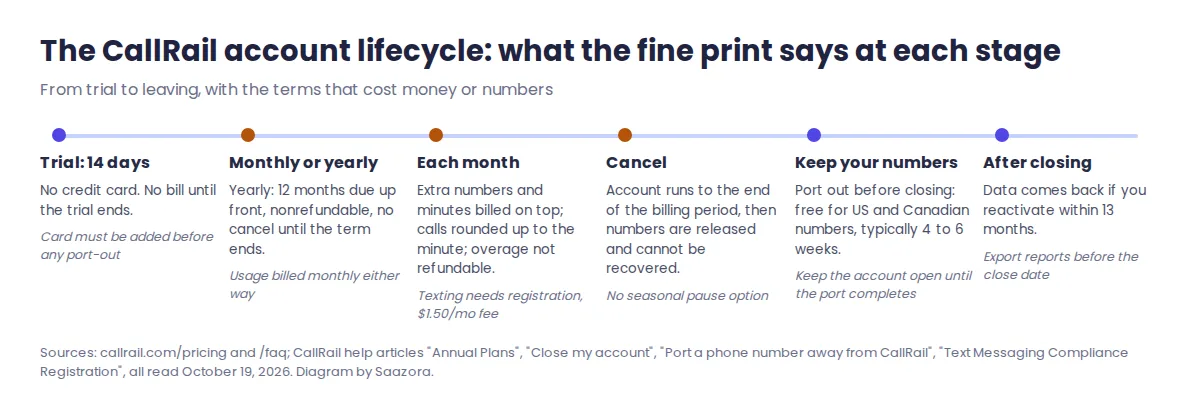
Most of this CallRail review's caveats live here. These are the terms that cost money or phone numbers, collected from five CallRail pages. None of them is hidden, but they sit in different articles, and several only matter at the moment you want to leave.
| Term | What CallRail says | What it means for you |
|---|---|---|
| Contract on monthly billing | "Because we don't require long-term contracts, you can cancel your account any time." | Month-to-month is genuinely open-ended. |
| Yearly billing | The base fee "for the upcoming 12 months is due upon your form of payment entry"; you "cannot change to a monthly plan or cancel your plan until the annual billing period ends"; "Annual plans are nonrefundable." | Saving $5 to $30 a month means committing $600 to $3,180 up front. Try monthly first. |
| Overage | Extra minutes and numbers are "billed in addition to your base fee" and "are not refundable under any circumstances." | A busy month costs more, and there is no credit if you over-buy numbers. |
| Minute rounding | "Minutes are calculated by rounding each call up to the nearest minute." | A 10-second wrong number counts as a full minute. |
| Price changes | CallRail "may change our fees at any time by posting a new pricing structure." | Re-check the pricing page at renewal. |
| Cancelling | Numbers "will be released at the end of your billing cycle" and "cannot be recovered." | Port out any number printed on signs or vehicles before you close. |
| Keeping a number | Porting a US or Canadian number away "is free"; it "typically takes 4-6 weeks"; keep the account open until it completes. Trial accounts must add a card first. | Plan the exit at least six weeks ahead. |
| Data after closing | Former data is available "if you reactivate your account within 13 months of closing." | Export reports you need for clients before the close date. |
| Texting | Businesses that want to reply to text leads "are required to register for texting," with a monthly fee of $1.50. | Budget a small fee and some lead time before texting customers back. |
| Toll-free minutes | The main comparison table lists $0.08 a minute; the expanded Lead Tracking table lists $0.09 on the two smaller tiers and "$0.65 ea." on the two larger ones. | The two tables disagree. Ask CallRail to confirm the rate in writing before you rely on toll-free numbers. |
Sources: callrail.com/pricing and callrail.com/faq; CallRail help articles "Annual Plans" (updated July 9, 2026), "Close my account" (January 22, 2026), "Port a phone number away from CallRail" (May 20, 2025) and "Text Messaging Compliance Registration" (September 17, 2026). All read October 19, 2026.
If the trial convinces you, start CallRail's 14-day trial (no card needed) (affiliate link) on monthly billing and switch to yearly only once your number count and minutes have settled.
Strengths and weak spots, weighed from the documentation
What CallRail does well
- A generous entry plan. Visitor-level website tracking, keyword attribution, recording, transcription and unlimited users are all on the $55 tier.
- Integrations on the base plan. Google Analytics, Google Ads, Google Business Profile, Facebook, Microsoft Ads, HubSpot, Slack and Zapier are listed for every Lead Tracking tier.
- A published pool-size rule. CallRail gives an exact formula for how many website numbers you need, which makes the bill easier to predict.
- Agency-friendly structure. Separate companies, client logins and restricted user roles inside one account.
- No card for the trial, and no contract on monthly billing.
Where it falls short
- Every plan says "plus additional usage." A growing account pays for extra numbers and minutes on top, and that usage is not refundable.
- Yearly billing has no exit. Nonrefundable, paid up front, no cancellation until the term ends.
- No pause and no vanity numbers. Seasonal businesses lose their numbers when they cancel.
- Salesforce costs extra. It sits behind the $80 a month premium integrations add-on.
- Healthcare pricing is not public. The BAA path goes through sales.
- Four countries only, and annual billing is not offered on international plans.
Using CallRail in Canada
Canada is one of the four countries CallRail serves. Its help article on international call tracking says "CallRail offers call tracking in four countries worldwide" and lists the United States, Canada, the United Kingdom and Australia. Canada is treated like the US for setup: the extra step of asking support to switch on international features applies only "If you want to create a tracking number in any country we service outside of the United States or Canada." By that wording, a Canadian business can create tracking numbers without contacting support first.
Three details are worth checking before you sign up from Canada. The pricing page links separate pricing pages for the UK and Australia but not for Canada, and the help article only says "Pricing and available features for international accounts vary by country," so confirm the currency and rates on your quote. CallRail's annual plans article says annual billing "is not available for international plans," and it does not say whether a Canadian account counts as one. On the plus side, porting a Canadian number away from CallRail is free, the same as a US number.
When another tool is the better buy
CallRail is not the cheapest option in every situation, and its documentation points to the cases where a rival fits better. Our ranking of seven call tracking tools at three call volumes prices all of them side by side; the short version for CallRail shoppers:
| If you need | Look at | Why, compared with CallRail |
|---|---|---|
| Call counts from Google Ads only | Google Ads forwarding numbers | Google says these work "without any cost to you"; no website pool, no other channels |
| A softphone, dialer or contact-center queue | CTM (CallTrackingMetrics) | Sells sales-team tools CallRail's pricing page does not list; numbers and minutes are bought separately |
| A lower monthly starting price | WhatConverts | Its Call Tracking plan is $30 a month on its pricing page, with HIPAA listed from its $100 Pro plan |
| Self-serve HIPAA pricing | WhatConverts Pro or CTM | Both name HIPAA on a priced plan; CallRail asks you to "Contact us today to get your BAA set up" |
| Tracking calls in other countries | A vendor with wider coverage | CallRail covers four countries only |
WhatConverts prices from whatconverts.com/pricing and Google's wording from Google Ads Help (answer 6095883), checked October 19, 2026. CTM details from ctm.com/plans-pricing, checked October 18, 2026.
For the closest head-to-head, our CallRail vs CTM cost comparison works out where CTM's lower per-minute rate catches up with CallRail's bundles.
Questions to settle before starting a trial
Is CallRail worth it for a small business?
It is worth it when phone calls are your main lead source and you spend on more than one channel, because the $55 entry plan already shows which ad, keyword or listing produced each call. If Google Ads is your only channel, Google's free forwarding numbers may be enough.
Can I keep my current business number with CallRail?
Yes. CallRail's tracking numbers forward to the line you already answer, and CallRail's help center also has guides for porting an existing number into CallRail. Leaving works the other way: port your numbers out before you close the account.
Does CallRail work in Canada?
Yes. Canada is one of CallRail's four countries, and Canadian tracking numbers do not need the support activation required for the UK and Australia.
Sources and how this CallRail review was researched
On October 19, 2026 Saazora read CallRail's US pricing page in yearly and monthly views, its expanded Lead Tracking table and pricing FAQ, the public FAQ at callrail.com/faq, and these CallRail help-center articles: Getting started with call tracking, Create a website pool, How to calculate the size of your website pool, Visitor tracking basics, CallRail's Plan Types, Annual Plans, Close my account, Port a phone number away from CallRail, Text Messaging Compliance Registration and International call tracking. The pool-size costs are our own calculation from those list prices. No vendor account was opened and no calls were placed, so this is a documentation-based review, not hands-on testing. Prices exclude tax and can change; check CallRail's pricing page before you buy. Our research and review process explains how prices are verified, and more lead-handling tools are in Sales Prospecting & CRM.
Ready to see your own call sources? Try CallRail free for 14 days (affiliate link).