Last checked October 13, 2026 · Research-based guide
Saazora may earn a commission if you sign up through some links on this page, at no extra cost to you.
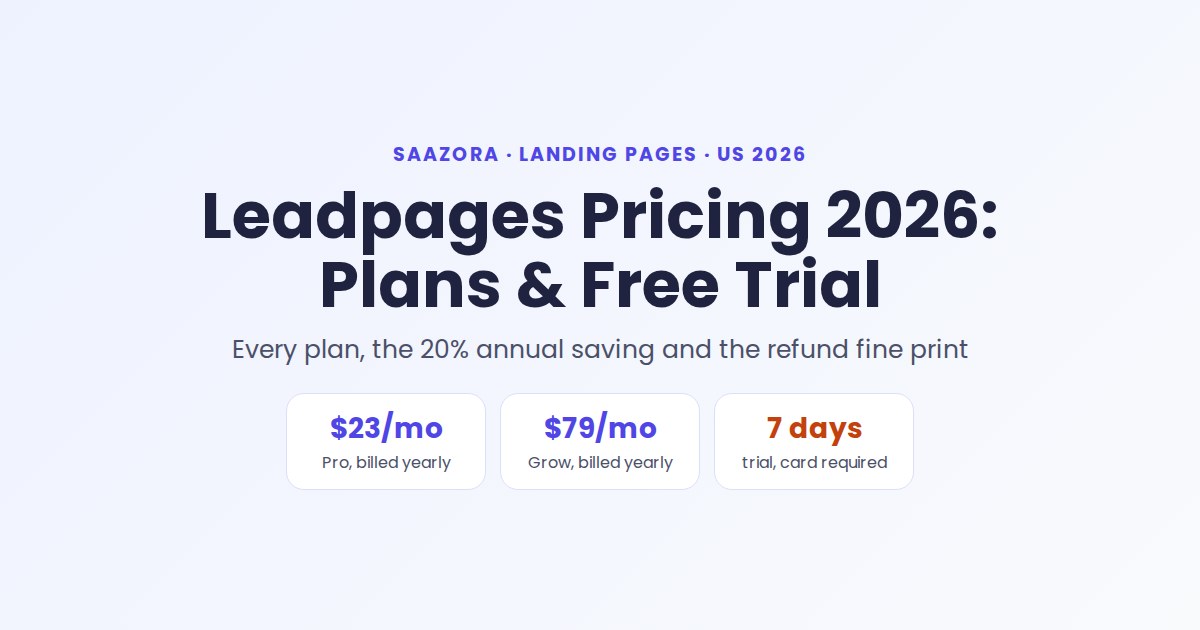
Leadpages pricing now comes in two families. The publishing plans, Pro and Business, cost $29 or $49 a month. The testing and optimization plans, the ones with A/B testing, cost $99 (Grow) or $199 (Optimize) a month. Paying for a year at once brings those to $23, $39, $79 and $159 a month, and Enterprise is custom-priced. Every plan starts with a 7-day free trial, but you need a credit card to begin it, and Leadpages' own FAQ says it does not refund subscription payments once the trial is over.
Many review sites still quote the older Standard and Pro plans, and the lineup changed again in October 2026: since our October 9 check, the $10 Starter and $399 Scale plans have left the plan cards. Below are the plans on Leadpages' pricing page as of October 13, 2026, what each tier unlocks, what the annual discount is worth in dollars, and the trial and refund terms to read before you enter a card.
Every Leadpages plan and price, side by side
Leadpages now shows four priced plans on one page, two under "Publishing" and two under "Testing & optimization", plus a custom-priced Enterprise tier. Annual billing takes about 20% off and is charged once a year.
| Plan | Billed monthly | Billed yearly (per month) | Yearly total | Headline limits |
|---|---|---|---|---|
| Pro (Publishing) | $29 | $23 | $276 | 25 pages, 1 domain, 1 blog, 12K AI credits/mo |
| Business (Publishing) | $49 | $39 | $468 | 50 pages, 2 domains, 2 blogs, 20K AI credits/mo |
| Grow (Testing & optimization) | $99 | $79 | $948 | Unlimited pages and traffic, 4 domains, manual A/B testing |
| Optimize (Testing & optimization) | $199 | $159 | $1,908 | 6 domains, Smart Traffic, heatmaps, multivariate tests, 3 team seats |
| Enterprise | Custom | Custom | Custom | SSO, custom contracts, dedicated support, volume publishing |
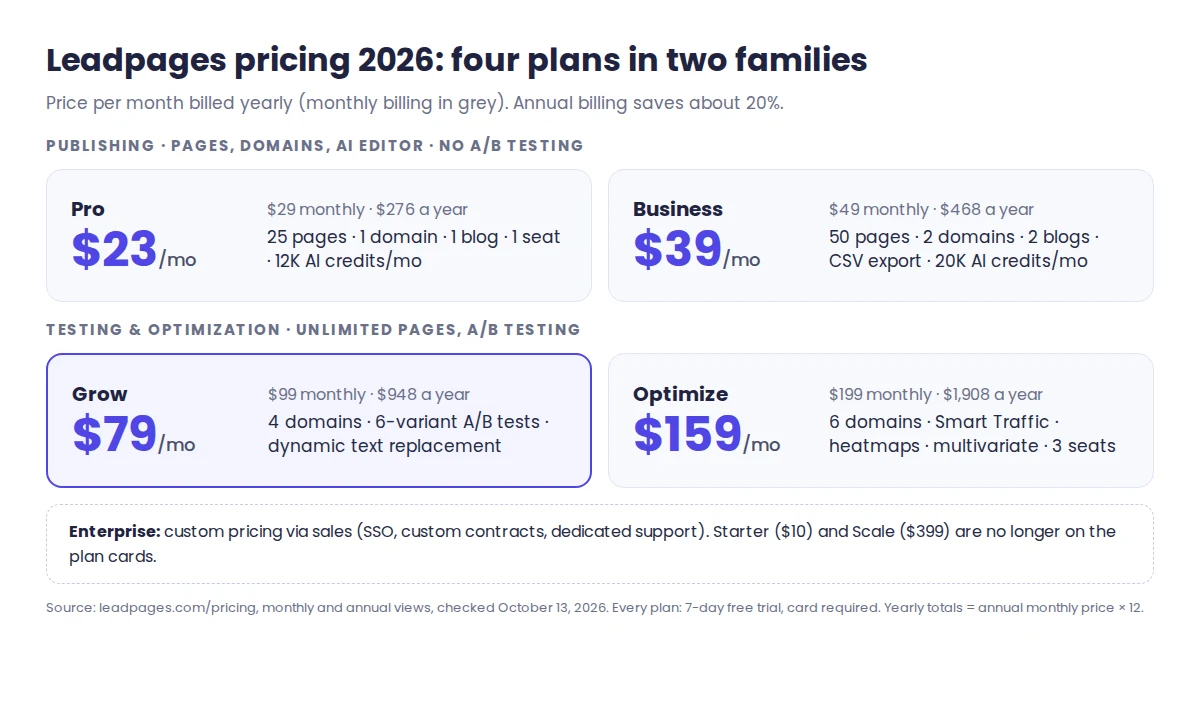
Yearly totals are simply the per-month annual price times 12. The pricing page lists no free plan: every plan starts with the paid-plan trial. Leadpages' help center still describes a limited free tier (5 pages) that an account drops to after cancelling, but it is not offered on the pricing page, so budget for at least Pro to keep a page live on your own domain.
Publishing or testing & optimization: which family do you actually need?
This choice moves your bill more than any other. Leadpages says publishing plans "build and ship your pages" and calls the testing and optimization plans "the superset": everything in Publishing, plus conversion tools. The dividing line is testing.
- Publishing (Pro, Business) covers landing pages, simple websites and blogs on a custom domain with SSL, the AI editor, custom slugs and API access. The comparison table marks A/B testing, Smart Traffic and heatmaps as not included on both plans. One FAQ answer on the same page says manual A/B testing is "included on every plan", but the plan cards and table do not support that, so do not buy Pro or Business to run tests.
- Testing & optimization (Grow, Optimize) removes the page cap, adds A/B tests, dynamic text replacement that matches page copy to your ad keywords, and visitor lead enrichment. Leadpages says traffic is unlimited on every plan with no overage fees.
The jump from Business ($39 a month yearly) to Grow ($79 a month yearly) roughly doubles the bill. It is worth paying only if you will actually run split tests or need more than 50 pages. If you publish a handful of pages for an email list or a local service, the $23-a-month Pro tier (paid annually) is the cheaper fit. Your pages and domains carry over when you move up, according to Leadpages, so starting small does not lock you in.
What Grow and Optimize add for the extra money
Grow and Optimize share unlimited pages, AI page creation, forms with webhooks and lead CSV export. The table on the pricing page shows where they split (Enterprise is quoted by sales, so it has no column):
| Feature | Grow | Optimize |
|---|---|---|
| Custom domains / sites | 4 | 6 |
| Blogs | 3 | 5 |
| A/B variants per page | 6 | 6 |
| Multivariate testing (A/B/C/D) | No | Yes |
| Smart Traffic, heatmaps, auto-personalization | No | Yes |
| Anonymous traffic detection / lead enrichment per month | 2,000 / 1,000 | 5,000 / 2,500 |
| AI credits per month | 40,000 | 80,000 |
| Analytics retention | 12 months | 24 months |
| Active integrations | 5 | 10 |
| Team seats included | 1 | 3 |
| Priority support | Not listed |
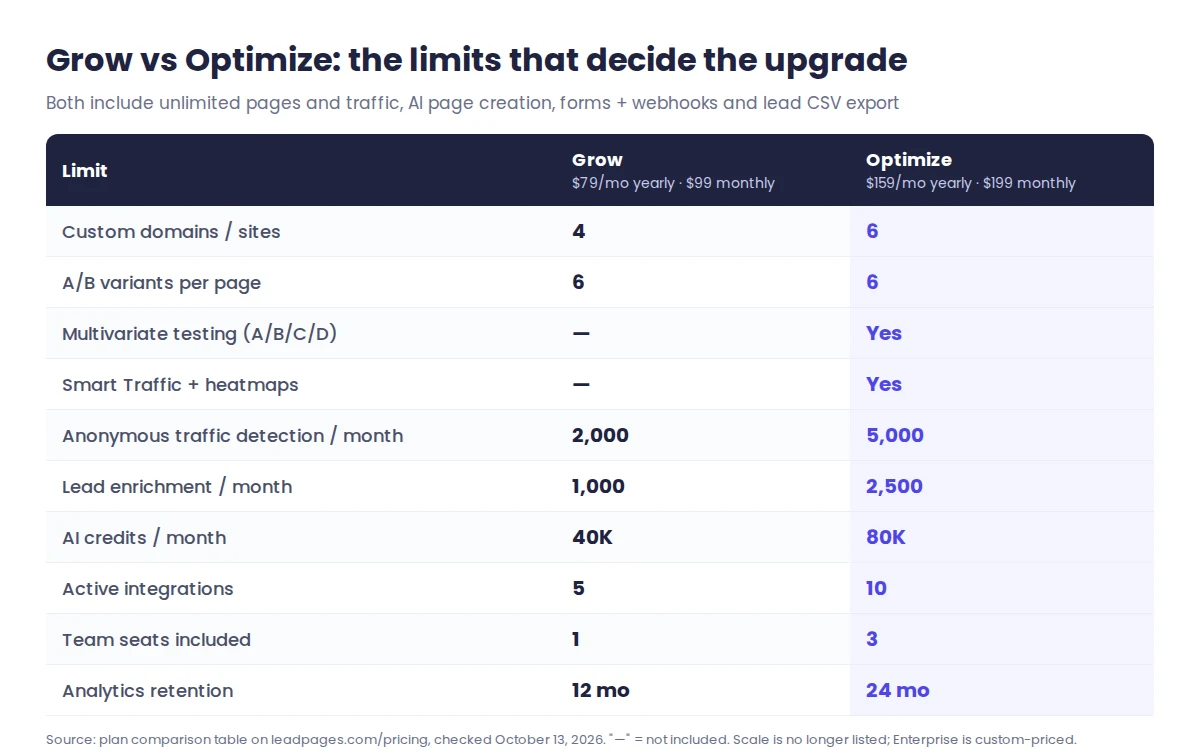
Three limits tend to decide the upgrade. First, team seats: the table lists one seat on Grow (and on Pro and Business), so a team that needs more than one login is effectively looking at Optimize with three. Second, testing method: both plans allow up to six A/B variants per page, but only Optimize adds multivariate tests, Smart Traffic routing and heatmaps. Third, integrations: five active connections on Grow can fill up quickly if you push leads to a CRM, an email tool, Zapier and ad platforms at once.
The enrichment allowance is a quieter perk. Grow detects up to 2,000 anonymous visitors a month, which overlaps with standalone visitor-identification tools. If that is your main goal, our guide on seeing which companies visit your website covers free options first.
Annual billing: what 20% off is worth in dollars
Per Leadpages, paying annually cuts the price by 20%, invoiced in one payment each year. Here is that discount in real money over 12 months:
- Pro: $348 monthly vs $276 yearly, a $72 saving.
- Business: $588 vs $468, saving $120.
- Grow: $1,188 vs $948, saving $240.
- Optimize: $2,388 vs $1,908, saving $480.
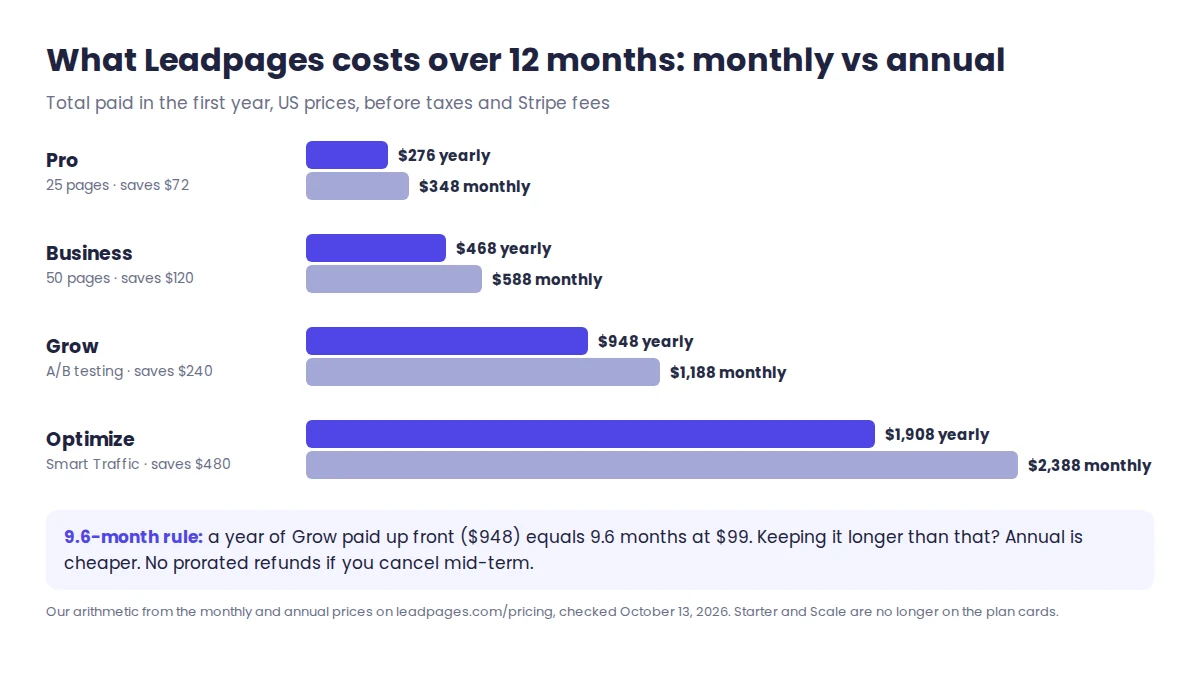
A simple way to decide: a year of Grow up front ($948) equals about 9.6 months of the monthly price. If you are confident you will keep the plan beyond nine months, annual is cheaper. If you are still proving that landing pages convert for your offer, stay monthly, because the terms rule out prorated refunds if you cancel partway through a paid term.
One caution about promos. A third-party review (Hackceleration, June 2026) reported a launch offer of $49 for Grow and $99 for Optimize for the first three months. We did not see that offer on the pricing page on October 13, so budget on the full prices above.
How the 7-day free trial works
Every priced plan, from Pro to Optimize, has a "Start 7-Day Free Trial" button. The key terms, in Leadpages' own words on the pricing page:
- A card is required. "We collect a card at checkout to start your 7-day trial, but you won't be charged until day 7."
- Nothing is held back. The trial gives full access to the plan you choose. On Grow you can run A/B tests and dynamic text replacement; on Optimize you also get Smart Traffic and heatmaps.
- Cancel before day 7 from your account settings to avoid the first charge.
- Plan changes (upgrades or downgrades) take effect on your next billing cycle, according to the pricing FAQ. The help center says upgrades apply immediately with a prorated charge, so expect an upgrade to bill straight away.
The wording at the end of the trial is not fully consistent. One answer says your card is charged on day 7, while another says "you choose a plan or your account pauses" with no surprise charges. Treat day 7 as a billing date: set a reminder for day 5, and decide by then.
To get the most from seven days, pick the plan you would really buy, connect your domain on day one, and send real traffic to one page. A week is short for a statistically meaningful A/B test, so judge the editor, page speed and integrations rather than conversion lifts.
Refunds and cancelling: read the fine print
Cancelling is easy. Leadpages says you can cancel anytime from account settings, with no cancellation fee, and your pages stay live through the end of the period you paid for.
Refunds are where the two official documents differ:
- Leadpages FAQ (leadpages.com/faq): "After that, we don't offer refunds on subscription payments, but you can cancel future renewals anytime." In other words, the trial is the risk-free window.
- Terms and Conditions (updated April 2, 2026): section 7.3 still describes a seven-day money-back guarantee for new accounts, requested on or before day 7 of the paid term, with renewals excluded. The same section refers to a 14-day trial, which no longer matches the 7-day trial on the pricing page.
Both documents agree on one thing: cancelling partway through a paid month or year does not earn a prorated refund. If a refund matters to you, email support before your first payment and ask which policy applies to your account. On an annual plan that can mean $948 or more at stake.
Costs that sit outside the plan price
- AI credit top-ups. AI page creation, URL imports and AI chat use monthly credits that refill each billing cycle. Extra packs start at $2.50.
- Payment fees. Leadpages' ecommerce page says it adds no transaction fees to Stripe checkout on your pages; standard Stripe fees still apply.
- Your domain. Plans connect custom domains and provision SSL, but the pricing page does not list domain registration, so expect to buy the domain from a registrar.
- Taxes. The terms say applicable taxes are charged on top of fees.
Two discounts are worth asking about. Nonprofits and schools can email Leadpages, which says it reviews that pricing case by case. Existing customers on older plans keep their current price, according to the pricing FAQ.
Which Leadpages plan fits your situation
- A coach or local business with 3 to 10 pages: Pro, $23 a month yearly. You get your own domain and a blog, without paying for tests you will not run.
- A solo marketer running Google or Meta ads: Grow, $79 a month yearly. Dynamic text replacement and A/B tests with up to six variants are the reason to pay for Grow over the publishing plans.
- A small in-house team with steady paid traffic: Optimize, $159 a month yearly. Three team seats, multivariate tests, Smart Traffic and heatmaps arrive here.
- An agency with many client brands: Optimize covers 6 domains and 3 seats; beyond that, Enterprise is custom-priced through sales. The pricing FAQ still mentions a $399 Scale plan, but it no longer appears on the plan cards, so ask sales whether it can still be bought.
If you are still choosing a tool rather than a plan, our comparison of the best landing page builders puts Leadpages next to its main rivals. If Leadpages already fits, you can start a Leadpages trial on the plan you would actually buy, and we track the current annual saving on our Leadpages discount page.
Leadpages pricing FAQ
How much does Leadpages cost per month?
Leadpages Grow costs $99 a month on monthly billing or $79 a month billed yearly ($948 a year), and Optimize is $199 or $159. The publishing-only plans cost $29 (Pro) or $49 (Business) a month, or $23 and $39 billed yearly. Enterprise is custom-priced.
Is there a free version of Leadpages?
No. The pricing page lists no free plan, and keeping pages live on your own domain needs a paid plan starting at $23 a month billed yearly (Pro, or $29 month to month). Every paid plan includes a 7-day free trial, and Leadpages asks for a card to start it.
Does the Leadpages trial need a credit card?
Yes. Leadpages collects a card at checkout to start the 7-day trial and says you will not be charged until day 7. You can cancel from your account settings before then. The trial unlocks every feature of the plan you pick, including A/B testing on Grow and Smart Traffic on Optimize.
Can I get a refund from Leadpages?
Probably not after you are billed. Leadpages' FAQ says it does not refund subscription payments after the trial, though its April 2026 terms still mention a seven-day money-back guarantee for new accounts. Neither gives a prorated refund for cancelling mid-term, so confirm with support before an annual purchase.
Which Leadpages plan includes A/B testing?
A/B testing starts on Grow at $99 a month, or $79 billed yearly, with up to six variants per page. Optimize adds multivariate tests, Smart Traffic, heatmaps and auto-personalization. The comparison table shows no A/B testing on Pro or Business, even though one FAQ answer on the pricing page says it is included on every plan.
Where these numbers come from
We read the Leadpages pricing page with the billing toggle on monthly and then annual, its plan comparison table and pricing FAQ, the general FAQ, the ecommerce page and section 7 of its Terms and Conditions on October 9, 2026, then re-checked the pricing page, its FAQ, the general FAQ, the Terms and the help center's plans and billing articles on October 13, 2026, all in US dollars. We calculated the yearly totals, savings and the 9.6-month comparison ourselves from those list prices. We have not built client pages on Leadpages; this is a research-based pricing guide. More builder and no-code tools are in our AI app builders and no-code hub, and our process is explained in how we review software.
Sources (checked October 13, 2026): Leadpages pricing page and plan comparison, Leadpages FAQ, Leadpages help center plans and billing articles, Leadpages ecommerce product page, Leadpages Terms and Conditions (last updated April 2, 2026), Hackceleration Leadpages pricing review (June 2026, promo report only).
Research-based guide: no vendor paid for or reviewed this article.