CallRail help center, Google Ads and Google Business Profile help pages and five call tracking vendors' sizing guidance read, and prices on callrail.com checked, October 26, 2026 · Research guide based on vendor documentation, not hands-on testing · US list prices
Saazora may earn a commission if you sign up for CallRail through links on this page, at no extra cost to you. Links to Google, CallTrackingMetrics, WhatConverts, Clixtell, Ringostat and Infinity pages are plain links with no affiliate tag.
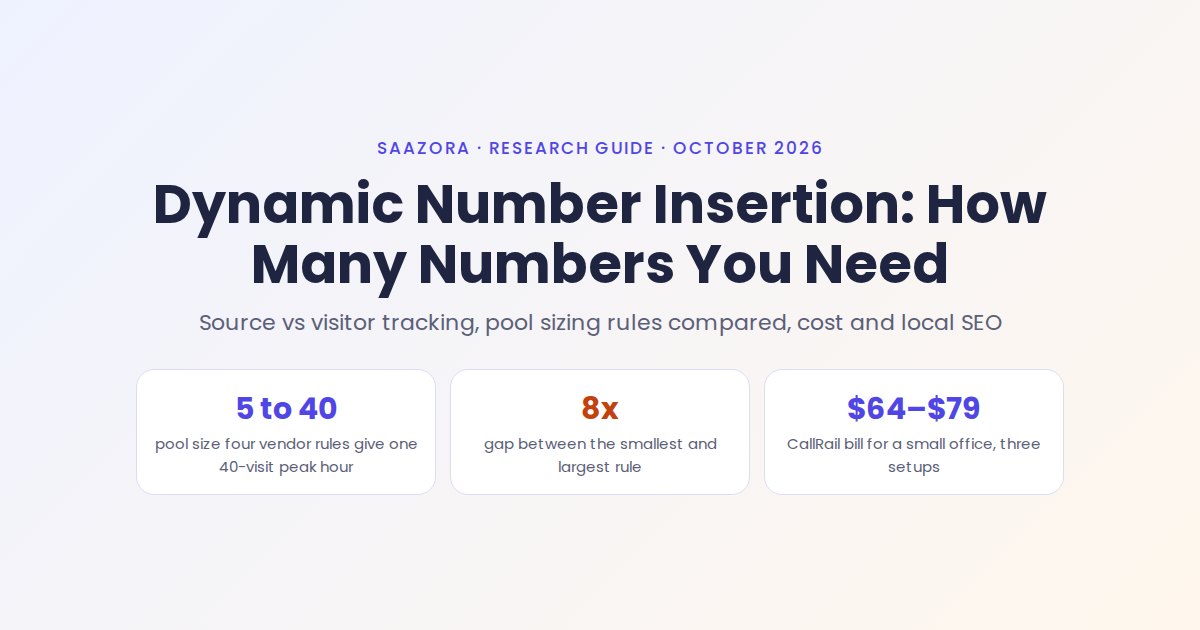
Dynamic number insertion (DNI) is a small script on your website that replaces the phone number a visitor sees with a tracking number, chosen by how that visitor arrived, so the call that follows can be tied back to the ad, search or link that sent them. The number in your HTML stays the same; only what shows in the browser changes. How many tracking numbers you need depends on which kind of DNI you run. With source-level tracking you need one number per source, often three to eight in total. With visitor-level tracking you need a pool big enough that no two people on your site at the same moment see the same number, and here the vendors disagree: for the same busy hour of 40 visits, their published rules of thumb range from 5 numbers to 40.
This guide explains both kinds of DNI, puts five vendors' sizing rules side by side, prices three setups at CallRail's list prices, and covers the part most explainers skip: how to keep your name, address and phone number consistent for local search while numbers swap. If you are still choosing a tool, our ranking of call tracking software for small businesses compares the vendors themselves.
Source-level or visitor-level: the choice that sets your number count
CallRail's help center describes two types of call tracking, and every other DNI vendor works along the same line. The difference is whether a number belongs to a marketing source or to a single visitor.
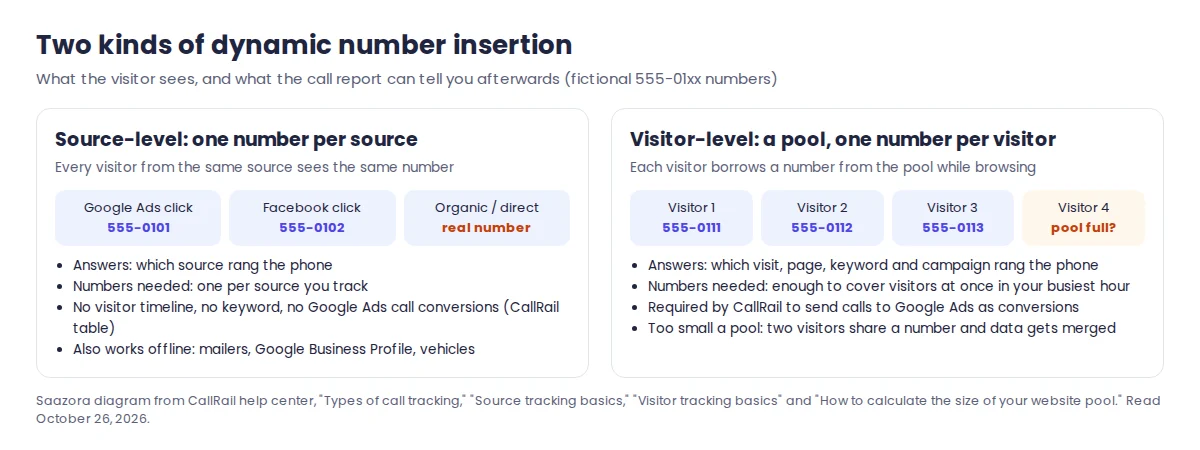
Source-level tracking uses one number per campaign. In CallRail's words, if you want to track Google visitors, a Yellow Pages ad and a direct mail campaign, "you'd create three tracking numbers total, one tracking number for each source." On a website, the script swaps in the Google number for visitors from Google, the Facebook number for visitors carrying your Facebook parameter, and leaves your real number for everyone else. The same kind of number also works offline, on a mailer or a van, with no script at all.
Visitor-level tracking uses a pool. CallRail describes it as "a pool of phone numbers that belongs exclusively to your business," where "each phone number is assigned to one visitor at a time, so you can link calls directly to individual visitors." Because the number identifies a session rather than a source, the call can be matched to the landing page, the pages viewed, the paid keyword and any UTM parameters on the visit.
| What you need from the data | Source-level numbers | Visitor-level pool |
|---|---|---|
| Which channel produced the call (Google Ads, Facebook, GBP, mailer) | Yes | Yes |
| Which paid keyword, landing page and pages viewed | No | Yes |
| Visitor timeline and multi-channel attribution | No | Yes |
| Calls sent to Google Ads as conversions through CallRail's Google Ads integration | No (except Call Details Forwarding for call assets) | Yes |
| Calls sent to Google Analytics | Yes | Yes |
| Offline use (print, vehicles, Google Business Profile) | Yes | No |
| Numbers to budget for | One per source | Pool size (CallRail allows 4 to 300) plus any offline numbers |
Source: CallRail help center, "Types of call tracking," "Source tracking basics," "Visitor tracking basics," "Google Ads integration" and "Decrease the size of a website pool." Read October 26, 2026.
Both types can run on one site. When a visitor matches more than one rule, CallRail's swap precedence decides which number shows: landing page parameters and landing page URLs first, then specific referring URLs, then referrer groups such as "All Search," then source numbers set to "Always Swap," and website pools last. CallRail spells out the consequence: "any source tracking number will always take precedence over a website pool." If you add a pool to replace older source numbers, switch those numbers to offline or deactivate them, or the pool will never swap for that traffic.
What actually happens when a number swaps
The mechanics explain most DNI problems, so they are worth a minute. You install one JavaScript snippet per company on every page with a phone number, before the closing body tag, the same way you would install an analytics tag. When a visitor arrives, the script reads the referrer and the landing page URL, decides which tracking number applies, finds your business number on the page and replaces it. CallRail looks for that number, the "swap target," in three formats: 111-222-3333, 111.222.3333 and (111) 222-3333. A number written any other way, or split across HTML tags, is not swapped.
The script then stores the visitor's source in a cookie. CallRail's cookie lasts up to six months by default, and its help center says a visitor tracking number "will also be assigned to a user for up to six months," unless that number is no longer available, in which case the visitor gets a new one from the pool. You can shorten the cookie to 30, 60 or 90 days. CallRail's visitor tracking article adds that once a visitor "is finished browsing your website, we free up that phone number so it can be assigned to another visitor." Read together, a returning visitor usually sees the same number again, but the pool only has to cover the people browsing at the same time.
Three practical details from CallRail's documentation cause most "the number isn't swapping" tickets:
- Caching and optimization plugins. CallRail names WP Rocket as an example of a plugin that can strip its snippet while removing code it deems unnecessary. Excluding cdn.callrail.com from the plugin is the fix it suggests.
- Numbers you want to keep static. Adding the
data-calltrk-noswapattribute to an element stops anything inside it from swapping, which is useful for an SMS link or a block you want to stay fixed. - Testing. CallRail's automatic DNI test checks one page at a time and can return false negatives on WordPress-plugin and AMP installs, so test as the visitor type you are tracking: click your own ad link or add your UTM parameter to the URL, then look at the number.
How many numbers a dynamic number insertion pool needs: five vendors' rules
For source-level DNI the count is simple: list every source you want to separate and buy one number each. For a pool, every vendor publishes a rule of thumb, and they do not agree. These are the rules in the vendors' own words:
| Vendor | Published pool sizing rule | Minimum | Where it is published |
|---|---|---|---|
| CallRail | "The number of peak hourly visitors divided by four equals the size of your pool" | 4 numbers | Help center, "How to calculate the size of your website pool" (updated August 28, 2025) |
| WhatConverts | "Peak traffic in an hour / 8 = Amount of tracking numbers you need," or its estimator in number setup | Not stated | WhatConverts blog, "How to Unlock Marketing Insights with Dynamic Number Pools" (July 12, 2024) |
| CallTrackingMetrics | "For tracking numbers used with DNI, we recommend one phone number per 20 visitors a day" | Not stated | Plans and pricing FAQ |
| Clixtell | "The number of visitors you wish to track in one hour during peak time equals the minimal amount of numbers required in your pool" | 5 for a small website | Support Academy, "How many phone numbers do I need?" |
| Ringostat | "The amount of numbers should be no less than the amount of users who are simultaneously on the website"; its dashboard recommends a count from live traffic | Not stated | Knowledge base, "A lack of numbers" (March 30, 2024) |
Sources read October 26, 2026. Infinity, a UK vendor, gives no formula but says most of its pools start with 20 to 50 numbers and an algorithm flags when more are needed.
To see how far apart these rules land, Saazora applied the four that give a formula to three example websites. The traffic figures are assumptions, with the busiest hour set at 10% of a day's visits:
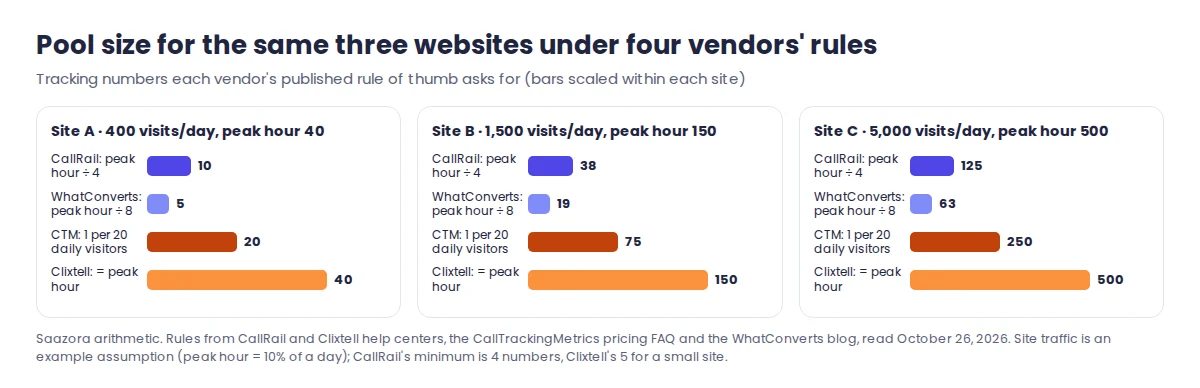
| Example site | Visits a day | Visits in busiest hour | CallRail rule | WhatConverts rule | CTM rule | Clixtell rule |
|---|---|---|---|---|---|---|
| Site A: local office | 400 | 40 | 10 | 5 | 20 | 40 |
| Site B: regional service firm | 1,500 | 150 | 38 | 19 | 75 | 150 |
| Site C: multi-location brand | 5,000 | 500 | 125 | 63 | 250 | 500 |
Saazora arithmetic, rounded up to whole numbers. Traffic is assumed for illustration, not measured.
Why the rules disagree
The rules are not as arbitrary as they look. A pool needs one number for every visitor holding a number at the same moment, and that count is roughly the visits in your busiest hour multiplied by how long each visitor keeps a number, as a share of the hour. Read that way, each rule carries an assumption about holding time. This is Saazora's interpretation; none of the vendors state it like this:
- Dividing by 4, CallRail's rule, implies each visitor ties up a number for about 15 minutes.
- Dividing by 8, WhatConverts' rule, implies about 7.5 minutes.
- One per peak-hour visitor, Clixtell's rule, implies a full hour.
- One per 20 daily visitors, CTM's rule, depends on how peaky your traffic is; with a busiest hour at 10% of the day it implies about 30 minutes.
Infinity is the one vendor that states a holding time: it aims for the number to "stay with the visitor for the length of the browsing session and average of 10-15 minutes after," and says this gave "97-99% accuracy" in its own tests. That sits close to CallRail's divide-by-four rule. A tighter rule saves money but leaves less room for long sessions, people who keep a tab open and call 20 minutes later, and traffic spikes. A looser rule costs more but rarely merges two visitors.
The rule you pick matters to the bill. Priced as extra numbers on CallRail's Tier 3 plan at 1,000 minutes a month, Site B's pool would cost $117.50 a month sized by the WhatConverts rule, $165.00 by CallRail's own, $257.50 by CTM's and $445.00 by Clixtell's. So follow the rule of the vendor whose holding behaviour you actually get, which in practice means the one you buy, and then check its assignment data.
Sizing your own pool from GA4
- Find your busiest hour. CallRail's steps: in Google Analytics, open Explore, start a Blank exploration, choose a Line chart with Hour granularity, use the Date + hour dimension and the Sessions metric, chart the last two weeks and note the highest point. A seasonal business should chart its peak season instead.
- Decide which visitors the pool covers. A pool does not have to cover everyone. CallRail lets a pool track All Website Visitors, Google Ads only, PPC Search only, a landing page or parameter, a referring site, All Except Direct, or All Except Direct and Organic. Sizing a pool for paid visitors only can cut it to a fraction of the all-traffic size, at the cost of losing visitor detail for organic callers.
- Apply your vendor's rule to that traffic and respect the minimum. A busiest hour of 10 paid visits still means 4 numbers on CallRail.
- Add numbers for each extra area code if you use local swapping. CallRail's Local Swap shows visitors a number with their own area code (US and Canada only) and needs at least two numbers per added area code, each counted on your invoice. Once Local Swap numbers are added, it cannot be switched off without deactivating the pool.
- Check after two weeks. CallRail's Number Assignment Table shows how often pool numbers are handed out. Signs of a pool that is too small: callers whose keyword or landing page does not match what they say on the recording, and ad visitors showing up as Direct.
What DNI costs at CallRail list prices for a small and a medium site
Every number in a CallRail pool is billed as a number. Its help center is explicit: "if you choose a pool with 30 visitor tracking numbers, then you will have 30 numbers total on your invoice." So the setup you pick, more than the plan name, drives the bill. The Lead Tracking tiers below were read from the "See all Lead Tracking plans" table on callrail.com/pricing on October 26, 2026.
| CallRail Lead Tracking tier | Monthly | Billed yearly | Local numbers included | Local minutes included | Each extra local number | Each extra local minute |
|---|---|---|---|---|---|---|
| Tier 1 | $55 | $50/mo | 5 | 250 | $3.00 | $0.06 |
| Tier 2 | $75 | $68/mo | 5 | 750 | $3.00 | $0.06 |
| Tier 3 | $95 | $85/mo | 10 | 1,000 | $2.50 | $0.05 |
| Tier 4 | $295 | $265/mo | 40 | 4,000 | $1.75 | $0.045 |
Source: callrail.com/pricing, checked October 26, 2026 (unchanged from the October 23 capture). Dynamic number insertion is listed as included on every Lead Tracking tier. Calls are rounded up to the next minute, extra usage is billed on top of the base fee and is not refundable, and there is a 14-day trial with no credit card.
Saazora priced two example businesses three ways: source numbers only, a pool for paid visitors plus offline numbers, and a pool for all visitors plus offline numbers. Pools follow CallRail's divide-by-four rule. Traffic, minutes and sources are assumptions, not customer data.
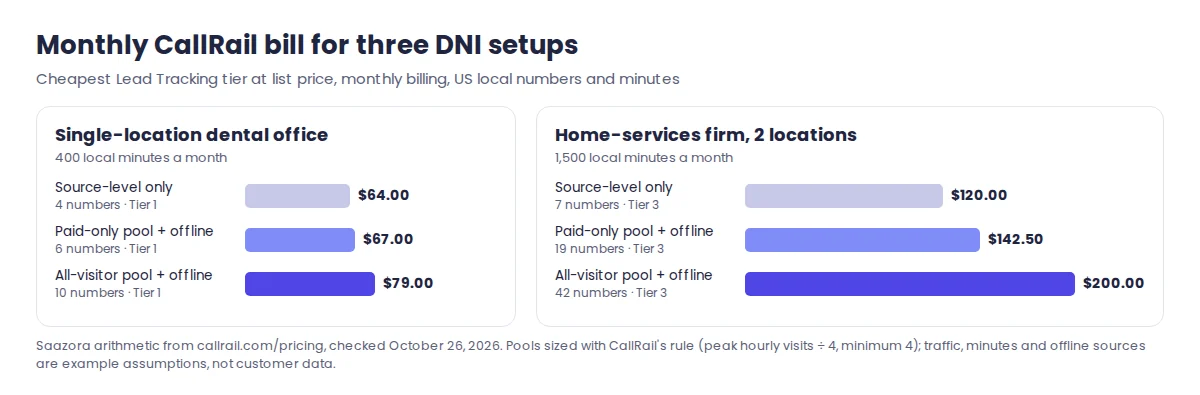
| Example business and setup | Numbers | Minutes a month | Cheapest CallRail tier | Monthly | Billed yearly |
|---|---|---|---|---|---|
| Dental office, source numbers only (GBP, Google Ads, Facebook, mailer) | 4 | 400 | Tier 1 | $64.00 | $59.00 |
| Dental office, paid-visitor pool (busiest paid hour 10 visits) + GBP + mailer | 4 + 2 = 6 | 400 | Tier 1 | $67.00 | $62.00 |
| Dental office, all-visitor pool (busiest hour 30 visits) + GBP + mailer | 8 + 2 = 10 | 400 | Tier 1 | $79.00 | $74.00 |
| Home-services firm, 2 locations, source numbers only (2 GBP, truck wrap, mailer, Google Ads, Microsoft Ads, Facebook) | 7 | 1,500 | Tier 3 | $120.00 | $110.00 |
| Home-services firm, paid-visitor pool (busiest paid hour 60 visits) + 4 offline | 15 + 4 = 19 | 1,500 | Tier 3 | $142.50 | $132.50 |
| Home-services firm, all-visitor pool (busiest hour 150 visits) + 4 offline | 38 + 4 = 42 | 1,500 | Tier 3 | $200.00 | $190.00 |
Saazora arithmetic, US local numbers and minutes only; texts, toll-free numbers, taxes and per-call rounding are excluded. Script and output saved with this guide's sources.
Two things stand out. For a small office the difference between the cheapest and the richest setup is $15 a month, so the deciding question is not cost but whether you advertise on Google Ads and want calls counted there, which needs a pool. For the busier firm the all-visitor pool adds $80 a month over source numbers, and a paid-only pool captures the keyword data for most of that at $22.50 more than source numbers. In the 42-number case Tier 4 looks tempting because it includes 40 numbers, but at 1,500 minutes it works out to $298.50 against $200.00 on Tier 3. Our CallRail pricing breakdown has the full plan list, toll-free rates and add-ons.
Google's own dynamic numbers, and how they fit with a DNI tool
Searches for "Google dynamic number insertion" usually mean Google Ads' website call conversions. Google describes them as tracking "calls made when someone clicks on your ad, then calls the forwarding number we display on your website," which "allows a Google forwarding number to dynamically replace your website number for users who clicked an ad." It is free, but narrow: it only covers visitors from your Google ads, and Google notes that "only one number can be tracked on a single page using the default Javascript tag." Our guide to Google Ads call tracking walks through that setup step by step; here is what matters when you also run a DNI tool:
- Verification conflicts. Google says that if your site uses DNI or third-party call tracking, "Google's automated verification system can't verify the phone number by scanning your website's source code," and it does not recommend its Google Tag Manager option for such sites.
- Pick one swapper per visitor. Two scripts both trying to replace the same number on the same visit is a recipe for confusing data. Most advertisers who buy a DNI tool let it handle website calls and send them to Google Ads through an integration instead.
- "Google Ads dynamic call tracking" through CallRail needs a pool. CallRail's Google Ads integration requires the snippet, visitor tracking ("a requirement for calls to report as conversions") and auto-tagging in Google Ads. Source-level numbers cannot report call conversions there, with one exception: Call Details Forwarding for call assets and call-only ads, which works with any tracking number set as a Google Ads asset and captures enhanced data only for calls of at least 15 seconds.
The same logic applies to Meta: landing-page numbers keyed to a UTM parameter are source-level, and a pool is the safer option when people browse and come back. Our Facebook and Instagram ads call tracking guide covers that setup.
What DNI adds to GA4
On its own, GA4 can count taps on a tel: link, but it cannot tell whether a call actually happened, and it misses people who read the number and dial it from another phone. A DNI tool fills that gap by sending each tracked call into GA4 as an event. CallRail's GA4 integration needs a GA4 property and the gtag on your site, and CallRail says it can take from an hour to a few days to complete. One point is specific to pools: when a visitor arrives several times through different channels before calling, CallRail's session-level attribution article says "the first channel or source that a user comes through is reported to Google Analytics," while CallRail's own timeline keeps every visit. If GA4 and CallRail disagree on a call's source, that is often why. The full event setup is in our guide to tracking phone calls in GA4.
Local SEO: keeping NAP consistent while numbers swap
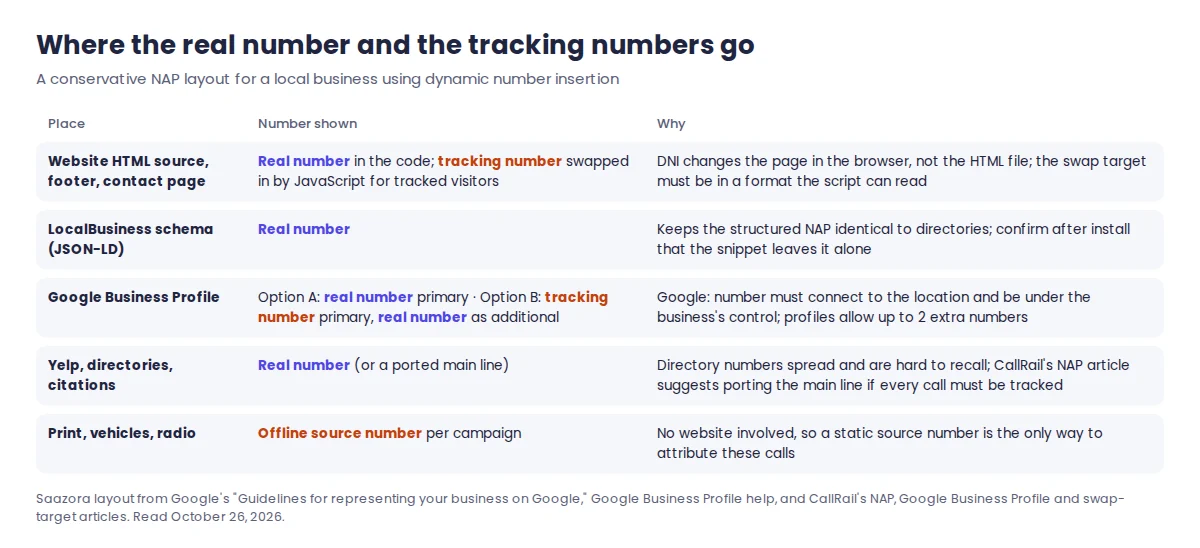
Local businesses worry, with reason, that tracking numbers will scatter different phone numbers across the web and weaken their name, address and phone (NAP) consistency. DNI itself is the low-risk part. The higher-risk part is where you put static tracking numbers, especially on your Google Business Profile.
Your website. DNI changes what a visitor sees, not the HTML your server sends. CallRail's source tracking FAQ describes the snippet as "the key to displaying a number to your website visitors without changing the phone number in the HTML," and its NAP article says its DNI "serves the same code and user experience to human visitors and bots alike." Keep your real number in the page source, in your footer and in your LocalBusiness structured data. After installing the snippet, view the rendered page and confirm the structured data still carries the real number; if any block must never change, wrap it with the no-swap attribute.
Your Google Business Profile. Google's guidelines do not mention call tracking numbers. What they do say is: "Provide a phone number that connects to your individual business location," "Use a local phone number instead of a central call center helpline number whenever possible," and "The phone number must be under the direct control of the business." Google Business Profile help adds that "in addition to your primary business phone number, you can add up to 2 more phone numbers." That leaves two defensible layouts:
| GBP layout | How GBP calls are tracked | Risk to weigh |
|---|---|---|
| A. Real number stays primary (conservative) | Calls from the listing itself are not separated; visits that click through to your website carry UTM parameters and see a pool number, which CallRail credits to GBP | You lose a clean count of calls straight from the listing |
| B. Tracking number primary, real number as an additional phone (what CallRail's GBP integration sets up) | Every call from the listing rings a dedicated tracking number | The listing depends on your CallRail account: CallRail warns that if you deactivate the integration or close your account, "calls to a tracking number that remains listed will not connect to your business" until you change it; listing tools such as Yext can also overwrite the number |
Sources: Google, "Guidelines for representing your business on Google" and "Add your phone number" (Google Business Profile Help); CallRail help center, "Google Business Profile integration" (updated October 15, 2026) and "Using CallRail with Google My Business." Read October 26, 2026.
CallRail's own position is that its integration keeps "your actual business number in GBP as a secondary number to maintain NAP consistency," and its GBP article says NAP "was once considered an important ranking factor in local SEO, although most industry experts agree that it no longer carries much impact." Google does not take a public position either way. If you choose layout B, keep the tracking number in your account for as long as it is listed, and switch the listing back before you ever cancel. For every other directory, keep the real number. CallRail's NAP article suggests porting your main line into CallRail if you want every call tracked without changing the number anywhere; porting in and out is free, per the same article.
Industry setups differ in the details. Dental and medical practices should also read our notes on call tracking for dental practices, which covers HIPAA plans and missed-call follow-up.
Questions about dynamic number insertion
Does dynamic number insertion hurt SEO?
Not on its own. The number in your HTML does not change; the script swaps it in the visitor's browser. The SEO risk comes from static tracking numbers placed in directories or on your Google Business Profile, which spread different numbers for one business. Keep the real number in the page source, in structured data and in directories.
How many tracking numbers do I need for a small business website?
With source-level tracking, one per source you want to separate, often three to six. With a CallRail pool, your busiest hour of visits divided by four, with a minimum of four numbers. Other vendors' rules range from dividing by eight to one number per peak-hour visitor, so follow the rule of the tool you buy.
What happens if my number pool is too small?
Two visitors see the same number at the same time, and the vendor cannot tell which of them called. CallRail says it then merges their sessions under the first person who contacts you, which can credit an ad visitor to Direct or show the wrong keyword. Its Number Assignment Table shows whether numbers are being reused too quickly.
Can I use Google forwarding numbers and a call tracking tool on the same site?
Google's help page allows for it but warns that DNI or third-party call tracking stops its automated system from verifying your number in the page source, and it advises against its Google Tag Manager option on such sites. Most advertisers with a DNI tool let that tool swap the number and send calls to Google Ads through its integration.
The 14-day CallRail trial needs no credit card, which is long enough to install the snippet, create a small pool, check the Number Assignment Table and see whether your traffic fits the rule. You can start a CallRail trial and size a pool on your own traffic (affiliate link), and any current offers are on the CallRail offers page.
How this guide was put together
This is a research guide. Saazora has no CallRail, CallTrackingMetrics, WhatConverts, Clixtell or Ringostat account for this page, installed no DNI snippet and placed no test calls. CallRail behaviour comes from its help center articles on dynamic number insertion, swap targets and swap precedence, source and visitor tracking, website pool sizing, Local Swap, cookie duration, the Number Assignment Table, caching plugins, NAP consistency, the Google Business Profile, Google Ads and GA4 integrations, and Call Details Forwarding. Google behaviour comes from Google Ads Help and Google Business Profile Help. The other vendors' sizing rules are quoted from their own help centers, FAQ or blog. Everything was read on October 26, 2026, as was callrail.com/pricing. The site traffic, minutes and sources in the examples are Saazora assumptions; pool sizes and dollar figures are arithmetic on the published rules and rates, and the holding-time reading of each rule is Saazora's interpretation, not a vendor statement.
Sources (plain links): CallRail: website pool size · CallRail: types of call tracking · CallRail: NAP consistency · CallTrackingMetrics FAQ · WhatConverts: dynamic number pools · Clixtell: how many numbers · Ringostat: a lack of numbers · Infinity: unique numbers · Google Ads: calls to a number on your website · Google: guidelines for representing your business