CallRail help center articles read, and prices on callrail.com, whatconverts.com and ctm.com checked, October 23, 2026 · Research guide based on CallRail's own help center and pricing page, not hands-on testing · US list prices
Saazora may earn a commission if you sign up for CallRail through links on this page, at no extra cost to you. Links to WhatConverts and CallTrackingMetrics pages are plain links with no affiliate tag.
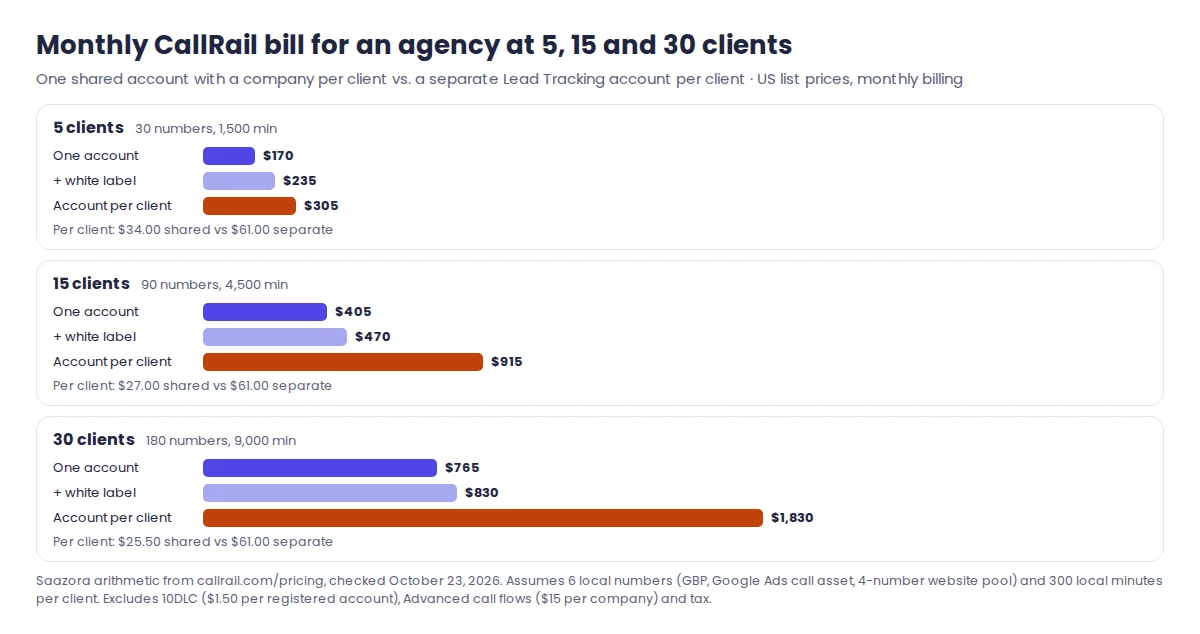
Call tracking for agencies comes down to one early decision: put every client inside a single CallRail account as a separate "company," or give each client an account of their own and manage them all from Account Center. The first is cheaper because companies cost nothing and every client draws on one plan; the second costs more but lets the client own and pay for the account, which makes the day they leave much simpler. For a small PPC or SEO agency with 5 to 30 local clients, the gap at list prices runs from about $135 a month at 5 clients to more than $1,000 a month at 30 (Saazora arithmetic on callrail.com/pricing, October 23, 2026). This guide walks through both setups, who pays in each, what CallRail's white label actually changes, how to get call reports in front of clients, and how to hand a client's numbers back when the contract ends.
If you are still choosing a vendor, our ranked guide to call tracking software covers the wider field; this page assumes CallRail is on the shortlist and focuses on the parts that only matter when you run it for other businesses.
One account with many companies, or one account per client
CallRail uses two words that are easy to mix up. A company lives inside an account. CallRail's help center defines it as "an organization that requires separate access to call tracking reports" and gives the agency case directly: "if you're a marketing agency looking to keep separate reports for each client you manage, you'd create a separate company for each client." Each company has its own tracking numbers, its own website snippet for dynamic number insertion, its own time zone and its own users. CallRail says "there is no cost associated with creating companies" and that each plan includes an unlimited number of them.
An account is the thing that gets billed. Account Center is CallRail's dashboard for people who hold several accounts under one login. CallRail describes it as "designed with our agency customers in mind," and its agency resources page says it lets clients "own and pay for their individual accounts directly" while the agency "retains complete access to manage all aspects of their campaigns." Each account in Account Center "retains separate settings and billing information."
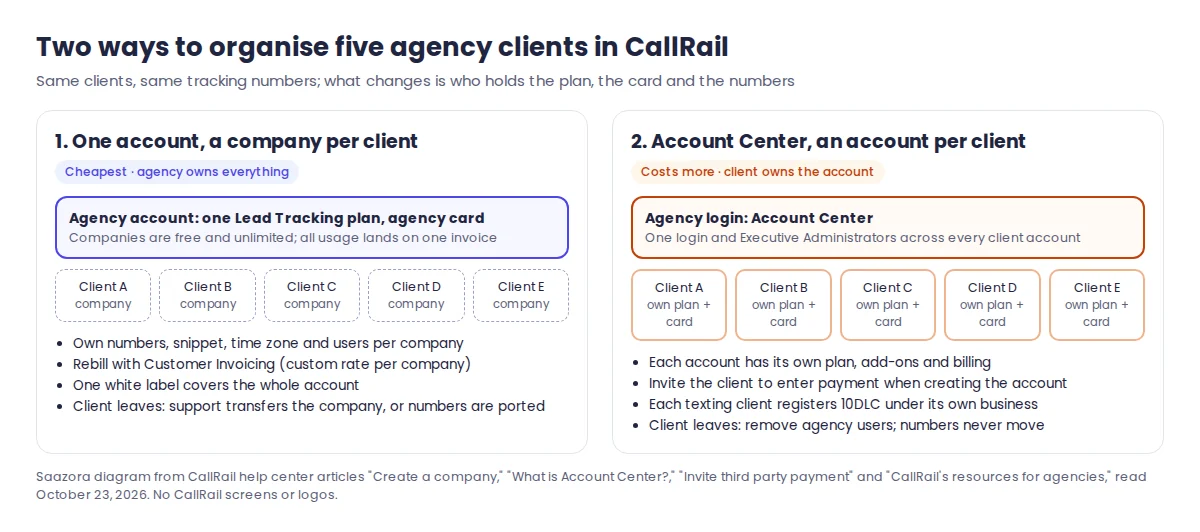
| Question | One account, a company per client | Account Center, an account per client |
|---|---|---|
| What it costs to add a client | Nothing for the company itself; the client's numbers and minutes are added to the agency's one plan | A new plan on a new account (from $55 a month on monthly billing), plus that client's usage |
| Whose card is charged | The agency's | Whoever enters payment for that account: the agency or the client |
| Separate reports per client | Yes, users can be limited to their own company | Yes, each account is fully separate |
| Plan choice per client | One plan for everyone in the account | Each account picks its own plan and add-ons |
| Text message registration (10DLC) | Either the agency registers everyone under its own business, or clients are split into their own accounts | Each client account registers with its own business details |
| When a client leaves | Support moves the company to the client's new account, or the numbers are ported away | The agency's access is removed; the account and numbers stay with the client |
Source: CallRail help center, "Create a company," "What is Account Center?," "Managing your accounts with Account Center," "CallRail's resources for agencies," "Agency Text Messaging Compliance Registration" and "Transfer a Company to Another Account." Read October 23, 2026.
One point needs care. CallRail does not publish a sentence that says "all companies share the plan's included numbers and minutes." That is how we read it: companies are free, billing and invoices are tied to the account, and the plan's allowances are stated per plan. Ask CallRail to confirm it for your account before you price a client on that basis.
Who pays: rebilling the client or letting the client hold the card
Small agencies tend to land on one of three billing arrangements, and CallRail has a tool for each.
1. Agency pays and rebills. All clients sit in the agency's account. CallRail's Customer Invoicing feature (Account Settings, then Customer Invoicing under Companies) lets you set a standard rate for every company and a custom rate for any one client: a base charge, a price per extra local or toll-free number, per local or toll-free minute, per text, per voicemail transcription and per transcribed minute. CallRail then shows a per-company invoice for each month, with your customer price next to what you pay. Two limits matter. CallRail says it "only checks the payment status of individual companies that are using the Stripe integration," which its help center now lists as legacy. And if the account is white-labeled, CallRail "won't email your company their individual invoices," so you send them yourself.
2. Client pays, agency operates. Each client gets their own account, created by the agency in Account Center. During account creation you can choose "Invite someone to enter Billing Information," enter the client's name and email, and add a note. The client sets a password, enters a card, and becomes an administrator on that account. CallRail says only the last four digits of the card are visible to anyone else on the account. The catch is timing: CallRail says this invite "is only available during the process of creating a new account." If you forget it, the client has to be added as an administrator later and change the card themselves.
3. Client already has CallRail. If the client opened an account before hiring you, ask for its account number, then use Add Existing Account in Account Center and request access. CallRail emails every admin on that account, and the account appears in your Account Center once one of them selects Grant Access.
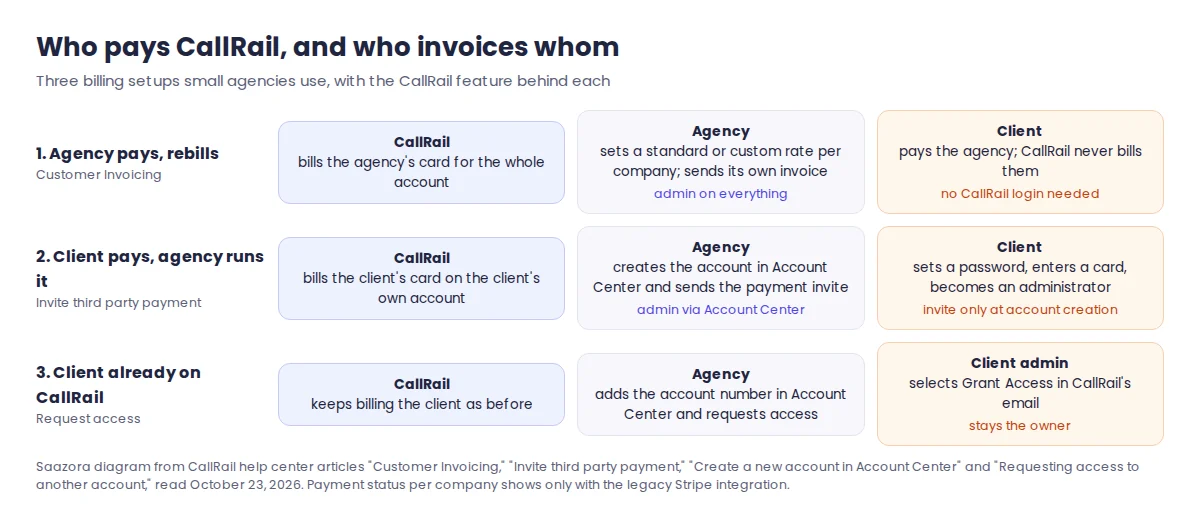
Rebilling makes money on the spread, and it hides CallRail's bill behind yours. The price is that every unpaid client invoice is your loss, and CallRail sees only you. Client-paid accounts remove the collections risk and make the client's ownership obvious, which helps at renewal and at the end. Many agencies end up with both: a client-paid account for the larger, longer contracts and companies inside the agency account for small retainers.
What CallRail's white label actually changes
CallRail's pricing page lists "White label $65 per month" under popular add-ons for the Lead Tracking plans (checked October 23, 2026). The help center calls it "part of our Agency Tools add-on." According to CallRail's own articles, turning it on does the following:
- Login address. Clients sign in on a subdomain instead of app.callrail.com. You can use CallRail's white-label subdomain, which you set yourself, or your own domain (for example calls.youragency.com). For your own domain, contact CallRail support, which supplies the CNAME entries and the SSL certificate.
- Branding. You pick an account color and upload a logo, which appears in three places: the navigation header, the login screen and email notifications. CallRail recommends an image of about 400 x 120 pixels.
- What is removed. CallRail says it removes "all CallRail branding from your account, including your online reporting dashboard and email notifications." Invoices for companies keep CallRail's blue design but drop the logo.
- What is not hidden. Notification emails in white-label accounts come from no-reply@callreports.com, a CallRail domain chosen "to ensure deliverability." Manager-level users on white-labeled accounts "can only edit integrations that do not mention CallRail's company name."
Who can switch it on is also fixed: in CallRail's user table, activating and editing white label settings is an administrator permission. CallRail's "Plan Types" article lists "Agency resources and an Account Center for working with multiple organizations" among the add-ons, while the current pricing page prices only the white label line. Whether the $65 applies once per agency or to every client account you white-label under Account Center is not stated on either page, so ask CallRail before you quote it.
For agency staff, two user types are worth knowing. An Executive Administrator, created in Account Center, "has unrestricted access to all current and future CallRail accounts," so a new client account is added to that person automatically. Regular users can be given Admin, Manager, Reporting or Agent rights and limited to particular companies. CallRail does not let you demote a user; you delete them and add them back with less access. Invites expire after 14 days.
Getting call reports in front of clients
Most clients want two things: to know right away when a lead calls, and a monthly number they can compare with their spend. CallRail offers four ways to deliver that, and they differ mainly in who is allowed to receive them.
| Report type | Who can receive it | How often | Good for |
|---|---|---|---|
| Company Summary email | Any user, including email-only users with no login | Daily (about 8:00 AM), weekly (Mondays, about 1:00 PM) or monthly (the 1st), in the company's time zone | A client owner who will never log in; totals, minutes, new callers, sources and keywords, filterable by tag or qualified status |
| Scheduled report | Only CallRail users (Admin, Manager, Reporting) | Daily, weekly or monthly, same send times | A saved custom report delivered as an Excel file; the date range follows the frequency |
| Calls by Company report | Agency users inside the account | On demand | Comparing call volume, answered and missed calls and minutes across every client company |
| Google Looker Studio connectors | Anyone you share the dashboard with | Live | Putting calls beside ad spend in your own client dashboard; four connectors, set up "at the company or agency level" |
Source: CallRail help center, "Company Summary emails," "Scheduled reports," "Calls by Company report" and "Google Looker Studio integration." Read October 23, 2026. CallRail notes the Call Details connector does not work with HIPAA accounts.
A practical split for a 5 to 30 client roster: give each client owner an email-only Company Summary filtered to qualified calls, keep the detailed exports for your account managers as Scheduled Reports, and build one Looker Studio template that pulls the Call Summary connector grouped by Company, so every client dashboard comes from the same source. Note that Scheduled Reports cannot go to people outside CallRail; CallRail says so directly. If a client wants the spreadsheet, either make them a Reporting user on their own company or send it on yourself.
Instant lead alerts are a separate setting (email and text notifications per company). CallRail's agency resources article frames these as a way to show "the immediate results you're delivering." Alerts by email need nothing extra; replying to leads by text from CallRail requires 10DLC registration, covered below.
Call tracking for agencies at 5, 15 and 30 clients: the cost math
To put numbers on the two setups, we used one typical local client: a tracking number on the Google Business Profile, an offline number for Google Ads call assets, and a 4-number website pool for dynamic number insertion (CallRail's stated minimum pool size). That is 6 local numbers and, as an assumption, 300 local minutes a month per client. All prices are CallRail's US list prices on monthly billing, checked October 23, 2026.
| Lead Tracking tier (monthly) | Included numbers | Included local minutes | Extra local number | Extra local minute |
|---|---|---|---|---|
| $55 ($50 billed yearly) | 5 | 250 | $3.00 | $0.06 |
| $75 ($68 yearly) | 5 | 750 | $3.00 | $0.06 |
| $95 ($85 yearly) | 10 | 1,000 | $2.50 | $0.05 |
| $295 ($265 yearly) | 40 | 4,000 | $1.75 | $0.045 |
Source: callrail.com/pricing, "See all Lead Tracking plans," monthly and yearly views, checked October 23, 2026. Every tier includes 25 text messages. Add-ons listed: White label $65 per month, Advanced call flows $15 per month per company, Premium integrations $80 per month.
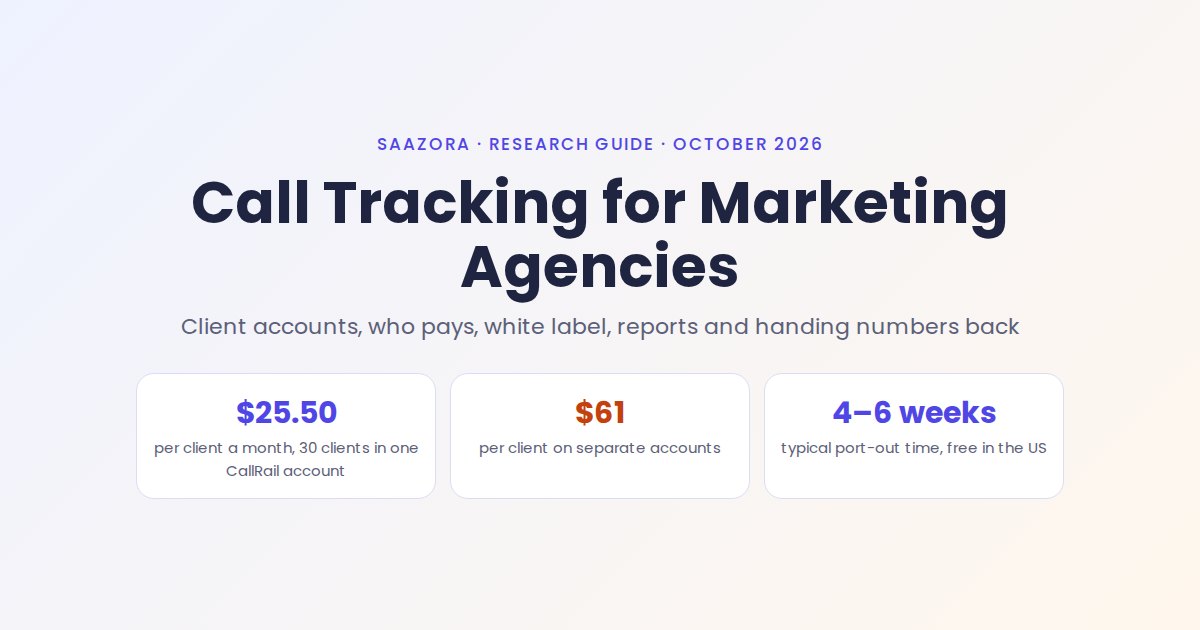
One Lead Tracking plan at $55 covers one client of this size with a little left over: 1 extra number ($3) and 50 extra minutes ($3) bring it to $61 a month. That is the per-client price in the Account Center setup. In the single-account setup, the clients' usage is added together and the cheapest tier for the total wins.
| Clients | Total usage | One account, company per client | Same, with white label | One account per client ($61 each) | Difference per month |
|---|---|---|---|---|---|
| 5 | 30 numbers, 1,500 min | $170.00 ($95 tier) | $235.00 | $305.00 | $135.00 |
| 15 | 90 numbers, 4,500 min | $405.00 ($295 tier) | $470.00 | $915.00 | $510.00 |
| 30 | 180 numbers, 9,000 min | $765.00 ($295 tier) | $830.00 | $1,830.00 | $1,065.00 |
Saazora arithmetic on callrail.com/pricing (October 23, 2026), US local usage, monthly billing. Client counts, numbers and minutes are assumptions. With yearly billing the single-account totals drop to $160, $375 and $735. Not included: 10DLC fees ($1.50 per registered account per month), Advanced call flows ($15 per company), taxes.
Three things move these numbers more than anything else:
- Minutes. A home services client taking 1,000 minutes a month on its own would push a separate account to the $95 tier, but adds only a few dollars to a shared $295 plan.
- Per-company add-ons. Advanced call flows (geo-based and responsive routing) are priced at $15 per month per company. For 30 clients that is $450 a month, more than half the single-account bill, so turn it on only for the clients who need it.
- Who absorbs the tier changes. In the single-account setup, the agency carries the move to a bigger tier as the roster grows; in this example the cheapest tier changes from $95 to $295 somewhere between 5 and 15 clients. With Account Center, every client carries their own base fee from day one.
For rebilling, the numbers suggest a simple floor: if a client would pay $61 a month on their own account, charging them that through Customer Invoicing covers the shared bill with room to spare at all three sizes in this example, white label included. That is arithmetic, not a pricing recommendation; most agencies roll tracking into the retainer anyway. For the full tier list and toll-free rates, see our breakdown of CallRail's plans and usage fees.
Text messaging registration can decide the setup for you
If your clients reply to leads by text, or you use CallRail's automated text replies to missed calls and form fills, the account structure has a compliance side. Carriers block business texts from 10-digit numbers unless the business is registered with The Campaign Registry (A2P 10DLC). CallRail says registration is free to file, takes up to 30 days to verify, and that "each individual CallRail account must pay a monthly fee of $1.50 USD" once registered, billed on the CallRail invoice.
For agencies, CallRail's agency registration article sets out the options:
- Single account with many companies: you can register the agency and all clients under your own business information. CallRail warns that you then "accept the responsibility for messages containing spam, phishing, and SHAFT" content, and that a violation "may result in significant penalty fees and/or the loss of text messaging access for all numbers." The alternative is asking CallRail to split texting clients into their own accounts, each registered with its own details.
- Account Center: each client account that texts registers with its own business information, including its tax ID, and pays its own $1.50.
- No outbound texting: inbound texts still arrive on tracking numbers, but replies from CallRail are blocked until the business registers.
So an agency that wants texting for many clients but does not want one client's bad message to cut off everyone's texting has a strong reason to use separate accounts, even though they cost more.
Offboarding a client without breaking their phone numbers
The end of a contract is where the setup choice shows. Tracking numbers end up printed on vans, listed on the Google Business Profile and saved in customers' phones. CallRail's position on ownership is clear: "You own the numbers you create in CallRail." The question is who "you" is. In the single-account setup, the numbers belong to the agency's account. Put in writing at the start who keeps them, and what the handover will look like.
CallRail gives three ways to hand numbers over:
- Move the whole company to the client's own CallRail account. The client opens an account; you open a support ticket naming the company. Administrators on both accounts must approve. Historical call data moves with the numbers, the website script keeps working because the company is unchanged, and the client's next invoice picks up the numbers. Call tags do not transfer.
- Move selected numbers to the client's account. The same support process for a list of numbers. If the numbers land in a different company, the client must install that company's snippet, because dynamic number insertion is tied to the company.
- Port the numbers away from CallRail. The client's new provider starts the port. An administrator authorizes it in a support ticket (a manager's request triggers an admin approval), CallRail's porting team supplies the Customer Service Record, and the carriers schedule the date. CallRail says porting US and Canadian numbers away is free and "typically takes 4-6 weeks," and that it won't block port-outs an administrator has approved.
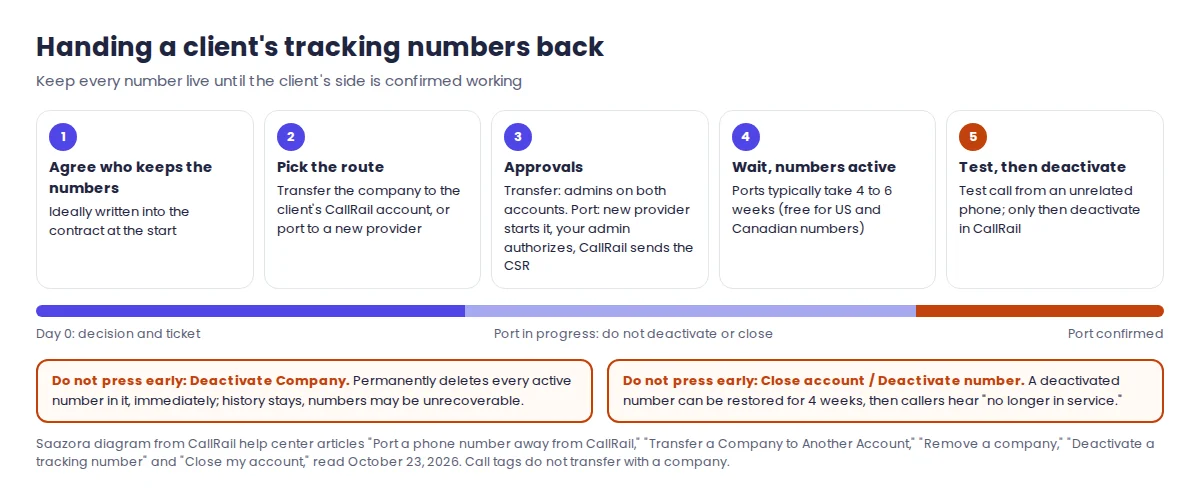
The mistakes that cannot be undone are both in the agency's own settings:
- Deactivating the company. CallRail says this "will permanently delete any active tracking number within that company" and that the action "is immediate and cannot be undone." Historical data stays visible, but the numbers may be unrecoverable.
- Deactivating numbers or closing the account mid-port. CallRail asks you not to do either until the port is confirmed. A single deactivated number can be reactivated for up to four weeks; after that it is released, and callers hear "This number is no longer in service."
Two smaller rules: numbers cannot be ported out while an account is still on its free trial (a card has to be added first), and when an agency closes its whole account, its former data is still available if the account is reactivated within 13 months, but the numbers will have been released. For client-owned accounts in Account Center, offboarding is mostly removing your users; the numbers never left the client.
How WhatConverts and CallTrackingMetrics package agency accounts
Both main alternatives sell agency features differently, and the pricing pages say so plainly.
| Vendor (own pricing page) | Agency structure | Entry price for agencies | White label | Usage rates (US local) |
|---|---|---|---|---|
| CallRail | Unlimited companies per account; Account Center for many accounts | $55/mo per account (Lead Tracking, monthly) | $65 per month add-on | $3.00 to $1.75 per number, 6 to 4.5 cents per minute, by tier |
| WhatConverts | Separate "Agency" plans with unlimited accounts | Plus $500/mo, including a $250 usage credit (Pro $800, Elite $1,250) | +$50 monthly | $1.75 per number, 4 cents per minute |
| CallTrackingMetrics | Marketing Pro lists "included sub-accounts & white label options" | Marketing Pro $179/mo monthly ($149 billed yearly) | Listed as an option; price not published on the plans page | $2.00 per number, 4 cents per minute |
Sources: callrail.com/pricing; whatconverts.com/pricing (Agency view); ctm.com/plans-pricing (monthly view and the page's embedded rate table). Checked October 23, 2026. WhatConverts agency plans are priced for "Lead Tracking" (calls, forms and chat).
Using the same 6 numbers and 300 minutes per client (our CallRail vs WhatConverts breakdown compares the single-business plans), WhatConverts Agency Plus comes to $500, $587.50 and $925 a month at 5, 15 and 30 clients, assuming the $250 usage credit is spent on numbers and minutes first. CallTrackingMetrics Marketing Pro comes to $299, $539 and $899, assuming sub-account usage rolls up to one bill. On those assumptions, a shared CallRail account is the cheapest of the three at every size, and separate CallRail accounts are the most expensive from 15 clients up. The trade-offs are covered in more depth in our CallRail and CallTrackingMetrics side-by-side and the list of CallRail alternatives worth a look. Vendor pages: WhatConverts pricing and CallTrackingMetrics plans.
Whichever way you set it up, the first client is the cheapest place to learn the structure. CallRail's 14-day trial needs no card, so you can create a company, a website pool and an email-only Company Summary before a client sees anything. You can start a CallRail trial for your agency (affiliate link), check the current CallRail offers, or read our full CallRail review for strengths and weaknesses beyond agency use. If most of your clients come from paid search, the guide to tying calls to Google Ads clicks covers the campaign side.
Questions agencies ask about call tracking
Does CallRail charge per client company?
No. CallRail says creating companies has no cost and every plan includes unlimited companies. You pay for the plan, the numbers and minutes above what it includes, and any add-ons. One add-on, Advanced call flows, is priced per company ($15 a month each).
Can clients see that the agency uses CallRail?
Without white label, yes: they log in at app.callrail.com and see CallRail's branding. With the $65 white label add-on, the dashboard, login page and notification emails carry your logo and color, but notification emails still come from no-reply@callreports.com.
Who owns the tracking numbers if the agency pays?
The account that holds them. CallRail says you own the numbers you create, and an admin on that account must approve any transfer or port. If the agency's account holds a client's numbers, settle in the contract that the agency will transfer or port them on request.
How long does it take to give a client their numbers back?
Moving a company to the client's own CallRail account is a support ticket approved by both admins. Porting to another provider typically takes 4 to 6 weeks, according to CallRail, and the numbers must stay active until it completes.
How this guide was put together
This is a research guide. Saazora has no CallRail, WhatConverts or CallTrackingMetrics agency account for this page and did not set up client companies, white label or ports. CallRail behaviour comes only from CallRail's help center articles on companies, Account Center, creating accounts, inviting third-party payment, requesting account access, Executive Administrators, users, Customer Invoicing, white labeling and custom subdomains, plan types, managing plans, Company Summary emails, Scheduled Reports, the Calls by Company report, the Looker Studio integration, website pool sizing, agency text messaging registration and its FAQ, transferring companies and numbers, porting away, deactivating numbers and companies, and closing an account, plus CallRail's agency page. All were read on October 23, 2026, as were the three pricing pages. The client counts, numbers per client and minutes are Saazora assumptions; the dollar figures are arithmetic on published list prices.
Sources (plain links): Create a company · What is Account Center? · Customer Invoicing · White labeling your CallRail account · Agency text messaging registration · Transfer a company to another account · Port a number away from CallRail