Meta and CallRail help pages read, and prices on callrail.com, whatconverts.com and ctm.com checked, October 23, 2026 · Research guide based on the Meta Business Help Center, Meta's Conversions API developer documentation and CallRail's help center, not hands-on testing · US list prices
Saazora may earn a commission if you sign up for CallRail through links on this page, at no extra cost to you. Links to Meta, WhatConverts and CallTrackingMetrics pages are plain links with no affiliate tag.
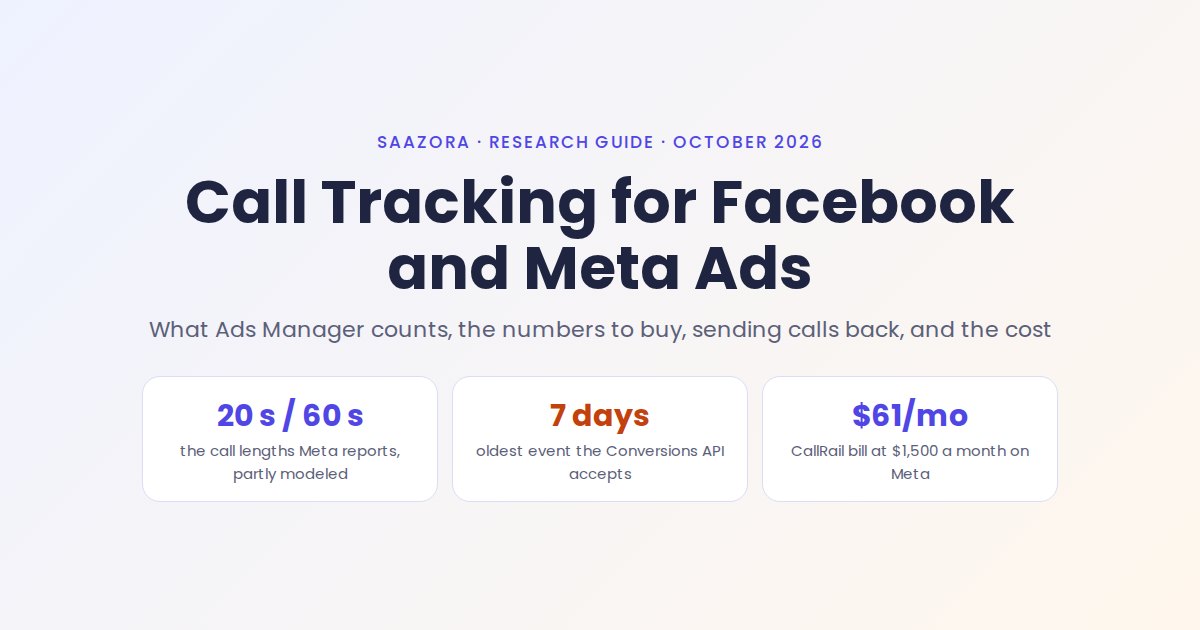
Facebook ads call tracking means giving every Meta ad that can produce a phone call its own tracking number, then sending each tracked call back to Meta so Ads Manager can count it. Meta does count some calls by itself: a call ad reports Calls placed, 20-second calls and 60-second calls. But Meta's help center says those figures are "partially derived through modeling, rather than a straight count," and they only cover people who tapped the call button inside the ad. Someone who clicks through to your site and dials the number on the page, or who sees the ad and calls you two days later, never shows up. A call tracking tool closes most of that gap. CallRail lists Facebook among the integrations included in every Lead Tracking plan, which start at $55 a month on monthly billing (callrail.com/pricing, October 23, 2026).
This guide is the Meta version of our breakdown of how Google Ads counts calls. The two platforms work very differently: Google matches a call to a click ID, while Meta tries to match the caller to a Facebook or Instagram profile, which changes how you set the numbers up and why the totals never quite agree.
What Meta Ads Manager reports about calls on its own
Meta calls this family of ads "lead ads with calling." There are three versions, and each reports calls in a different way:
- Call ads. A single image, video or carousel with a Call now button. Tapping it opens the phone's keypad with your number already filled in. You can run them under the Awareness, Traffic, Engagement, Leads or Sales objective; with all but Awareness, Meta says the ad "optimizes for 60-second calls."
- Call add-ons. The ad sends people to your website in Facebook's in-app browser, with a Call now bar at the bottom of the page. Meta says call add-ons "optimize for website conversion events only."
- Website and calls. A conversion location that optimizes for both at once, with value rules to tell Meta which outcome you prefer.
Call ads only run on mobile placements: Facebook Feed, Marketplace, Reels and Stories, plus Instagram feed and Stories. The phone number can be a mobile, a landline or a toll-free 1-800 number, so a tracking number works as the destination like any other.
| Native call metric | Meta's definition | Where to find it | What it leaves out |
|---|---|---|---|
| Calls placed | "The number of times a call was made to your business by selecting an ad" | Ads Manager: Columns, Customize columns, Engagement, Calling | Calls dialled any other way than from the ad |
| 20-second calls | Calls placed that connected for at least 20 seconds | Same column set; default Results metric for "Maximize number of calls" campaigns targeting only the US | Whether the caller booked, bought or was a wrong number |
| 60-second calls | Calls placed that connected for at least 60 seconds | Same column set | Same as above |
| Callback requests submitted | People who used Send message on a call ad to ask you to call back | Same column set (needs Messenger) | Whether you actually called back |
| Caller number, answered or missed, cost per quality call | Per-call list with your own "quality call" length | Call Insights in Meta Business Suite | Caller numbers appear only with Meta call forwarding on (US only); Messenger and WhatsApp calls are not included |
Source: Meta Business Help Center, "View metrics for call ads in Meta Ads Manager," "About Call Insights in Meta Business Suite," "About lead ads with calling" and "Supported objectives and placement options for call ads and call add-ons." Read October 23, 2026. Meta notes the call metrics are not available for campaigns created before June 20, 2025 outside the US, Australia, Brazil, Canada, Mexico and Israel.
Meta's own call forwarding is worth knowing about before you buy anything. When you switch it on (ad set level: Conversion section, Calls, then the Call Insights toggle), callers who tap the ad dial a Meta-managed number that forwards to yours. Meta says this is what lets Call Insights show the caller's phone number and whether the call was answered, that the forwarding number "may not have the same area code" as your business, and that a person who calls the same Meta number again within 60 days still reaches you. It is US-only and does nothing for calls that start on your website.
Why calls from Meta ads often go unattributed
On Google, a phone call can be tied to the exact click that preceded it. On Meta, most of the signal is lost somewhere between the ad and the dial tone. The common breaks are these:
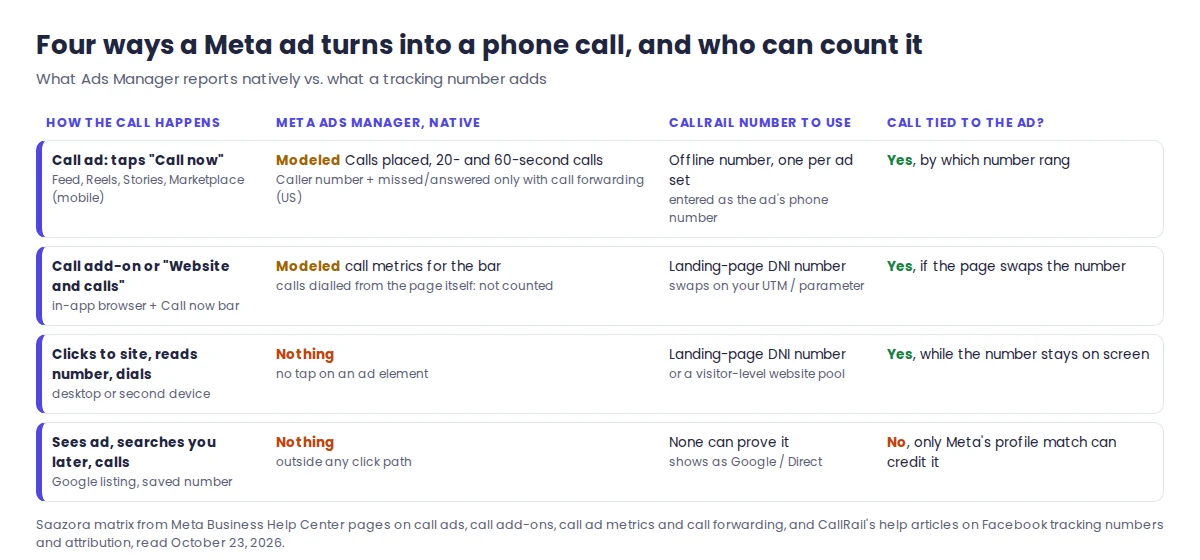
- The caller never taps the ad. Meta's Calls placed metric needs someone to select the ad. A person who sees a Reel for your clinic, then searches your name and calls from your Google listing, is invisible to Ads Manager and lands in your books as a Google or direct call.
- The number on the landing page is static. With a call add-on or a plain Traffic ad, many people read the number on your page and dial it, often from a desk phone. Meta has no tap to record, and without a swapped number your call log cannot say which ad sent them.
- The URL parameters disappear. Meta's URL parameter page warns that a parameter "is only applicable to the first product page." If the visitor leaves and comes back later on their own, the parameter is gone, and a landing-page number keyed only to that parameter has nothing to react to on the return visit. A visitor-level website pool is the safer choice when people tend to come back before calling.
- Meta could not match the caller to a profile. CallRail's attribution article explains that Meta credits a call to an ad only after it finds a matching Facebook profile (by phone number, email or Facebook click ID) and then confirms that person saw or clicked an ad within the attribution window. Calls that fail either step are sent but never appear in campaign reports.
- The call fell outside the attribution window. Meta's standard settings for website and in-store conversions count events within 1 or 7 days of a link click and 1 day of an impression. A homeowner who calls three weeks after first seeing the ad will not be credited, however good the tracking.
The first and last breaks cannot be fully fixed by any tool. The middle three can, and that is where tracking numbers earn their cost.
Facebook ads call tracking with one number per ad set
The practical rule is one tracking number for every place a caller can dial from. For call ads that means a separate number per campaign or, better, per ad set, typed straight into the ad's phone field. The number itself then tells you which audience, radius or offer produced the call, no profile matching needed.
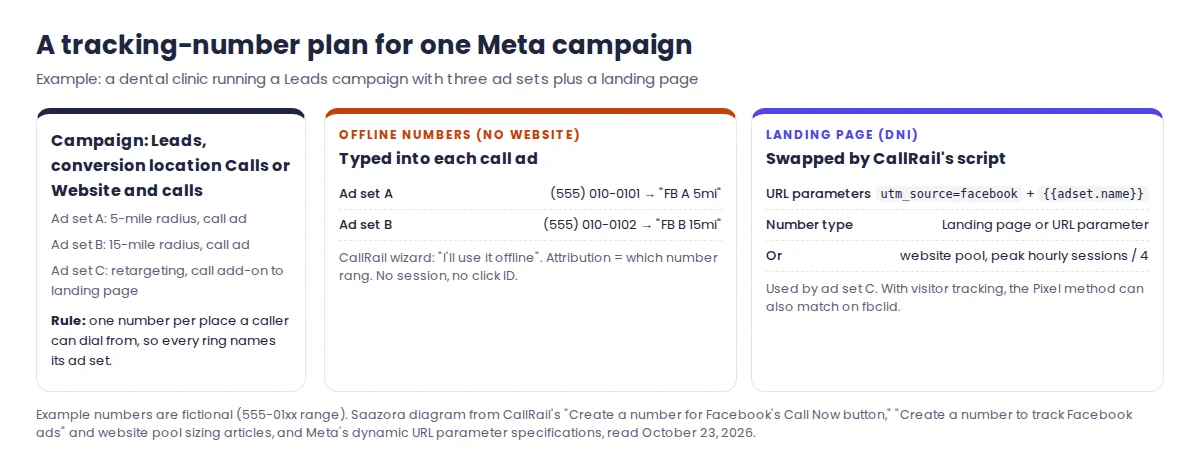
CallRail's help center describes two different number types for Meta, and mixing them up is the most common setup mistake:
| Ad type | CallRail number to create | Choices in the new-number wizard | Where the number goes |
|---|---|---|---|
| Call ad (Call now button, no website) | Offline tracking number | "Where do you want to use this tracking number?" → I'll use it offline | Typed into the phone number field of the ad in Ads Manager |
| Call add-on, Website and calls, Traffic or Leads ad that lands on your site | Website number tracking a landing page parameter | On my website → Calls only → Landing page or URL parameter, then enter the parameter | Nowhere by hand: CallRail's script swaps it onto the page when the parameter is in the URL |
| Several Meta campaigns, or visitor-level detail | Website pool (visitor tracking) | A pool sized from your busiest hour of traffic | Swapped per visitor, which also keeps the session for later calls |
Source: CallRail help center, "Create a number for Facebook's 'Call Now' button" (updated December 2, 2025), "Create a number to track Facebook ads" (updated July 12, 2026) and "How to calculate the size of your website pool." Read October 23, 2026.
One instruction in CallRail's Call Now article is out of date: it says to choose "Local Awareness" as the objective. Meta's current help pages list Awareness, Traffic, Engagement, Leads and Sales for call ads, so pick whichever fits the campaign and paste the CallRail number as the destination. The tracking still works, because the attribution comes from the number, not the objective.
If you also turn on Meta's call forwarding, the caller dials Meta's number, which then forwards to the number in the ad, which in this setup is your CallRail number. Neither Meta nor CallRail documents what caller ID CallRail receives after that double hop, so place a test call from a phone you can recognise before relying on caller numbers in CallRail for those ad sets. The source attribution itself does not depend on it, since it comes from which CallRail number rang.
How many numbers you buy is a budget question. Each extra local number on CallRail's entry tier costs $3.00 a month, so ten ad sets with their own numbers add up quickly. A sensible middle ground is one number per ad set that has its own audience or offer, and one shared number for small test ad sets you will switch off within a week.
Putting the right number on the landing page: DNI and UTM parameters
For every Meta ad that sends people to your website, the landing page has to show a tracking number instead of your office line. CallRail does this with dynamic number insertion: its JavaScript detects your business number on the page and replaces it when the visitor arrived with the parameter you set on the tracking number. For the parameter to arrive, it has to be on the ad.
Meta gives you a URL parameters field under Tracking at the ad level, plus a Build a URL parameter helper. Its dynamic values fill themselves in from the campaign. A template that works for both CallRail and Google Analytics looks like this:
utm_source=facebook&utm_medium=paid&utm_campaign={{campaign.name}}&utm_content={{ad.name}}&utm_term={{adset.name}}&fb_ad_id={{ad.id}}
utm_source=facebookis the static value you tell CallRail to look for when you create the landing-page number. CallRail's list of common marketing sources givesutm_campaign=facebookas an example; any parameter works as long as the ad and the number use the same one.utm_medium=paidmatches the medium Meta says it may add automatically. Since January 1, 2024, Meta may append campaign source (Facebook or Instagram), medium "paid," and the ad, ad set, campaign and campaign tracking group IDs to your ad traffic.fb_ad_id={{ad.id}}is the exact parameter CallRail asks for in "Set up Facebook Ads for lead reporting." It lets CallRail's Multi-Touch Cost per Lead report join each call to the ad's spend, which CallRail pulls in automatically once the Facebook integration is active.{{site_source_name}}and{{placement}}are also available if you want to split Facebook from Instagram or Feed from Reels.
Three Meta rules decide whether this template survives contact with a live campaign. Parameters in the URL parameters field override duplicates in the Website URL field, so keep UTMs in one place only. Name-based values such as {{campaign.name}} are frozen at the name used when the ad was first published, so renaming a campaign later will not change the UTM; name things properly before launch. And Meta says editing URL parameters on a running campaign "may cause your ad set to re-enter the learning phase," which is a good reason to get the template right on day one. Meta also warns against empty values: every key needs a value or should be removed.
Then size the swap. If several Meta ad sets share one landing page, a single landing-page number tells you "Facebook" but not which ad set. A website pool fixes that by giving each visitor their own number. CallRail's rule is to take your busiest hour of sessions over the last two weeks, divide by four, and never go below four numbers, because a pool that is too small merges two visitors who saw the same number. If calls from Meta keep appearing as Direct in CallRail, a small pool is the first thing to check.
Sending call conversions back to Meta
Tracking numbers tell you which ad produced a call. Meta's delivery system only learns from calls you send back to it. There are two documented routes.
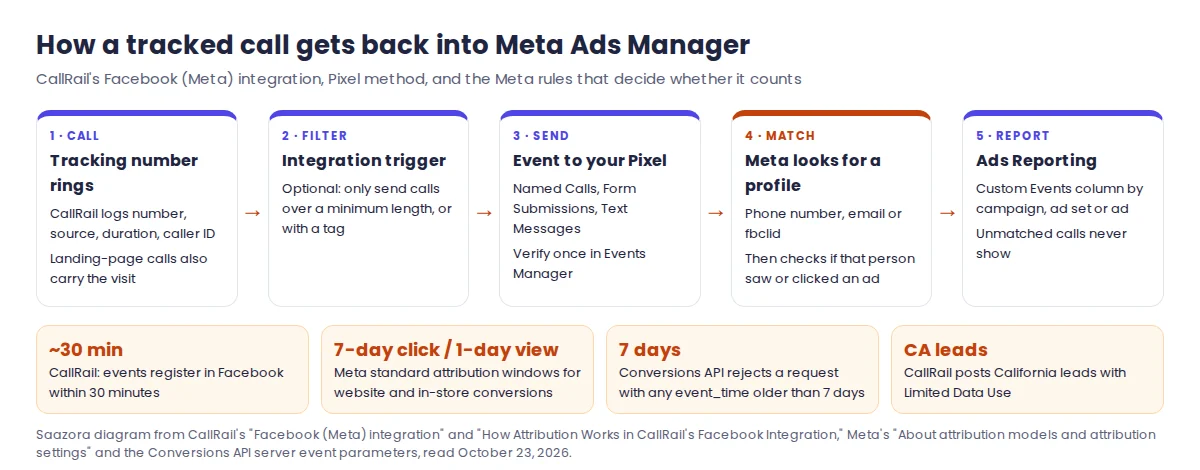
Route 1: CallRail's Facebook (Meta) integration. CallRail's help article describes a "Pixel Setup" that posts each call, text and form submission to the Pixel you choose. You need to be an administrator of the Business Manager account, have Manage-level access to the ad account and the Pixel, and the Pixel must be connected to that ad account. In CallRail: Integrations, Facebook, choose the company, Log in with Facebook, pick the Business Manager and ad account, leave the setting on Pixel Setup, choose the Pixel and the events, then Activate. Afterwards, open Meta Events Manager and verify the new custom events; CallRail says they should register "within 30 minutes" of each call. To see them by campaign, open Ads Reporting and add "Custom Events" in the pivot table, which shows the events but not whether each one was a call, form or text.
Three details in CallRail's documentation matter for call quality. You can add an integration trigger so only calls over a minimum duration, or calls with a certain tag, are sent, which keeps wrong numbers out of Meta's optimization. Leads that CallRail determines are from California are posted with Meta's Limited Data Use setting, which CallRail says may affect retargeting and measurement for those leads. And the older Offline Events method of the integration was sunset in January 2024; accounts still on it see an alert on the integration page and should reconnect with the Pixel method, which CallRail says gives better matching "if used alongside visitor tracking."
Route 2: the Conversions API, directly. Meta's developer documentation calls the Conversions API its "recommended integration method" for offline and physical-store events, and its server event parameters include an action_source value of phone_call ("Conversion was made over the phone"). This is the route for a business that keeps call outcomes in its own CRM and has a developer. The rules to plan around:
| Conversions API rule | What Meta's documentation says | Effect on call conversions |
|---|---|---|
| Event age | event_time can be up to 7 days before you send it; if any event in a request is older, the whole request is rejected | Send calls daily, not in a monthly batch |
| Store and offline uploads | Events with physical_store as action source should be uploaded within 62 days | Only for in-store sales, not for the call itself |
| Matching data | Phone, email, name, city, state, zip and country must be hashed; external_id is "highly recommended" | Send the caller's number, hashed, with every call event |
| Deduplication | Offline events deduplicate only against other offline events, by order_id or user data, within a 7-day window | Use a call ID as order_id if two systems might send the same call |
| Legacy API | Meta's Offline Conversions API was scheduled for discontinuation in May 2025; Meta recommends datasets plus the Conversions API | Old offline event set uploads need migrating |
Source: Meta for Developers, "Sending Offline Events Using the Conversions API" (updated January 5, 2026) and "Server Event Parameters"; Meta Business Help Center, "About Conversions API." Read October 23, 2026.
CallRail's help pages describe its integration as the Pixel method and do not say which Meta endpoint it uses behind the scenes, so do not run both routes for the same calls unless you have checked how they deduplicate. For most small advertisers Route 1 is the whole job.
Finally, expect the numbers to disagree. CallRail's attribution article states that only interactions Meta manages to attribute appear in Facebook's ad reporting, so you "will likely see a difference" between the two. Its suggested check is to filter CallRail to Facebook calls and compare with Meta's events for the same dates. One caution: that article (last updated January 2025) describes Meta's default as a 1-day impression and 28-day click window, while Meta's current help page lists 1-day or 7-day click and 1-day view for standard attribution. Go by the setting on your own ad set.
Setup steps, in the order that avoids rework
- Install CallRail's swap script on every page. Dynamic number insertion needs the JavaScript snippet before any website number will swap.
- List every place a Meta ad can produce a call. Call ads per ad set, call add-ons, and each landing page. This list decides how many numbers you buy.
- Create one offline number per call-ad ad set. Name it after the ad set so it reads clearly in reports, set routing to your main line, and decide on a whisper message and recording.
- Create the landing-page number or website pool. Tracking source "Landing page or URL parameter" with your static parameter, or a pool sized at peak hourly sessions divided by four.
- Build the URL parameter template and name campaigns before publishing. Name-based parameters lock at first publish, and later edits can restart learning.
- Paste the offline numbers into each call ad and schedule call ads to business hours. Meta reports that, in an experiment, call ads scheduled this way delivered 25.4% more call conversions.
- Connect the Facebook integration with the Pixel method and add a minimum-duration trigger. A 60-second minimum mirrors what Meta's call ads optimize for, so CallRail and Meta judge a call by the same length.
- Verify the custom events in Events Manager, then make one test call through a call ad and one through the landing page, and check both arrive in CallRail with the right source.
- After a week, compare totals in three places: CallRail filtered to Facebook, Meta's Calls placed and 60-second calls, and the Custom Events column. Large gaps usually point to a pool that is too small or a missing parameter.
If you advertise on Google as well, the same CallRail account handles both; the Google side has its own steps for call conversions and forwarding numbers, and if you report in Google Analytics, our guide to sending tracked calls into GA4 covers the event setup. Businesses that send call data on to field-service software should also read our call tracking setup for HVAC and plumbing companies, which covers what reaches ServiceTitan, Housecall Pro and Jobber.
What the tracking costs at three Meta ad budgets
CallRail's Lead Tracking plans all include the Facebook integration, so what changes the bill is the number count and the minutes. The tiers below were read from the "See all Lead Tracking plans" table on callrail.com/pricing on October 23, 2026.
| CallRail Lead Tracking tier | Monthly | Billed yearly | Local numbers included | Local minutes included | Each extra number | Each extra minute |
|---|---|---|---|---|---|---|
| Tier 1 | $55 | $50/mo | 5 | 250 | $3.00 | $0.06 |
| Tier 2 | $75 | $68/mo | 5 | 750 | $3.00 | $0.06 |
| Tier 3 | $95 | $85/mo | 10 | 1,000 | $2.50 | $0.05 |
| Tier 4 | $295 | $265/mo | 40 | 4,000 | $1.75 | $0.045 |
Source: callrail.com/pricing, checked October 23, 2026. Integrations listed for every Lead Tracking tier: Google Analytics, Google Ads, GMB, Facebook, Microsoft Ads, HubSpot, Slack, Zapier. CallRail rounds each call up to the next minute; extra usage is billed on top of the base fee and is not refundable; there is a 14-day trial with no credit card.
To turn ad spend into a bill, Saazora assumed one offline number per ad set running call ads, a landing-page pool sized by CallRail's rule, and a monthly minute total for each budget. These are illustrations, not customer data. The two alternatives are priced on the cheapest plan whose own documentation includes a Facebook integration: WhatConverts says its Facebook integration is available on all plans, and CallTrackingMetrics lists Facebook among the premium integrations of Marketing Pro, not Marketing Lite.
| Example advertiser | Numbers needed | Minutes a month | CallRail, cheapest tier | WhatConverts Call Tracking | CTM Marketing Pro |
|---|---|---|---|---|---|
| $1,500 a month on Meta, 2 call-ad ad sets, peak 16 sessions an hour | 6 (2 + pool of 4) | 300 | $61.00 on Tier 1 ($56.00 billed yearly) | $30.00 | $203.00 ($173.00 yearly) |
| $5,000 a month, 4 call-ad ad sets, peak 24 sessions an hour | 10 (4 + pool of 6) | 1,000 | $95.00 on Tier 3 ($85.00 billed yearly) | $70.00 | $239.00 ($209.00 yearly) |
| $15,000 a month, 10 call-ad ad sets, peak 60 sessions an hour | 25 (10 + pool of 15) | 3,000 | $232.50 on Tier 3 ($222.50 billed yearly) | $197.50 | $349.00 ($319.00 yearly) |
Saazora arithmetic, US local numbers and minutes, monthly billing unless noted. WhatConverts Call Tracking: $30/mo including a $30 usage credit, $2.50 per extra local number, 4.5¢ per local minute (whatconverts.com/pricing). CallTrackingMetrics Marketing Pro: $179 monthly or $149/mo billed yearly, $2.00 per local number, 4.0¢ per local forwarding minute (ctm.com/plans-pricing). All checked October 23, 2026.
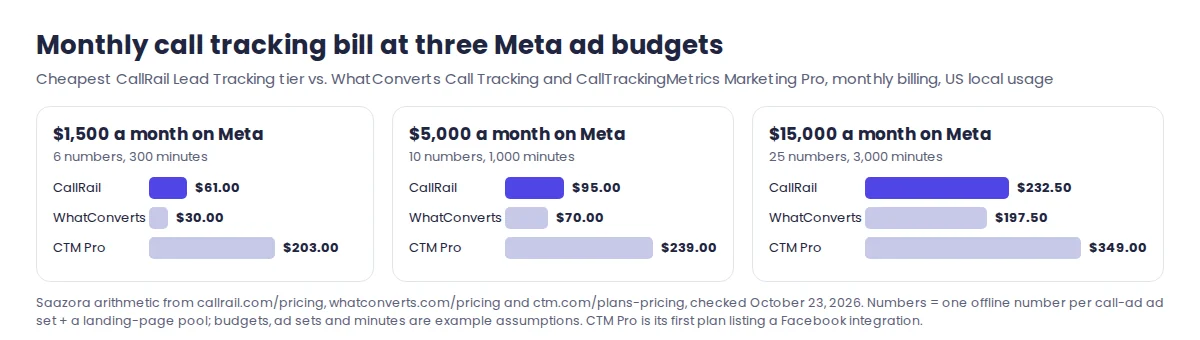
Read the comparison with its limits in mind. WhatConverts comes out cheapest on paper, but its pricing table also shows "Up to 148" included phone call leads on every plan, and the page does not say what happens above that, which matters for the two larger examples. CallTrackingMetrics' higher price buys more than the Facebook connection: Marketing Pro also includes form tracking, 3,000 transcribed minutes and if/then triggers. CallRail sits between them, and the Tier 3 plan covers the middle and upper example because its 10 included numbers and 1,000 minutes absorb most of the usage. For the full plan list, toll-free rates and add-ons, see our full CallRail price list; for more vendors side by side, the comparison of call tracking tools and the wider roundup of CallRail alternatives go further.
The 14-day trial is long enough to buy two offline numbers, connect the Pixel, run call ads for a week and compare CallRail's count with Meta's. You can open a 14-day CallRail trial (affiliate link), and any current offers are on the CallRail deals page. Vendor pricing pages: WhatConverts pricing and CallTrackingMetrics plans.
Questions about tracking calls from Facebook and Instagram ads
Does Meta Ads Manager track phone calls without extra software?
Partly. Call ads, call add-ons and Website and calls campaigns report Calls placed, 20-second calls and 60-second calls, and Meta says these are partly modeled. Calls that do not start from a tap on the ad, such as someone dialling the number on your landing page, are not counted. Call Insights shows caller numbers only when Meta's US-only call forwarding is switched on.
Can I put a call tracking number in a Facebook call ad?
Yes. Meta accepts mobile, landline and toll-free numbers as the destination, and CallRail recommends an offline tracking number for the Call now button. Use one number per ad set if you want CallRail to tell you which audience or offer drove each call.
Why does Meta show fewer call conversions than CallRail?
Because CallRail sends every call it tracks, while Meta credits only calls it can match to a profile that saw or clicked an ad within your attribution window. Unmatched calls never appear in campaign reports. Compare CallRail's Facebook-filtered calls with Meta's events for the same dates, not with your total call count.
Do I need the Conversions API if I already use CallRail?
Not for the calls CallRail tracks: its Facebook integration posts them to your Pixel for you. A direct Conversions API setup makes sense when the real outcome, such as a booked job or a sale, is recorded later in your own CRM. Keep Meta's 7-day limit on event age in mind, and avoid sending the same call through both routes.
How this guide was put together
This is a research guide. Saazora has no CallRail, WhatConverts or CallTrackingMetrics account for this page and placed no test calls through Meta ads. Meta behaviour comes only from the Meta Business Help Center (call ads, call add-ons, Call Insights, call forwarding, call ad metrics, URL parameters and dynamic parameters, attribution settings, the Conversions API overview) and Meta's developer pages on offline events and server event parameters. CallRail behaviour comes from its help articles on the Facebook (Meta) integration, Facebook attribution, the Offline Events transition, Facebook tracking numbers, lead reporting parameters, cost per lead sources and website pool sizing. All were read on October 23, 2026, as were the three pricing pages. The ad budgets, ad set counts, traffic peaks and minutes in the cost examples are Saazora assumptions; the dollar figures are arithmetic on the published rates.
Sources (plain links): About lead ads with calling · Metrics for call ads · Meta call forwarding · Dynamic URL parameters · Attribution settings · Conversions API offline events · CallRail Facebook (Meta) integration · How attribution works in CallRail's Facebook integration