Prices and vendor pages checked October 22, 2026 · Research-based guide built from CallRail's pricing page, its home services and integration pages and its help center, plus the WhatConverts and CallTrackingMetrics pricing pages, not hands-on testing · US list prices, local numbers only
Saazora may earn a commission if you sign up for CallRail through links on this page, at no extra cost to you. Links to WhatConverts and CallTrackingMetrics are plain links with no affiliate tag.
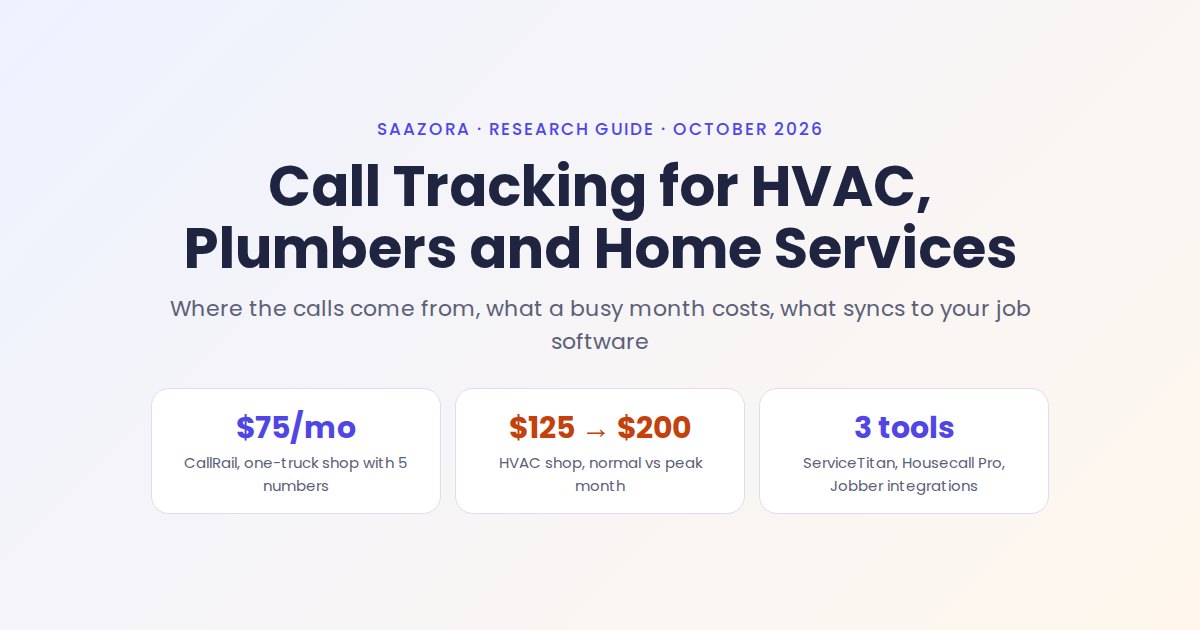
Call tracking for home services answers a question every HVAC, plumbing or electrical owner asks after a slow week: did the phone stop ringing because the Google ads stopped working, or because nobody picked up while the techs were on jobs? A tracking number on each lead source (the Google Business Profile, Local Services Ads, Google Ads, Yelp, Angi, the van wrap, the yard signs) shows which one produced the call, and the call log shows which calls went unanswered. On CallRail's published price list, a one-truck plumber with five numbers and around 600 call minutes a month pays $75 on monthly billing. A four-to-six-truck HVAC shop running a Google Ads number pool pays about $125 in a normal month and about $200 in a peak month when minutes double.
Below: where home-service calls actually start and how each source gets its own number, what a missed call costs next to the tool, the bill at three company sizes and in a busy month, what CallRail sends into ServiceTitan, Housecall Pro and Jobber, two alternatives with their own published prices, and a setup order. For a ranked comparison of trackers beyond the trades, see our best call tracking software for small businesses.
Where home-service calls actually come from
Most service companies get calls from six to ten places at once, and the expensive ones (Google Ads, Local Services Ads, lead marketplaces) sit next to free ones (the Google listing, trucks, referrals). Each source needs its own tracking number, and CallRail's help center sorts them into three kinds: a website pool that swaps numbers for website visitors, an online source number shown on one listing or ad, and an offline number printed or placed on a single piece of marketing.
| Where the call starts | Number type CallRail recommends | Setup detail from CallRail's help center | The catch for a service business |
|---|---|---|---|
| Google Local Services Ads ("Google Guaranteed" results) | Dedicated number, created under "Somewhere else" then "Google Local Services Ads" | "LSAs require a direct, manual number assignment in your LSA account." Google support makes the change. | Reusing the GBP number in LSAs means "the leads will be attributed to Google Business Profile" and LSA-only automations cannot be set up. |
| Google Ads clicks to the website | Website pool (visitor tracking) | Needs the JavaScript snippet on the site and visitor tracking for calls to report back to Google Ads as conversions. | Calls placed straight from a call ad or call asset need Call Details Forwarding, set up on the Google Ads side. |
| Google Business Profile (Maps, local pack) | Source number plus the GBP integration | Once connected, the tracking number becomes the listing's main phone and the office line moves to the secondary field. | One listing per service area means one number per listing. |
| Yelp | Offline source number on the listing; a web-referral number for Yelp visitors who reach your site | Add it at biz.yelp.com under Business Information, phone number section. | Two Yelp routes, two numbers, or the paid and organic Yelp calls blur together. |
| Angi and HomeAdvisor | Offline source number | CallRail lists both as offline sources, one number per listing. | Check each marketplace's own rules on which phone number a profile may show. |
| Thumbtack and other lead apps | No CallRail help article found on October 22, 2026 | A search of CallRail's help center for "Thumbtack" returned no results. | Check whether the platform lets a profile show your own number before ordering one for it. |
| Van wraps, yard signs, door hangers, bandit signs, flyers | Offline source number, one per item type | CallRail lists van wrap, yard sign, door hanger, bandit sign, flyer, brochure and business card as offline sources. | A wrapped truck stays on the road for years, so that number has to stay active for as long as the wrap does. |
Source: CallRail help center "Common marketing sources to use with call tracking" (updated August 17, 2026), "How to set up Google Local Services Ads with CallRail," "Adding your tracking number to a Yelp listing" (September 12, 2026), "Google Business Profile integration" (October 15, 2026) and "Google Ads integration," read October 22, 2026.
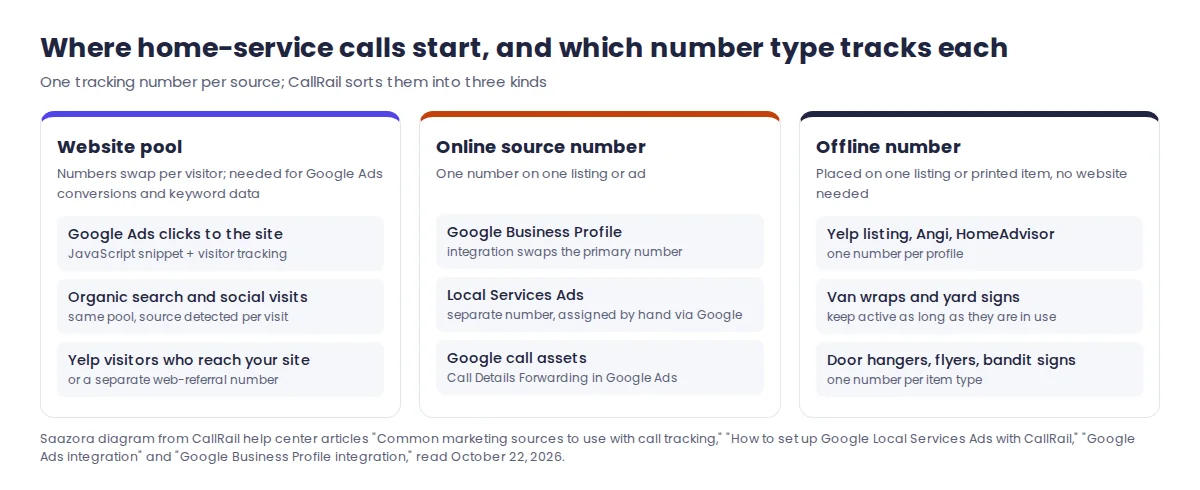
Local Services Ads deserve the extra step. CallRail's LSA article says Google "will use its own number layer," so a customer taps the ad, Google's number forwards to the CallRail number, and that forwards to the office. CallRail notes this double-forwarding can cause "a second of dead air." The same article says LSAs "use messaging response time as a key ranking factor," which is CallRail's case for pointing LSA calls at a call flow or Voice Assist. It also suggests tagging calls in CallRail ("qualified," "wrong number") and then grading the matching leads in the LSA app, which helps when disputing a lead Google charged for.
Google Ads is the source where the setup most often goes wrong. A single source number on the website shows calls inside CallRail but does not send conversions back to Google Ads; the pool does. Our walkthrough of Google Ads call conversion setup covers the Google side, including call assets.
What a missed call costs in a busy week
A missed call is a job that may go to the next contractor on the list, and in a heat wave or the first freeze that happens while every tech is already booked. CallRail's home services page puts it plainly: "if you don’t pick up now they’ll just call one of your competitors." The tool does not stop calls being missed; it shows how many there were, when, and from which source, and it can reply automatically.
The simplest way to judge the cost is to compare the monthly bill with one average ticket. Using the CallRail bills calculated in the next section and three example tickets (Saazora assumptions, not industry data):
| Company (Saazora assumption) | CallRail bill, monthly billing | Booked jobs to cover it at a $150 ticket | At a $350 ticket | At an $800 ticket |
|---|---|---|---|---|
| One-truck plumber or electrician | $75 | 0.50 | 0.21 | 0.09 |
| HVAC shop, normal month | $125 | 0.83 | 0.36 | 0.16 |
| HVAC shop, peak month | $200 | 1.33 | 0.57 | 0.25 |
| Multi-trade company, two service areas | $282.50 | 1.88 | 0.81 | 0.35 |
Saazora calculation (src/cost_calc.py) from callrail.com/pricing, October 22, 2026. Ticket sizes are round examples; use your own average invoice.
Read it this way: if the call log shows even one recovered job a month that would otherwise have been lost, most of these bills are covered. The harder question is what to do about the misses once you can see them. CallRail offers three responses:
- See when calls are missed. The Unanswered Calls report groups misses by weekday and hour. A shop that misses most calls between 7 and 9 a.m., when techs are loading trucks, has a staffing fix, not a software fix. Calls picked up by a phone system outside CallRail count as answered, so an outside auto-attendant can hide misses.
- Text the caller back. The Automated Response setting sends a text when a call is missed. It needs Text Messaging Compliance registration, works on US and Canadian numbers only, cannot send from toll-free numbers, and skips callers who hang up before 15 seconds. Every CallRail plan comes with 25 texts monthly; each one after that is $0.03.
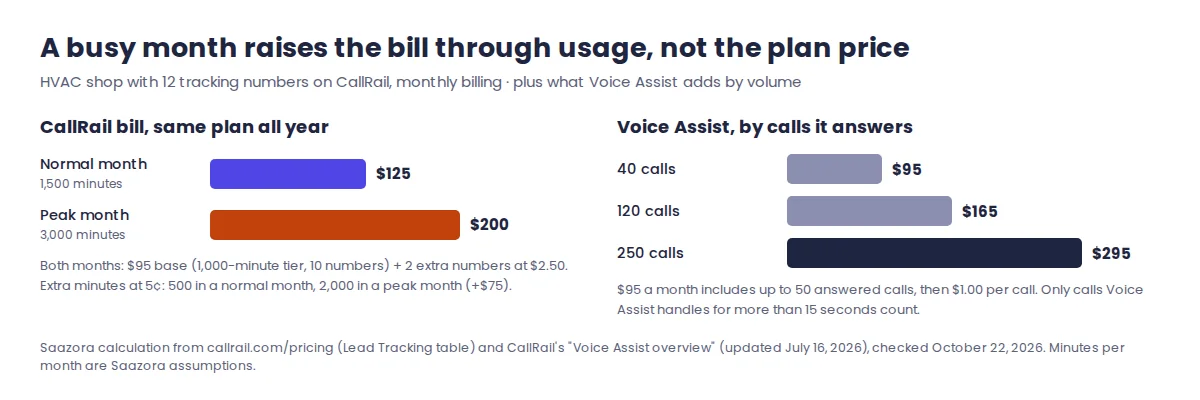
- Let AI answer. Voice Assist picks up when nobody else does, asks intake questions and logs the answers. CallRail's help center prices it at $95 a month with up to 50 answered calls, then $1.00 per call, and only calls it handles for more than fifteen seconds are billed. At 120 answered calls that is $165 a month; at 250 it is $295. Higher-volume bundles are listed at $550 and $2,500 a month.
Call tracking for home services: the bill at three company sizes
For the three company sizes below, CallRail's cheapest plan that fits costs $75, $125 and $282.50 a month on monthly billing, or $68, $115 and $265 a month billed yearly. Usage is the moving part: every number past the plan's allowance and every minute past the included minutes is added to the bill, and minutes are rounded up per call.
| Company size (Saazora assumption) | CallRail, monthly / yearly billing | WhatConverts Plus, monthly | CallTrackingMetrics Marketing Lite, monthly / yearly |
|---|---|---|---|
| One-truck plumber or electrician: 5 numbers (GBP, LSA, Yelp, truck, website), 600 minutes | $75 / $68 (Lead Tracking with 750 minutes) | $69.50 ($81.50 with transcription) | $113 / $99 |
| HVAC shop, 4 to 6 trucks: 12 numbers including a 4-number Google Ads pool, 1,500 minutes | $125 / $115 (Lead Tracking with 1,000 minutes and 10 numbers) | $127.50 ($157.50 with transcription) | $163 / $149 |
| Same HVAC shop in a peak month: 12 numbers, 3,000 minutes | $200 / $190 | $195 ($255 with transcription) | $223 / $209 |
| Multi-trade company, two service areas: 25 numbers, 4,000 minutes | $282.50 monthly on the 1,000-minute tier / $265 yearly on the 4,000-minute tier | $272.50 ($352.50 with transcription) | $289 / $275 |
Bills worked out by Saazora on October 22, 2026 from the three US price lists, counting local numbers and local minutes; toll-free lines, extra texts and sales tax are not included. CallRail's Lead Tracking tiers: $55, $75, $95 or $295 a month ($50, $68, $85 or $265 yearly) with 5, 5, 10 or 40 numbers and 250, 750, 1,000 or 4,000 minutes; extra numbers $3.00 to $1.75 and extra minutes 6¢ to 4.5¢ by tier, with transcription included in the minute. WhatConverts Plus: $60 including $30 of usage, after which each number is $2.50, 4.5¢ per minute, 2¢ per transcribed minute. CTM Marketing Lite: $79 monthly or $65 yearly, $2.00 per number and 4.0¢ per forwarded minute, no usage included.
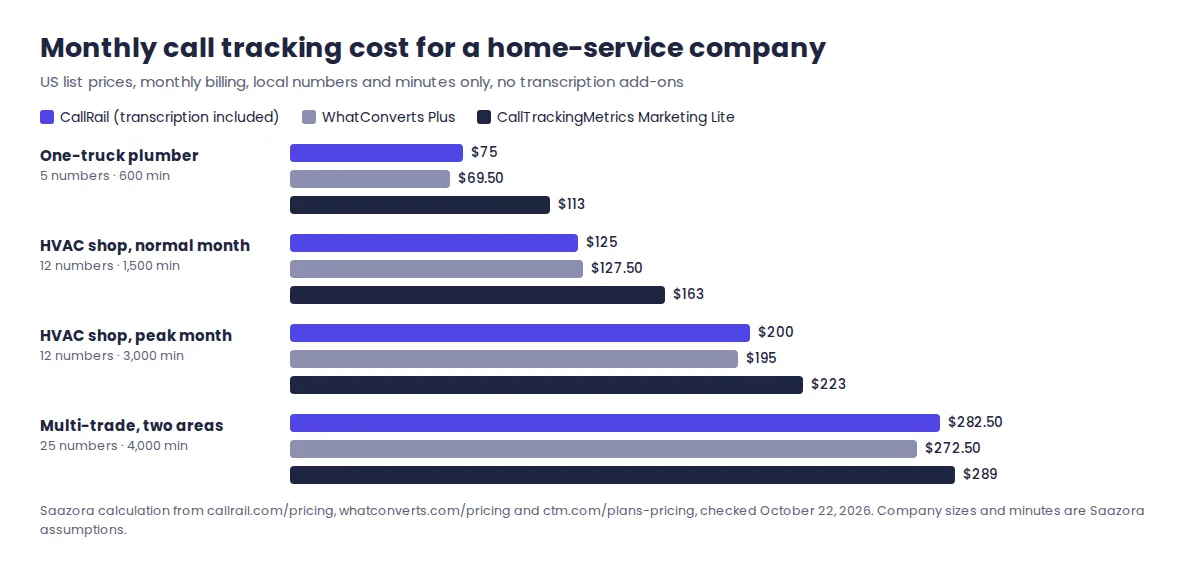
What the table shows:
- The busy season raises the bill, not the plan price. The HVAC shop pays the same $95 base all year; doubling minutes from 1,500 to 3,000 adds $75 in usage. Budget for the July and January bill, not the April one.
- Usage rates change by tier. At 12 numbers and 1,500 minutes the 1,000-minute tier ($95 base, $2.50 per number, 5¢ a minute) beats the 750-minute tier, which would come to $141. Moving up a tier lowers the per-number and per-minute rates, which is why the cheapest plan is not always the cheapest bill.
- WhatConverts Plus is close on price but charges for transcription. Without transcription it lands within a few dollars of CallRail at every size; with it, it costs more from the HVAC shop up. CallRail includes transcription in every minute.
- CTM Marketing Lite costs the most for small shops because it includes no numbers or minutes. The gap narrows at 25 numbers.
CallRail's pricing FAQ also says extra usage is "not refundable under any circumstances" and that a yearly plan's base fee for the next 12 months is due up front. Our CallRail pricing explained plan by plan covers the other bundles (Lead Tracking Complete, Lead Conversion) and the API tiers.
Sending calls into ServiceTitan, Housecall Pro or Jobber
The real payoff for a contractor is seeing the marketing source on the job, not just on the call. CallRail lists native integrations with all three of the big field service management tools, but they do different amounts of work and have different requirements. Everything below comes from CallRail's own integration pages and help articles.
| ServiceTitan | Housecall Pro | Jobber | |
|---|---|---|---|
| What CallRail sends | Call details and last-touch attribution (landing page, referrer, gclid, UTM source, medium, campaign, term) through ServiceTitan's ExternalCallAttributions API | Calls from the chosen company to the Housecall Pro dashboard | Creates or matches a Client by phone number and adds a Request with source, medium, campaign, call summary, first call and answered flags and a recording link |
| Requirements CallRail states | A ServiceTitan Marketing Pro Ads Package, and a CallRail website pool whose "Forward Calls To" number is a ServiceTitan tracking number | Authorize in CallRail and log in to Housecall Pro | "You must be on a Jobber Connect plan or higher"; Core plan users do not get it |
| Setup time noted | Authorization email "may take up to 24 hours" | Not stated | Not stated; CallRail's notice says all existing users must re-authorize after a recent update |
| Calls outside the website pool | Without Google Call Details Forwarding, "CallRail only sends calls to website pools/with full session information" | All calls for the company | All calls for the company |
| Goes the other way | Not stated | Jobs are tagged automatically from the tags set up in CallRail | Bidirectional: Voice Assist can read Jobber client records and, with online booking on, book appointments into the Jobber calendar |
| Texts and forms | Not stated | Not stated | Help article: "only sends call data"; the integration page mentions texts and forms (see note) |
Sources: CallRail help center "ServiceTitan integration" (updated February 16, 2026), "Housecall Pro integration" (November 12, 2025) and "Jobber integration" (July 1, 2026), and CallRail's ServiceTitan, Housecall Pro and Jobber integration pages, read October 22, 2026.
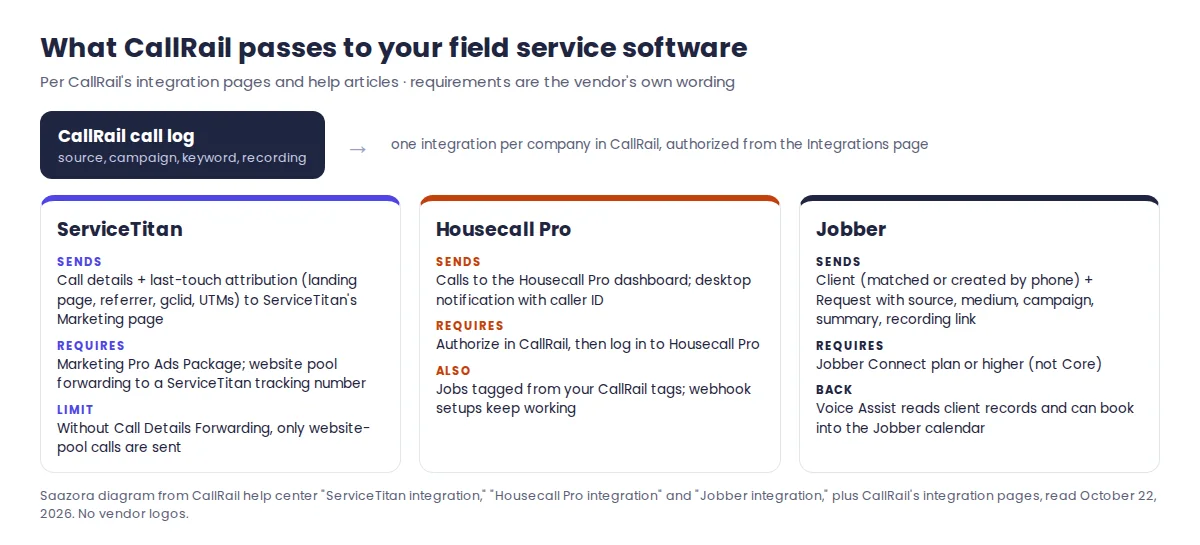
Three details matter before buying:
- ServiceTitan only sees pool calls by default. GBP, LSA, Yelp and truck numbers are source numbers, not a website pool, so those calls stay in CallRail unless Call Details Forwarding covers the Google ad calls. Plan on reporting non-web sources from CallRail itself.
- Jobber's two pages disagree on texts and forms. CallRail's Jobber integration page says the data entry runs "every time a lead calls, texts, or submits a form," while the help article's FAQ says "Text messages and form submissions won't report to Jobber." Ask CallRail support which one is current before relying on text leads in Jobber.
- Housecall Pro users on webhooks do not need to switch. CallRail says the native integration "provides identical functionality" to an existing webhook setup. If you are still choosing a field service tool, current trial terms are on our Housecall Pro offers page.
CallRail's own list of integrations its home services customers use also names JobNimbus, JobTread and Workiz, which helps roofing, remodeling and smaller trade shops not on the big three.
WhatConverts and CallTrackingMetrics: when each makes more sense
Both publish their US rates, both have a plan priced near CallRail's entry level, and each wins in a specific case. The comparison below sticks to what their pricing and integration pages state.
| CallRail Lead Tracking | WhatConverts Plus | CallTrackingMetrics Marketing Lite | |
|---|---|---|---|
| Published base price | $55 monthly, $50 yearly | $60/month incl. $30 usage credit | $79 monthly, $65 yearly, + usage |
| Included usage | 5 numbers, 250 minutes, 25 texts | $30 credit; table lists "Up to 148" phone call leads | None |
| Extra local number / minute | $3.00 / 6¢ (entry tier) | $2.50 / 4.5¢ | $2.00 / 4.0¢ |
| Transcription | Included in the minute | 2¢ a minute | Not in the Lite plan details (3,000 minutes come with Marketing Pro) |
| Google Ads and LSA | Google Ads integration; LSA by manual number | "Bing, Google Ads & Analytics Integration" on Plus | "Integrate with Google Ads, Google LSA, Data Studio, and GA4" |
| Field service tools named | ServiceTitan, Housecall Pro, Jobber | Jobber on its integrations page | None of the three found on its integrations page |
| Missed-call answering | Voice Assist, $95 base | None shown on its pricing page | VoiceAI promoted on the pricing page; price not in Lite plan details |
| Trial | 14 days, no credit card | 14 days free | First month without plan fees ("Pay $0 in Plan Fees for the First Month") |
Sources: callrail.com/pricing; WhatConverts pricing and integrations page; CallTrackingMetrics plans and pricing (US rate table) and integrations page. All read October 22, 2026.
Pick CallRail when the business runs on ServiceTitan, Housecall Pro or Jobber and wants the lead source written onto the job, or when Voice Assist answering missed calls is the main draw. Pick WhatConverts Plus when web forms and chat leads matter as much as calls and you do not need transcription; confirm how it bills call leads past the "Up to 148" line in its table. Pick CTM Marketing Lite when LSA lead tracking is the core need and the company has enough numbers that the lower per-number rate pays off. Six more options, priced per number, are in our roundup of CallRail alternatives.
If CallRail is the fit, you can try CallRail free for 14 days (affiliate link); the trial needs no credit card. Any current CallRail promotion is listed on our CallRail deals page.
Setup order for a service company
When setting up call tracking for home services, start with the sources that cost money and the ones that are hardest to change later (LSA and printed or wrapped numbers), then add the rest one at a time and test each.
- List every source and give it a name. Use the source table above. Decide now whether you need a Google Ads pool (yes if you want keyword-level data or ServiceTitan attribution).
- Connect the field service tool first if you use ServiceTitan. Its integration expects the website pool to forward to a ServiceTitan tracking number, so set that forwarding before the pool goes live rather than re-routing it later. Leave time for the authorization email.
- Install the website snippet and build the pool. Then connect Google Ads; calls placed from call assets are a separate Call Details Forwarding setting inside your Google Ads account.
- Connect Google Business Profile for each service-area listing, one number per listing.
- Create a separate LSA number and ask Google support to swap it in. Point it at a call flow so someone or something answers fast.
- Order offline numbers last but print them carefully. One per item type (wrap, yard sign, door hanger, mailer), named so the report reads clearly, and kept active for as long as the item is in use.
- Register for text compliance and turn on the missed-call text. After a month of Unanswered Calls data, decide whether Voice Assist is worth adding.
- Connect Housecall Pro or Jobber, then place a test call from a mobile phone to every number and confirm the call shows the right source in CallRail and in the field service tool.
Multi-location dental and medical practices follow a similar order with an extra compliance step; see call tracking for dental practices for that version.
Questions contractors ask before buying call tracking
Will a tracking number hurt my Google Business Profile ranking?
CallRail's GBP integration is built around that worry: the tracking number becomes the listing's main phone and your office line is kept as an additional number "to maintain NAP consistency." List the office line in your website footer and directory citations so the business details stay consistent. Saazora has not measured ranking effects.
How many tracking numbers does a small HVAC or plumbing company need?
One for each source you want to measure separately: typically GBP, LSA, Yelp, one per marketplace, one per offline item type and one for organic website visits, plus a pool of a few numbers if you run Google Ads to the site. That is five numbers for a one-truck shop and around a dozen for a shop running ads, which is what the cost table assumes.
Can call tracking show which calls turned into booked jobs?
Yes, through the field service tool. Jobber gets a Client and a Request with the marketing source for each call; ServiceTitan receives attribution for website-pool calls so job revenue can be tied back to the source; Housecall Pro jobs are tagged from CallRail's tags. Without one of those, staff can tag calls by hand in CallRail.
Does CallRail answer calls when my techs are on a job?
Only if you add Voice Assist, from $95 a month for up to 50 answered calls. Without it, CallRail can route calls to a teammate through a call flow or text the caller back after a miss, but a person still has to call back.
How this guide was put together
On October 22, 2026, Saazora re-read CallRail's pricing page (yearly and monthly views and the expanded Lead Tracking table; prices were unchanged from the previous day's capture), its CallRail for Home Services page, its ServiceTitan, Housecall Pro and Jobber integration pages, and these help center articles: "ServiceTitan integration," "Housecall Pro integration," "Jobber integration," "Industry-specific integrations," "Common marketing sources to use with call tracking," "Adding your tracking number to a Yelp listing," "How to set up Google Local Services Ads with CallRail," "Using CallRail with Google Local Services Ads," "Google Business Profile integration," "Google Ads integration," "Automated responses for missed calls," "Unanswered calls report" and "Voice Assist overview." Alternative prices come from the WhatConverts pricing page and the CallTrackingMetrics plans page and its US rate table, with both vendors' integrations pages, read the same day. Company sizes, minutes and ticket values are Saazora assumptions, and every bill is Saazora's own arithmetic from list prices. No vendor account was opened and no calls were placed, so this is a research guide, not hands-on testing. Real bills will vary with toll-free numbers, texts, taxes and call length.