
Research-based guide, not a product test: Saazora did not run a monday.com account on the Free plan for this article · Free plan limits, trial rules and prices read on monday.com/pricing (US English, USD, every team-size option on the Yearly and Monthly toggles) and in monday.com's Help Center on November 11, 2026 · Prices before tax
Some links on this page are affiliate links: Saazora may be paid if you sign up for monday.com through them, at no extra cost to you. The limits and cost math below do not depend on that.
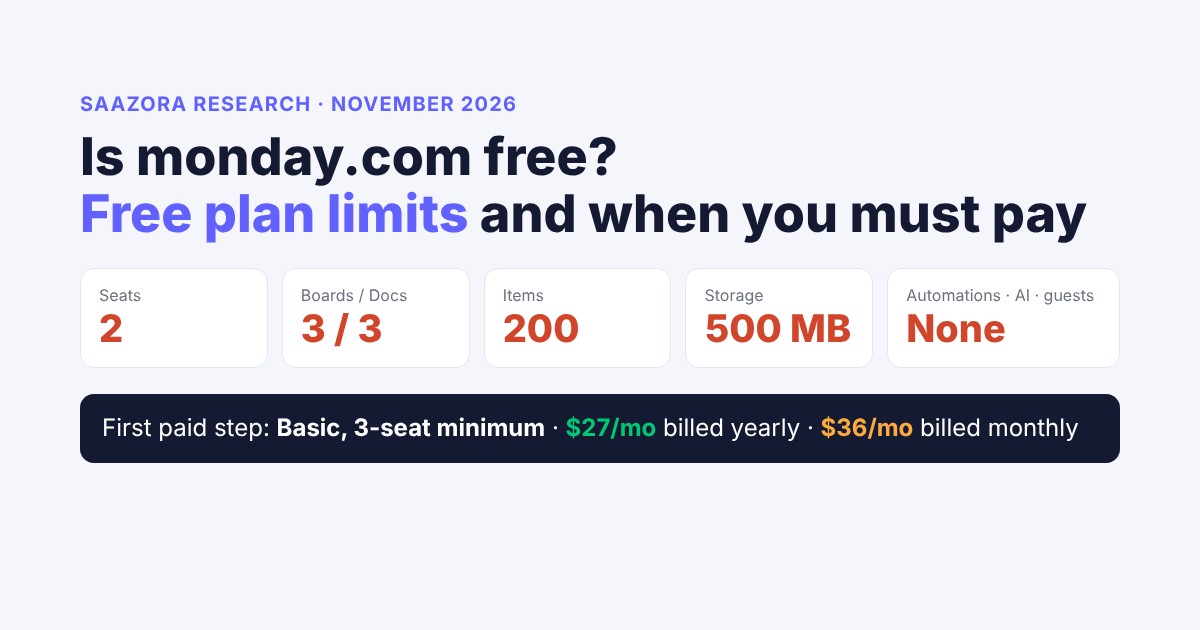
Is monday.com free? Yes, but only one product and only for two people. monday work management (now sold as the "AI work platform") has a Free plan at $0 "free forever" for up to 2 seats, with up to 3 boards, up to 3 docs, 200 items to start (up to 1,000 if you refer friends), 500 MB of storage and a dashboard that reads 1 board. It has no automations, no integrations, no guests, no viewers and no AI features. monday CRM, monday dev and monday service have no Free plan, only a 14-day trial. The trial is a different thing: every sign-up starts a 14-day Pro trial that needs no credit card, and when it ends you either pay, click "downgrade to our free plan", or the account goes inactive. The cheapest way past any Free limit is Basic for 3 seats (the minimum bucket): $27 a month billed yearly ($324 up front) or $36 billed monthly, so a two-person team that adds a third person, a fourth board or its 201st item starts paying for three seats.
This page is for freelancers, two-person teams and small teams who want to know how far monday's Free plan goes before a bill appears. It lists every Free plan cap with the source line it comes from, explains what monday says happens when you hit each one, separates the free trial from the free plan, and prices the first paid step on both billing cycles. A decision table near the end tells you whether your team can stay on Free or which plan it must buy. For seat prices beyond the first bucket, our monday.com pricing calculator covers every bucket from 3 to 40 seats.
The monday.com Free plan in one list (November 11, 2026)
- Price: $0, shown on the pricing page as "free forever".
- People: up to 2 seats. No guests and no viewers.
- Work: up to 3 boards and up to 3 docs; 200 items, which can grow to 1,000 through referrals.
- Files: 500 MB storage; activity log kept for 1 week.
- Not included: automations, integrations, AI features, timeline, calendar and Gantt views, formula and time tracking columns.
- First paid step: Basic, 3 seats minimum, $27/month yearly or $36/month monthly.
Start the 14-day trial, then pick Free or a paid plan when it ends: try monday.com (affiliate link)
Is monday.com free? What the Free plan includes
monday.com's pricing page lists Free as the first card, at $0, "free forever" and "Up to 2 seats", and under "Free includes:" four lines: "Up to 3 boards", "Up to 3 Docs", "200+ templates", "8 column types", plus the iOS and Android apps. Its FAQ answers the question directly: "monday.com has a free plan of monday work management which is ideal for freelancers and individual professionals."
The Help Center article "Understanding the Free Plan" describes it as the plan for "small teams looking to keep track of their tasks and work", and lists what you do get:
- Main boards that every member of the account can see (private and shareable boards are paid features).
- Updates and @mentions on each item, which is where files live on Free, because the Files column is not available.
- Board filters for search inside a board. Searching across the whole account ("Search Everything") starts on Standard.
- Kanban view, Files view and Forms view. The forms view turns a board into a form whose answers arrive as new items, which is one of the more useful free features for intake work.
- Dashboards, as many as you like, but each one reads data from only 1 board.
- Apps from the monday apps marketplace.
- Two-factor authentication and SOC 2 Type II coverage, which the feature table marks as included on every plan, Free too.
Support is self-serve on Free: the feature table marks the knowledge base for Free, while "24/7 customer support" and daily live webinars start on Basic.
monday.com Free plan caps, and what Basic lifts them to
Free plan value on top, Basic (cheapest paid plan) underneath. Source: monday.com/pricing feature list and Help Center, November 11, 2026.
Seats
2
Basic: unlimited seats, 3-seat minimum purchase
Boards
3
Basic: unlimited boards
Docs
3
Basic: unlimited docs
Items
200
Up to 1,000 with 8 referrals. Basic: unlimited items
Storage
500 MB
Basic: 5 GB
Viewers and guests
0
Basic: unlimited free viewers. Guests from Standard
Automations
0
Basic: none either. Standard: 250 actions a month
AI credits
0
Basic: 1,000 a month. "Available from Basic"
Red numbers are Free plan limits. Dashboards read 1 board on both Free and Basic; the activity log keeps 1 week on both.
Every Free plan limit, and what happens when you reach it
monday's pages describe a cap for each resource but are not equally clear about what you see when you hit it. The table below keeps the two apart: the limit, then what monday's own wording says happens, then the cheapest plan that removes it.
| Resource | Free plan limit | At the limit (what monday says) | Cheapest plan that lifts it |
|---|---|---|---|
| Seats | 2 per account | To move an account to Free "you must have the exact number of members you're allowed on the free plan or fewer" | Basic, bought as a 3-seat bucket |
| Boards | 3 for the whole account | Creating a fourth board shows a limit message | Basic (unlimited boards) |
| Items | 200 to start, +100 per referral, 1,000 maximum | "the total number of items can't go over your item limit"; deleted and archived items do not count | Basic (unlimited items) |
| Docs | Up to 3 (pricing page) | Not described | Basic (unlimited docs) |
| File storage | 500 MB | Not described | Basic (5 GB) |
| Viewers and guests | None | "You can't invite guests or viewers on this plan" | Viewers: Basic. Guests: Standard |
| Automations and integrations | None | "you will not be able to use automations or integrations" | Standard (250 actions a month each) |
| AI features | None | Pricing card: "AI features Available from Basic" | Basic (1,000 AI credits a month) |
| Dashboards | Unlimited, 1 board each | Each dashboard "can only contain information from 1 board" | Standard (combine up to 5 boards) |
| Columns | No Formula, Time Tracking, Progress Tracking or Files columns | Columns removed on Free cannot be re-added without upgrading | Formula and time tracking: Pro |
| Views | Kanban, Files, Forms | Not included on Free (feature table) | Standard |
| Other products | monday CRM and monday dev cannot be added | "you will need to upgrade to a paid plan" | A paid plan of that product |
Three of these limits deserve more than a table cell.
The item cap is account-wide, and archiving frees room
The 200 items are shared by all three boards, not 200 per board: "No matter the number of boards in your account, the total number of items can't go over your item limit." You can see your count from your profile picture menu. Each person you refer who signs up and verifies their email adds 100 items, and monday caps this at 8 referrals, so the ceiling is 1,000 items for the account.
The useful detail is that "A deleted or archived item will not count towards the item limit." Free therefore caps your active items, not your history. A team that archives finished tasks every week can stay under 200 for a long time; a team that keeps every finished task on the board will hit the wall on a schedule you can work out in advance:
| New items added per week (never archived) | Weeks until 200 items | Weeks until 1,000 items (8 referrals) |
|---|---|---|
| 5 (a freelancer's client tasks) | 40 | 200 |
| 10 | 20 | 100 |
| 25 (a busy two-person team) | 8 | 40 |
| 50 (form submissions landing as items) | 4 | 20 |
Saazora arithmetic: item limit ÷ items added per week, starting from an empty account. Archive or delete finished items and the clock stops. Whether subitems count toward the 200 is not stated in the Free plan article.
The last row matters if you plan to use the free Forms view for intake: every form submission becomes an item, so a public form can use up a Free account faster than the team itself does.
Two seats is a hard number, and there is no free reader seat
On paid plans you can add unlimited viewers, who read boards without editing and are not billed. Free has no viewers and no guests, so the only way a third person sees anything is as one of the two seats. A manager who just wants to check progress, or a client who wants to watch a project, cannot be added for free. You can still collect information from outsiders through a form, because the person filling it in does not need a seat.
No automations means no integrations either
monday counts automations and integrations separately on paid plans (250 actions a month each on Standard), but on Free both are zero: "If you choose the Free Plan, you will not be able to use automations or integrations." Basic does not fix this. Its feature table marks automations and integrations as not included, so a team whose real need is moving an item when its status changes, or creating an item from an email, skips Basic and lands on Standard.
Free trial vs Free plan: two different free options
Most confusion about whether monday.com is free comes from the sign-up flow. There is no separate sign-up for the Free plan. You sign up, get a trial, and only reach Free afterwards.
- The trial is 14 days of the Pro plan. "When you sign up for monday.com, you'll automatically start a free 14-day trial of the Pro plan." It needs no card: "Free trials don't require a credit card - your account simply deactivates if you don't upgrade. You will not be charged." Trials "can't be extended", and monday does not offer trials of other plans, so you cannot trial Basic or Standard specifically.
- The Free plan is the permanent $0 tier. The Free plan article says to "sign up for a free trial of the AI Work Platform product first", and when the trial expires, you click "downgrade to our free plan" on the screen that appears.
From sign-up to Free: the 14-day path
Based on monday.com Help Center articles on the free trial, the Free plan and cancelling a trial, read November 11, 2026.
Day 0
Sign up. Account starts on a 14-day Pro trial. No credit card.
Days 1 to 14
Pro features on: shareable and private boards, formula and time tracking columns, timeline, calendar and chart views, automations.
Before day 14
Trim to fit Free: 2 members or fewer, private and shareable boards converted to main boards.
Day 14
Choose: buy Basic, Standard, Pro or Enterprise; click "downgrade to our free plan"; or do nothing and the account becomes inactive. No charge either way.
The trial cannot be extended. Inside a Free account, some advanced features also offer their own "Try for 14 days" button.
If you do nothing on day 14, the account does not fall back to Free on its own; monday says "your account will become inactive when the trial ends". Data is kept by default after a cancellation, but monday adds that it "can not guarantee that we will continue this practice indefinitely", and recommends exporting boards to Excel first.
Moving from the trial (or a paid plan) down to Free
Your boards survive the move, but anything over the Free limits freezes. monday's wording: "your existing data remains accessible in view-only mode. This means you can still open and review your content, but you won't be able to add new items or create additional boards." So a trial account with six boards and 400 items moves to Free intact, then becomes read-only for new work until it is back under 3 boards and the item limit.
Before the trial ends, do four things:
- Get down to two members. The account must have two users or fewer to move to Free, so deactivate the rest first.
- Convert private and shareable boards to main boards. Otherwise they "will appear as unavailable" after the move.
- Pick your three boards. Merge or archive the others so new work has somewhere to go.
- Accept the column loss. If you remove an unsupported column (formula, time tracking) while on Free, "you won't be able to re-add them unless you upgrade again".
The cheapest paid step: Basic, three seats, two billing options
Any paid plan starts at a 3-seat bucket: "Our pricing plans start at a minimum of 3 seats", and the team-size menu goes 3, 5, 10, 15, 20, 25, 30 and 40 seats, then "Get a quote". So the step off Free is never one seat. A pair who adds a third person moves from $0 to a 3-seat bill, and a pair who stays two but needs a fourth board also pays for three seats, one of them empty.
| Plan, 3 seats | Yearly billing (per month) | Paid up front for the year | Monthly billing | 12 months on monthly | Yearly saves | Yearly is cheaper if you stay |
|---|---|---|---|---|---|---|
| Basic ($9 / $12 a seat) | $27 | $324 | $36 | $432 | $108 (25%) | 10 months or more |
| Standard ($12 / $14 a seat) | $36 | $432 | $42 | $504 | $72 (14%) | 11 months or more |
| Pro ($19 / $24 a seat) | $57 | $684 | $72 | $864 | $180 (21%) | 10 months or more |
Totals as displayed on monday.com/pricing for 3 seats, US, November 11, 2026, before tax. The last column is Saazora arithmetic: the yearly up-front total compared with that many months on monthly billing.
Three things in that table are easy to miss:
- The advertised 18% is not your discount. The pricing page and Help Center quote "an 18% discount" for yearly billing, but at list prices the saving is 25% on Basic, about 14% on Standard and about 21% on Pro.
- Yearly means paying the year now. "If you purchase a plan for one year, you will pay for one year upfront." Basic yearly is a $324 charge on day one. If you cancel within 30 days of a yearly payment, the FAQ says you get "a partial refund" of the remaining balance; after that, downgrades are not refunded.
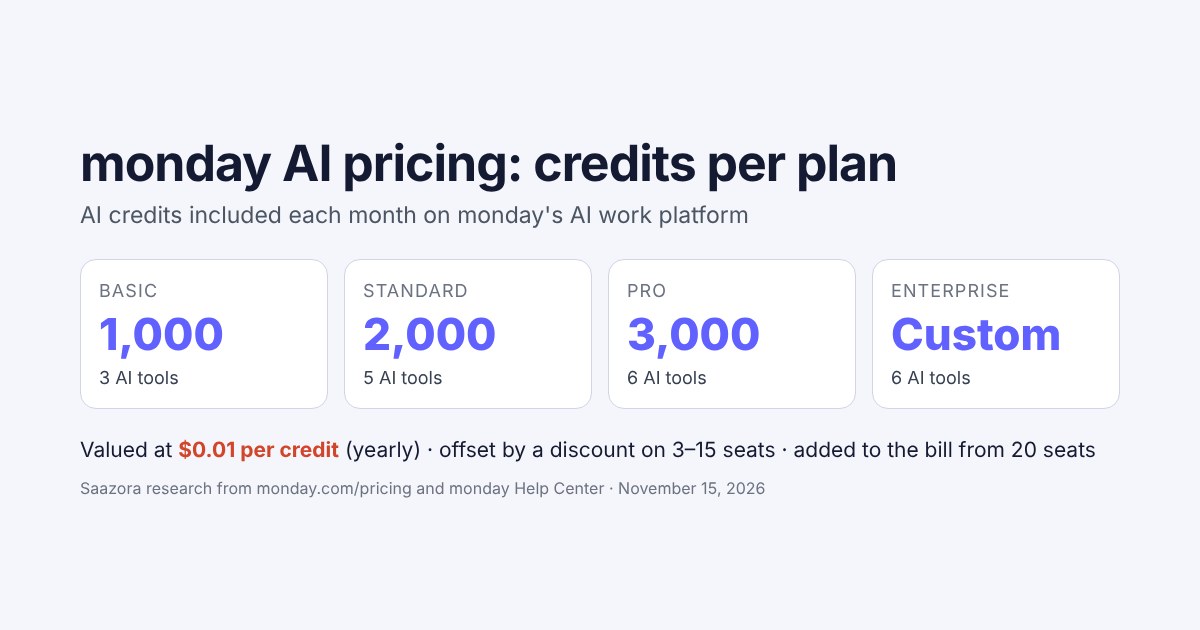
- AI credits are folded into the price. Each paid card lists monthly AI credits (1,000 on Basic, 2,000 on Standard, 3,000 on Pro) and offsets their value with a "Special monthly discount" line, so the $27 total already includes Basic's credits.
For a two-person team, Basic yearly works out to $13.50 per active person per month, because the third seat is paid for and unused. That empty seat is the real cost of leaving Free: until a third person joins, you are paying a third more than your headcount needs. You can check the current figures for your team size on monday.com's pricing page (affiliate link).
What leaving Free costs a month (3-seat minimum)
Billed yearly Billed monthly
Basic: $27 yearly · $36 monthly
Standard: $36 yearly · $42 monthly
Pro: $57 yearly · $72 monthly
monday.com/pricing, 3 seats, US list prices before tax, November 11, 2026. Bars scaled to $72. Free is $0 for up to 2 seats.
Which Free limit pushes you to which plan
The plan you need is set by the first limit that blocks real work, not by headcount alone. The Free caps fall into three groups, and each group is lifted by a different plan.
The upgrade ladder out of Free
Each column lists the Free plan limits that plan removes. Source: monday.com/pricing feature list, November 11, 2026.
Free · $0
2 seats
3 boards, 3 docs
200 to 1,000 items
500 MB, Kanban, forms
Basic · $27/mo
3 seats, yearly
3rd person or more
Unlimited boards, docs, items
5 GB, free viewers
1,000 AI credits a month
Standard · $36/mo
3 seats, yearly
Automations and integrations (250 actions each)
Guests (3 free, then every 4 billed as 1 seat)
Timeline, Gantt, calendar views
Dashboards of 5 boards
Pro · $57/mo
3 seats, yearly
Time tracking, formula column
Private boards and docs
25,000 actions each
Unlimited guests
Prices are monthly totals for the 3-seat minimum, billed yearly. Monthly billing: $36, $42 and $72.
Decision table: can your team stay on monday.com Free?
Find the row that matches your situation. The cost column is the cheapest monday option that covers it, from the 3-seat totals above.
| Your situation | Stay on Free? | Cheapest plan that works | Cost a month (yearly / monthly) |
|---|---|---|---|
| 1 or 2 people, 3 boards or fewer, finished items archived | Yes | Free | $0 |
| 1 or 2 people, need a 4th board or more than 3 docs | No | Basic, 3 seats | $27 / $36 |
| 1 or 2 people, over 200 items you want to keep active | Refer up to 8 accounts for 1,000, or pay | Free, then Basic | $0, then $27 / $36 |
| A 3rd teammate who edits | No | Basic, 3 seats | $27 / $36 |
| A boss or client who only needs to read | No (no viewers on Free) | Basic (viewers are free) | $27 / $36 |
| A client who must comment or edit on one board | No (no guests on Free) | Standard (3 guests free) | $36 / $42 |
| Any automation or integration (Gmail, Slack, status rules) | No | Standard | $36 / $42 |
| Timeline, Gantt or calendar view | No | Standard | $36 / $42 |
| Track billable hours or use formulas | No | Pro | $57 / $72 |
| Any AI feature (Sidekick assistant, AI agents) | No | Basic (1,000 AI credits a month) | $27 / $36 |
| You need a CRM pipeline or sprint board, not general tasks | No (Free covers work management only) | monday CRM or monday dev Basic | CRM $36 / $54; dev $27 / $36 |
| Registered nonprofit | Apply instead | Nonprofit Program (10 free Pro seats) | $0 for up to 10 seats if approved |
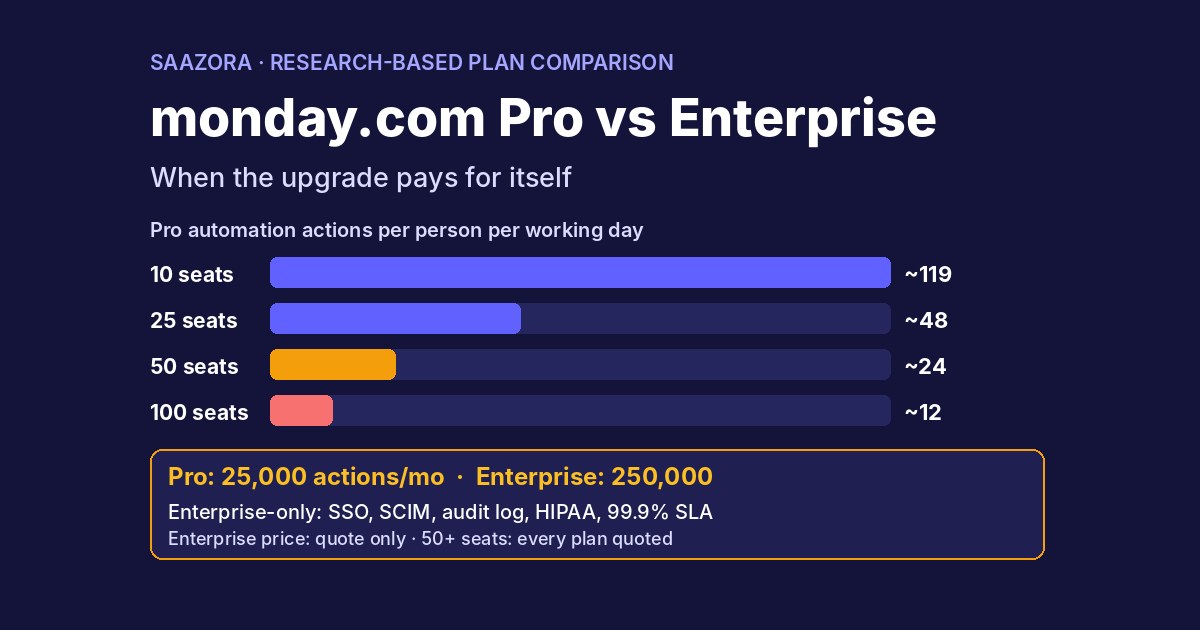
A quick way to use it: count the people who must edit, then list the first feature you would miss. If both answers fit Free (two editors, nothing from the Standard or Pro columns), stay. If the only blocker is a third editor, a fourth board or room for items, Basic is enough. If the blocker is anything that moves work automatically or lets an outsider in, budget for Standard. If you are deciding between Pro and a quote-based plan later on, that is a separate question with different limits; our monday.com Pro vs Enterprise comparison covers it.
Free options in monday CRM, monday dev and monday service
None of the other three monday products has a Free plan. The Help Center states it plainly: "The Free plan is only available on monday AI work platform". The Free plan article adds that "monday sales CRM and monday dev are not available on the Free Plan", so a Free account cannot even add them. What each product does offer for free:
- monday CRM: the 14-day trial only. The cheapest paid step is Basic at $12 a seat billed yearly or $18 monthly, so $36 or $54 a month for the 3-seat minimum. CRM's yearly toggle reads "SAVE 33%", a bigger yearly discount than work management's. Our monday CRM pricing guide covers every CRM plan. If you want to see the CRM product before deciding, start from monday CRM's trial page (affiliate link).
- monday dev: the 14-day trial only. Basic is $9 a seat yearly or $12 monthly, $27 or $36 a month for 3 seats, and already includes unlimited items and free viewers.
- monday service: no Free plan and no Basic plan either; plans start at Standard, listed at $31 a seat billed yearly ($93 a month for 3 seats).
A solo seller who mainly needs a free CRM will usually do better with a CRM that has a real free tier than with monday's 3-seat minimum; our best free CRM for small business roundup compares those. If the real question is which work tool to pay for at all, our monday vs ClickUp vs Asana cost comparison prices the three side by side for a 10-person team.
Two programs that are free or close to it
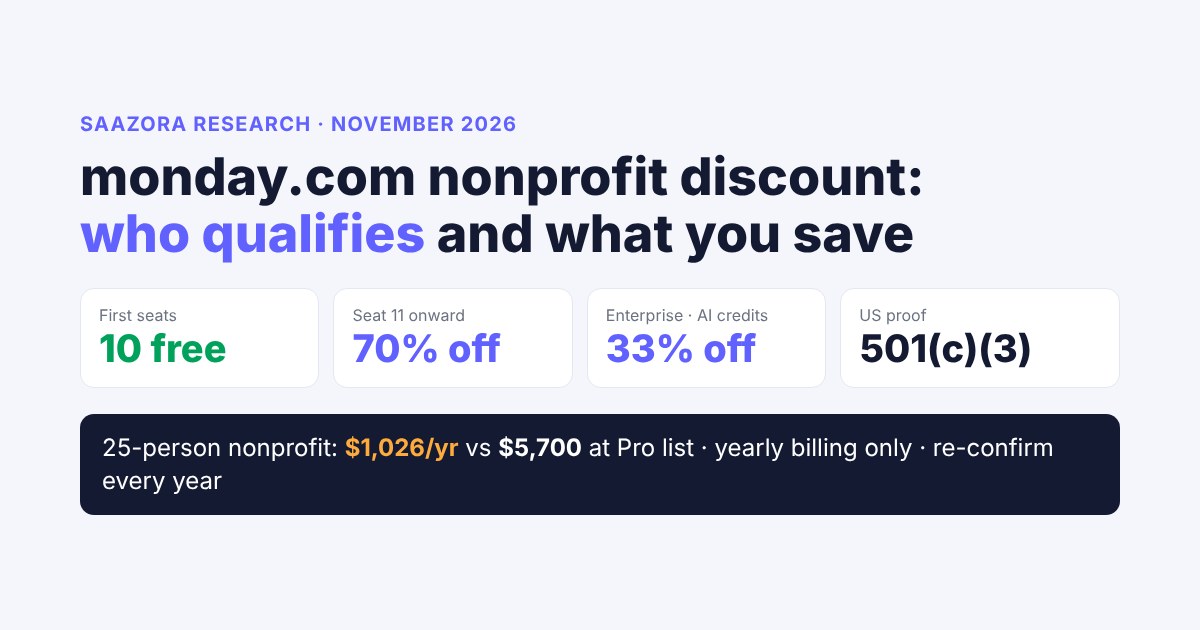
- Nonprofits: approved organizations get "10 free seats on AI Work Platform, CRM, Service, and Dev on the Pro plan", with extra seats at a 70% discount and AI credits at 33% off. This is the only route to a paid-level monday plan at $0.
- Students: monday recommends the regular Free plan for students and suggests sharing the account "with one other person". Its student page says students for whom Free is not enough can contact support, which "may be able to help accommodate your needs". No fixed student discount is published.
Where the monday.com pages disagree
Reading the pricing page and the Help Center side by side turned up three mismatches. They do not change the main answer, but they matter if you plan around a specific number:
- Docs. The pricing page and its feature table say Free includes "Up to 3 Docs". The Help Center's plan-types article still lists "Unlimited workdocs" for Free. This guide uses the pricing page, which is the more recently loaded source; expect three.
- Column types. The Free card says "8 column types", the feature table ticks "Over 20 column types" for every plan, and the Help Center says most columns are available on Free except formula, time tracking, progress tracking and files. Plan around the named exclusions.
- Items. The feature table shows "Up to 1000" items for Free while the Help Center says you start with 200. Both are right: 1,000 is the ceiling after 8 referrals, 200 is the starting point.
For an agency weighing Free against paid plans because of client access, our monday.com for agencies guide shows how guests change the cost per client. Current monday.com offers, including the trial, are listed on our monday.com offers page.
monday.com Free plan FAQ
Is monday.com really free forever?
The Free plan of monday work management has no time limit; the pricing page shows it at $0 and labels it "free forever". The 14-day trial is what ends. If you do not choose Free or a paid plan when it does, the account becomes inactive.
Do I need a credit card to use monday.com for free?
No. The trial needs no card, and moving to Free is a button on the trial-expired screen; monday's pages describe no payment step for it. Payment details come in only when you buy a paid plan.
How many users can use monday.com for free?
Two. The Free plan allows up to 2 seats and no viewers or guests. A third person, even one who only reads, needs a paid plan, and paid plans start at 3 seats.
Can I use automations or integrations on the Free plan?
No. Free includes neither, and Basic does not add them. Automations and integrations start on Standard with 250 actions a month each.
Does the Free plan include monday AI?
No. The pricing page shows AI features as "Available from Basic", which comes with 1,000 AI credits a month.
What happens to my boards if I downgrade to Free?
They stay in the account. Anything over the Free limits becomes view-only, so you can read it but not add items or boards. Private and shareable boards appear unavailable unless you convert them to main boards first.
Is there a free version of monday CRM?
No. monday CRM has a 14-day trial and paid plans from $12 a seat billed yearly, with a 3-seat minimum. The Free plan exists only for monday work management.
Is yearly or monthly billing better after Free?
Yearly is cheaper per month (25% on Basic, about 14% on Standard, about 21% on Pro at current list prices) but is paid up front. If you are not sure you will stay at least 10 to 11 months, monthly billing costs less overall.
How we researched this
On November 11, 2026, Saazora loaded monday.com/pricing in a US-English browser session (USD), saved the plan cards and the FAQ, opened the complete feature list and recorded every Free and Basic row, and selected each team-size option for work management, monday CRM and monday dev on both the Yearly and Monthly toggles. monday's Help Center articles on the Free plan, the free trial, cancelling a trial, plans and pricing, plan types for the AI work platform and monday dev, downgrading, auto-upgrades, guest pricing, item limits, AI credits, students and nonprofits were read the same day through the Help Center's public article feed, because the article pages sit behind a bot check. The item runway, the yearly break-even and the decision table are Saazora's own arithmetic from those published numbers. Saazora did not run a Free account or buy a plan for this article, and monday.com did not review it. See how we review software.
Sources (read November 11, 2026): monday.com pricing; Understanding the Free Plan; All about the monday.com free trial; How to cancel a free trial; Plans and pricing for monday.com; Available plan types on monday AI work platform; Available plan types on monday dev; Downgrading your plan; Pricing for guests; monday.com for students; monday.com for nonprofits.
Research-based guide: Saazora read monday.com's own pages and did not test the product. Plans, limits and prices change; check monday.com's pricing page before you buy.