
Research-based monday.com for agencies guide, not a product test: Saazora did not build these boards in a monday account or invite real clients for this article · Prices, plan limits, guest and viewer rules, workdoc, dashboard and time-tracking behavior read on monday.com and the monday Help Center on November 8, 2026 · US list prices in US dollars, before tax
Some links on this page are affiliate links: Saazora may be paid if you sign up for monday.com through them, at no extra cost to you. The board design and cost math below do not depend on that.
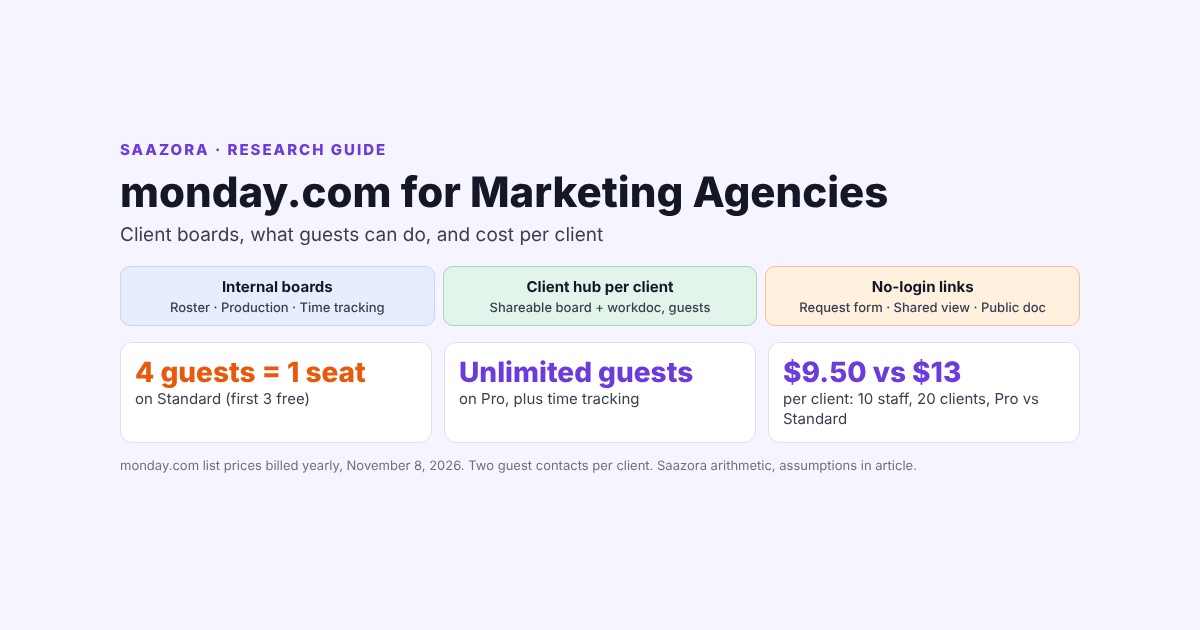
monday.com for agencies works best as two layers: internal boards your team works in (client roster, production, time tracking) and one Shareable board per client that the client's contacts join as guests. Guests see only the Shareable boards they are invited to and cannot create boards or invite other guests, but by default they can add columns, automations and integrations, so set each client board to "View and comment" or "Only edit content" before you invite anyone. Guests also decide the plan more than features do: on Standard every 4 guests count as 1 billed seat, while Pro allows unlimited guests and is the plan that adds time tracking, private boards and column permissions. At list prices billed yearly on November 8, 2026, a 10-person agency with 20 clients (two client contacts each) pays $260 a month on Standard and $190 on Pro, which is $13.00 versus $9.50 per client. Pro becomes the cheaper plan once a 3-person agency invites 4 guests or a 10-person agency invites 24. A 25-person agency stays cheaper on Standard until 64 guests push it past 40 seats, where monday stops listing prices and asks for a quote (Saazora arithmetic, assumptions below).
This guide is for marketing, creative and digital agencies deciding how to run client work on monday.com, and what to let clients see. It is built from monday's pricing page and its Help Center articles on guests, viewers, board types, board and column permissions, shared views, dashboards, workdocs, WorkForms, time tracking and seat billing. You get a client-board blueprint, a plain list of what a client can and cannot do as a guest, the four ways to show a client work without a login, and a cost-per-client table for agencies with 3, 10 and 25 staff serving 5, 20 and 50 clients. If you only need seat prices for your headcount, our monday.com pricing calculator covers every seat bucket.
The access question comes first: five ways a client can reach your monday account
Before any board design, decide how each client gets in. monday has one user type built for clients (guests) and several ways to show work without adding a user at all. They differ in what the client can change, whether a login is needed, and whether they touch your bill.
| Route | Client logs in? | Client can edit? | Plan needed | Effect on your bill | Watch out for |
|---|---|---|---|---|---|
| Guest on a Shareable board | Yes, a guest profile on your account | Yes, limited by board permissions | Standard and above | Standard: 3 guests free, then every 4 guests = 1 seat. Pro and Enterprise: unlimited | Guest email domain must differ from your organization's domain |
| Shared board view (public link or embed) | No | No, read-only | Not plan-gated in the article we read; only board owners can share | None | Hidden items and columns "can still be accessed" by technical users, per monday |
| Workdoc public link | No | No, read-only | Not on trial accounts | None | Embedded boards, widgets, files and comments are not shown; updates appear in about 30-minute intervals |
| WorkForm (request or approval form) | No, unless you require login | Submits new items only | All plans; hiding monday branding needs Pro | None | Password protection and response editing are Enterprise-only |
| Viewer or dashboard invite | Yes | No, read-only | All paid plans | None, viewers are free | Viewers can see every Main board in open workspaces: not suitable for clients |
The last row is the trap. monday's user-types article says viewers can "View all the Main boards from any open workspace on the account," because viewers are team members, not external users. And the dashboard permissions article says that people "invited to your Dashboard but are not members of your account will be invited as free, read-only viewers." Inviting a client to a dashboard by email can therefore give them read access to more than that dashboard if your agency keeps its work on Main boards. Use guests for clients, and keep viewers for internal people such as a part-time finance contact.
Guests have one more rule that matters to agencies working with contractors: "A guest must have a different email domain than the person who created the account." A freelancer on your company domain cannot join as a guest; they need a member seat or a viewer seat.
What clients can see and do as guests
monday's guest article is specific, and the list is longer than most agencies expect. Guests "can only see the Shareable boards they've been invited to," and board owners can restrict them further with board permissions. Here is the full list from the Help Center, grouped for an agency reading it.
Two items on the first list deserve attention. First, guests can "Add automations" and "Add integrations." On Standard, automation actions are capped at 250 a month for the whole account, so a client who builds a notification rule on their board spends your quota. Second, guests can "Edit and add columns," which on a board without permissions means a client can restructure the board your team relies on. Account-level rules that block these actions by user type exist, but monday lists account permissions as Enterprise-only, so on Standard and Pro the practical control is the board permission set.
The board permissions article describes the four sets this way: "Edit everything," "Only edit content," "Only edit assigned items" (Pro and above) and "View and comment," and notes that "Only board owners can set board permissions." When account, workspace and board rules conflict, "The strictest rule applies." For most client boards, "Only edit content" is the right default: the client can flip an approval status or fill a feedback column, but cannot add columns or rebuild views.
On Pro you can go one step further and keep internal data on the same board as client data. The column permissions article says the feature is "Available on Pro and Enterprise plans" and lets a board owner "restrict column view access and select who can see them." A Hours logged or Internal notes column can stay on the client's board but be invisible to their guest profiles. Note that monday's general permissions overview lists column permissions under Enterprise; the dedicated column permissions article says Pro and Enterprise. Check it in a Pro trial before you rely on it, or keep internal columns off client boards entirely, which is what the blueprint below does.
A client-board blueprint for monday.com for agencies
The design principle is simple: clients only ever touch Shareable boards and Shareable workdocs, and everything about money, hours and other clients lives on boards they cannot reach. monday's board-type article makes the boundary clear: Private boards "are only for internal use and therefore we do not offer the ability to invite guests on to a private board," and guests "will NOT be able to view information on Main or Private Boards."
Internal layer
Client roster. One board, one item per client. Columns: Retainer per month, Contract renewal, Account lead (People), Monthly hours budget (Numbers), Guest contacts (Text or Email), Client status (Active, Paused, Offboarding). On Pro, make it Private so only the leadership team sees retainer values.
Production. One board for all clients, grouped by week or sprint. Columns: Client (Connect boards to the roster, or a Dropdown), Owner, Status, Due date, Time tracking, Hourly rate, and a Formula column for billable value. Your team lives here; clients never do.
Agency dashboard. Hours per client, workload by person, overdue work. monday's plan article sets the size: each dashboard "can contain information from 5 boards" on Standard and "20 boards" on Pro. An agency that wants one dashboard across Production, the roster and several client hubs will hit Standard's five-board limit quickly.
Client layer
Client hub, one per client. A Shareable board with four groups that mirror how clients think: Needs your approval, In production, Scheduled or live, Done. Keep columns few and readable: Deliverable, Approval status (Waiting, Approved, Changes requested), Due date, Preview link, Agency owner. Set the permission set to "Only edit content" so the client can change Approval status and comment, but not restructure the board. On Pro, "Only edit assigned items" lets you limit edits to items where the client contact is assigned.
How the hub stays in sync with Production. The simplest pattern is one item per client-facing deliverable on the hub and the detailed task breakdown on Production, linked with a Connect boards column. Two limits shape this. monday's time-tracking article says "The Time Tracking column cannot be mapped when using automations to create or move items to another board," so hours stay on Production. And the shared-view article says "Mirrored items will not show up in a shared board view due to privacy," so if you plan to send stakeholders a read-only link, put the client-facing fields directly on the hub, not as mirror columns.
Shareable workdoc. Workdocs have the same three types as boards. The workdoc permissions article says a Shareable workdoc lets you "invite these people as guests," and that guests "will only have access to the specific workdoc they have been invited to." Set editing to "Only workdoc owners" for reports, or open it for a brief you want the client to comment on and fill in.
No-login layer
Request form. A WorkForm on the Production board turns client requests into items, with form tags to record which client sent it. If a client asks for monday branding to be removed from the form, that toggle is "only available for Pro and Enterprise accounts."
Shared view. For a stakeholder who only needs to glance at status, a shared board view gives a link or embed code with no login. Only board owners can create one ("The ability to share a board view is only available for board owners"), files in a Files column are not shown, and monday warns that "filtered data (items and columns) can still be accessed through the shared views by technical savvy users although it is hidden." Never share a view of a board that holds data the client should not see, even if the view filters it out.
Workdoc public link. Good for a finished monthly report. It is read-only, and monday lists what does not come through: files, videos, comments, and "Embedded boards and widgets will not be publicly visible, as they contain account data." Changes reach the public version in intervals of roughly 30 minutes, and "The option to publicly share a workdoc is not available on Trial accounts," so you cannot test it before you pay.
You can build this blueprint on a monday trial, which starts on the Pro plan for 14 days according to monday's plans article: start a monday.com trial (affiliate link).
Time tracking and billable hours: a Pro feature
For agencies that bill by the hour or watch retainer burn, this is the feature that settles the plan. The time-tracking column article says: "This feature is only available for the Pro and Enterprise plans." monday's plan article lists Basic as having most columns "except the Formula Column and the Time Tracking Column," and only adds "Full access to the column center" at Pro, so on Standard you cannot calculate billable value with a Formula column on the board either.
What the column does, per monday's article:
- Start and pause a timer per item, or add a session manually (no future times).
- Track time on subitems and show the sum on the parent item.
- Export a whole column to Excel with item name, the user who logged the time and totals.
- Combine with a Formula column. monday's own example is a creative agency billing hours:
ROUND(MULTIPLY({Time Tracking#Hours},{Hourly Rate}),0).
And what it does not do: active sessions are not counted until the timer is paused or stopped, so a "more than 4 hours" alert cannot fire while the clock runs; the column does not move between boards by automation; and the board-level total needs a Formula column in the group summary, because the column "is not automatically summed." monday's article also names three Marketplace apps for heavier timesheet needs (Tracket, Time Reporting Solution and TMetric), and the Help Center has a Harvest integration article; Saazora did not price those add-ons.
Keep the Time Tracking and Hourly rate columns on the internal Production board. If you put them on a client hub, every guest with access can see your rate unless you add a column-view restriction on Pro.
Standard or Pro: guests change the answer
monday sells seats in buckets, not one at a time: "Our pricing plans start at a minimum of 3 seats, and then ascend in multiples of 5." The live team-size menu on November 8, 2026 offered 3, 5, 10, 15, 20, 25, 30 and 40 seats, then 50, 100 and 200+ with "Get a quote" instead of a price. Guests slot into that system differently on each plan:
- Standard: "every 4 guests count as 1 billed seat. That means you can invite up to 3 guests for free." Members and guest groups share the same seat count, and if the total passes your bucket, "your account will be automatically upgraded."
- Pro and Enterprise: "you can invite an unlimited number of guests."
- Basic: no Shareable boards and no guests at all.
| Plan (work management) | Per seat, billed yearly | Per seat, billed monthly | Client guests | Time tracking | Private boards | Automations a month | Boards per dashboard |
|---|---|---|---|---|---|---|---|
| Basic | $9 | $12 | None | No | No | Not listed | 1 |
| Standard | $12 | $14 | 3 free, then 4 guests = 1 seat | No | No | 250 actions | 5 |
| Pro | $19 | $24 | Unlimited | Yes | Yes | 25,000 actions | 20 |
| Enterprise | Quote | Quote | Unlimited | Yes | Yes | Up to 250,000 actions | 50 |
Because guests on Standard add seats and seats come in buckets, the cheaper plan flips as your client list grows. The chart compares Standard with guest seats against Pro with unlimited guests for three agency sizes.
The pattern: small agencies should go straight to Pro once they invite clients. A 3-person agency on Standard pays $36 a month with no guests, but the 4th guest adds a seat, which pushes 3 staff into the 5-seat bucket at $60, already above Pro's $57. A 10-person agency reaches the crossover at 24 guests (16 seats, so the 20-seat bucket at $260 against Pro's $190). A 25-person agency is the exception: Pro's 25-seat price ($505) is high enough that Standard stays a few dollars cheaper even at the 40-seat bucket ($500), until 64 guests push the count to 41 and Standard requires a quote. At that size, choose on features (time tracking, private boards, column permissions), not on guest math.
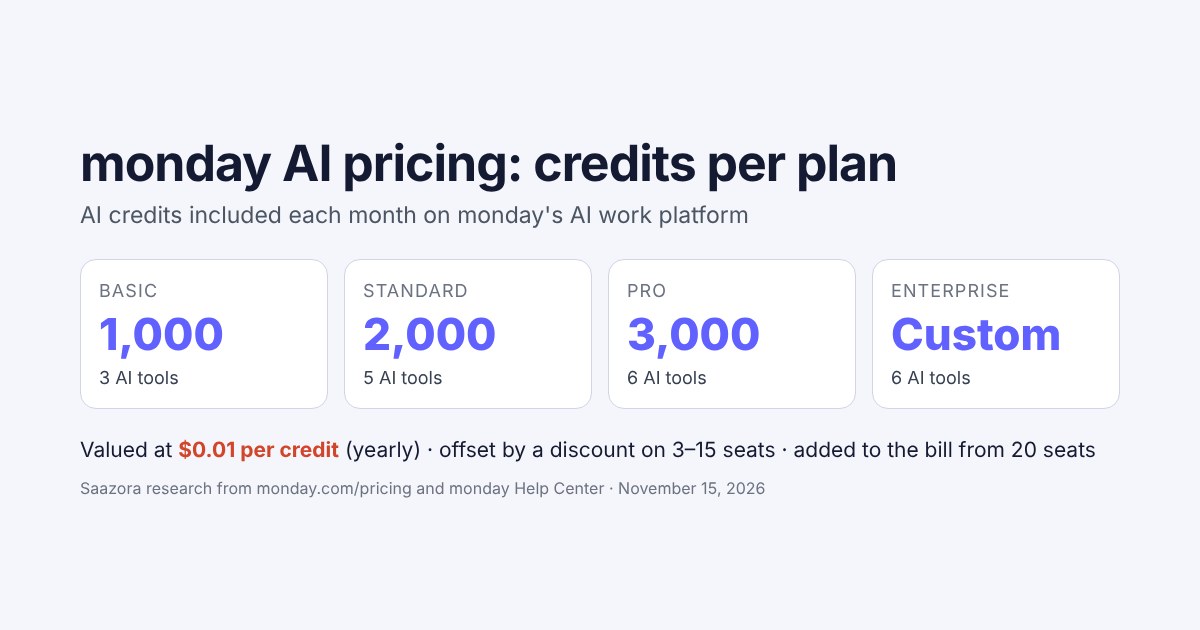
Two details from the pricing page change the totals above 15 seats. From the 20-seat option, each plan's monthly total includes an AI-credits line ($10 on Basic, $20 on Standard, $30 on Pro, billed yearly), which the page offsets with a "Special monthly discount" on 3 to 15 seats only. That is why Standard at 20 seats shows $260, not $240. The pricing figures in this guide use the totals exactly as monday displays them. See current numbers on monday.com's pricing page (affiliate link).
Cost per client at 3, 10 and 25 staff
The table below is Saazora's arithmetic, not a monday quote. Assumptions: every staff member needs a member seat; each client gets two guest contacts (for example a marketing lead and an approver); nobody internal is moved to a free viewer seat; yearly billing; list prices on monday.com/pricing on November 8, 2026, before tax. Standard seats = staff + guests ÷ 4 (rounded down), then rounded up to the next bucket. Pro seats = staff only.
| Agency | Clients (guests) | Standard seats → bucket | Standard / month | Pro / month | Standard per client | Pro per client | Cheaper |
|---|---|---|---|---|---|---|---|
| 3 staff | 5 (10) | 5 → 5 | $60 | $57 | $12.00 | $11.40 | Pro |
| 3 staff | 20 (40) | 13 → 15 | $180 | $57 | $9.00 | $2.85 | Pro |
| 3 staff | 50 (100) | 28 → 30 | $380 | $57 | $7.60 | $1.14 | Pro |
| 10 staff | 5 (10) | 12 → 15 | $180 | $190 | $36.00 | $38.00 | Standard |
| 10 staff | 20 (40) | 20 → 20 | $260 | $190 | $13.00 | $9.50 | Pro |
| 10 staff | 50 (100) | 35 → 40 | $500 | $190 | $10.00 | $3.80 | Pro |
| 25 staff | 5 (10) | 27 → 30 | $380 | $505 | $76.00 | $101.00 | Standard |
| 25 staff | 20 (40) | 35 → 40 | $500 | $505 | $25.00 | $25.25 | Standard |
| 25 staff | 50 (100) | 50 → 50 (quote) | Quote | $505 | n/a | $10.10 | Pro (Standard unpriced) |
What the table shows:
- Client count drives cost per client down faster than headcount drives it up, but only on Pro. On Pro the bill depends on staff alone, so a 10-person agency pays $9.50 per client at 20 clients and $3.80 at 50. On Standard, each new client adds half a seat, so the per-client cost falls much more slowly ($13.00 to $10.00 for the same agency).
- Few clients with a large team favors Standard. At 25 staff and 5 clients, Standard costs $380 against Pro's $505, a $76 versus $101 cost per client. If you do not need time tracking or private boards, that gap is real. At 25 staff and 20 clients the two plans are $5 apart ($500 against $505), so features should decide.
- Monthly billing raises everything. Pro billed monthly is $72, $240 and $637.50 for 3, 10 and 25 seats, so the 10-person agency with 20 clients pays $12.00 per client instead of $9.50.
- One guest per client changes the Standard column, not Pro. With one contact per client, Standard needs a quarter seat per client instead of half; rerun the seat formula above with your real contact count.
If you rebill monday to clients, the per-client number is the floor for what to charge for project-portal access. If you treat it as overhead, compare it with the other tools you already pay per client, such as call tracking: our guide to call tracking for agencies works through the same per-client math for CallRail at 5, 15 and 30 clients.
Seat traps that catch agencies
A new client can upgrade your plan. On Standard, inviting guests counts toward seats. monday's auto-upgrade article says that when seats are exceeded, "the system starts a 5-day countdown before applying an auto-upgrade," with warning emails, after which the account moves to the next bucket. You then have 30 days to revert and request a refund, but only after removing the extra users. Onboarding three clients in one week on Standard can move a 10-seat account to 15.
Offboarding is a billing task. When a client leaves, deactivate their guest profiles in Administration, Directory. On Standard that frees seats; on Pro it is still good hygiene, since guests keep access to boards they were invited to. Change the old hub to Private (Pro) or Main if you want to keep its history without client access.
There are gaps between buckets. The menu jumps from 30 to 40, so 31 seats bills as 40. On Standard, two extra guests can be the difference.
Freelancers on your domain are not guests. Because of the email-domain rule, a contractor with an address on your agency domain must be a member (billed) or a viewer (free, read-only). Give freelancers their own address domain if you want them as guests on specific boards only.
Viewers are free but see too much for clients. "You can invite an unlimited number of viewers, regardless of your plan. Viewers do not count toward billing." Use them for internal read-only people, never as a way to avoid guest seats for clients.
Where monday falls short for agencies
- No client portal in the work management product. monday's portal feature belongs to monday service, a separate product. In work management, the "portal" is the Shareable board, which looks like your workspace, not a branded client site.
- Guest defaults are permissive. Without a permission set, guests can add columns, automations and integrations. Blocking those by user type needs Enterprise account permissions.
- Time tracking is basic. No timesheet approval or invoicing; heavy hourly billing usually needs a Marketplace app or an integration.
- Read-only links have privacy caveats. Shared views can expose hidden data to technical users; workdoc public links drop embedded boards and files.
- Not a CRM by itself. Tracking leads and proposals before a client signs is a different job. For that side, compare monday CRM against HubSpot and Pipedrive, and check monday CRM pricing, which is sold separately from the work management plans priced here.
Current monday deals, if any, are listed on our monday.com store page.
Questions about monday.com for agencies
Can clients use monday.com for free?
Yes on Pro and Enterprise, where guests are unlimited. On Standard, the first 3 guests are free and then every 4 guests count as 1 billed seat. Basic has no guests. Clients can also see work without any account through a shared board view, a workdoc public link or a WorkForm.
What can a client see as a guest on monday.com?
Only the Shareable boards and Shareable workdocs they are invited to. They cannot see Main or Private boards, workspace names, other clients' boards or the board activity log. Within their board, what they can change depends on the permission set you choose.
Is Standard or Pro better for a marketing agency?
Pro for most agencies that invite clients: unlimited guests, time tracking, private boards and column permissions. On our numbers Pro is also cheaper for a 3-person agency from 4 guests and for a 10-person agency from 24 guests. Larger teams with few client contacts and no hourly billing can stay on Standard.
Can I hide hours or rates from a client on the same board?
On Pro and Enterprise, the column permissions article says you can restrict column view. The simpler and safer pattern is to keep hours and rates on an internal board and never add them to the client's Shareable board.
Can I white-label monday.com for clients?
Not in the sense of a branded client portal in work management. You can hide monday branding on WorkForms on Pro and Enterprise, rename shared views, and export workdocs to PDF or Word for reports.
How we researched this guide
This is a research-based guide. Saazora did not create a monday account, build these boards or invite clients for this article, and monday did not review it before publication. On November 8, 2026 we read monday.com/pricing with every team-size option and both the yearly and monthly toggles (Playwright Chromium, US English, USD), and these monday Help Center articles through the Help Center's public API, because the pages sit behind a bot check: How to get started as a guest; Pricing for guests; How to share projects with guests; User types explained; Shareable Boards; The difference between board types; Board permissions; Column permissions; Permissions on monday.com; How to share a board view publicly; Dashboard permissions; monday workdoc permissions; Share and export your workdocs; WorkForms settings and permissions; The Time Tracking Column; Available plan types on monday AI work platform; Plans and pricing for monday.com; How to manage an auto-upgrade; Automation and Integration actions and limits. The blueprint, permission choices, guest-per-client assumption, seat counts and cost-per-client figures are Saazora's own design and arithmetic. Where two monday articles disagree (column permissions: Pro and Enterprise in one, Enterprise in the other), we say so in the text.
Sources (checked November 8, 2026):
- monday.com, Pricing (work management plans): monday.com/pricing
- monday Help Center, guests: How to get started as a guest; Pricing for guests; How to share projects with guests; Shareable Boards (support.monday.com)
- monday Help Center, users and access: User types explained; The difference between board types; Board permissions; Column permissions; Permissions on monday.com; Dashboard permissions (support.monday.com)
- monday Help Center, client-facing output: How to share a board view publicly; monday workdoc permissions; Share and export your workdocs; WorkForms settings and permissions (support.monday.com)
- monday Help Center, plans and billing: Available plan types on monday AI work platform; Plans and pricing for monday.com; How to manage an auto-upgrade; Automation and Integration actions and limits; The Time Tracking Column (support.monday.com)