
Research-based plan comparison: Saazora did not buy a monday.com plan for this article · Plan limits read on monday.com/pricing (US, USD, every team-size option, Yearly and Monthly) and in monday.com's Help Center on November 10, 2026, and re-checked on November 13, 2026 · Enterprise pricing is quote-only and is not shown here
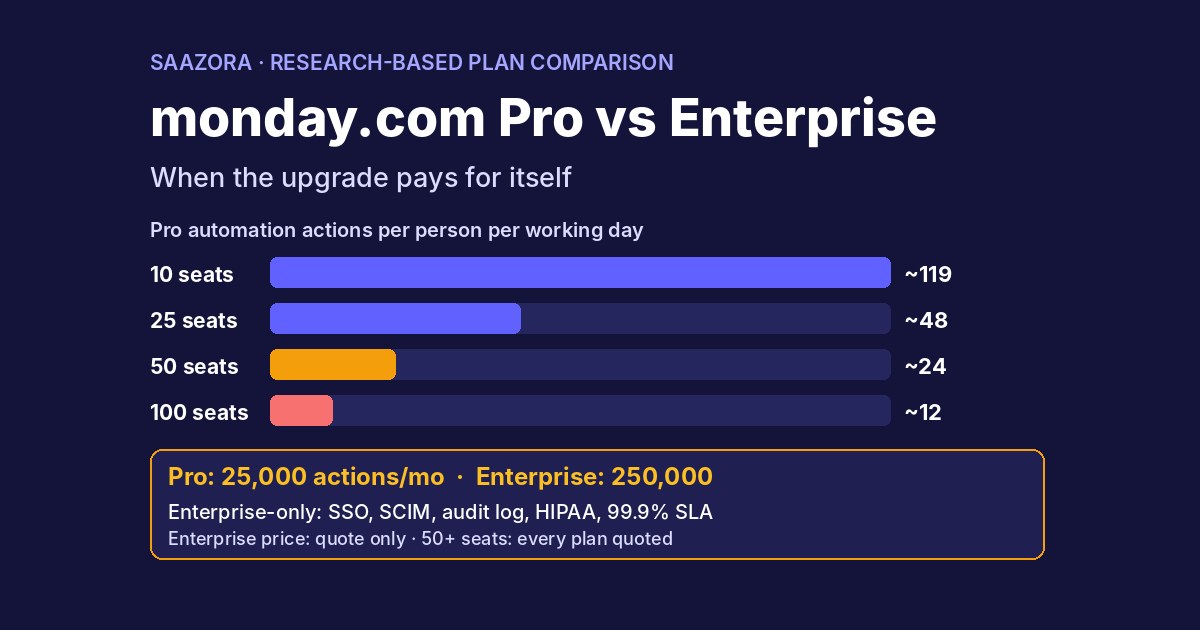
Short answer to monday Pro vs Enterprise: for most teams of 10 to 25 seats, Pro is enough, and the upgrade pays for itself only when one of two walls appears. The first is volume: Pro gives the whole account 25,000 automation actions and 25,000 integration actions a month, Enterprise gives 250,000 of each, and only Enterprise customers can buy more actions. Split across 25 seats, Pro's pool is about 48 actions per person per working day; across 100 seats it is about 12. The second wall is control: single sign-on, SCIM provisioning, audit log, IP restrictions, HIPAA compliance, custom account roles and a 99.9% uptime SLA are Enterprise-only. Guests do not decide it (both plans allow unlimited guests), and above 40 seats every plan, Pro included, is sold by quote.
monday.com publishes a price for Pro ($19 a seat a month billed yearly, $24 monthly) but not for Enterprise, which says "custom price" and "Get a quote". So this page does not guess the Enterprise price. It works the other way round: it shows how many automated steps each person on your team gets under Pro, which limit a team of 10, 25, 50 or 100 seats hits first, and the highest Enterprise quote that would still pay for itself under assumptions you can swap for your own. For the seat-bucket arithmetic behind the Pro totals, our monday.com pricing calculator covers every bucket from 3 to 40 seats. If you are still weighing monday.com against other tools, our monday vs ClickUp vs Asana cost comparison prices a 10-person team on all three.
Pro vs Enterprise in four numbers (November 13, 2026)
Saazora may earn a commission if you sign up through the links on this page, at no extra cost to you.
- Automation actions a month: 25,000 on Pro, 250,000 on Enterprise (integrations: the same split).
- Active workflows: 20 on Pro, 250 on Enterprise.
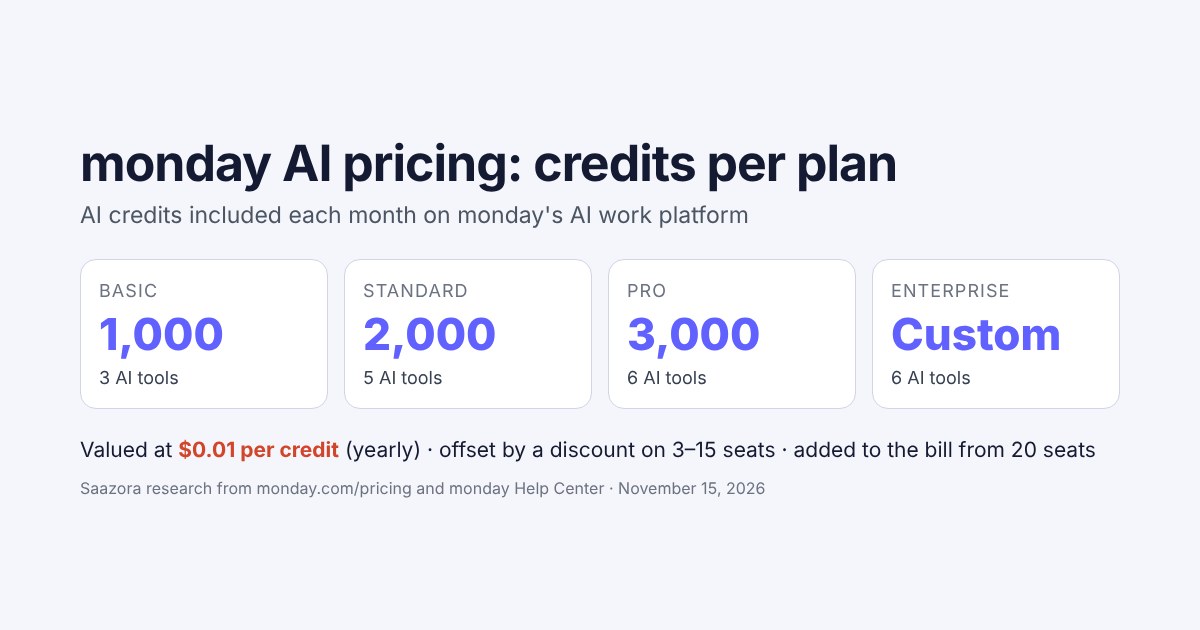
- AI credits: 3,000 a month on Pro; Enterprise "Start with 20,000 credits".
- Price: Pro $19 a seat a month billed yearly up to 40 seats; Enterprise by quote, minimum 12-month term.
monday Pro vs Enterprise: the limits that actually differ
Most rows of monday.com's feature list are identical on the two plans. The table below keeps only the rows where Pro and Enterprise differ, plus guests, because guest rules are a common reason people assume they need to upgrade. Everything is for monday work management (monday.com now calls it the AI work platform); monday CRM has its own tiers, covered further down.
| Limit or feature | Pro | Enterprise | Can Pro buy more? |
|---|---|---|---|
| Automation actions | 25,000 / month | 250,000 / month | No: only Enterprise can buy actions |
| Integration actions | 25,000 / month | 250,000 / month | No |
| Active workflows | 20 | 250 | Yes, add-on through sales |
| AI credits | 3,000 / month | Starts at 20,000 | Yes, credit packages and top-ups |
| API calls | 10,000 / day | 25,000 / day | Not stated |
| Boards per dashboard | 20 | 50 (portfolio dashboards up to 200) | No |
| File storage | 100 GB | 1,000 GB | Not stated |
| Activity log history | 1 year | 5 years | No |
| Guests | Unlimited | Unlimited | Not needed |
| Self-serve seat options | 3 to 40 seats; 50+ by quote | Quote only | n/a |
| Security and admin | Two-factor, Google login, private boards, board admins | Adds SSO, SCIM, audit log, IP restrictions, session management, panic mode, HIPAA, account permissions and custom roles | No |
| Support | 24/7 support, daily webinars | Adds 99.9% uptime SLA, dedicated customer success manager (above a minimum spend), tailored onboarding | No |
| Planning features | Time tracking, formula, dependencies, workload | Adds portfolio management, resource planner, capacity manager, cross-project dependencies, pivot reports | No |
The last column is the one that matters for the upgrade decision. A limit you can top up on Pro (AI credits, active workflows) is a cost to compare, not a reason to switch plans. A limit you cannot top up (actions, security features, the SLA) is a hard wall: once you need it, Pro has no answer.
How much bigger each limit is on Enterprise
Enterprise limit ÷ Pro limit, from monday.com's pricing page feature list. Bars scaled to 12.5×.
Cannot be topped up on Pro Can be bought on Pro
Active workflows: 20 → 250 = 12.5×
Automation actions: 25,000 → 250,000 = 10×
Integration actions: 25,000 → 250,000 = 10×
File storage: 100 GB → 1,000 GB = 10×
AI credits: 3,000 → 20,000 starting = 6.7×
Activity log: 1 year → 5 years = 5×
API calls per day: 10,000 → 25,000 = 2.5×
Boards per dashboard: 20 → 50 = 2.5×
Saazora's arithmetic from monday.com/pricing, November 10, 2026. Storage and API calls are marked "cannot be topped up" because monday.com publishes no add-on for them on Pro.
Why actions, not seats, are where Pro runs out
An action is one thing an automation does. In monday.com's own example, "When a status changes to something, delete the item" uses one action each time it fires. The catch is that many common recipes use several actions per trigger, and the Help Center lists the main ones:
- Notifications to a group: notifying board subscribers or a team uses one action per person. With 6 subscribers, "6 actions will be used each time this automation runs."
- Creating an item with mapped columns: one action for the new item plus one for each mapped Status, Tag, People or Dropdown column or Update.
- Emails through Gmail or Outlook: one action per recipient, and monday.com warns that these integrations "can consume a lot of actions."
- Workflows and apps: workflow builder runs, condition steps and marketplace apps all draw from the Automation pool, even when the steps talk to an outside tool.
The pool belongs to the account, not to each seat. So the same 25,000 actions stretch further on a 10-seat team than on a 100-seat one, which is the whole reason the Pro vs Enterprise answer changes with team size.
Running out is not instant. monday.com describes the process with the Standard plan's quota as its example: the first time an account hits the limit, it only sends an email and the "actions debt will roll over to the next cycle." After that, billing contacts get warnings at 50% and 80%, and at 100% there is a 72-hour grace period before automations pause. Overage is deducted from next month: in the Help Center's example, 28,000 actions used in April leave 22,000 for May. Pro accounts cannot pay to reactivate actions; the options are to cut usage, wait for the reset or upgrade.
Pro's 25,000 monthly actions, shared by the team
Automation actions per person per working day if the pool is split evenly. Assumes 21 working days a month. Bars scaled to 119.
10 seats: 2,500 a month → about 119 a day each
25 seats: 1,000 a month → about 48 a day each
50 seats: 500 a month → about 24 a day each
100 seats: 250 a month → about 12 a day each
Saazora's arithmetic: 25,000 ÷ seats ÷ 21. The integration pool is separate and splits the same way. Enterprise's 250,000 would give each column ten times as much.
How many automated status changes each person can trigger
"48 actions a day" is hard to picture, so the next figure turns it into triggers: how many times a day each person can fire an automation before the account burns through Pro's 25,000 actions in a month. The three columns are recipe sizes taken from monday.com's own examples: a one-action recipe, a three-action recipe (create an item and map two Status columns) and a six-action recipe (notify six board subscribers).
Triggers per person per working day before Pro runs dry
25,000 ÷ (seats × 21 working days × actions per trigger). Green: comfortable; amber: tight for an automation-heavy team; red: likely to run out.
| Seats | 1-action recipe | 3-action recipe | 6-action recipe |
|---|---|---|---|
| 10 | 119 | 40 | 20 |
| 25 | 48 | 16 | 8 |
| 50 | 24 | 8 | 4 |
| 100 | 12 | 4 | 2 |
Saazora's arithmetic. Color bands are Saazora's judgment, not monday.com guidance: red means fewer than about 5 triggers per person per day. Real accounts mix recipe sizes, and integrations draw from a separate 25,000 pool.
To find your own row, open Administration, then Usage stats, and look at last month's automation actions. monday.com lets you download the top automations, boards and creators as CSV, which tells you whether one noisy recipe is doing most of the damage. If last month's figure divided by 25,000 is above about 0.8, you are in the zone where the 50% and 80% warnings will become routine.
Decision table: which limit forces Enterprise first at 10, 25, 50 and 100 seats
This is the original part of the page. For each team size it lists the Pro bill where one is published, what Pro's shared pools work out to per person, and the limit most likely to push the team to Enterprise first. "First" is Saazora's reading of the published limits, not something monday.com states.
| Seats | Pro bill (yearly billing) | Pro pools per person | Limit that forces Enterprise first | Verdict |
|---|---|---|---|---|
| 10 | $190 a month ($2,280 a year) | ~119 actions a workday; 300 AI credits a month; 1,000 API calls a day | Rarely volume. The first wall is usually a requirement: SSO, SCIM, audit log, HIPAA or a contractual uptime SLA. | Stay on Pro unless security or compliance demands Enterprise. |
| 25 | $505 a month ($6,060 a year), incl. a $30 AI credits line | ~48 actions a workday; 120 AI credits a month; 400 API calls a day | Automation actions, if your recipes notify groups or send email through Gmail/Outlook. Next: 20 active workflows (buyable on Pro). | Pro, unless last month used over 20,000 actions. |
| 50 | No list price: "Get a quote" on every plan | ~24 actions a workday; 60 AI credits a month; 200 API calls a day | Automation actions for most active teams; at this size, user provisioning (SCIM) and account permissions start to matter to IT. | Ask sales to quote Pro and Enterprise side by side. |
| 100 | No list price: "Get a quote" on every plan | ~12 actions a workday; 30 AI credits a month; 100 API calls a day | Automation actions, almost certainly; integration actions too if email or CRM syncs run daily. | Enterprise is the default; Pro only for light automation use. |
Three patterns stand out. First, a 10-seat team almost never outgrows Pro on volume; when it upgrades, it is because a customer, auditor or IT policy asks for SSO, HIPAA or an audit trail. Second, 25 seats is the swing size: the same team can sit comfortably on Pro with one-action recipes or run dry by mid-month with notification-heavy ones. Third, from 50 seats there is no self-serve Pro checkout at all, so the decision becomes a negotiation. Since you are talking to sales either way, ask for both quotes.
Teams that live in pipelines feel this earliest. A brokerage that pings every agent on each new lead, or a recruiting desk that emails candidates from monday.com, will spend actions much faster than a content team moving cards. Our guides to monday.com for real estate and monday.com for recruiting show those workflows in detail. Agencies are in a similar spot: guests are unlimited on both Pro and Enterprise, so adding clients does not add seats, but automations on every client board still draw on the same account-wide action budget. Our monday.com for agencies guide covers how to set up those client boards.
Five Enterprise features no amount of Pro seats can buy
Some teams upgrade without ever touching an action limit. If any of these is a hard requirement, the volume math above does not matter.
- Single sign-on and SCIM. Enterprise supports SAML single sign-on (monday.com names Okta, OneLogin, Azure AD and custom SAML) and SCIM provisioning, which adds and removes users from your identity provider automatically. Pro offers Google authentication and two-factor only.
- Audit log, IP restrictions, session management and panic mode. The audit log shows who logged in, when and from which IP. IP restrictions limit access to set addresses, such as the office or a VPN. Panic mode locks the whole account if credentials leak.
- HIPAA compliance. Listed only on Enterprise. If you handle protected health information, this one item decides the plan; this is not legal advice, so confirm the details with monday.com and your compliance lead.
- Account permissions and custom roles. Enterprise admins can decide which roles may create private boards, broadcast boards publicly or use AI features, and can build custom roles from an existing one. Custom roles can only lower a parent role's permissions, not raise them.
- 99.9% uptime SLA and a dedicated customer success manager. Both are Enterprise-only, and the success manager comes with a condition: "Provided that customers meet the minimum spend threshold."
The private-board difference is smaller than people expect. Private boards and docs already exist on Pro. What Enterprise adds is oversight: admins can see high-level details of private and shareable boards (name, subscribers, creation date) through the Content Directory.
Putting a ceiling on the Enterprise quote
Because monday.com publishes no Enterprise price, the useful question is not "what does Enterprise cost?" but "what is the most we should accept?". For a team that is outgrowing Pro on actions, a simple ceiling is:
Highest Enterprise quote worth paying per month = Pro bill + (extra actions needed a month × seconds of manual work each action saves ÷ 3,600 × loaded hourly cost)
The worked example below uses a 25-seat team that needs 35,000 automation actions a month, 10,000 more than Pro allows. The seconds per action and the $35 hourly cost are assumptions for illustration, not monday.com figures and not an Enterprise price. Replace them with your own numbers.
| Assumed manual time per action | Hours of work the extra 10,000 actions replace | Value at an assumed $35/hour | Ceiling for the Enterprise quote (Pro bill $505 + value) | Per seat (25) |
|---|---|---|---|---|
| 5 seconds | 13.9 | $486 | $991 a month | ~$40 |
| 20 seconds | 55.6 | $1,944 | $2,449 a month | ~$98 |
| 60 seconds | 166.7 | $5,833 | $6,338 a month | ~$254 |
If the quote comes in under your ceiling, the upgrade pays for itself on actions alone, before you count SSO, the SLA or any of the planning features. If it comes in above, you have a number to negotiate with, or a case for trimming your heaviest automations first. Two contract terms belong in the same calculation: the Enterprise plan has a minimum term of 12 months, so compare it with Pro's yearly price rather than its $24 monthly rate, and if you bundle several monday.com products on an Enterprise account, all of them must be on Enterprise.
Enterprise quote ceiling at 25 seats (illustration)
Pro bill ($505 a month, published) plus the assumed value of 10,000 extra actions. Bars scaled to $6,338. Assumptions, not prices.
Pro bill (published) Value of extra actions (assumed)
5 s per action: $505 + $486 = $991
20 s per action: $505 + $1,944 = $2,449
60 s per action: $505 + $5,833 = $6,338
Saazora's arithmetic. $505 is the 25-seat Pro total on monday.com/pricing (yearly billing, re-checked November 13, 2026). Seconds per action and the $35 hourly cost are illustrative assumptions.
If you run monday CRM: Pro vs Ultimate
On monday CRM the top tier is called Ultimate, and the pricing page notes that "Ultimate is a new name for our Enterprise tier". CRM Pro costs $28 a seat a month billed yearly and includes 25K custom automations a month, 15 workspaces and 100,000 active contacts and deals. Ultimate is quote-only and lifts those to unlimited workspaces, contacts and dashboards, "Enterprise-scale" automations, HIPAA compliance, advanced permissions and 24/7 prioritized support. One limit is tighter on CRM than on work management: CRM Pro accounts can publish up to 5 active workflows, against 250 on Enterprise. If you are still choosing a CRM tier, our monday CRM pricing guide covers the plans below Ultimate.
Before you ask for a quote: five checks
- Read last month's usage. Administration, Usage stats shows automation and integration actions separately. Integrations have their own 25,000 pool on Pro; if only one pool is tight, say so in the sales call.
- Look for background apps. monday.com notes that marketplace apps can create automations that consume actions in the background. The Autopilot hub's Usage tab lists every source.
- Swap per-person notifications. A recipe that notifies six subscribers costs six actions; one that notifies a single owner costs one. That change alone can move a 25-seat team from the amber column to the green one.
- Price AI credits separately. Pro's 3,000 monthly credits are shared by the account: about 120 per person at 25 seats. The AI notetaker uses 120 credits per meeting hour, so heavy AI use can be solved with a credit package on Pro rather than an Enterprise contract.
- Check the workflow count. Hitting 20 active workflows on Pro does not force Enterprise; monday.com sells an add-on for more on Pro and Enterprise.
If the checks still point to Enterprise, you can start the conversation from the pricing page: see monday.com plans and request a quote (affiliate link). If you have not used monday.com yet, a new account starts with a 14-day Pro trial: start a monday.com trial (affiliate link).
monday.com Pro vs Enterprise FAQ
How much does monday.com Enterprise cost?
monday.com does not publish it. The pricing page shows "custom price" and "Get a quote", with the note "Discounts available". The Help Center adds that Enterprise has a minimum term of 12 months.
How many automations do you get on monday.com Pro?
25,000 automation actions and 25,000 integration actions a month for the whole account, not per seat. Enterprise has 250,000 of each. Only Enterprise customers can buy additional actions.
What happens when a Pro account runs out of actions?
Overage is deducted from the next month's allowance. In monday.com's description of the process, the first overrun only triggers an email; later, billing contacts are warned at 50% and 80%, and at 100% automations pause after a 72-hour grace period. You cannot pay to reactivate actions on Pro.
Do I need Enterprise for guests?
No. Pro and Enterprise both allow unlimited guests. Guest billing (every 4 guests count as 1 seat) applies only on Standard.
Can I buy monday.com Pro for more than 40 users?
Yes, but not at a listed price. On monday.com/pricing the team-size menu offers 50, 100 and 200+ seats, and for those every plan, Pro included, shows "Get a quote" instead of a price.
Is single sign-on available on Pro?
No. Pro supports Google authentication and two-factor authentication. SAML single sign-on and SCIM provisioning are Enterprise features.
How we researched this
On November 10, 2026, Saazora loaded monday.com/pricing in a US-English browser session (USD), saved the plan cards, opened the complete feature list and recorded every row for Pro and Enterprise, and selected each team-size option from 3 to 200+ seats on both the Yearly and Monthly toggles to confirm where list prices stop and "Get a quote" begins. monday.com's Help Center articles on automation and integration actions, automations pricing, the workflow builder, AI credits, buying AI credits, guest pricing, user types, account permissions, board types, plan types and plans and pricing were read the same day through the Help Center's public article feed, because the article pages sit behind a bot check. The per-person pools, the trigger table, the decision table and the quote ceiling are Saazora's own arithmetic from those published limits; the 21 working days, the seconds per action and the hourly cost are assumptions and are labeled as such. Saazora did not buy a plan, request a quote or test the product, and monday.com did not review this article. See how we review software.
Sources (read November 10, 2026): monday.com pricing; Automation and Integration actions and limits; Automations and integrations pricing; The AI workflow builder: active workflows and actions; AI Credits; Buy AI credits in monday.com; Pricing for guests; User types explained; Account permissions; The difference between board types; Available plan types on monday AI work platform; Plans and pricing for monday.com.
Research-based comparison: Saazora read monday.com's own pages and did not test the product. Limits and prices change; check monday.com's pricing page before you buy.