LinkedIn Help pages checked October 23, 2026 · Research-based guide built from LinkedIn's own help center, not hands-on testing
Saazora may earn a commission if you sign up for Taplio through a link on this page, at no extra cost to you. No other link on this page earns us anything.
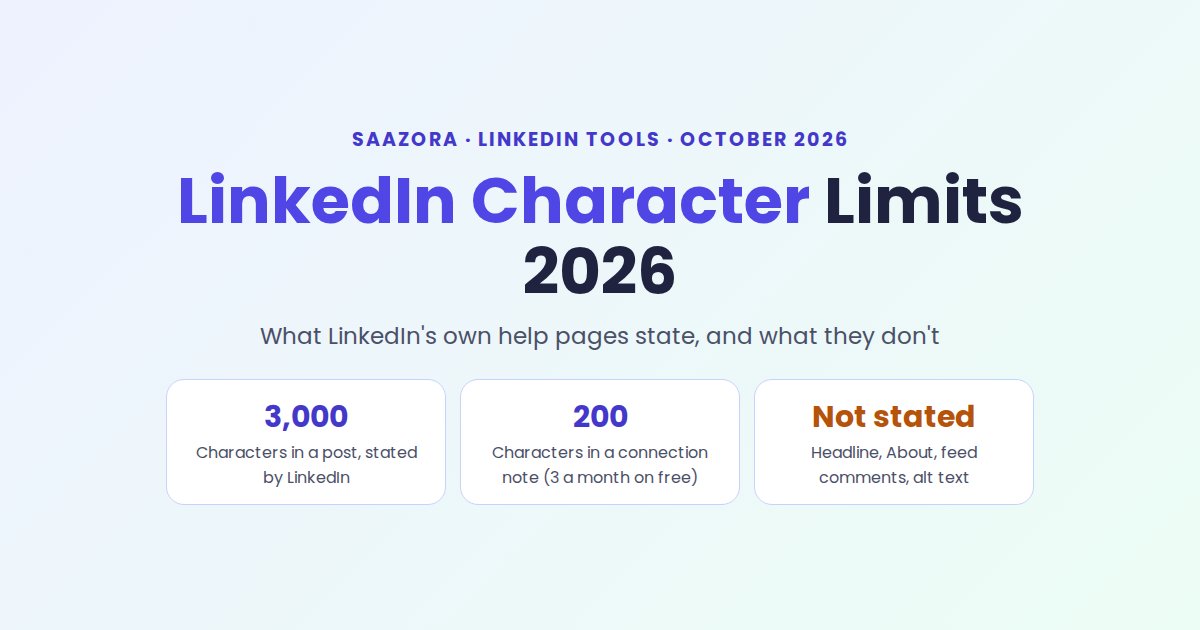
The LinkedIn character limit that matters most in 2026 is still 3,000 characters for a post, and LinkedIn says so in writing. Much of the rest of the list you see quoted online is not on LinkedIn's help pages. On October 23, 2026 we read 29 LinkedIn Help articles. LinkedIn gives exact numbers for posts, connection notes, InMail, group comments, polls, custom URLs, article SEO fields and one Page field. It gives no number for the headline, the About section, feed comments, alt text or article length, even on the pages that explain how to edit those fields.
That difference changes what you can rely on. A limit LinkedIn publishes is one you can plan around. A limit only third-party guides publish is a measurement someone made at some point, and it can change without notice. This guide lists every limit with the LinkedIn page that states it, flags where LinkedIn's own pages disagree, and says plainly where LinkedIn is silent. If you are choosing tools to write or schedule LinkedIn posts, start at Saazora's LinkedIn tools hub; current prices for those tools are in the LinkedIn tool price tracker, refreshed monthly.
The numbers LinkedIn puts in writing
If you only need the short version, these are the text limits LinkedIn itself states on its help center as of October 23, 2026:
- Post: up to 3,000 characters. The same 3,000 applies to text added above a shared link and to posts inside LinkedIn groups (a change LinkedIn says is still rolling out there).
- Connection request note: up to 200 characters, and a free account can personalize only three requests a month.
- InMail: 200 characters for the subject. The body is 1,900 characters on one LinkedIn page and 2,000 on two others.
- Comments in LinkedIn groups: 1,250 characters. LinkedIn does not publish a comment limit for the main feed.
- Polls: 140 characters for the question, 30 for each option.
- Custom profile URL: 3 to 100 characters.
- Article and newsletter SEO title: cut off past 60 characters; LinkedIn suggests 140 to 160 for the SEO description.
- LinkedIn Page custom testimonial: 80 characters.
Everything else in a typical "LinkedIn character limits" list (headline, About, Experience, comment length outside groups, alt text, article body, Page tagline and description) is a number LinkedIn's help center does not state. The table below shows each one side by side.
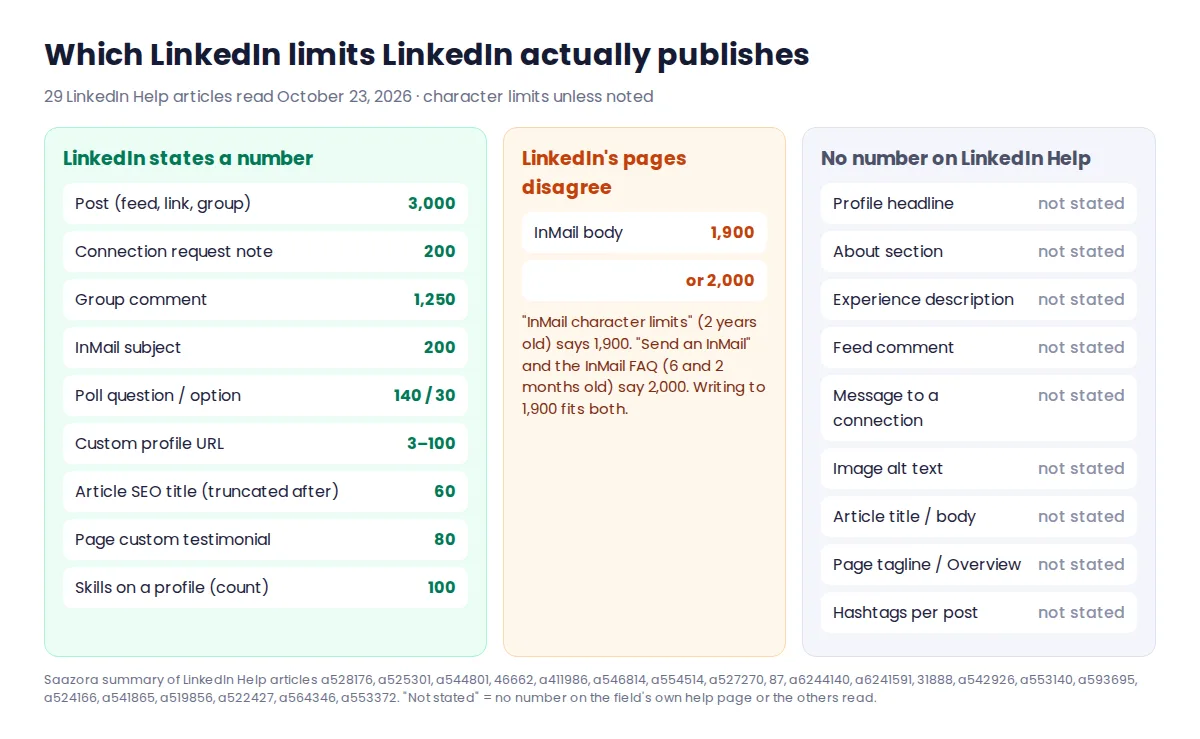
LinkedIn character limit 2026: every field and the page that states it
"Page last updated" is the age LinkedIn shows at the top of each help article on the day we read it. An old page is not necessarily wrong, but it is one more reason to check the field itself before you rely on a number.
| Field | Limit LinkedIn states | LinkedIn Help page | Page last updated (as shown Oct 23, 2026) |
|---|---|---|---|
| Post text | 3,000 characters | Post and share updates | 2 weeks ago |
| Text with a shared link | 3,000 characters | Share articles or links | 2 years ago |
| Group post | 3,000 characters (rolling out gradually) | General limits for LinkedIn groups | 1 year ago |
| Group comment | 1,250 characters | General limits for LinkedIn groups | 1 year ago |
| Feed comment | Not stated | Comment on posts and reply to a comment | 4 months ago |
| Connection request note | 200 characters; 3 personalized notes a month on free accounts | Personalize invitations to connect | 6 months ago |
| InMail subject | 200 characters | InMail character limits; Send an InMail; InMail FAQ | 2 years / 6 months / 2 months ago |
| InMail body | 1,900 characters (one page) or 2,000 (two pages) | Same three pages | 2 years / 6 months / 2 months ago |
| Message to a connection | Not stated | Send messages to connections | 2 weeks ago |
| Profile headline | Not stated | Edit your headline | 5 years ago |
| About section | Not stated | Edit the About section on your profile | 2 years ago |
| Experience description | Not stated | Manage your profile Experience section | 2 years ago |
| Skills | 100 skills (a count, not characters) | Skill endorsements | 8 months ago |
| Custom profile URL | 3 to 100 characters | Manage your public profile URL | 2 years ago |
| Poll question / option | 140 / 30 characters | LinkedIn Polls FAQ | 10 months ago |
| Image alt text | Not stated | Add alternative text to images | 3 years ago |
| Article title and body | Not stated | Write and publish articles on LinkedIn | 2 months ago |
| Article / newsletter SEO title | Truncated past 60 characters | SEO settings for articles or newsletters | 3 years ago |
| Article / newsletter SEO description | 140 to 160 characters suggested (not a cap) | SEO settings for articles or newsletters | 3 years ago |
| Page tagline, Overview, description | Not stated | Edit your LinkedIn Page; Complete your LinkedIn Page | 5 months / 1 year ago |
| Page custom testimonial | 80 characters | Custom testimonial for your LinkedIn Page | 6 months ago |
| Hashtags in a post | Not stated (no help page found with a hashtag limit) | None | None |
"Not stated" means we found no number on the help article that explains that field, and none in the other articles we read. It does not mean the field is unlimited; it means LinkedIn does not document the number in its help center.
Connection notes: 200 characters, and three a month on a free account
This is the limit most guides get wrong. LinkedIn's help article on personalizing invitations says "Each message can be up to 200 characters", and adds that free members "can add a personalized message to up to three connection requests per month". Premium members "can send unlimited personalized invitations", though LinkedIn notes that connection request limits may still apply. Several top-ranking guides checked the same day, including AuthoredUp's and Unilink's, still give 300 characters for the note; Hublead's lists 200 and cites LinkedIn Help.
Two smaller rules on the same page are easy to miss. Invitations sent from People You May Know in the mobile app "can't be personalized", and when you pick "We don't know each other" LinkedIn may ask you to send a message before the invitation goes out.
What 200 characters looks like in practice. This note is 198 characters, spaces included:
Hi Dana, I read your post on onboarding checklists and tried the day-one buddy idea with my team. It worked. I write about ops for small SaaS teams and would like to keep learning from you. Connect?
That is about three short sentences: where you saw them, one specific reaction, and who you are. A note drafted for 300 characters will not fit the 200 LinkedIn describes, so write to 200 and treat your three free notes a month as worth spending on people you have a real reason to contact.
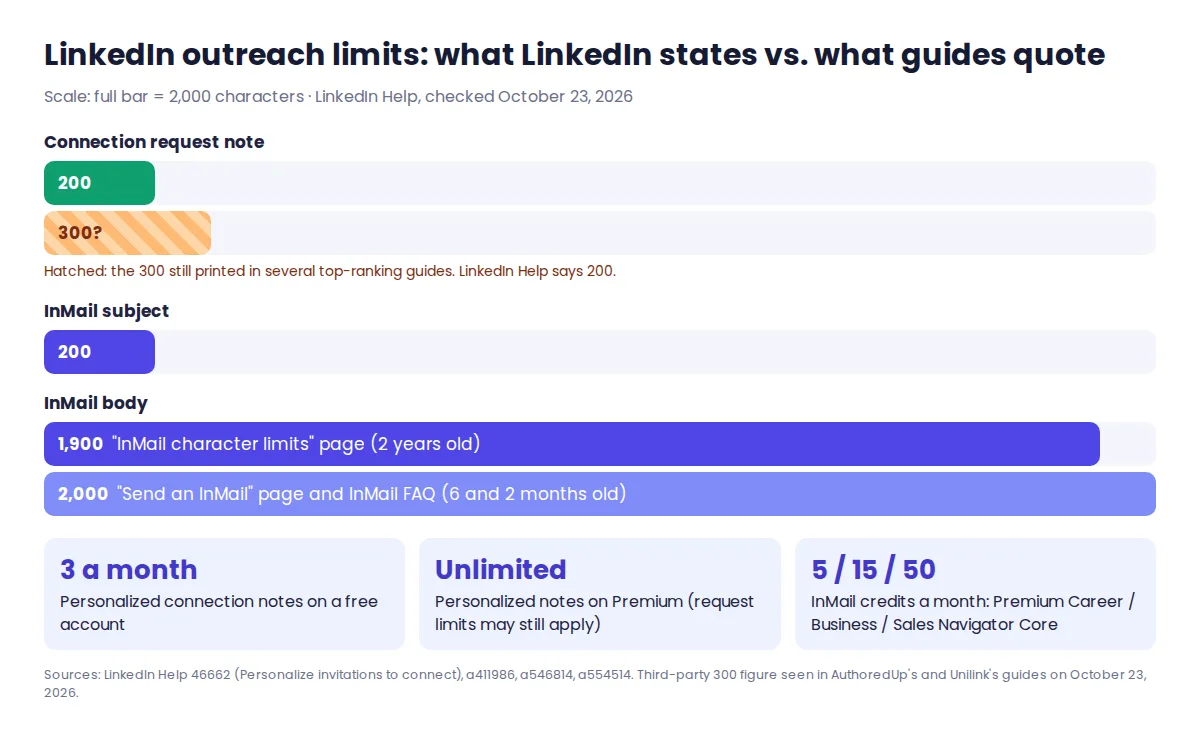
InMail: two LinkedIn pages, two body limits
LinkedIn's dedicated "InMail character limits" article, last updated two years ago, says InMail can have "up to 200 characters in the required subject line and up to 1900 characters in the body". Its "Send an InMail Message" article (six months ago) and its InMail FAQ (two months ago) both say 2,000 characters for the body, and the FAQ calls the subject line "optional" rather than required.
The safe reading is to write to 1,900. A message that fits 1,900 fits both versions, and the older page also says a character counter appears in the bottom right of the compose box, so you can check before sending. In practice an InMail near either number is rarely a good idea anyway; the limit is a ceiling, not a target.
InMail is also limited by credits, not just characters. The FAQ lists 5 credits a month on Premium Career, 15 on Premium Business and 50 on Sales Navigator Core, and says credits "expire after 90 days".
The profile fields LinkedIn never puts a number on
The headline, About section and Experience descriptions are the fields people look up most, and LinkedIn's help pages for all three explain where to click without giving a character count.
- Headline. "Edit your headline" describes the headline as "the text below your name in the introduction section on your profile" and walks through the Edit intro window. No limit is given. The page was last updated five years ago.
- About. "Edit the About section on your profile" says to "fill out your information in the textbox" and save. No limit.
- Experience. The Experience section article says to "enter your information into the fields provided". No limit on the description field.
Third-party guides commonly print 220 characters for the headline and 2,600 for About. We have not verified those figures and LinkedIn does not publish them, so we do not repeat them as fact here. If a number matters to you, for example because you are preparing a headline in a document first, paste your text into the field on LinkedIn before you finalize it. The field is the authority; a list on someone else's site, including this one, is not.
One profile rule LinkedIn does state is a count, not a length: "You can add a maximum of 100 skills to your profile." The custom URL is the other one: 3 to 100 characters, with no spaces, symbols, special characters or the word LinkedIn.
Comments, hashtags and alt text: the help pages are silent
The only comment limit LinkedIn publishes is inside groups. Its "General limits for LinkedIn groups" table lists a "Character limit for comments 1250", next to a 3,000-character limit for group posts that LinkedIn says is still being rolled out gradually. The main help article on commenting in the feed gives no character limit. What it does say is that LinkedIn "may limit how many comments a member or a LinkedIn Page can make in a certain time period", and may limit the visibility of comments if it detects "excessive comment creation or use of an automation tool".
Hashtags have no published limit at all. We found no LinkedIn Help article that caps how many hashtags a post may carry. Anything you read about a "maximum" number of hashtags is advice, not a LinkedIn rule.
Alt text is the same. LinkedIn's accessibility article explains how to add alt text on desktop and mobile and notes that LinkedIn "may automatically add alt-text to images that don't have it", but it gives no length. Write alt text for the person using a screen reader: what the image shows and why it is in the post, in a sentence or two.
Where "see more" cuts a post, and who says so
LinkedIn does not state where the feed truncates a post behind "see more". None of the help articles on posting, sharing or formatting gives a number for organic posts.
What exists is observation by tool makers. Hublead's guide and Eden's both put the cut at roughly 210 characters on desktop and about 140 on mobile. ContentIn's guide says the opposite of a fixed rule: "There's no single, confirmed number." Treat the 210 and 140 figures as a rough description of what some tools have seen, which can vary with screen width, line breaks and LinkedIn's own interface changes.
The closest LinkedIn comes is in its advertising specs, which are written for sponsored posts, not ordinary ones. For video ads, LinkedIn tells advertisers to "Use up to 150 characters including spaces, emojis, and punctuation to avoid truncation (3,000 character maximum)". For carousel ads it says "Use up to 150 characters to avoid truncation on some devices". That is LinkedIn's own advice for paid introductory text, and a reasonable cautious target for any opening line: if your point lands in the first 150 characters, it is visible under every estimate above.
Why two character counters disagree on the same text
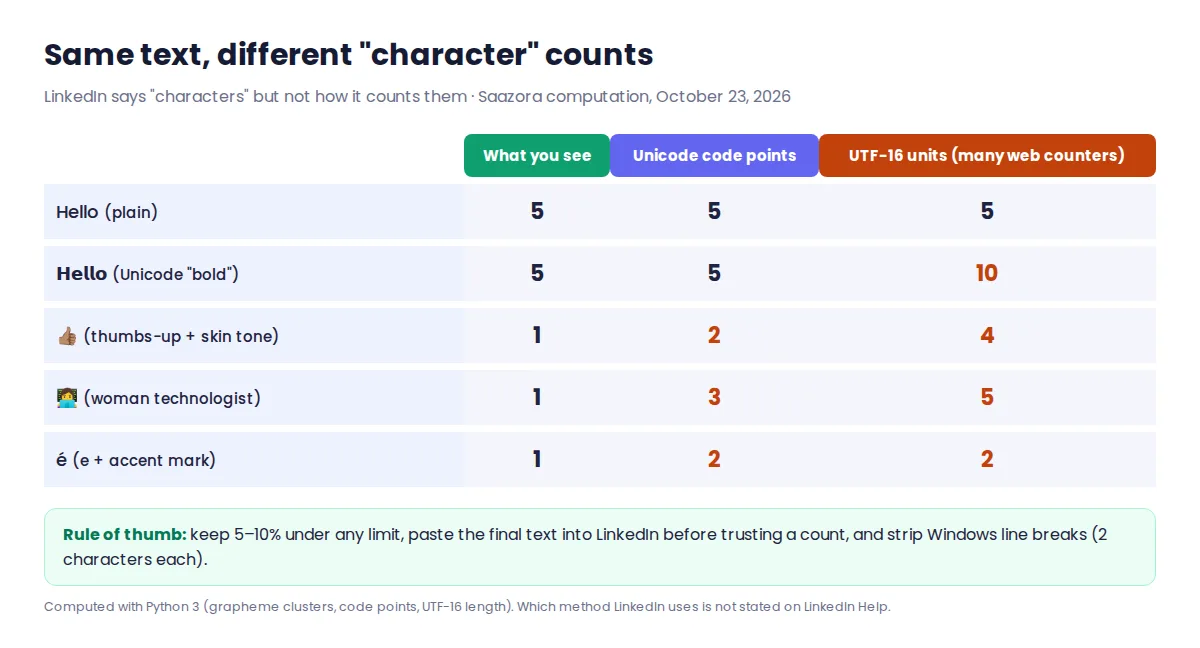
LinkedIn's help pages say "characters" without saying how a character is counted. The ad spec quoted above shows that emojis and spaces count, but not whether an emoji counts as one character or several. That matters because "one character" can mean different things to the software doing the counting. We ran the same short strings through three common counting methods:
| What you type | Characters you see | Unicode code points | UTF-16 units (what many web counters measure) |
|---|---|---|---|
| Hello (plain text) | 5 | 5 | 5 |
| 𝗛𝗲𝗹𝗹𝗼 (Unicode "bold" letters) | 5 | 5 | 10 |
| 👍🏽 (thumbs-up with skin tone) | 1 | 2 | 4 |
| 👩💻 (woman technologist emoji) | 1 | 3 | 5 |
| é typed as one character | 1 | 1 | 1 |
| é built from e plus an accent mark | 1 | 2 | 2 |
| Line break from a Windows document | 0 visible | 2 | 2 |
Saazora computation, October 23, 2026 (Python 3, grapheme clusters for "characters you see"). We do not know which of these methods LinkedIn uses, and LinkedIn does not say.
The practical effect is real for anyone who writes close to a limit. A connection note with a few emojis, or a post with Unicode "bold" headings, can read as safely under the limit in one counter and over it in another. Three habits avoid the problem: leave a margin of 5 to 10 percent under any limit, paste the final text into LinkedIn itself before you rely on a count, and remove line breaks copied from Word documents, which can arrive as two characters each.
This is where a writing tool can help, as long as you keep the margin. Taplio lists "Format your LinkedIn posts with unicode (bold, italic, stroke & more)" in its plan comparison, and every plan starts with a 7-day trial and a 30-day money-back guarantee, according to its pricing page on October 23. If you use bold or italic Unicode headings, you can draft and format a post in Taplio during the 7-day trial (affiliate link) and then paste it into LinkedIn to see the real count. Our scorecard of Taplio alternatives compares other LinkedIn editors with formatting and preview, and the AuthoredUp review covers an editor with desktop, mobile and dark-mode previews.
Video, document and photo limits that sit next to the text limits
Media limits matter for the same post as your text, and LinkedIn documents these more fully than most text fields:
| Media | What LinkedIn states | LinkedIn Help page |
|---|---|---|
| Video in a member post | 75 KB to 5 GB; 3 seconds (2 on mobile) to 15 minutes; aspect ratio 1:2.4 to 2.4:1 | Share videos on LinkedIn |
| Video on a LinkedIn Page or Career Page | Up to 5 GB and 10 minutes | Video specifications for LinkedIn Pages and Career Pages (4 years old) |
| Document post | Up to 100 MB and 300 pages; PPT, PPTX, DOC, DOCX, PDF | Upload and share documents on LinkedIn |
| Photos | Up to 20 images per post; 5 MB per upload | Share photos on LinkedIn |
| Poll | Question 140 characters, options 30; 4 options on desktop and Android, 5 on iOS | LinkedIn Polls FAQ |
Two details worth knowing before you post. The Page video limit (10 minutes) is shorter than the member limit (15 minutes), so a video that uploads from your profile may not upload to your company Page. And for document posts LinkedIn says you can edit the description later "but you can't change or edit the document in the post", so check the file before you publish, not after.
Company Pages: one text limit LinkedIn states
LinkedIn's Page help articles explain how to edit the tagline, Overview and description, and say Pages with a description, logo and website "potentially receive 30% more weekly views". They give no character limit for any of those fields. The one Page text limit LinkedIn states is for the custom testimonial: "A custom testimonial has a maximum limit of 80 characters."
LinkedIn does make three Page fields mandatory for one feature: you must complete Industry, Company size and Overview to use Invite to follow. If you run a Page alongside your profile, our guide to tools that measure profile and Page posts together covers what each one reports.
Articles and newsletters: only the SEO fields have numbers
LinkedIn's article help page says you can write articles from desktop only ("This feature isn't available on the LinkedIn mobile app") and explains the title and body fields, but gives no length for either. The post article also says that if a post would run past 3,000 characters, "you can instead write an article using LinkedIn's Publishing Platform", which is the clearest sign LinkedIn sees articles as the long-form option.
The numbers LinkedIn does give are for search engines. In the SEO settings for an article or newsletter edition, "If your SEO title is over 60 characters, it will be truncated", and LinkedIn suggests "aiming to write between 140-160 characters" for the SEO description. Each account can run "up to five newsletters", with unlimited editions.
If you plan posts and articles ahead, the native scheduler and the tools that add to it are covered in how to schedule LinkedIn posts, free or with a tool. If you draft with AI, keep in mind that a generator has no more knowledge of LinkedIn's unpublished limits than anyone else; our ranking of AI LinkedIn post generators compares what each one produces.
Questions people ask about LinkedIn limits
What is the LinkedIn post character limit in 2026?
3,000 characters. LinkedIn's "Post and share updates" article, updated two weeks before we read it, says "Posts can contain up to 3,000 characters." The same limit applies to text added to a shared link and to group posts.
Is the connection request note 200 or 300 characters?
LinkedIn's help center says 200. It also says free accounts can personalize up to three connection requests per month, while Premium members can personalize every request. The 300 figure still printed in several guides is not what LinkedIn states today.
How long can a LinkedIn comment be?
LinkedIn states 1,250 characters for comments in groups. It does not publish a character limit for comments in the main feed, though it says it may limit how many comments you can post in a period.
Does LinkedIn limit hashtags or alt text?
Not in its help center. We found no LinkedIn Help article with a hashtag limit, and the alt text article gives no length. Any number you see for either comes from a third party.
How we checked these limits
This is a research-based guide, not a hands-on test. On October 23, 2026 we saved copies of 29 LinkedIn Help articles (posting, sharing links, commenting, groups, invitations, three InMail pages, messaging, headline, About, Experience, introduction section, skills, custom URL, polls, alt text, photos, video, Page video, documents, articles, article SEO settings, newsletters, Page editing, Page completion, custom testimonial, video ad specs and Sponsored Content specs) and matched every quoted limit against those copies. We recorded each page's "last updated" label as shown that day. Third-party guides (AuthoredUp, Unilink, Hublead, Eden, ContentIn) were read only to see which numbers they quote and to attribute the "see more" observations; none of their figures is presented here as a LinkedIn limit. The counting table is our own calculation. We did not test limits inside a LinkedIn account for this article, and no vendor or LinkedIn reviewed it. More on how Saazora researches software.
Sources (checked October 23, 2026): LinkedIn Help: Post and share updates, General limits for LinkedIn groups, Personalize invitations to connect, InMail character limits, Send an InMail message, InMail messages FAQ, Edit your headline, Edit the About section, Comment on posts, Add alternative text to images, LinkedIn Polls FAQ, Manage your public profile URL, SEO settings for articles or newsletters, Share videos on LinkedIn, Video specifications for LinkedIn Pages, Upload and share documents, Share photos on LinkedIn, Custom testimonial for your LinkedIn Page, Video ads advertising specifications. Taplio features and trial terms are from Taplio's pricing page.
Research-based guide: no vendor paid for, supplied an account for, or reviewed this article.