
Research-based monday.com for recruiting guide, not a product test: Saazora did not build this board in a monday account or order a Checkr report for this article · monday.com prices, plan limits and templates, Checkr prices and Checkr API documentation read on November 7, 2026 · FCRA steps taken from FTC and CFPB pages read the same day · US list prices in US dollars, before tax · This is not legal advice
Some links on this page are affiliate links: Saazora may be paid if you sign up for monday.com or Checkr through them, at no extra cost to you. The board design and cost math below do not depend on that.
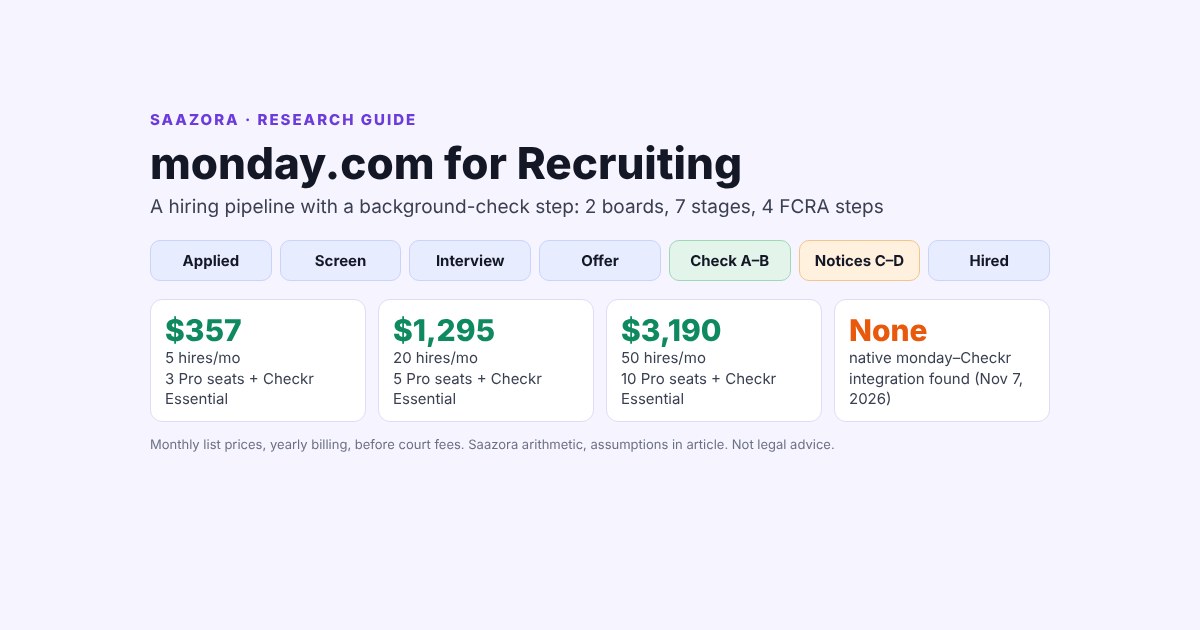
monday.com for recruiting works as a hiring pipeline you assemble yourself: one board for openings, one for candidates with a group per stage, and a background-check stage that tracks four FCRA steps (disclosure and authorization, the check, the pre-adverse notice, the adverse action notice). There is no native monday–Checkr integration: Checkr's partner directory does not list monday, so the documented routes are updating the board by hand, an integration platform that has connectors for both, or Checkr webhooks plus the monday API. Pro (from $19 a seat a month billed yearly) is the plan we would pick for most hiring teams, because only Pro and Enterprise offer private boards and because applicant-level automations burn through Standard's 250 monthly actions fast. At list prices, hiring 5 people a month with Checkr's Essential package costs about $357 a month; 20 hires about $1,295; 50 hires about $3,190, and more than 90% of each bill is Checkr reports (Saazora arithmetic, assumptions below).
This guide is built from monday's pricing page, its HR and recruitment templates, monday Help Center articles, the monday API reference, Checkr's pricing page and API documentation, and FTC and CFPB guidance. It gives a stage-by-stage board blueprint, the columns and automations for the background-check step, the webhook events that can keep that step current, an automation budget per hire, and a monthly cost table for 5, 20 and 50 hires a month. For the screening process itself, apart from monday, read our step-by-step guide to running an employee background check.
What monday.com offers recruiters out of the box
monday does not sell a separate applicant tracking product. Its HR use-case page pitches the core work platform for "recruitment, onboarding, and employee management" and lists three recruiting building blocks: a board view under the heading "Manage your job recruitment with ease," forms to "Capture job applications from your website," and templates named Job Recruitment, Employee Onboarding and Job Referrals.
Two templates are worth opening before you build:
- Recruitment Pipeline Template (work management). monday describes it in one line: "Easily track the pipeline of potential applicants and hires from beginning to end." The template page gives no column list, so treat it as a starting board rather than a finished process.
- Recruitment Pipeline Management CRM Template (monday CRM marketplace). This one is detailed: Accounts, Leads, Contacts, Deals, Job Applications and Candidates boards, plus dashboards such as "Pipeline conversion." It is aimed at agencies that place candidates with client companies, which is why it carries deal values and revenue forecasts. An in-house team hiring for itself can skip the CRM boards and borrow only the Job Applications and Candidates structure.
Neither template has a background-check stage. The CRM template's FAQ mentions "tracking consent for data processing," but nothing about consumer reports, pre-adverse notices or a waiting period. That gap is what the rest of this guide fills.
Picking a plan: why most hiring teams land on Pro
Three plan limits matter for recruiting more than the per-seat price does: private boards, automation actions and guests. Prices below are monday's work management plans as shown on monday.com/pricing on November 7, 2026, for the 3-, 5- and 10-seat options.
| Plan | Per seat, billed yearly | Per seat, billed monthly | Automations a month | Private boards | Guests | Fit for recruiting |
|---|---|---|---|---|---|---|
| Free | $0 (up to 2 seats) | $0 | Not listed | No | No | Up to 3 boards and 8 column types: too small for a pipeline with a check step |
| Basic | $9 | $12 | Not listed | No | No | Manual tracking only; no automations to start or chase a check |
| Standard | $12 | $14 | 250 actions | No | 3 free, then 4 guests = 1 seat | Works for low volume if you automate only the later stages |
| Pro | $19 | $24 | 25,000 actions | Yes | Unlimited | Our pick: candidate data on a private board and room for applicant-level automations |
| Enterprise | Custom | Custom | Up to 250,000 automation and integration actions | Yes | Unlimited | Large HR teams that need enterprise controls |
Private boards. monday's Help Center says private boards are "Available on Pro and Enterprise plans" and are visible only to the board's subscribers. On Standard, any member of the account can open a main board, so a sales rep could see which candidate's check came back as needing review. One caveat from the same article: "Admins do have access to private boards when they export the entire account's data." Privacy on monday is about who can browse the board, not a substitute for keeping the report itself out of monday (more on that below).
Automation actions. monday meters automations per account, not per seat. Its Help Center says "Standard accounts receive 250 actions per month," and when an account hits the full quota there is "a grace period of 72 hours before your automation runs will be paused." Notifications are a hidden cost: when an automation notifies a whole group, "an action will be used for each notification sent out." The budget section below turns this into hires per month.
Seats, viewers and guests. Seats come in buckets: monday's pricing article says plans "start at a minimum of 3 seats, and then ascend in multiples of 5." Hiring managers who only read the board can be viewers: "Viewers do not count toward billing." But viewers cannot edit, so an interviewer who has to move a card or fill a scorecard column needs a seat, or a form (below). Guests are for people outside your email domain, such as an external recruiter: "Shareable boards feature, and therefore guests, are not included in the Basic plan," and on Standard "every 4 guests count as 1 billed seat." Pro allows unlimited guests.
Every new account starts with a "14-day free Pro plan trial," which is long enough to build the boards below and run a few test candidates through them. For seat-bucket totals at every team size, use our monday.com pricing calculator, or compare monday.com plans on the pricing page (affiliate link).
The monday.com for recruiting blueprint: two boards, seven stages
Keep it to two boards. A third board for interviews or offers sounds tidy but adds connect-board columns and automations that each cost actions. Everything about one candidate for one opening lives on one item.
Board 1: Openings
One item per requisition. Columns: Role (item name), Hiring manager (people), Department (dropdown), Work location state and city (text or dropdown), Checkr package (dropdown: Basic, Essential, Complete), Openings to fill (number), Status (Draft, Open, On hold, Filled), Target start (date) and Candidates (connect boards, linked to Board 2).
The work location and package columns are there for the check. Checkr's API requires a package and the candidate's work_locations when you create an invitation, and the state you hire in decides which state and city rules apply. Deciding the package per role, before anyone applies, also keeps screening consistent across candidates for the same job.
Board 2: Candidates (private on Pro)
One item per candidate per opening. Groups are the pipeline stages, so dragging an item between groups is the stage change. Columns:
| Column | Type | Why it is there |
|---|---|---|
| Candidate | Item name | Full name as entered on the application |
| Email, Phone | Email, Phone | Contact; the email is what a Checkr invitation is sent to |
| Opening | Connect boards | Links to Board 1; mirror the package and work location from there |
| Source | Dropdown | Job board, referral, careers page; feeds a source dashboard |
| Recruiter | People | Owner for notifications (notify one person, not the board, to save actions) |
| Interview date, Scorecard | Date, Rating or Link | Interviewers submit scorecards through a form, so they can stay viewers |
| Offer status | Status | Not sent, Conditional offer sent, Accepted, Declined |
| Disclosure & authorization | Status | Not sent, Invited, Signed, Expired (updated from Checkr events) |
| Check status | Status | Pending, Clear, Consider, Canceled |
| Checkr candidate ID | Text | The key that lets a webhook find the right item; no report contents |
| Assessment owner | People | Who reviews a Consider result before any decision |
| Pre-adverse notice sent | Date | Day the notice with the report copy and Summary of Rights went out |
| Earliest final decision | Date | Pre-adverse date plus the waiting period your counsel sets |
| Final decision | Status | Engaged, Adverse action sent, Candidate withdrew |
| Start date | Date | Hand-off to onboarding |
What stays out of monday: Social Security numbers, dates of birth, and the report itself. Checkr's documentation says that "With the Checkr-Hosted Apply Flow, the candidate signs disclosures and authorizations and enters their own PII," so that data never has to pass through your board. Store a status and an ID, and read the report in Checkr. That also makes the FTC's disposal rule easier to follow: "When you're done using a consumer report, you must securely dispose of the report and any information you gathered from it." A board full of copied report details would be one more place to clean up.
The background-check stage, step by step (not legal advice)
The Fair Credit Reporting Act applies when an employer uses a background check from a consumer reporting agency such as Checkr. The steps below follow the FTC's employer guidance and the CFPB's consumer pages, matched to the columns above. State and city laws can add steps or set timing; ask employment counsel to approve the sequence before you automate it. This section explains a workflow and is not legal advice.
Step A: Disclosure and written authorization
The FTC says the disclosure "must be in writing and in a stand-alone format" and that "The notice cannot be in an employment application." Then: "Get written permission from the applicant or employee." The CFPB says the same thing from the candidate's side: "An employer is required to get your written permission before running an employment report on you."
In this setup, Checkr does the paperwork. Its documentation says the hosted flow will "present disclosures and authorizations to the candidate, and enable eSignature to capture consent." Your board just records the state: Invited when the invitation goes out, Signed when the candidate finishes, Expired if they do not. Checkr's invitation "is valid for 7 days, during which Checkr will send a follow-up notice every 24 hours," so there is no need for a monday reminder automation in the first week; add one only for the Expired status. Do not put a consent checkbox inside your monday application form: that would mix the disclosure into the application, the thing the FTC says not to do.
Ordering the check also requires a certification from you. The FTC says to "Certify compliance to the company from which you are getting the applicant or employee's information." Checkr's documentation describes this as part of credentialing your account, where it confirms a "permissible purpose" for the checks you run. It happens in Checkr, not in monday.
Step B: The check runs and comes back Clear or Consider
Checkr returns one of two default results. "A Clear result can be interpreted as that report having no items listed on the candidate's record that require consideration," while Consider "indicates that there are items on the candidate's report that require your review." Checkr is explicit that the decision is yours: "Checkr does not make this determination on the customer's behalf." Map Clear to a move into group 6 and Consider to an assignment for the Assessment owner. Neither result should trigger an automatic rejection.
Which package to order per role, and what each search covers, is covered in our Checkr pricing guide.
Step C: Individualized review, then the pre-adverse notice
If the review leads toward not hiring, the FTC requires a notice before the decision that includes "a copy of the consumer report you relied on to make your decision" and "A Summary of Your Rights Under the Fair Credit Reporting Act." The reason, in the FTC's words: "Giving the person the notice in advance gives the person the opportunity to review the report and tell you if it is correct." The CFPB's model summary opens with the candidate's side of this rule: "You must be told if information in your file has been used against you."
On the board, fill Pre-adverse notice sent, then set Earliest final decision. The FTC page we read gives no number of days for this wait, and state or city rules may set one, so the gap is a number your counsel picks, not one monday or Saazora should choose for you. A date automation then reminds the Assessment owner when the date arrives. It does not move the item.
Step D: The adverse action notice
After the wait, and after considering anything the candidate sent, a final no requires an adverse action notice. Per the FTC, it must include "the name, address, and phone number of the consumer reporting company that supplied the report;" a statement that the agency "did not make the decision to take the unfavorable action and can't give specific reasons for it;" "a notice of the person's right to dispute the accuracy or completeness of any information" and the right "to get an additional free report from the company if the person asks for it within 60 days." Checkr can send both notices: its webhook events include report.pre_adverse_action, described as "The Pre-Adverse Action notice has been sent to the candidate of that report," and report.post_adverse_action for the final notice. The board records the date and moves the item to group 7.
For the full process outside monday, including what to say in each notice, see our background check how-to.
Connecting Checkr to monday: what exists and what does not
On November 7, 2026 we found no native integration between monday.com and Checkr. Checkr's partner directory, which it describes as its "out-of-the-box integration partners," lists ATS and HR systems such as Workday, Greenhouse, Gusto and Paylocity, but not monday. Zapier's Checkr app page returned a 404, and we found no Checkr app in monday's marketplace listings we could load (its search box sits behind a bot check our browser could not pass, so treat that last point as a search, not proof). That leaves three documented routes.
| Route | How the board gets updated | Build effort | Best at |
|---|---|---|---|
| 1. Manual | Recruiter orders the check in the Checkr dashboard and changes the status columns when Checkr's email arrives | None | Up to a handful of checks a month |
| 2. Integration platform | A platform with connectors for both apps. Workato, for example, lists a Checkr trigger "New/updated record in Checkr" and monday actions | Low to medium; platform priced separately (not checked here) | Teams already paying for an iPaaS |
| 3. Webhooks + monday API | Checkr sends events to a small service you host, which calls monday's change_column_value mutation; a monday webhook on Offer status can call Checkr's invitations endpoint | A developer for a few days, plus Checkr API approval | 20+ checks a month |
For route 3, Checkr's docs say: "Please reach out to clients@checkr.com before you start integrating with our API to learn about our approval process for production." monday's side is easier: webhooks are built into board automations, and monday sends a JSON challenge to verify the receiving URL. monday's API caps calls per day, at 1,000 on Standard and Basic and 10,000 on Pro. At five or so events per checked candidate, even 50 hires a month is a few hundred calls, far below either cap.
A practical rule for both automated routes: match on the Checkr candidate ID column, never on name. Two candidates named the same, or one candidate applying to two openings, is exactly where a name match writes a Consider result onto the wrong person.
Automations to build, and the action budget per hire
These are the automations we would build on the Candidates board, in monday's when-then style. Counts assume each notifies one person.
- New applicant (per applicant, about 2 actions): when an item is created, assign the recruiter for that opening and notify them.
- Interview set (per interviewee, 1 action): when the item moves to Interview, notify the hiring manager.
- Offer accepted (per hire, 2 actions): when Offer status changes to Accepted, move the item to Background check and send a webhook to start the Checkr invitation (or notify the recruiter to send it, on route 1).
- Result in (per hire, 2 actions): when Check status changes to Clear, move to Cleared & hired and notify the recruiter. Consider instead notifies the Assessment owner.
- Waiting period (only on a Consider that heads to a no, 1 action): when Earliest final decision arrives, notify the Assessment owner.
- Start date (per hire, 2 actions): when Final decision changes to Engaged, set the Start date reminder and notify onboarding.
That is about 6 actions per hire for the check stage, 1 per interview and 2 per applicant. The applicants are what move the total. Saazora's illustration, assuming 25 applicants and 4 interviews per hire: a lean setup that automates only from Interview onward uses about 10 actions per hire (4 + 6); a full setup that also automates every new applicant uses about 60 (50 + 4 + 6).
The takeaway: on Standard, the lean setup stops fitting at about 25 hires a month (250 ÷ 10), and the full setup does not fit even at 5. Pro's 25,000 actions cover the full setup at 50 hires with room left over. If you stay on Standard, watch the usage counter in the first month, because monday warns that an account can use up "the following month's as well."
Want to sketch the board before choosing a plan? Start a monday.com work management account (affiliate link) and build the two boards during the trial.
What hiring 5, 20 or 50 people a month costs
Assumptions, all Saazora's: 3 seats at 5 hires a month (for example, a recruiter, an HR generalist and one hiring manager who edits the board), 5 seats at 20 hires and 10 seats at 50; everyone else is a free viewer or submits scorecards by form. One Checkr report per hire, on the same package for every role. monday prices are work management list prices for those seat buckets; Checkr prices are the starting list prices per report on checkr.com/pricing. Checkr adds that "Standard third-party court and database access fees may apply, passed through at cost with no markup," and those fees are not included.
| Hires a month | monday Pro seats (yearly billing) | Checkr Basic ($29.99) | Checkr Essential ($59.99) | Checkr Complete ($94.99) | Total with Essential, yearly | Total with Essential, monthly billing | Per hire (Essential, yearly) |
|---|---|---|---|---|---|---|---|
| 5 | 3 seats: $57 | $149.95 | $299.95 | $474.95 | $356.95 | $371.95 | $71.39 |
| 20 | 5 seats: $95 | $599.80 | $1,199.80 | $1,899.80 | $1,294.80 | $1,319.80 | $64.74 |
| 50 | 10 seats: $190 | $1,499.50 | $2,999.50 | $4,749.50 | $3,189.50 | $3,239.50 | $63.79 |
Full range on yearly billing: 5 hires runs $206.95 (Basic) to $531.95 (Complete); 20 hires $694.80 to $1,994.80; 50 hires $1,689.50 to $4,939.50. Standard instead of Pro saves $21, $35 and $70 a month at the three sizes ($36, $60 and $120 for the seats), but only the 5-hire team on a lean setup fits inside Standard's actions comfortably.
monday's share of the cost per hire falls from $11.40 at 5 hires to $3.80 at 50, while Checkr's stays fixed per report. Two things move the bill more than the monday plan: which package you order, and how many checks you order for people who do not start. If one in ten checked candidates withdraws or is not hired, add 10% to the Checkr column. To model your own mix of packages, add-ons and fees, use our background check cost calculator.
Checkr's account terms and any current offer are on our Checkr store page; monday's are on the monday.com store page. When you are ready to order the first check, open a Checkr account for your hiring pipeline (affiliate link).
A setup order for the first week
- Day 1: Start the trial, create the Openings board and fill one real requisition, including work location and Checkr package.
- Day 2: Create the Candidates board with the seven groups and the columns above. On Pro, make it private and invite only the recruiting team.
- Day 3: Build the application form and a separate scorecard form. Check that no consent or disclosure language sits in the application form.
- Day 4: Open the Checkr account, set the packages per role, and have counsel approve your pre-adverse waiting period and notice templates.
- Day 5: Add the six automations, starting with the lean set. Run two test candidates through every group, including a Consider path, and read the action counter.
- After the trial: Pick Standard or Pro from the counter and the privacy question, not from the seat price alone. Decide on route 2 or 3 once you pass about 20 checks a month.
Where monday falls short as a recruiting tool
- No job-board posting or résumé parsing appears on the templates or HR page we read. A dedicated ATS, several of which are Checkr partners, does this out of the box.
- No Checkr connection without building one. ATS partners in Checkr's directory let you order a check from the candidate record; monday needs route 2 or 3.
- Compliance is your design. monday will move an item wherever an automation tells it to. Nothing in the product stops a rule that rejects on Consider, so the guardrails are in how you build it.
- Privacy depends on the plan. Without Pro's private boards, every member can see the candidate board.
- Action limits are account-wide. If sales or marketing share the account, their automations draw from the same 250 on Standard.
If those gaps matter more than flexibility and price, compare Checkr's ATS partners before you build. If your team already runs on monday, the two-board setup is a reasonable, low-cost way to keep hiring in the same place. For the CRM side of monday, see our monday CRM pricing breakdown; for another industry built the same way (monday boards plus an outside tool connected through Zapier), see monday CRM for real estate.
Questions about monday.com for recruiting
Is monday.com good for recruiting?
For a small or mid-size team that already uses monday, yes, as a pipeline board: it has a Recruitment Pipeline template, application forms and automations. It is not an applicant tracking system, and it has no built-in background-check step, so you add the columns and rules yourself.
Does monday.com integrate with Checkr?
Not natively as of November 7, 2026. Checkr's partner directory does not list monday. You can update the board by hand, use an integration platform with connectors for both apps (Workato lists one), or connect Checkr webhooks to the monday API.
Which monday plan is best for recruiting?
Pro, for most teams: private boards for candidate data, unlimited guests and 25,000 automation actions a month. Standard can work at low volume if you automate only from the interview stage onward.
Can monday.com send the FCRA disclosure and authorization?
It is better not to. The FTC says the disclosure must be stand-alone and cannot sit in the application. Checkr's hosted flow presents the disclosure and collects an e-signature; monday should only record whether it was signed. Not legal advice.
How much does monday.com plus Checkr cost per hire?
On our assumptions, about $64 to $71 per hire on Pro yearly billing with Checkr Essential, before court fees. Most of that is the Checkr report; monday seats add $3.80 to $11.40 per hire depending on volume.
How we researched this guide
This is a research-based guide. Saazora did not create a monday account, build these boards, open a Checkr account or order a report for this article, and neither company reviewed it before publication. On November 7, 2026 we read monday.com/pricing with each team-size option and the yearly and monthly toggle (Playwright Chromium, US English), monday's HR use-case page, its Recruitment Pipeline template and the Recruitment Pipeline Management CRM template, monday Help Center articles on automation actions, private boards, guest pricing, user types, plans and webhooks (through the Help Center's public API, because the pages are behind a bot check), and monday's API reference on columns and rate limits. On the Checkr side we read checkr.com/pricing, Checkr's partner directory and its API documentation (screening process, invitations, webhooks, adverse actions). The FTC employer guidance was read through a fetch tool because ftc.gov blocked our headless browser; the CFPB pages were read directly. The board blueprint, automation list, action estimates, seat counts and cost totals are Saazora's own design and arithmetic; applicant and interview counts are assumptions, labeled as such. This guide is not legal advice.
Sources (checked November 7, 2026):
- monday.com, Pricing (work management plans): monday.com/pricing
- monday.com, HR use case: monday.com/use-cases/hr
- monday.com, Recruitment Pipeline Template: monday.com/templates/recruitment-pipeline
- monday.com, Recruitment Pipeline Management CRM Template: monday.com/crm/marketplace/template/recruitment-pipeline-management-crm
- monday Help Center: Automation and Integration actions and limits; Private Boards; Pricing for guests; User types explained; Plans and pricing for monday.com; Webhook integration (support.monday.com)
- monday API reference: Columns; Rate limits (developer.monday.com)
- Checkr, Pricing: checkr.com/pricing
- Checkr, Partners directory: checkr.com/company/partners
- Checkr API documentation: Getting started, Invitations, Webhooks, Adverse Actions (docs.checkr.com)
- Workato, Checkr and Monday integration page: workato.com/integrations/checkr+monday
- Federal Trade Commission, Using Consumer Reports: What Employers Need to Know (ftc.gov)
- Consumer Financial Protection Bureau, A Summary of Your Rights Under the Fair Credit Reporting Act (model form PDF), and Ask CFPB: what employers see in employment background checks (consumerfinance.gov)