
Research-based monday CRM for real estate guide with no product testing: Saazora did not set up a monday CRM account or CallRail numbers for this article · Prices, plan limits and integration options read on monday.com, CallRail's pricing page, the monday and CallRail help centers and Zapier on November 4, 2026 · US list prices in US dollars, before tax
Some links on this page are affiliate links: Saazora may be paid if you sign up for monday CRM or CallRail through them, at no extra cost to you. The plan picks and cost math below do not depend on that.
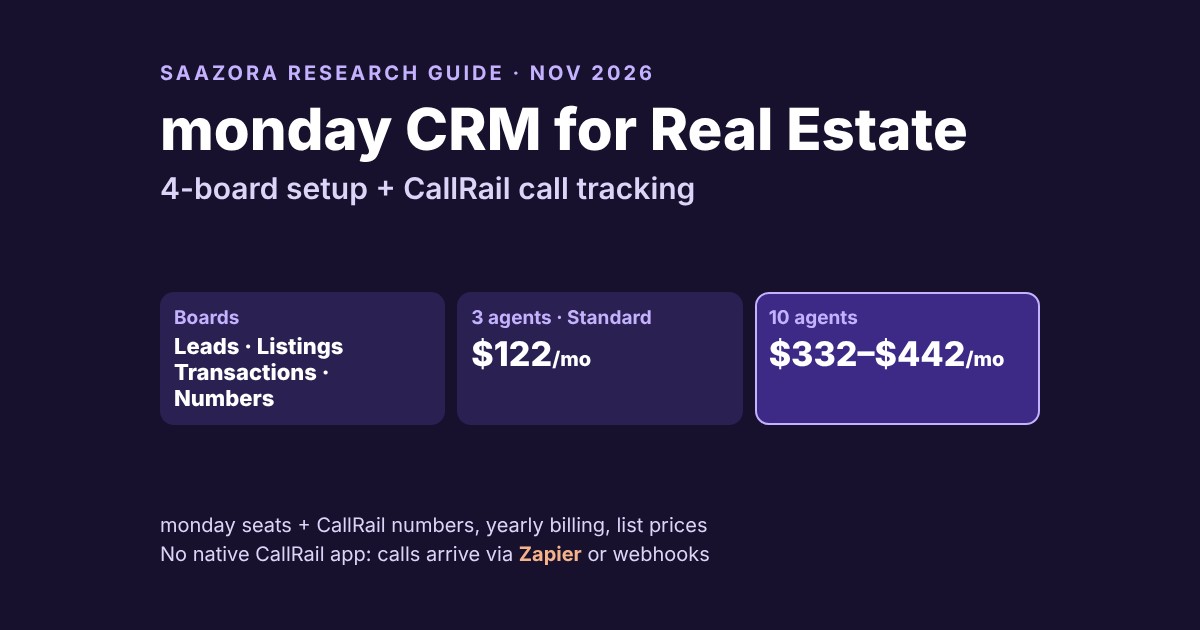
Monday CRM for real estate works best as a board system you design yourself: a Leads board, a Listings board, a Transactions board and a small Tracking numbers board, with calls flowing in from a call tracking tool. Two facts shape the whole setup. First, Basic caps boards at 5 columns and lists no custom automations, so a real estate team should start on Standard ($17 a seat a month billed yearly, $25 monthly) or Pro ($28 or $41). Second, on November 4, 2026 we found no native CallRail app for monday: CallRail's own CRM integration list does not include monday, and the documented route is Zapier or webhooks. At list prices, a 3-agent team with 9 tracking numbers comes to about $122 a month, and a 10-agent brokerage with 23 numbers about $332 to $442, depending on whether automation volume pushes it to Pro (Saazora arithmetic, assumptions below).
This guide is built from monday's pricing page, its real estate CRM page and templates, the monday and CallRail help centers, CallRail's pricing page and Zapier's CallRail + monday listing. It gives a column-by-column board blueprint that fits inside Standard's limits, the automations to build and how many monthly actions they use, the documented way to push call data into monday, a number plan for each team size, and a monthly cost table. For the call tracking side on its own (which marketing sources a tracking number can see, Zillow and Realtor.com portal calls, recording consent), read our call tracking guide for real estate agents.
What monday gives a real estate team, and the gap you fill yourself
monday sells its CRM to agents directly. Its real estate page promises "every buyer, seller, and listing tracked in one place" and says the CRM "captures inquiries automatically from your website forms, ad campaigns, and open house sign-ins." The same page describes lead assignment "by property type, location, deal size, or round robin across agents" and dashboards for "close rate, source performance, and revenue forecasting." For a small team, monday says it "can be up and running in minutes with pre-built templates."
Phone calls are the piece that list leaves out. Buyers who see a yard sign, a postcard or a Google Business Profile listing usually call, and a CRM only knows which marketing produced that call if a call tracking tool hands it the source. monday's real estate page mentions forms, ads and sign-ins, not tracked calls. So the realistic monday CRM for real estate setup is two products: monday for the pipeline and follow-up, and a call tracking tool such as CallRail for numbers, recordings and source attribution, joined by an integration you build.
monday offers real estate templates you can start from. Its CRM template catalog lists a "Comprehensive Real Estate CRM Solution" with an Accounts board, Leads board, Contacts board, Deals board, Products & Services board and a Real Estate Listings board that tracks "property type, price, listing status, location, agent, and date listed." The work management template library has a separate real estate CRM template to "Capture potential clients, connect them to properties, store listing details, and manage agent workloads." The blueprint below trims those ideas to what an agent team actually updates, and adds the call data neither template is built around.
Which monday CRM plan a real estate team needs
The plan decision for real estate comes down to three caps on the pricing page: columns per board, automations a month, and whether email sequences are included.
| Plan | Per seat, billed yearly | Per seat, billed monthly | Columns per board | Custom automations a month | Contacts and deals | Fit for a real estate team |
|---|---|---|---|---|---|---|
| Basic | $12 | $18 | 5 | None listed | 1,000 | Too tight: a lead board needs more than 5 columns, and there are no custom automations |
| Standard | $17 | $25 | 15 | 250 | 10,000 | The starting point for most teams; adds the "Centralized comms hub" and mobile apps |
| Pro ("Most Popular") | $28 | $41 | 75 | 25K | 100,000 | Teams with high lead volume, or that want "Send mass emails" and "Set email sequences" |
| Ultimate | Custom price from sales | Unlimited | Enterprise-scale | Unlimited | Large brokerages that need advanced permissions | |
From monday.com/crm/pricing, November 4, 2026, yearly and monthly views. monday's FAQ says plans "start from 3 users"; the team-size selector offers 3, 5, 10, 15, 20, 25, 30, 40, 50, 100 and 200+ seats. The FAQ also says "monthly plans are not discounted."
Two details matter more for agents than for most sales teams. The real estate page talks about follow-up sequences after showings, but the pricing page lists "Set email sequences" only from Pro up, so a Standard team will build follow-up with reminders and notifications rather than automatic email sequences. And seats are sold in steps: a 10-agent office that adds a broker or a transaction coordinator as an 11th user moves to the 15-seat option. Plan the head count before you pick a billing cycle; our monday CRM pricing breakdown works through the seat minimum and the yearly discount in more detail, and the monday.com pricing calculator prices any seat count on either billing cycle.
The board blueprint: four boards, column by column
This is Saazora's suggested layout, written to fit inside Standard's 15-column cap per board. Each board below lists the column and the monday column type to use. Names are suggestions; the structure is the point.
1. Leads (every inbound call, form and referral)
| # | Column | Type | What goes in it |
|---|---|---|---|
| 1 | Lead name | Item name | Caller name from caller ID, or the phone number until you know the name |
| 2 | Phone | Phone | Caller's number, written by the integration |
| 3 | Status | Status | New · Contacted · Showing set · Nurture · Converted · Not a lead |
| 4 | Agent | People | Who owns the lead |
| 5 | Lead source | Dropdown | Yard sign · Google Business Profile · Website · Postcard · Facebook ads · Portal · Referral · Open house |
| 6 | Tracking number | Text | The CallRail number that was dialed |
| 7 | Buyer or seller | Status | Buyer · Seller · Both · Renter |
| 8 | First contact | Date | Date and time of the first call |
| 9 | Call length | Numbers | Seconds, from the call record |
| 10 | Recording | Link | Link back to the call in CallRail |
| 11 | Price range | Dropdown | Your local brackets |
| 12 | Area | Dropdown | Neighborhoods or ZIP codes you farm |
| 13 | Next follow-up | Date | Set by automation, editable by the agent |
| 14 | Listing | Connect boards | Links to the Listings board when the call came from a sign or a listing ad |
| 15 | Notes | Long text | Short summary; the full timeline lives in the item's updates |
Fifteen columns, exactly Standard's cap. If you need more fields (pre-approval, lender, timeline), either move them to the Transactions board or plan on Pro's 75-column limit.
2. Listings
Address (item name), Listing status (Coming soon · Active · Under contract · Sold · Withdrawn), List agent (people), List price (numbers), Property type (dropdown), Date listed (date), Sign number (text: the tracking number on the yard sign rider), Leads (connect boards to Leads), Calls this month (a mirror or count of linked leads), Showings (numbers), Open house dates (date). Eleven columns, so there is room to grow.
3. Transactions
Client (item name), Stage (Offer submitted · Under contract · Inspection · Appraisal · Clear to close · Closed · Fell through), Agent (people), Side (buyer or seller), Listing (connect boards), Contract price (numbers), Contract date, Inspection deadline, Financing deadline and Closing date (four date columns), Lead source (mirror from the linked lead, so closed volume can be reported by source). Eleven columns. This is the board the dashboards read for closed volume per agent and per source.
4. Tracking numbers
The small board most setups skip. One item per CallRail number: Number (item name), Source (dropdown, same list as Leads), Placement (text, for example Oak St sign or spring farm postcard), Agent (people), Listing (connect boards), Date live, Date retired, Monthly cost (numbers). When a sign comes down, you mark the number retired instead of losing track of what it was. It also makes the Zapier step simpler, because the Zap only has to copy the number; the source and agent can be matched from this board.
Getting CallRail calls into monday: the documented route
There is no native CallRail app for monday that we could find on November 4, 2026. CallRail's integrations directory, filtered to CRM, lists about 30 tools including HubSpot, Salesforce, Pipedrive, Zoho, Close and Freshsales, and monday is not among them. A search of monday's marketplace turned up phone apps such as Aircall and JustCall, not CallRail. What both companies do document is a bridge. CallRail's help center describes Zapier as a platform that "acts as a bridge for data between different platforms that don't natively integrate with each other," and adds that "An active Zapier account is required." CallRail's pricing page lists "API & Webhooks access" and Zapier on every Lead Tracking plan. If a direct call-tracking connection matters more to you than board flexibility, our monday CRM vs HubSpot vs Pipedrive comparison weighs monday against two CRMs that are in that directory.
Route 1: Zapier (no code). Zapier publishes a CallRail + monday.com template, "Tag new CallRail phone calls to create items in monday.com." On Zapier's listing, CallRail triggers include Phone Call Completed, Phone Call Started, Phone Call Tagged, Outbound Call Completed, SMS Received and Form Captured, and monday actions include Create Item, Update Item, Create Update and Move Item to Group, plus a Find Items search. monday's help article on Zapier says you connect by "providing your API key," which you copy from monday's Developer Center under My access tokens.
Pick the trigger with care, because the two obvious choices behave differently:
- Phone Call Completed carries the full call record, but Zapier warns it "should not be expected to be real-time and has a maximum delay of 20 minutes after the hangup before it fires." Fine for logging; too slow if you want the agent alerted while the caller is still in the car outside the listing. For speed, let CallRail ring the agent's phone directly (its Round Robin step can "sequentially route phone calls to multiple destination numbers in a queue") and let monday catch up.
- Phone Call Tagged fires when a call is tagged after it ends. Zapier notes that for tags applied by automation rules, keypad scoring or a call flow, you should use Phone Call Completed instead. This trigger suits teams where an ISA or the agent tags real leads by hand, which also keeps vendor calls and spam off the Leads board.
The simplest Zap is two steps: CallRail trigger, then monday Create Item on the Leads board, mapping caller name, caller number, tracking number, start time, duration and recording link to columns 1, 2, 6, 8, 9 and 10. Zapier's Free plan includes "Two-step Zaps" and 100 tasks a month. A better Zap first searches the Leads board for the caller's number and updates the existing item instead of creating a duplicate when a buyer calls back. That needs more than two steps, and Zapier lists "Multi-step Zaps" on Professional, from $19.99 a month billed yearly or $29.99 billed monthly at its entry task tier.
Route 2: webhooks (developer work). CallRail calls webhooks "a developer-grade feature used to send real-time notifications to external web applications," and they "can be applied to your calls, text messages, and form submissions." monday's own webhook integration runs the other way: it "delivers data to other applications" when something changes on a board. So a webhook-only setup needs a small service in the middle that receives CallRail's notification and writes to monday through its API. That suits a brokerage with a developer; for a 3-agent team, Zapier is the practical choice.
The automations to build, and what they cost in monday actions
monday meters automations. Its help center says "Every automation template has a trigger and an action (or multiple actions)," that "Every account has an action limit - one for Automations and one for Integrations," and that "Standard accounts receive 250 actions per month." The limit is per account, not per seat, so adding agents does not add actions. If you run out, monday says "the account will be blocked from editing or adding new Automations/Integrations," with "a grace period of 72 hours before your automation runs will be paused." Pro raises the figure to 25K custom automations a month on the pricing page.
Here are the four automations we would build first on the Leads board, written in monday's when-then style. Each run uses at least one action:
- Route: when Tracking number or Lead source changes to a given value, assign the matching agent and notify them. (One rule per agent sign number, or one rule per source with round robin.)
- Set the clock: when Status changes to Contacted, set Next follow-up to a date a few days out.
- Chase: when Next follow-up arrives and Status is still Contacted, notify the agent.
- Hand off: when Status changes to Showing set, create an item on the Transactions board, or on a Showings group, linked to the lead.
That is roughly four actions per new lead before you count any automation on Listings or Transactions. Saazora's arithmetic at that rate: 40 new leads a month uses about 160 actions, inside Standard's 250. The ceiling is about 62 leads a month (62 × 4 = 248). A 10-agent brokerage handling 150 new leads a month would need about 600 actions, well past Standard, which is the real reason a busy office ends up on Pro. monday's article does not say whether items created through Zapier use integration actions, so watch the usage counter in the admin area during the first month rather than assuming either way.
How many tracking numbers each team size needs
CallRail sells numbers two ways that matter here. A website pool swaps numbers for each visitor, and CallRail's help center says "Four tracking numbers are the minimum amount that can be in a given pool," sized by the rule that "The number of peak hourly visitors divided by four equals the size of your pool." Fixed source numbers cover everything printed: CallRail lists "Printed material such as flyers, signs, and business cards" and advises that "it's best to use one source tracking number for per campaign."
| Number | 3-agent team | 10-agent brokerage |
|---|---|---|
| Website pool (IDX site, landing pages) | 4 (the minimum) | 6 (assumes about 24 peak hourly visitors) |
| Google Business Profile | 1 | 1 |
| Yard sign riders, one per agent | 3 | 10 |
| Farm postcards and mailers | 1 | 4 |
| Facebook and Instagram ad campaigns | 0 (use the website pool) | 2 |
| Total numbers | 9 | 23 |
| Assumed local minutes a month | 400 | 1,500 |
Saazora's example plans. Pool rules from CallRail's help center, November 4, 2026. A sign number per agent rather than per listing keeps the count low; a per-listing number gives cleaner listing reports but adds a number for every active listing.
Monthly cost of monday CRM plus CallRail at 3 and 10 agents
CallRail's Lead Tracking plan comes in four volume tiers, shown when you open "See all Lead Tracking plans" on its pricing page. We re-read them on November 4, 2026 and they matched the October 30 figures:
| Lead Tracking tier | Billed yearly (per month) | Billed monthly | Local numbers included | Local minutes included | Extra local number | Extra local minute |
|---|---|---|---|---|---|---|
| Tier 1 | $50 | $55 | 5 | 250 | $3.00 | $0.06 |
| Tier 2 | $68 | $75 | 5 | 750 | $3.00 | $0.06 |
| Tier 3 | $85 | $95 | 10 | 1,000 | $2.50 | $0.05 |
| Tier 4 | $265 | $295 | 40 | 4,000 | $1.75 | $0.045 |
From callrail.com/pricing, Lead Tracking plans dialog, November 4, 2026. Every tier includes 25 texts. CallRail bills extra usage monthly and says those fees "are not refundable under any circumstances." Minutes are rounded up per call. Current CallRail costs and deals are tracked on our CallRail deals page, and the full plan list is in our CallRail pricing guide.
For each team we priced every tier with the number plan above and kept the cheapest: Tier 1 for the 3-agent team (5 included numbers + 4 extra, 150 extra minutes) and Tier 3 for the brokerage (10 included + 13 extra, 500 extra minutes). Zapier is $0 for the small team on the Free plan's two-step Zap if call volume stays under 100 tasks a month, and Professional's entry price for the brokerage.
| Line item | 3 agents, Standard | 3 agents, Pro | 10 agents, Standard | 10 agents, Pro |
|---|---|---|---|---|
| monday CRM seats (billed yearly) | 3 × $17 = $51 | 3 × $28 = $84 | 10 × $17 = $170 | 10 × $28 = $280 |
| CallRail Lead Tracking (billed yearly) | $50 + $12 numbers + $9 minutes = $71 | $71 | $85 + $32.50 numbers + $25 minutes = $142.50 | $142.50 |
| Zapier | $0 (Free, two-step) | $0 | $19.99 (Professional, yearly) | $19.99 |
| Total per month, yearly billing | $122 | $155 | $332.49 | $442.49 |
| Per agent per month | $40.67 | $51.67 | $33.25 | $44.25 |
| Total per month, all monthly billing | $151 | $199 | $432.49 | $592.49 |
Saazora arithmetic from monday.com/crm/pricing, callrail.com/pricing and zapier.com/pricing list prices, November 4, 2026, before tax. Minutes and number counts are assumptions from the number plan above. Yearly plans are paid up front: monday says "if you purchase a plan for one year, you will pay for one year upfront," and CallRail bills the yearly base fee up front with usage monthly.
Three things stand out. CallRail is the larger line for the 3-agent team, because number and minute costs do not shrink with head count; on Tier 3 ($85 yearly, 10 numbers, 1,000 minutes) the same team would pay $14 more for a lot of headroom. For the brokerage, the move from Standard to Pro adds $110 a month, which is the price of the automation budget, not of any real estate feature. And the per-agent cost falls as the team grows on Standard but not much on Pro, because monday seats become most of the bill.
If those numbers fit, you can start a monday CRM trial (affiliate link) and build the Leads board first; monday's FAQ says "Your first option to use monday CRM for free is a 14-day trial." Current monday offers are on our monday.com deals page.
A first-week setup order
- Day 1, numbers first. Open a CallRail trial (CallRail says "Every account starts with a 14-day free trial" with no credit card), buy the website pool and the Google Business Profile number, and one sign number per agent. Fill in the Tracking numbers board as you go.
- Day 2, boards. In monday, start from a real estate template or a blank board and build Leads with the 15 columns above, then Listings, Transactions and Tracking numbers. Add the connect-board columns last.
- Day 3, the Zap. Connect monday to Zapier with your API token, then build CallRail Phone Call Completed (or Phone Call Tagged) to monday Create Item. Place two test calls to each kind of number and check that tracking number, duration and recording link land in the right columns.
- Day 4, automations. Build the four Leads-board automations and check the action counter after a day of real calls.
- Day 5, dashboards. Add a chart of leads by Lead source and a table of Transactions by mirrored source. That second view is what tells you whether yard signs or postcards produce closings, not just calls.
- Before the trials end. Decide on Standard or Pro from your real action count, and on CallRail's tier from your real number and minute count.
To set up the call side in parallel, start a CallRail free trial (affiliate link) on day 1 so both 14-day windows overlap.
Where this setup falls short
- Portal calls. Calls that Zillow or Realtor.com connect to you do not dial a number you placed, so they reach monday only if the agent's receiving line is itself a tracking number. Our real estate call tracking guide covers how those programs place calls.
- Recording consent. Buyers call from other states, and some states require every party's consent to record. Read the consent section of that guide before you switch recording on. This is not legal advice.
- No native sync. With Zapier in the middle, a broken connection or an expired API token stops new leads silently. Check the Leads board against CallRail's call log weekly at first.
- Duplicates. A two-step Zap creates a new item for every call, including callbacks. Either tag calls by hand and use Phone Call Tagged, or pay for a multi-step Zap that finds the caller first.
- Sequences. monday's real estate page talks up follow-up sequences, but email sequences are listed only from Pro. On Standard, follow-up is reminders and notifications.
- Seat steps. The 11th user moves you to 15 seats. Count your broker, admin and ISA before you commit to a year.
Questions about monday CRM for real estate
Is monday CRM good for real estate agents?
It suits teams that want to design their own pipeline: monday's real estate page and templates cover leads, listings, deals and dashboards, and Standard gives 15 columns a board and 250 automation actions a month. It is not a turnkey real estate CRM with portal feeds or call tracking built in; you connect those yourself.
Does monday CRM integrate with CallRail?
Not natively, as far as we could find on November 4, 2026: monday is not in CallRail's CRM integration list, and we found no CallRail app in monday's marketplace. Zapier lists CallRail + monday.com triggers and actions, and CallRail also offers webhooks for a custom build.
Which monday CRM plan should a real estate team buy?
Standard for most small teams ($17 a seat a month yearly, $25 monthly). Basic's 5-column cap and missing custom automations make it a poor fit. Move to Pro ($28 or $41) when you need email sequences, more than 15 columns a board, or more than 250 automation actions a month.
How much does monday CRM plus call tracking cost for a small team?
About $122 a month for three agents on Standard with nine CallRail numbers and 400 minutes, on yearly billing at list prices, or $151 if everything is billed monthly. See the cost table above for the assumptions.
Can monday CRM route leads to agents automatically?
monday's real estate page says assignment can run "by property type, location, deal size, or round robin across agents." For phone calls, routing to the right phone happens in CallRail (direct forwarding or its Round Robin step); monday then assigns the item to match.
Ready to build the boards? Try monday CRM free for 14 days (affiliate link) and compare the action counter with the estimates above before you choose a plan.
How we researched this guide
This is a research-based guide. Saazora did not create a monday account, buy CallRail numbers or run a Zap for this article, and neither company reviewed it before publication. On November 4, 2026 we read monday's CRM pricing page in its yearly and monthly views and with the team-size selector open, monday's real estate CRM page, its real estate CRM templates, and monday help center articles on Zapier, webhooks and automation actions. On the CallRail side we read the pricing page including the Lead Tracking plans dialog, the integrations directory filtered to CRM, and help center articles on website pools, source tracking, Round Robin routing and custom integrations. We also read Zapier's CallRail + monday.com listing and Zapier's pricing page. Some help center pages were read through a fetch tool because they did not load in a headless browser. The board blueprint, automation list, number plans, action estimates and cost totals are Saazora's own design and arithmetic from those published figures; lead volumes, minutes and number counts are assumptions, labeled as such. For how Saazora works in general, see our about page.
Sources (checked November 4, 2026):
- monday.com, monday CRM pricing: monday.com/crm/pricing
- monday.com, The AI CRM for real estate agents: monday.com/crm/industries/real-estate-agents
- monday.com, CRM templates and the Comprehensive Real Estate CRM Solution template: monday.com/crm/templates, monday.com/crm/marketplace/template/comprehensive-real-estate-crm-solution
- monday.com, Real estate CRM template: monday.com/templates/template/82286/real-estate-crm
- monday Help Center: How to create an integration using Zapier; Webhook integration; Automation and Integration actions and limits (support.monday.com)
- CallRail, Pricing and Lead Tracking plans: callrail.com/pricing
- CallRail, Integrations directory (CRM category): callrail.com/integrations
- CallRail Help Center: How to calculate the size of your website pool; Source tracking basics; Round Robin step; Building a Custom Integration (support.callrail.com)
- Zapier, CallRail + monday.com integration template, and Zapier pricing: zapier.com