Google and vendor help pages read, and CallRail prices checked, October 23, 2026 · Research-based guide built from Google Analytics and Tag Manager help pages, CallRail's help center and pricing page, and the WhatConverts and CallTrackingMetrics GA4 documentation, not hands-on testing · US list prices
Saazora may earn a commission if you sign up for CallRail through links on this page, at no extra cost to you. Links to Google, WhatConverts and CallTrackingMetrics documentation are plain links with no affiliate tag.
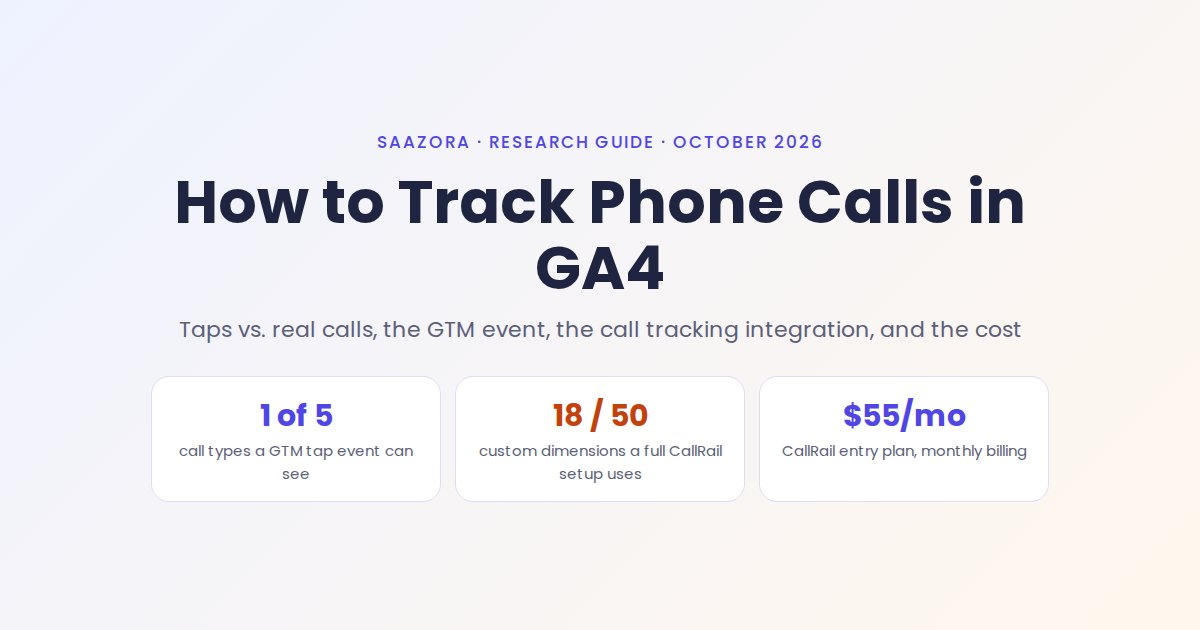
To track phone calls in Google Analytics 4 you need two separate pieces, because GA4 by itself never hears a phone ring. The first is a Google Tag Manager event that fires when a visitor taps a tel: link, which you then mark as a key event. That counts taps, not calls. The second is a call tracking tool that swaps the number on your site (dynamic number insertion) and sends each real call into GA4 as its own event, with the duration and whether the caller is new. Without the second piece, GA4 misses everyone who reads your number and dials it, every call to your Google Business Profile or printed numbers, and every call length. CallRail's entry Lead Tracking plan, which lists Google Analytics among its included integrations, costs $55 a month on monthly billing or $50 a month billed yearly (callrail.com/pricing, October 23, 2026).
This guide covers the GA4 side. If your question is mainly about counting calls as conversions inside Google Ads (call assets, Google forwarding numbers, call imports), our walkthrough of Google Ads call conversions handles that, and the two setups work side by side. For a wider look at the vendors that can feed GA4, see our ranked list of call tracking software.
What GA4 can record without a call tracking tool
Out of the box, GA4 records no phone activity at all. Google's enhanced measurement, the switch that collects scrolls, file downloads and outbound clicks without code, defines an outbound click as a click on "a link that leads away from the current domain and to another website." A tel: link does not lead to another website, and Google's list of enhanced measurement events has no phone or call event. So the starting point is zero, even if your number is a tappable link.
With one Tag Manager event, GA4 gains a single signal: someone tapped or clicked the number. That is useful on mobile, where most callers tap. It still tells you nothing about what happened next.
| Question you want GA4 to answer | GA4 alone | GA4 + GTM tel: event | GA4 + call tracking integration |
|---|---|---|---|
| Did someone tap the phone number? | No | Yes, one event per tap | Indirectly: a call event arrives if the tap became a call |
| Did the call actually connect? | No | No (a tap that is cancelled still counts) | Yes, the event is sent for the call itself |
| Did a desktop visitor dial the number by hand? | No | No, there is no click | Yes, if the number on the page was a swapped tracking number |
| How long was the call? | No | No | Yes: CallRail sends call_duration in seconds; WhatConverts sends call_duration_seconds |
| First-time or repeat caller? | No | No | Yes, as a parameter or as separate event names |
| Which campaign drove the call? | No | Yes, from the session that tapped | Yes for website calls; offline and listing numbers arrive with the source as custom parameters |
| Was it a good lead or a sale? | No | No | Partly: CallRail can send a qualified parameter and a value |
Source: Google Analytics Help "Enhanced measurement events"; CallRail help center "Google Analytics 4 (GA4) integration" (updated January 14, 2026); WhatConverts help center "Understand What Event Data is Sent to Google Analytics." Read October 23, 2026.
Five ways a phone call reaches you, and what lands in GA4 for each
The gap is easier to see call by call. A small business typically gets calls in at least five ways, and each one shows up in GA4 differently, or not at all. The deciding factor is whether the call is tied to a website session. CallRail's own documentation draws the line: calls to a website pool (numbers that swap per visitor) carry a Google Analytics session ID, while calls to a source number (one fixed number on a listing, an ad or a flyer) do not.
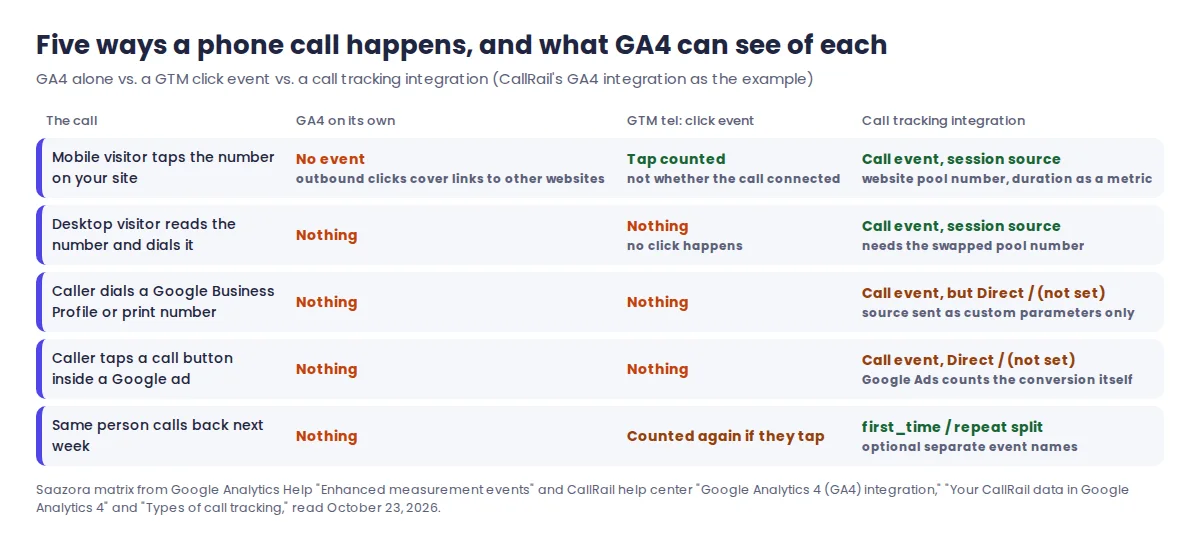
Two rows in that matrix catch most people out. First, the desktop visitor who reads your number and dials it from a desk phone or mobile: no click happens, so no tag can see it. Only a tracking number shown to that one visitor can connect the call back to the visit. Second, calls to fixed numbers such as your Google Business Profile listing or a printed flyer: CallRail does send them to GA4, but its "Your CallRail data in Google Analytics 4" article says Google "did not make the necessary attribution fields available," so source, medium, campaign and landing page arrive as "not set" or "none" and the events fall into the Direct or Unassigned channel. The real source still travels with the event as custom parameters, which is why the custom dimension step later in this guide matters.
Calls placed straight from a Google ad's call button are a third special case. They pass through a Google forwarding number, and CallRail's Call Details Forwarding article says CallRail "does not post conversions to Google Ads" for those calls; Google Ads counts them under its own call conversion settings. In GA4 they behave like any other fixed-number call.
Step 1: track phone calls in Google Analytics 4 with a GTM tel: click event
This part is free and takes about as long as any other Tag Manager event. It assumes GTM is already installed and your GA4 Google tag already fires on every page. The settings below follow Google's Tag Manager help pages for click triggers, built-in variables and GA4 event tags.
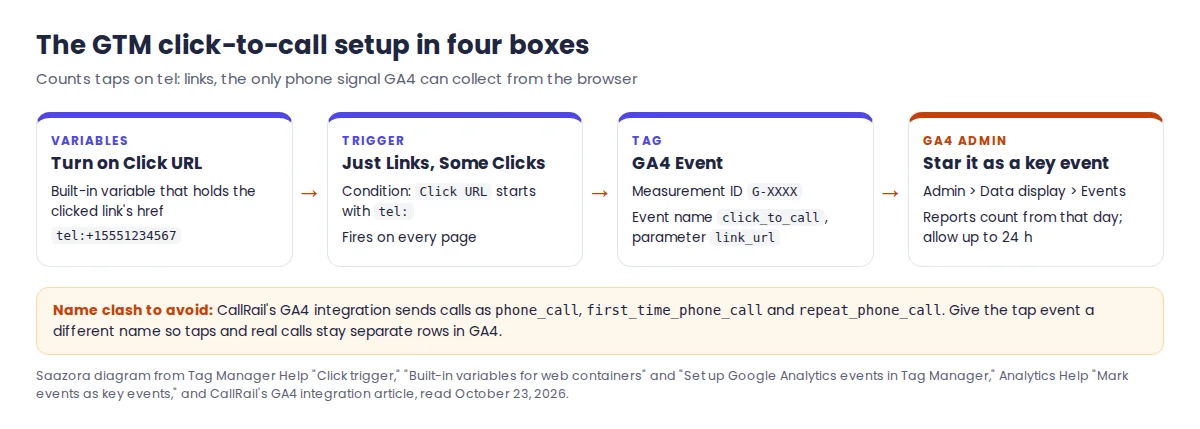
- Turn on the Click URL variable. In your GTM workspace, open Variables, click Configure under Built-In Variables and tick Click URL. Google describes it as the value of
gtm.elementUrl, set by click triggers, which for a phone link is the fulltel:address. - Create the trigger. Triggers, New, then choose the click type "Just Links." Under "This trigger fires on" pick Some Clicks and add the condition Click URL starts with tel:. Google recommends the Some Clicks filter for performance, and it also stops the event firing on every other link.
- Create the GA4 Event tag. Tags, New, "Google Analytics: GA4 Event." Enter your measurement ID (it starts with G-), an event name such as
click_to_call, and one event parameter,link_urlset to{{Click URL}}, so you can tell your main line from a second location's number. Attach the trigger from step 2. - Test before publishing. Click Preview to open Tag Assistant, connect your site, tap or click the phone number and confirm the tag fired once. Then Submit, "Publish and Create Version." The event shows in GA4's Realtime report within minutes.
- Mark it as a key event. In GA4, Admin, Data display, Events: find
click_to_calland click the star. Google's help page says this needs the Editor role or above, applies only from that day forward ("It doesn't change historic data") and can take up to 24 hours to reach standard reports. A standard property can mark up to 30 events as key events.
Three details from the Google pages are worth acting on. Choose your own event name rather than Google's recommended generate_lead if you also track form leads, or taps and form fills merge into one number. Avoid phone_call, because that is the exact name CallRail's integration uses for real calls, and two different things under one name cannot be separated later in a report. And if you plan to bid on this event in Google Ads, Google's "Create or modify key events" page says a value must come with a currency parameter in ISO 4217 format (USD, for example), or the event is counted but "won't be sent to Google Ads."
How call tracking sends the actual call into GA4
A call tracking tool does the part GA4 cannot. CallRail's dynamic number insertion article describes the mechanism: a JavaScript snippet on every page detects your business number (in formats such as 111-222-3333 or (111) 222-3333) and replaces it with a tracking number. A website pool hands each visitor their own number for the length of the visit, and stores the visitor's source in a cookie so a returning visitor sees the same number. When that number rings, CallRail knows which visit it belonged to.
CallRail then pushes the call to GA4 from its own servers rather than from the visitor's browser. It asks for your GA4 measurement ID and a GA4 API secret, which are the two credentials of Google's Measurement Protocol. Google's developer docs describe the Measurement Protocol as a way to record "server-to-server and offline interactions" and say it is meant "to supplement, not replace" the normal Google tag. That is why the GA4 tag still has to be on your site: CallRail's setup article lists a GA4 property with the gtag installed as a prerequisite.
The website pool has to be big enough for this to work. If two visitors see the same number at the same time, CallRail's pool-sizing article says their sessions get merged under whoever calls first, which can turn an ad click into a Direct visit. CallRail's rule is to take your busiest hour of sessions over the last two weeks and divide by four, with a minimum of four numbers per pool. You can read that peak from GA4 itself: Explore, Blank, a line chart with Date + hour as the dimension and Sessions as the metric.
One limit matters for anyone running ads. Because CallRail cannot fill GA4's standard gclid field, its documentation says CallRail events "will not show in any connected Google Ads reporting within GA4," and "the conversion import from GA4 to Google Ads will not include our events." For Google Ads bidding, CallRail points you to its direct Google Ads integration instead. In practice that means GA4 is where you analyse calls next to the rest of your traffic, and Google Ads gets its call conversions from a separate connection.
Setting up the CallRail GA4 integration, in order
These steps follow CallRail's "Google Analytics 4 (GA4) integration" help article, last updated January 14, 2026. CallRail says the whole job can take "anywhere from an hour or up to a few days," depending on the size of the business. The integration is set per company inside a CallRail account, so an agency repeats it for each client.
- Get the swap script live first. In CallRail, Integrations, Google Tag Manager gives a Custom HTML snippet. CallRail's GTM article says to fire it on All Page Views, because the script must load on the landing page and every page that shows a number.
- Open the GA4 integration. Integrations, Google Analytics 4, choose the company, enter your website URL. CallRail searches the site for your measurement ID. If it cannot find it, enter the ID and an API secret by hand (GA4 creates secrets under the data stream's Measurement Protocol API secrets).
- Add extra properties if you need them. One integration can send to up to five GA4 properties, but all of them must use the same event settings.
- Pick what to send. Tick Calls, and SMS, Forms or Chat if you use them. Then choose one call event for everything, or separate events for first-time and repeat callers. A default monetary value per event is optional and can be overwritten by a CallRail automation rule.
- Activate, then make a test call straight away. CallRail recommends calling a tracking number right after activating, because GA4 needs to receive an event before the next steps can be finished. Data can take up to 24 hours to appear.
- Create custom dimensions and metrics the same day. CallRail warns these settings "do not apply retroactively," so calls received before you create them cannot be used in reports. In GA4, Admin, Custom definitions, create event-scoped dimensions for the parameters you care about (CallRail's list has 18, from
sourceandcampaigntotracking_number_nameandqualified) and metrics forcall_duration(seconds) andvalue. You need the Editor role. - Mark the call events as key events. Optional in CallRail's article, but needed if calls should appear in Acquisition and Advertising reports. The names to look for are
phone_call,first_time_phone_call,repeat_phone_call,form,chatandsms.
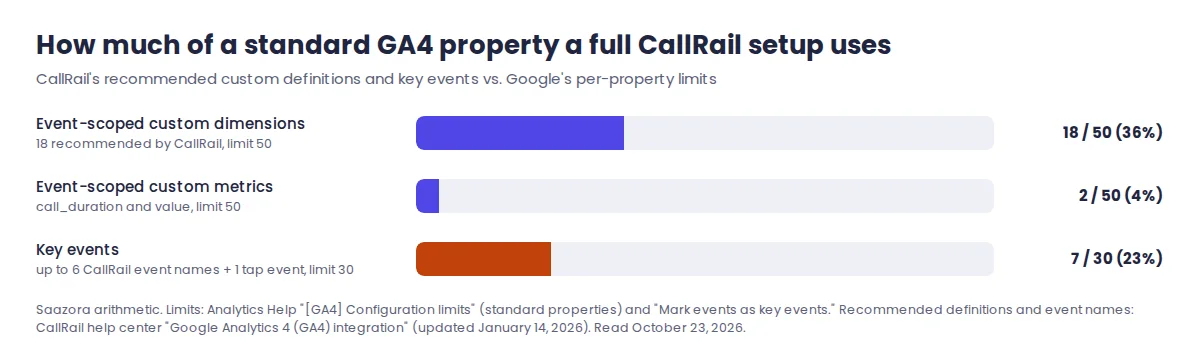
Before creating all 18 dimensions, check what your property already uses. Google's configuration limits page gives a standard property 50 event-scoped custom dimensions, 50 event-scoped custom metrics and 30 key events. CallRail's full list takes 18 of the 50 dimensions, which is fine on a fresh property but can crowd one that already carries ecommerce or form parameters. For most small businesses, source, medium, campaign, tracking_number_name, first_time_caller and qualified answer the everyday questions; the rest can wait.
If calls are missing in GA4 after a day, CallRail's troubleshooting article names two usual causes: data thresholding when Google signals is included in reporting identity (switching reporting identity to Device-based is one fix it lists), and an active Developer traffic data filter. For a fuller picture of what else the platform does once calls are flowing, see our CallRail review.
How WhatConverts and CallTrackingMetrics handle GA4
CallRail is not the only tool that sends calls to GA4 this way. Both main alternatives also use a measurement ID plus an API secret, but their documentation shows real differences in what reaches GA4.
| Detail, from each vendor's own GA4 article | CallRail | WhatConverts | CallTrackingMetrics |
|---|---|---|---|
| Call event name | phone_call, or first_time_phone_call / repeat_phone_call | phone_call; optional _unique / _repeat suffix | Built from toggles (activity type such as InboundCall, first-time or repeat); example given is CTM_Activity |
| Skip short calls before they reach GA4 | Not in the GA4 article; duration sent as a metric to filter in reports | Yes: a minimum call duration in seconds (example: 60) | Not in the setup article; conditions can be added through Triggers on higher plans |
| Calls with no website session | Sent; source travels as custom parameters | Not described separately; events use the GA4 Client ID | Separate switch: "Send events when no GA4 session data is available (offline sources)" |
| GA4 properties per setup | Up to 5, same event settings | Properties added one by one ("+ Add Property") | Non-agency: one account, one property, one data stream |
| How fast events appear | Up to 24 hours after activation | "Typically" 1 to 5 minutes after the lead | Not stated; recommends custom dimensions so data outlives the 30-minute Realtime view |
Source: CallRail help center "Google Analytics 4 (GA4) integration"; WhatConverts help center "Connect WhatConverts to Google Analytics 4" and "Understand What Event Data is Sent to Google Analytics"; CallTrackingMetrics help center "Set up your Google Analytics (GA4) Integration" (updated January 30, 2026). Read October 23, 2026.
The short-call filter is the practical difference. If wrong numbers and hang-ups are a big share of your calls, WhatConverts can keep them out of GA4 at the source, while with CallRail you filter on call_duration in reports or let automation rules set qualified. CallTrackingMetrics' explicit offline-sources switch makes it clear which events will arrive without session data. Prices and the rest of the comparison are in our CallRail alternatives roundup. Vendor docs: WhatConverts GA4 setup and CallTrackingMetrics GA4 setup.
Consent banners: what changes when a visitor says no
Call tracking sits awkwardly with cookie banners, and the two vendors involved describe it differently. CallRail's "Cookie Consent banners" article says the cookies its number swap uses are "strictly necessary" first-party cookies that, under current privacy rules, "do not require consent," while adding that telling visitors about them is the site owner's job and that you should confirm the details with your own legal counsel. It also gives two ways to hold the swap until consent if you choose to: in GTM, change the CallRail tag's trigger from All Pages to your banner's consent event or require a consent type such as analytics_storage under Advanced Settings, Consent Settings; or wrap the script in a function that only loads after the visitor clicks accept.
Google's consent mode page covers the GA4 side. When analytics_storage is denied, no Analytics cookies are set, and in the "advanced" setup tags still send cookieless pings that GA4 uses for behavioral and conversion modeling. In the "basic" setup tags are blocked until consent, and Google says you then lose that modeled data.
The practical effect for call tracking: if you hold CallRail's swap until consent, a visitor who declines keeps seeing your normal office number, so their call reaches you untracked and never appears in GA4. Your call totals in GA4 then reflect only visitors who accepted. Which way to go is a legal decision for your market, not a technical one; this guide is not legal advice.
What CallRail's entry plan costs for a GA4 setup
CallRail's pricing page lists Google Analytics among the integrations included in all four Lead Tracking plans, so the GA4 connection itself carries no add-on fee. What changes the bill is how many numbers your website pool needs and how many minutes you use. Prices below were read from callrail.com/pricing ("See all Lead Tracking plans") on October 23, 2026.
| Lead Tracking tier | Monthly billing | Billed yearly | Numbers included | Minutes included | Extra local number | Extra local minute |
|---|---|---|---|---|---|---|
| Entry | $55/mo | $50/mo | 5 | 250 | $3.00 | $0.06 |
| Second | $75/mo | $68/mo | 5 | 750 | $3.00 | $0.06 |
| Third | $95/mo | $85/mo | 10 | 1,000 | $2.50 | $0.05 |
| Fourth | $295/mo | $265/mo | 40 | 4,000 | $1.75 | $0.045 |
Source: callrail.com/pricing, checked October 23, 2026. Usage is billed on top of the base fee and is not refundable; CallRail rounds each call up to the nearest minute; yearly plans pay the 12-month base fee upfront. 25 text messages included, then $0.03 each.
Using CallRail's pool rule (peak hourly sessions divided by four, minimum four) plus one fixed number for a Google Business Profile listing, here is what three example sites would pay on monthly billing. The traffic and minute figures are Saazora assumptions for illustration.
| Example site | Peak hour sessions | Numbers needed | Minutes a month | Entry tier bill | Cheapest tier |
|---|---|---|---|---|---|
| Small local business | 16 | 5 (pool of 4 + 1) | 300 | $58.00 | Entry, $58.00 ($53.00 billed yearly) |
| Busy single-location business | 40 | 11 (pool of 10 + 1) | 600 | $94.00 | Second, $93.00 ($86.00 billed yearly) |
| Multi-location business | 100 | 26 (pool of 25 + 1) | 1,200 | $175.00 | Third, $145.00 ($135.00 billed yearly) |
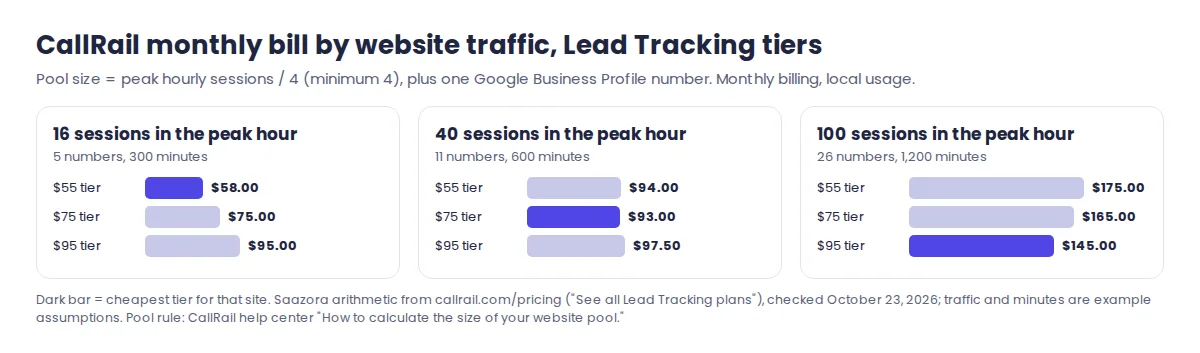
The pattern is that the entry plan fits a site whose busiest hour brings fewer than about 20 sessions. Above that, each extra pool number costs $3 a month on the entry tier, and the $75 and $95 tiers come out level or cheaper once you add minutes. The 14-day trial is enough to install the swap script, connect GA4, make a test call and see whether events arrive with the source you expect. You can start a CallRail trial here (affiliate link). Toll-free numbers, add-ons and the higher Lead Conversion plans are broken down in our CallRail pricing breakdown, and current deals are on the CallRail store page.
Questions about GA4 call tracking
Does GA4 track phone calls automatically?
No. Enhanced measurement has no phone event, and its outbound click event covers links to other websites. You need a Tag Manager event for taps on tel: links, and a call tracking integration for the calls themselves.
Why do my CallRail calls show as Direct in GA4?
Calls to fixed source numbers (a Google Business Profile listing, a flyer, an ad's call button) have no GA4 session, and CallRail says Google does not let it fill the standard source and medium fields for those. The real source is sent as custom parameters; create custom dimensions for source, medium and campaign to see it. Calls to a website pool do carry the session and appear under the right channel.
Can I import CallRail's GA4 call events into Google Ads?
Not through GA4. CallRail's documentation says the GA4-to-Google Ads conversion import will not include its events and recommends its direct Google Ads integration. A GTM tap event you create yourself can be imported like any other key event.
Should the tap event and the call event both be key events?
They measure different things, so both can be key events, but do not add them together as "calls." On mobile, a tap that turns into a call produces both events. Treat the tap as intent and the call event as the result; if you only want one number for leads, use the call event.
How this guide was researched
Saazora did not open a CallRail, WhatConverts or CallTrackingMetrics account or place test calls for this guide; it is a research guide. Every product behaviour above comes from the vendors' own help pages, read on October 23, 2026: CallRail's articles on the GA4 integration, its data in GA4, missing GA4 events, dynamic number insertion, visitor tracking, website pool sizing, Google Tag Manager installation, Call Details Forwarding and cookie consent; WhatConverts' GA4 connection and event data articles; and CallTrackingMetrics' GA4 setup article. GA4 and Tag Manager behaviour comes from Google's help pages on enhanced measurement, key events, configuration limits, consent mode, click triggers, built-in variables and GA4 event tags, plus the Measurement Protocol developer guide. CallRail prices were captured from callrail.com/pricing the same day. The cost examples and the GA4 limit arithmetic are Saazora calculations; the traffic and minute figures in them are assumptions, not customer data.
Sources (plain links): Enhanced measurement events · Mark events as key events · GA4 configuration limits · GA4 events in Tag Manager · Consent mode · CallRail GA4 integration · Your CallRail data in GA4