Google Local Services Ads and Google Ads help pages, CallRail's help center, four state statutes and the federal wiretap statute read, and prices on callrail.com checked, October 23, 2026 · Research guide, not hands-on testing and not legal advice · US list prices
Saazora may earn a commission if you sign up for CallRail through links on this page, at no extra cost to you. Links to Google, state legislature and statute pages are plain links with no affiliate tag.
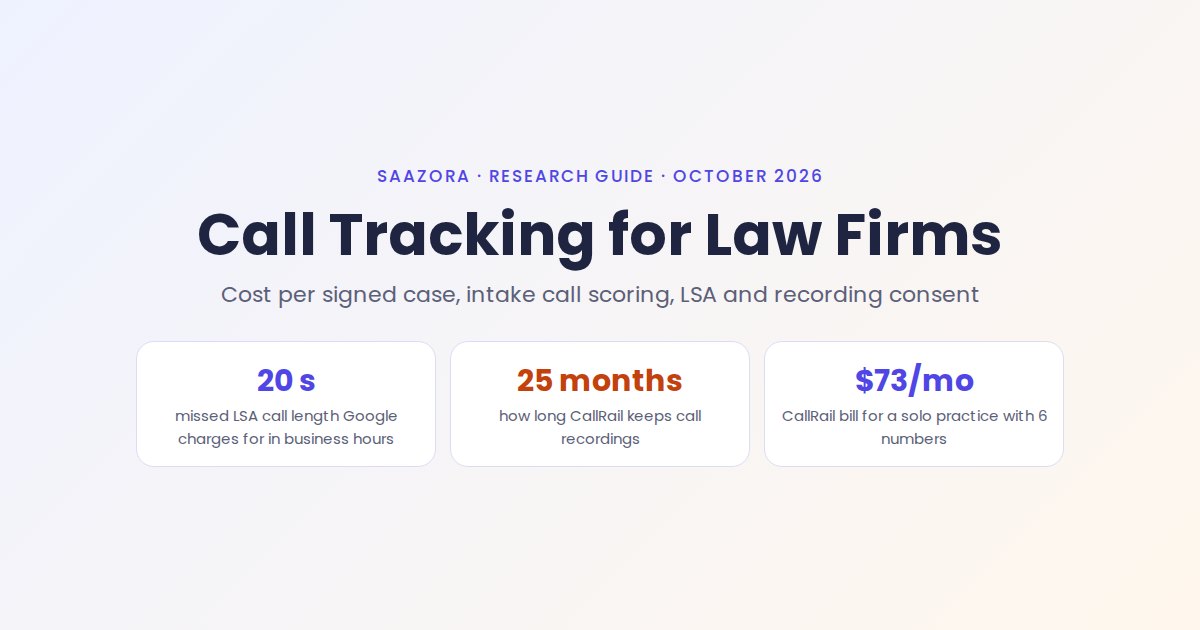
Call tracking for law firms comes down to one number: what each signed case cost, broken down by the channel that made the phone ring. Google Ads reports cost per conversion, Local Services Ads reports cost per lead, and neither knows which caller became a client. A tracking number on every paid channel, plus a short score for each intake call, is how a personal injury, family law or criminal defense firm joins those dots. In practice that means a separate number for Local Services Ads, the Google Business Profile, the website and any TV or billboard spot. Each intake call is then marked by outcome, and recording is set up so it holds up in states that require every party's consent. CallRail's Lead Tracking plans start at $55 a month on monthly billing, with call recording included (callrail.com/pricing, October 23, 2026).
This page is about the parts specific to legal intake. For how Google itself counts a call from a search ad, see our guide to counting calls as Google Ads conversions; for a ranked list of vendors, see the best call tracking software for small firms.
Cost per signed case: the number call tracking exists to produce
Most ad dashboards stop at the lead. A personal injury firm can see that a campaign produced 160 calls at $50 each and still have no idea whether it signed one client or twenty. Cost per signed case divides the spend on a channel by the cases actually signed from that channel's callers. To get there you need three things per call: which channel it came from (the tracking number), whether it was a real prospective client (the intake score), and whether a retainer followed (the outcome, usually from the case management system).
The ranking of channels often flips once you look past the cost per call. The figures below are a Saazora illustration, not benchmarks from any firm, but the arithmetic shows why the extra step matters:
| Channel (illustration) | Monthly spend | Tracked calls | Qualified intake calls | Signed cases | Cost per call | Cost per qualified call | Cost per signed case |
|---|---|---|---|---|---|---|---|
| Google Ads search (website number pool) | $8,000 | 160 | 40 | 8 | $50.00 | $200.00 | $1,000.00 |
| Local Services Ads (one LSA number) | $4,000 | 50 | 30 | 6 | $80.00 | $133.33 | $666.67 |
| Facebook call ads (one number) | $1,500 | 45 | 9 | 1 | $33.33 | $166.67 | $1,500.00 |
| All three | $13,500 | 255 | 79 | 15 | $52.94 | $170.89 | $900.00 |
Saazora arithmetic on assumed volumes (src/cost_calc.py). The call, qualification and signing counts are invented for illustration only; your own numbers will differ by practice area, market and intake process.
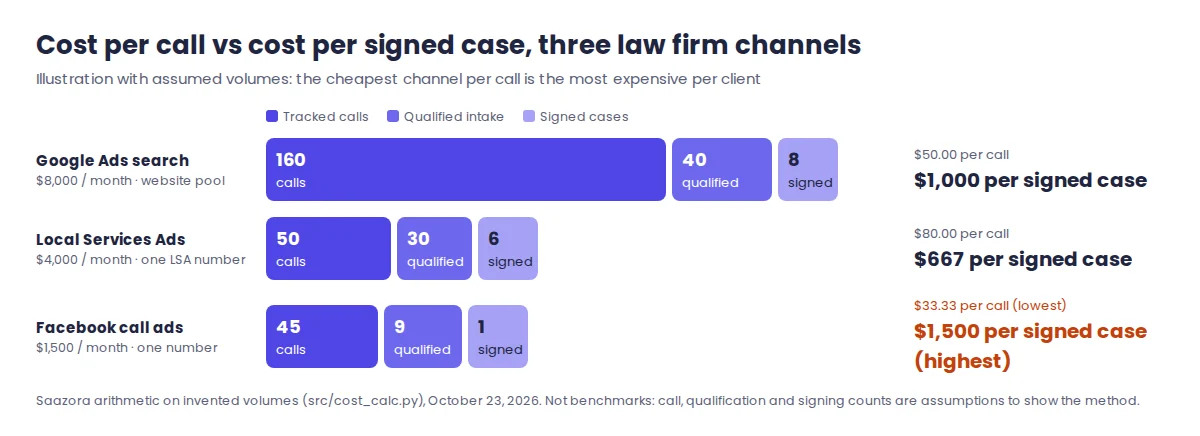
Two practical notes before building this report. First, the gap between first call and signed retainer can range from the same day to several weeks depending on the matter, so read cost per signed case over at least a full quarter rather than week by week. Second, decide now who records the outcome. If intake staff tag a call "signed" in CallRail, the report lives there; if the retainer is logged in Clio, the outcome has to come back from Clio, which the Clio section below covers.
One tracking number for every channel a firm pays for
Most of the work in call tracking for law firms is deciding where the numbers go. A tracking number only answers "where did this caller come from" if no other channel shares it. For a law firm the list of places a phone number appears is usually longer than it looks: the Local Services Ads profile, the Google Business Profile for each office, the website (reached from Google Ads, organic search and referrals), Facebook call ads, legal directory profiles, and offline media such as TV, radio, billboards and bus benches.
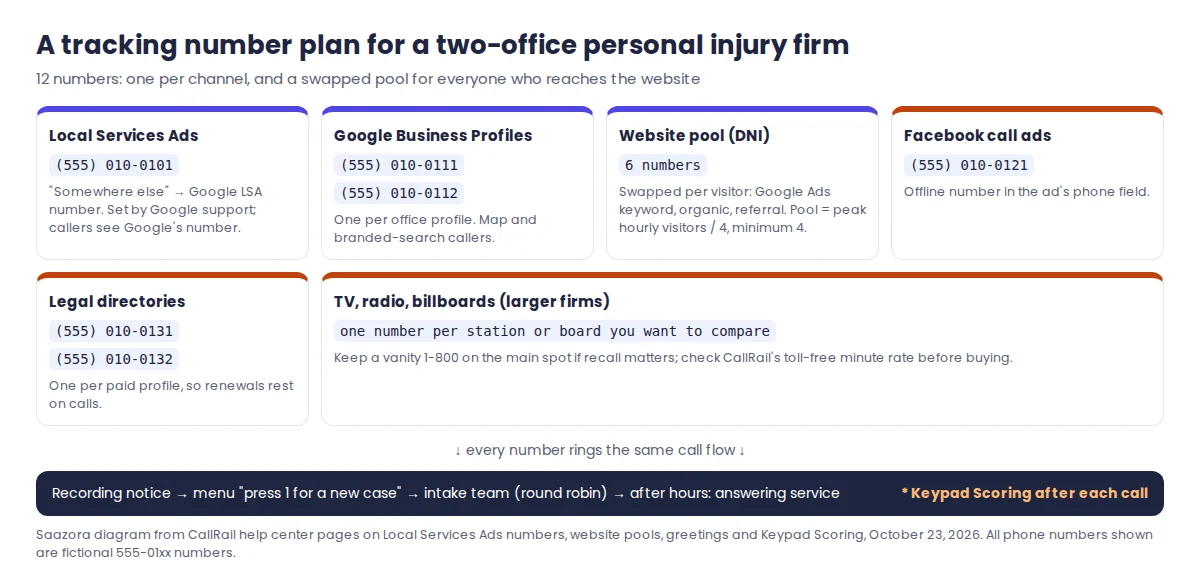
| Where the number appears | CallRail number type | How many | What it tells you |
|---|---|---|---|
| Local Services Ads profile | "Somewhere else" → Google Local Services Ads | 1 per LSA account | Which LSA leads called, with your own recording and score next to Google's lead record |
| Google Business Profile | Google Business Profile number | 1 per office profile | Map and branded-search callers, kept separate from paid search |
| Website (Google Ads, organic, referrals) | Website pool with dynamic number insertion | Pool sized from peak hourly visitors, minimum 4 | Source, campaign and keyword of each caller who visited the site |
| Facebook or Instagram call ads | Offline number | 1 per ad set worth comparing | Which audience or offer produced the call |
| Legal directory profiles | Offline number | 1 per directory | Whether a paid directory listing still earns its fee |
| TV, radio, billboards | Offline number (local or toll-free) | 1 per station or placement you want to compare | Which spot or board drives calls, by day and hour |
Source: CallRail help center, "How to set up Google Local Services Ads with CallRail" (updated December 2, 2025), "Using CallRail with Google Local Services Ads" and "How to calculate the size of your website pool" (peak hourly visitors divided by four, four numbers minimum). Read October 23, 2026.
Two law-firm specifics. If your TV campaign is built around a memorable vanity 1-800 number, weigh the recall it buys against the data you lose before replacing it; a common compromise is to keep the vanity number on the main spot and use separate tracking numbers only on the placements you want to compare. And if a legal directory profile lets you edit its phone field, give it its own number well before the listing comes up for renewal, so the renewal decision rests on calls rather than on the directory's own report.
Google Local Services Ads for lawyers: what Google checks, records and charges for
Local Services Ads are the boxes above the regular search ads, and they charge per lead rather than per click. Google lists personal injury, family, criminal, DUI, immigration, estate, bankruptcy and several other legal categories. Three parts of Google's own help pages matter for call tracking.
What Google verifies. For personal injury, family and criminal lawyers, Google's business screening page lists business owner identity verification, professional liability insurance and, for select advertisers, business and business-representative checks. The license line is the same for each practice area: "State bar license checks for each personal injury lawyer in the firm" (and the same wording for family and criminal lawyers). Google has also moved every advertiser to a single Google Verified badge and is discontinuing the Money Back Guarantee; reimbursement requests only covered services booked before December 7, 2025. One of CallRail's LSA articles still describes the old "Google Guaranteed" status, so go by Google's pages.
What Google records. Google's LSA leads page says that in the US and Canada "all inbound calls from customers via the Google forwarding number are recorded by Google", and that callers hear a pre-recorded notice before you hear "Call from Google". You can listen to these recordings in the LSA lead inbox. The same page excludes health care verticals and tax specialists from call recordings; legal categories are not on that list.
What Google charges for. These rules decide how you set up the phone line behind an LSA number:
| Google's LSA rule | What the help page says | What it means for a law firm's intake line |
|---|---|---|
| Answered call | Charged as a valid lead when you answer or call back and speak with the customer; poor-quality, duplicate or invalid leads are credited | Score every LSA call yourself so you can match Google's charge list against real prospective clients |
| Missed call | Charged if it rings during your business hours and the caller stays on the line for more than 20 seconds | An unanswered intake line during office hours costs money; route LSA calls to whoever answers fastest |
| Phone menu (IVR) | No charge if the caller hangs up without pressing a key; the 20-second timer starts after the first key press | A "press 1 for a new case" step screens existing clients and vendors before a lead is charged |
| Voicemail | A call that reaches voicemail or a greeting during business hours is charged if the caller stays over 20 seconds, message or not | Do not send business-hours LSA calls straight to voicemail |
| Repeat contact | Follow-ups from the same number or email within 15 days of activity are not charged again | Callbacks to an existing lead are free; a caller who comes back after 15 quiet days is a new charge |
| Credits | Google reassesses lead quality over 30 days and credits low-quality leads automatically; you can rate each lead in a feedback survey | Rate LSA leads within days, using your CallRail tags as the record |
Source: Google Local Services Ads Help, "How leads work", "Manage leads and jobs", "Business screening and verification requirements" and "About Google Verified badge". Read October 23, 2026. Google says lead prices vary by location, job type, lead type and bidding mode and does not publish a price list.
Putting a CallRail number behind LSA is a manual change. CallRail's setup article says you create the number under "Somewhere else", then Google Local Services Ads, and that "this setup cannot be done via CallRail's API." You then replace the phone number in the LSA profile. CallRail warns this can need re-verification through Google support. The call path becomes caller → Google's forwarding number → CallRail number → your intake line. CallRail says this double forwarding occasionally adds "a second of dead air". The area code of the CallRail number does not matter because callers only see Google's number. If you reuse your Google Business Profile number in LSA instead, CallRail says those leads are attributed to Google Business Profile, not LSA, which defeats the point of a separate number.
Because the CallRail number sits in the path, a CallRail call flow can do what the table recommends. A menu step screens callers before Google's charge timer runs, a schedule step sends after-hours calls to an answering service, and round robin rings several intake staff at once.
Scoring intake calls: from "answered" to "signed"
A call log full of "answered, 6 minutes" says little about whether a call was a new car-accident case, an opposing party, a court clerk or a vendor. CallRail gives you four ways to score calls, from free and manual to automatic on the higher plan:
| CallRail tool | How it works | Plan, per CallRail | Good fit for |
|---|---|---|---|
| Keypad Scoring | After the call, the intake person presses * and answers a short keypad survey: qualified lead or not, one of up to 9 tags, and a value. "Only the agent taking the call will hear the survey" | Lead Tracking (call scoring is listed in every tier) | Small intake teams who will not open a dashboard after each call |
| Tags and manual qualification | Thumbs-up or tag on the call in the activity log or caller timeline | Lead Tracking | Weekly review by the managing partner or marketing lead |
| Automation Rules | Tag, qualify or add a value automatically based on call length, campaign or words spoken in the transcript; transcripts must be on | Lead Tracking lists automation rules; CallRail's LSA article ties transcript-keyword rules to its Conversation Intelligence plan | Tagging every call that mentions "accident", "custody" or "arrested" without anyone listening |
| Lead Score | Scores the caller 0 to 100 on Need, Fit, Timeline/Urgency and Interest/Intent (25 points each), steered by your own "Ideal lead" and "What to screen out" text | Premium Conversation Intelligence or Voice Assist plans only | Firms with enough volume that someone must decide which callbacks come first |
Source: CallRail help center, "Keypad Scoring", "How to qualify leads in CallRail", "Adding call values", "Understanding Lead Score in CallRail" (updated October 19, 2026), "Conversion Signals" and "AI features"; callrail.com/pricing feature list. Read October 23, 2026. CallRail says transcription and Keypad Scoring messages work in English only.
Keep the tag list short and tied to decisions, not to every nuance of a matter. A workable starting set for a mixed practice:
- New matter: in practice area (one tag per practice area you take: PI, family, criminal defense). These are the calls that count toward cost per qualified call.
- New matter: outside practice area or jurisdiction. Real people, wrong firm. A high share from one channel usually means its targeting or keywords are too broad.
- Existing client or case-related. Clients, opposing counsel, adjusters, courts. These calls should not count against marketing at all.
- Consult booked and Retained. The two outcome tags that turn the call log into cost per signed case.
- Spam or sales call. Also worth reporting in the LSA lead survey.
For Lead Score, "What to screen out" is where a firm describes the matters it declines. Examples are case types you do not handle, counties you do not practise in, or (for some PI firms) property-damage-only claims. CallRail says these criteria take priority over the general scoring guidelines and mainly lower the Fit score. Treat the score as a sort order for callbacks. It is not an intake decision: only the firm decides whether to take a matter, and conflict checks still happen in your own system.
Recording intake calls in all-party consent states
This section summarizes public statutes and vendor documentation. It is not legal advice; confirm your obligations with your state bar's ethics resources or counsel.
Federal law permits recording a call when one party consents. 18 U.S.C. § 2511(2)(d) allows it "where one of the parties to the communication has given prior consent." Several states require every party's consent, and those statutes are written in the firm's terms: you cannot record the caller unless the caller agrees. Four examples, quoted from each state's statute:
| Jurisdiction | Statute | Wording on consent |
|---|---|---|
| Federal | 18 U.S.C. § 2511(2)(d) | Lawful "where one of the parties to the communication has given prior consent" |
| California | Penal Code § 632(a) | Offense to record a confidential communication "without the consent of all parties" |
| Florida | Fla. Stat. § 934.03(2)(d) | Lawful "when all of the parties to the communication have given prior consent" |
| Pennsylvania | 18 Pa.C.S. § 5704(4) | Not unlawful "where all parties to the communication have given prior consent" |
| Washington | RCW 9.73.030(1) and (3) | Requires "the consent of all the participants"; consent is "considered obtained" when one party announces the recording "in any reasonably effective manner" and the announcement is itself recorded |
Sources: 18 U.S.C. § 2511 (Cornell LII), Florida Statutes § 934.03 (leg.state.fl.us), Pennsylvania 18 Pa.C.S. § 5704 (palegis.us), RCW 9.73.030 (app.leg.wa.gov), California Penal Code § 632 (text via california.public.law; leginfo.legislature.ca.gov blocks automated reads). Read October 23, 2026. Other states also require all-party consent; this table is not a complete list.
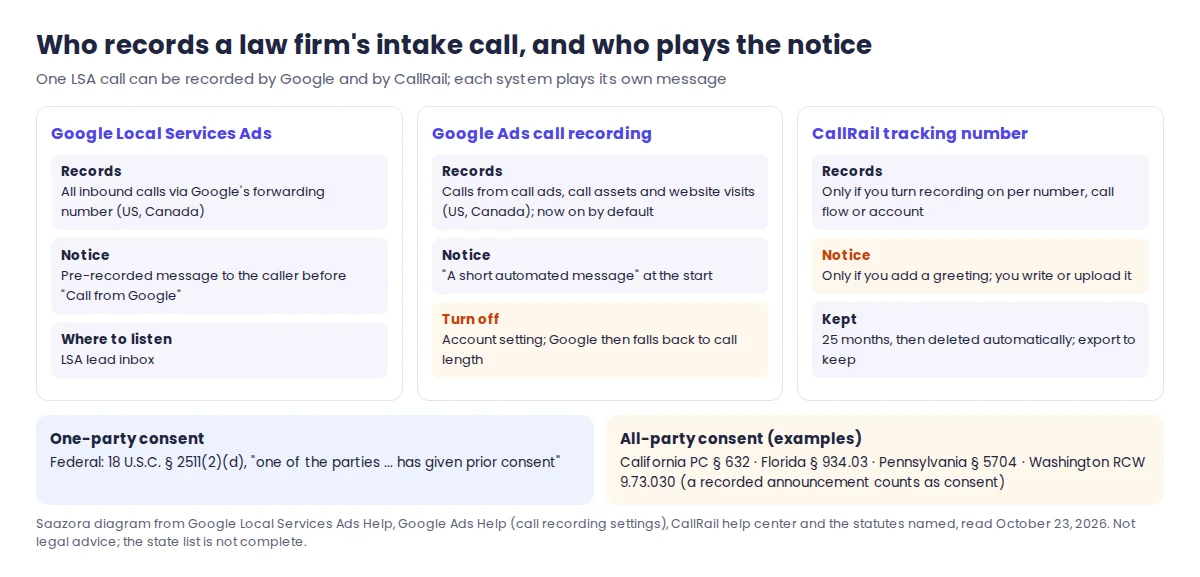
The practical problem for a law firm is that you rarely know where the caller is. Area codes travel with mobile phones, and a firm in a one-party state still gets calls from people in all-party states. The simplest safe pattern is a short notice on every line, rather than trying to decide call by call. CallRail supports this directly. Its inbound recording article says some states "require both parties to consent" and that you can type or upload a greeting "to notify the caller that their call will be recorded". The greeting is the first thing a caller hears on that tracking number. For outbound calls, an administrator can turn on outbound recording and a separate automated "may be recorded" message.
Know which other systems already record. Google records LSA calls through its forwarding number and plays its own notice. In Google Ads, the call recording setting is now on by default for calls from call ads, call assets and website visits in the US and Canada. It stays off only if you turned it off earlier or Google identified your business as healthcare or financial services, and callers hear "a short automated message". A single intake call from an LSA ad can therefore be recorded by Google and by CallRail, and the caller may hear two notices. That is clumsy but not harmful, and it is safer than assuming the other system's notice covers your recording.
Recordings of intake calls hold exactly the facts a prospective client expects to stay confidential, so treat them like case files:
- Limit who can listen. CallRail has four user types (Admin, Manager, Reporting, Agent) with different privileges. Check which roles can review recordings before giving an outside marketing agency a login.
- Look at the PII redaction options. CallRail's AI features settings include checkboxes to redact personally identifiable information; review them before switching on transcripts and summaries for intake lines.
- Plan for the 25-month limit. CallRail's data retention policy says call recordings and other communication records "are retained for 25 months, after which they are automatically deleted," that the period cannot be extended, and that deleted data can sit in backups for up to 90 more days. A personal injury matter can easily outlast that window, so if a recording may matter later, export it into the matter file.
- Be careful with automatic texts. CallRail can text every missed caller back from the tracking number. In family law and some criminal matters the caller may be using a shared or monitored phone, so consider switching the automatic text off on the numbers those callers use, or keeping its wording neutral.
Getting call data into Clio Grow or Clio Manage
Cost per signed case needs the outcome next to the source. CallRail's legal integration list includes Clio, Clio Grow, MyCase, HubSpot and Calendly alongside Google Ads and GA4. The Clio connections are the most detailed in CallRail's documentation:
| Clio Grow (intake CRM) | Clio Manage (existing clients) | |
|---|---|---|
| What CallRail sends | Calls, texts and forms, to Clio's Leads page | Calls only |
| Fields on a call | Source, medium, campaign, gclid, recording URL, timeline URL, answered, lead status, phone, referring URL; call summary with Premium Conversation Intelligence | Source, medium, campaign, answered, recording URL, timeline URL, tags, lead status, referring URL; call summary with Premium Conversation Intelligence |
| Duplicate check | Searches existing contacts, inbox leads and open matters first, then updates contact notes | Searches existing contacts and inbox leads first |
| Voice Assist | Caller context only (greets returning clients by name); no booking | Can book, cancel and reschedule appointments in the Clio Manage calendar |
| Availability | US only | US only |
Source: CallRail help center, "Clio Grow Integration" (updated June 30, 2026), "Clio Manage integration" (updated August 19, 2026) and "Industry-specific integrations" (July 23, 2026). Read October 23, 2026.
CallRail's advice for firms using both products is to connect only Clio Grow, because Grow already moves leads into Manage and connecting both "risks creating duplicate leads." Clio also moved Grow onto its unified platform, and CallRail set June 30, 2026 as the date to reconnect through the new Clio tile. If your integration was set up before then and calls stopped appearing in Clio, that is the first thing to check. Once the source fields are in Clio, the matter record carries the channel and campaign, and cost per signed case becomes a report on retained matters rather than a spreadsheet exercise.
What call tracking for law firms costs at three sizes
Every CallRail Lead Tracking tier includes unlimited call recording, call scoring, custom tags, call routing and the Google Ads, Google Analytics, Google Business Profile and Facebook integrations. What changes the bill is how many numbers you need and how many minutes your intake calls run. Intake calls tend to be long, so minutes matter more than for a typical local business.
| CallRail Lead Tracking tier | Monthly | Billed yearly | Local numbers included | Local minutes included | Each extra number | Each extra minute |
|---|---|---|---|---|---|---|
| Tier 1 | $55 | $50/mo | 5 | 250 | $3.00 | $0.06 |
| Tier 2 | $75 | $68/mo | 5 | 750 | $3.00 | $0.06 |
| Tier 3 | $95 | $85/mo | 10 | 1,000 | $2.50 | $0.05 |
| Tier 4 | $295 | $265/mo | 40 | 4,000 | $1.75 | $0.045 |
Source: callrail.com/pricing, "See all Lead Tracking plans" table, checked October 23, 2026. CallRail rounds each call up to the next minute, bills extra usage on top of the base fee and says those fees are not refundable; there is a 14-day trial with no credit card. Lead Conversion, the plan with Premium Conversation Intelligence and Lead Score, is $165 a month ($150 billed yearly) and its default table shows 5 numbers, 250 minutes and 10,000 analysis minutes.
Saazora priced three example firms on the cheapest Lead Tracking tier for their usage. The number counts follow the channel plan above, and the minute totals are assumptions:
| Example firm | Numbers | Minutes a month | Cheapest Lead Tracking tier | Same usage on Lead Conversion (with Lead Score) |
|---|---|---|---|---|
| Solo family law or criminal defense practice: LSA, one Google Business Profile, website pool of 4 | 6 | 500 | $73.00 on Tier 1 ($68.00 billed yearly) | $183.00 ($168.00 yearly) |
| Personal injury firm, 4 lawyers, 2 offices: LSA, 2 profiles, pool of 6, Facebook, 2 directories | 12 | 1,500 | $125.00 on Tier 3 ($115.00 billed yearly) | $261.00 ($246.00 yearly) |
| Personal injury firm with TV and billboards: 2 LSA, 3 profiles, pool of 15, 8 offline media numbers, 2 directories | 30 | 5,000 | $340.00 on Tier 4 ($310.00 billed yearly) | $525.00 ($510.00 yearly) |
Saazora arithmetic on callrail.com/pricing rates, US local numbers and minutes, checked October 23, 2026 (src/cost_calc.py). The Lead Conversion column assumes its usage is billed at the 5-number, 250-minute base with $3.00 per number and $0.06 per minute on top, as its default table shows; CallRail's page does not show volume tiers for that plan.
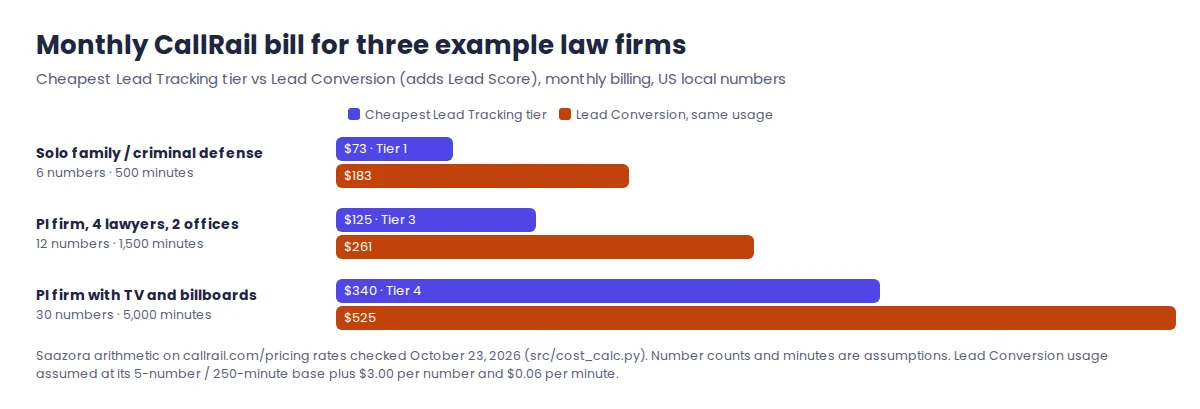
Two things in these numbers are easy to miss. Tier 1 is not automatically the cheapest: at 12 numbers and 1,500 minutes it would bill $151, against $125 on Tier 3. And if a TV campaign needs toll-free numbers, check the rate with CallRail before signing. The tier table lists toll-free minutes at $0.09 on Tiers 1 and 2 but $0.65 on Tiers 3 and 4, while the default comparison table shows $0.08 on every plan. The $0.65 looks like a typo, but it is what the page says. For the full list of plans and add-ons, see our CallRail price breakdown by plan, and for the other vendors' costs, our CallRail alternatives roundup.
A first-month setup order for a law firm
- List every place your phone number is printed or listed. LSA, each office's Google Business Profile, website, directories, ads, TV and outdoor. This list sets your number count and tier.
- Write the recording greeting first. A one-sentence notice, reviewed by whoever handles ethics questions at the firm, and turned on for every tracking number before any number goes live.
- Install CallRail's script on the website and create the website pool. Size it from your busiest hour of visitors, with at least four numbers.
- Create the LSA number and ask Google support to change the LSA phone number. Allow time for any re-verification. Add a menu step if you want existing clients and vendors filtered before Google's 20-second timer starts.
- Give each Google Business Profile and each directory its own number. Update the profiles directly.
- Set up the tag list and Keypad Scoring. Practice-area tags, outside-scope, existing client, consult booked, retained, spam. Show intake staff the * survey on day one.
- Connect Google Ads and Clio Grow (or Clio Manage). Then check that one test call appears in both with the right source.
- Rate every LSA lead in Google's survey each week, using the CallRail tags as your record.
- After the first full quarter, build the cost-per-signed-case table by channel and move budget on that number, not on cost per lead.
The 14-day trial is enough to set up the LSA number, the website pool and the greeting, and to see a couple of weeks of tagged intake calls before paying. You can start CallRail's 14-day trial (affiliate link), and current offers are listed on the CallRail deals page. Practices in other industries face different rules. Our call tracking guide for dental practices covers HIPAA, and the home services version covers field-service software.
Questions law firms ask about call tracking
Can I use a call tracking number in Google Local Services Ads?
Yes. CallRail documents a dedicated "Google Local Services Ads" number type. You list it as the phone number in your LSA profile through Google support, and Google's own forwarding number then rings it. Callers never see the tracking number, so its area code does not matter. Use a number that is not shared with your Google Business Profile, or CallRail will attribute the calls to the profile instead.
Is it legal for a law firm to record intake calls?
It depends on where the parties are. Federal law and many states need only one party's consent, while California, Florida, Pennsylvania, Washington and several other states require all parties' consent. Because a firm cannot reliably tell where a caller is, playing a recording notice on every line is the simplest approach. This is a summary of public statutes, not legal advice.
Does Google charge for an LSA call that nobody answers?
Only in some cases. Google's help page says a missed call is charged if it rings during your business hours and the caller stays on the line for more than 20 seconds. With a phone menu, the 20 seconds start after the caller presses a key, and a caller who hangs up without pressing one is not charged.
How long does CallRail keep call recordings?
Twenty-five months. CallRail's data retention policy says call recordings, texts and other communication records are deleted automatically after that and the period cannot be extended, so export any recording you need to keep with a matter.
How this guide was researched
This is a research guide to call tracking for law firms. Saazora has no CallRail account for this page, placed no test calls and ran no Local Services Ads. Google behaviour comes from the Local Services Ads Help Center (how leads work, managing leads, business screening and verification requirements, how providers qualify, the Google Verified badge) and the Google Ads Help page on call recording settings. CallRail behaviour comes from its help center articles on Local Services Ads, inbound and outbound recording, greetings, Keypad Scoring, lead qualification, Lead Score, Conversion Signals, AI features, call values, missed-call texts, users, data retention, Clio Grow, Clio Manage and industry integrations. The statutes are quoted from official or public-law sources. Everything was read on October 23, 2026, along with callrail.com/pricing. The channel spend, call counts and signing counts in the cost-per-signed-case table, and the number counts and minutes in the firm examples, are Saazora assumptions. The dollar figures are arithmetic on the published rates. Nothing here is legal advice.
Sources (plain links): LSA: How leads work · LSA: Manage leads and jobs · LSA: Business screening and verification requirements · Google Ads: call recording settings · CallRail: Local Services Ads setup · CallRail: Inbound call recording · CallRail: Data retention policy · CallRail: Clio Grow integration · 18 U.S.C. § 2511 · Fla. Stat. § 934.03 · RCW 9.73.030