Google Business Profile, Google Analytics and CallRail help pages read October 30, 2026 · CallRail prices from callrail.com/pricing as of October 29, 2026 · Research guide based on published documentation, not product testing · US list prices
Saazora may earn a commission if you sign up for CallRail through links on this page, at no extra cost to you. Links to Google help pages are plain links with no affiliate tag.
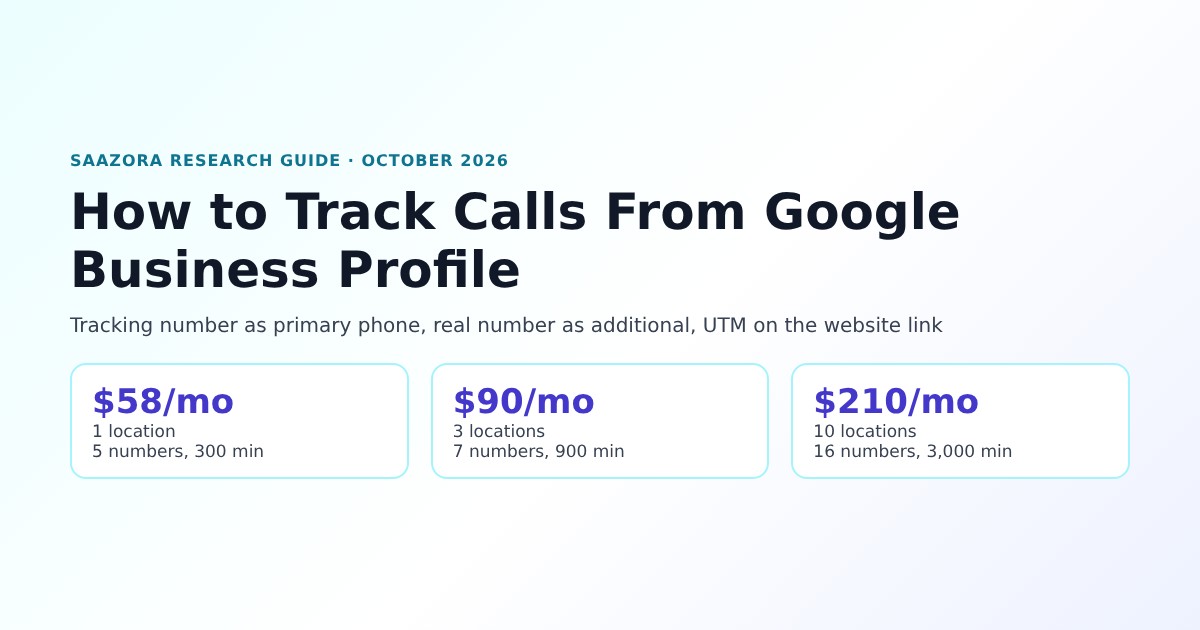
To track calls from Google Business Profile properly, put a call tracking number in the profile's primary phone field, move your real number to an additional phone field, and add a UTM parameter to the profile's website link so calls made from your site after a profile visit are credited to the profile too. Google's own Performance report does show a Calls figure, but Google defines it as "The number of times a customer clicked on the call button on your Business Profile." That is a count of taps, not of connected calls, and nobody can listen to it, score it or tie it to a booked job. Google also switched off the call history list inside Business Profiles on July 31, 2024. A tracking number fills that gap. With CallRail, a single location fits inside the $55-a-month entry tier for about $58 at 300 minutes, and ten locations come to about $210 a month (callrail.com/pricing, October 29, 2026).
This guide sticks to what each company actually publishes. Google's rules come from Google's help center, and the tracking-number setup comes from CallRail's help center, because Google itself never describes one. If you also run ads, the Google Ads side works differently and is covered in our breakdown of how Google Ads counts phone calls.
What Google Business Profile reports about calls on its own
Every verified profile has a Performance page (open your profile on Google Search, then Performance) with a date-range picker. Google lists the metrics as below. Two of them matter for calls, and neither one is a call log.
| Metric in Performance | Google's definition | What it can't tell you |
|---|---|---|
| Calls | "The number of times a customer clicked on the call button on your Business Profile." Google adds: "Add your phone number to track this metric." | Whether the call connected, how long it lasted, who called, whether they became a customer. People who read the number and dial it by hand are not counted. |
| Website clicks | "The number of times people clicked on the website link on your Business Profile." | Whether that visitor later phoned you from the website |
| Interactions | "A summary of all your total interactions." | Which interaction turned into revenue |
| Directions, Messages, Bookings and others | Shown only where relevant: "Only metrics that apply to your business appear." | Phone outcomes |
Source: Google Business Profile Help, "Understand your Business Profile performance & insights," read October 30, 2026. Google also notes: "Performance data is available only for verified Business Profiles."
Three more details from Google's page change how you read the Calls number. First, "Performance data includes views, searches, and actions from both organic search results and Google Ads," so a call-button tap from an ad that shows your profile can land in the same total as an organic one. Second, there is a download: from Business Profile Manager you can tick several profiles and use Actions, then Insights, then Download Report, which is the only native way to compare locations side by side. Third, nothing in Performance is per call. It is a daily-aggregated count.
The per-call view used to exist. Google's notice is short: "As of July 31, 2024, the chat and call history features are no longer available in your Business Profile." The same page says calls through the profile now reach the business's own number, because "numbers will be automatically updated to use the merchant's supplied phone number in Google Business Profile," and that past call history could be exported with Google Takeout only until August 30, 2024. Any guide that tells you to open a call history list in your profile is out of date.
Google Analytics 4 can now pull the same aggregates in. Google's help page "Connect Google Business Profile (GBP) to Google Analytics" lists Calls and Website clicks among the metrics, but with limits that make it a dashboard rather than a tracking tool: "Google Business Profile metrics are available for the last 6 months," and with several profiles linked "you won't be able to segment or filter GBP metrics by an individual Business Profile(s)." It also says "GBP metrics cannot be used in custom explorations, comparisons, or have filters applied." For a multi-location business, that means GA4 can show a single combined Calls total but cannot split it by location. (If GA4 is your main report, our guide to tracking phone calls in GA4 covers sending real calls into it as events.)
What Google's rules say about the phone number, and what they leave out
Before swapping in a different number, it is worth reading Google's actual words. The relevant text sits under "Website & phone" in Google's "Guidelines for representing your business on Google." In full, the phone rules are:
- "Provide a phone number that connects to your individual business location, or provide a website that represents your individual business location."
- "Use a local phone number instead of a central call center helpline number whenever possible."
- "Do not provide phone numbers or URLs that redirect or "refer" users to landing pages or phone numbers other than those of the actual business, including pages created on social media sites."
- "The phone number must be under the direct control of the business."
- "Additional phone numbers can be used on Google Business Profile websites and other local surfaces."
- "Premium phone numbers are not acceptable regardless of the rate charged to the caller."
Source: Google Business Profile Help, "Guidelines for representing your business on Google," "Website & phone" section, read in full (all collapsed sections expanded) on October 30, 2026.
What the page does not say is just as important. Google's guidelines never mention call tracking or tracking numbers. We searched the full expanded text on October 30, 2026 for "call tracking," "tracking number" and "forwarding," and none of them appear. Google neither approves nor bans a tracking number in the primary field. Separately, the "Edit your Business Profile" page sets the format: "In addition to your primary business phone number, you can enter up to 2 more phone numbers. They can be mobile numbers or landline, but not fax."
So whether a tracking number is acceptable comes down to how you read the general rules. Saazora's reading, which is not Google's statement: a local tracking number that rings straight through to the same location does "connect" to that location and does not send callers to someone else's business, which is what the redirect rule is about. Three of the rules still shape how you set it up:
- Use a local number, not toll-free. Google prefers a local number over a central helpline, and a local tracking number in the location's own area code also costs less on CallRail ($3.00 a month for an extra local number on the entry tier versus $5.00 for toll-free).
- Keep the number in the business's own account. A number "under the direct control of the business" is easiest to show if the CallRail account belongs to the business, or if an agency's account lets the business take the number with it. CallRail says porting "in and out of CallRail is always free." Our guide to call tracking for agencies covers who should own the account.
- One location, one number. The rule talks about "your individual business location," so a shared number across three branches is the wrong pattern even before you think about tracking.
CallRail makes its own claim about this, and it should be read as the vendor's view: its NAP article says "CallRail's methods are consistent with Google's guidelines." Google has not published anything that confirms or contradicts that.
The setup CallRail recommends: tracking number as primary, real number as additional
The pattern that most call tracking vendors use comes, in CallRail's case, from its help center, not from Google. CallRail's manual instructions for adding a number to a profile end with this step: "enter the CallRail tracking number you created in the primary phone field and enter your main business number in the additional phone field." Its integration does the same thing automatically, and CallRail gives the reason: "We also set your actual business number in GBP as a secondary number to maintain NAP consistency."
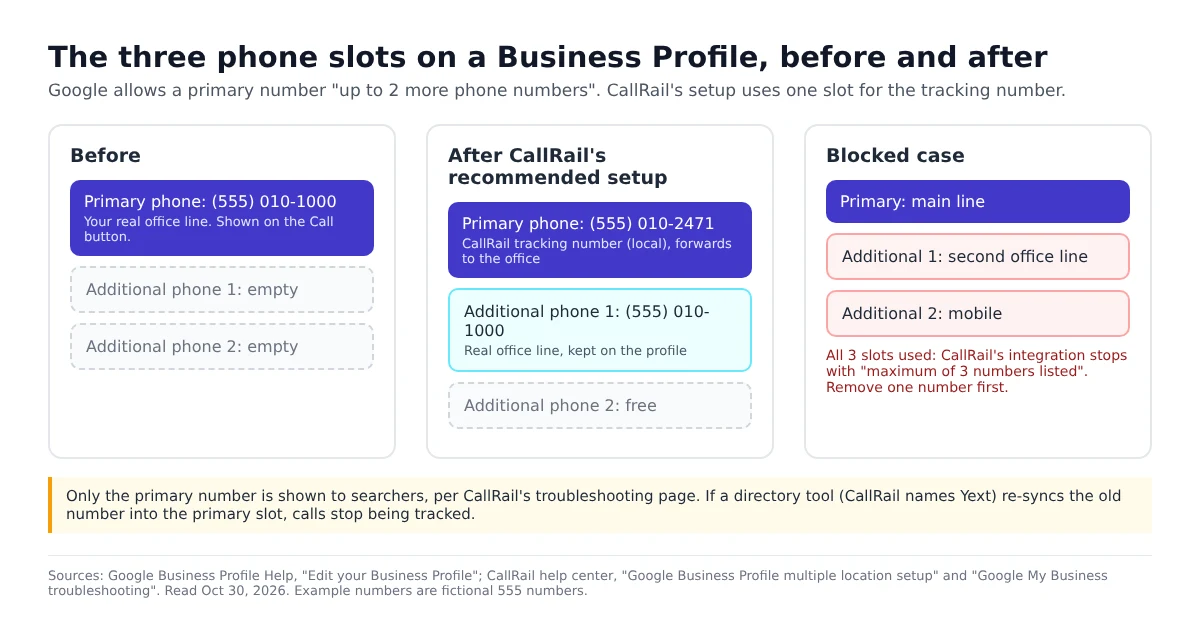
Why the primary slot specifically: CallRail's troubleshooting page says "GMB only shows the location's primary number to customers searching for the business." The additional numbers are kept on the profile, mainly so your real line stays linked to the listing in Google's data. How much that consistency still matters for ranking is open to debate, and CallRail itself is cautious: it says NAP consistency was once seen as a ranking factor but that "most industry experts agree that it no longer carries much impact," while still calling it good practice to keep the main number on the profile.
CallRail's general advice for listings matches this. Its "Common marketing sources" article says: "We recommend using a source tracking number for online sources like Google Ad Extensions, Google My Business (now called Google Business Profile), Apple Business Connect, and any other ad or listing you want to track separately from your website pool." In other words, the profile gets its own fixed number. It is not one of the numbers that rotate on your website.
Two ways to put the number in
| CallRail's Google Business Profile integration | Manual setup | |
|---|---|---|
| How | CallRail: Integrations, Google Business Profile, Authorize, pick the location, pick a tracking number, Activate | Create a number (Somewhere else, then Google Business Profile), then type it into the profile's primary phone field yourself |
| Phone fields | CallRail "automatically swaps the primary phone number" and sets the real one as secondary | You move the real number to an additional phone field |
| Website UTM | Tick "Track GBP visitors on your site" and CallRail adds the parameter | You add it to the website URL yourself |
| Watches for changes | Yes: it fails and warns you if the tracking number stops being primary or the UTM is removed | No: you find out when the GBP numbers in CallRail drop to zero |
| Who can connect | "Only an Owner or Manager can activate this integration"; Site Managers cannot | Anyone who can edit the profile |
| Locations | One location per CallRail company | Any number in one company |
Source: CallRail help center, "Google Business Profile integration," "Google Business Profile multiple location setup" and "Google My Business troubleshooting," read October 30, 2026.
After activation, give Google time. CallRail says the change usually shows on Maps before the search results panel, and can take "up to three days in some cases." Call the profile from a phone that is not on your team during that window and check whether the call appears in CallRail with Google Business Profile as the source.
Putting a UTM parameter on the website link
The phone number only covers people who call straight from the profile. Plenty of people tap Website first, look around, and then call the number on your site. Without extra work, those calls show up as Google organic traffic, or as Direct, and the profile gets no credit. CallRail describes the fix in "Using CallRail with Google My Business": its tracking "can trace these calls back to your GMB listing as well," and these capabilities "rely on UTM parameters that need to be amended to your site's URL."
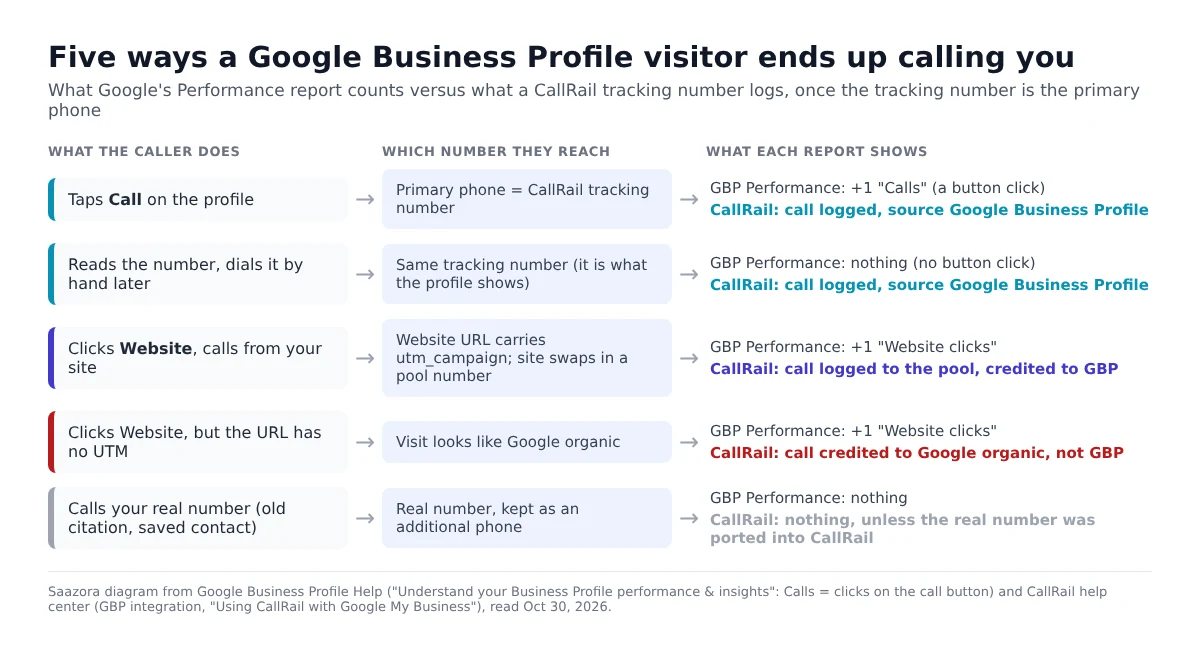
What happens on your site: CallRail's dynamic number insertion script sees the parameter on the landing URL and shows that visitor a number from your website pool. In CallRail's own words, those visitors "will see your website pool number, and the source will be credited as GBP." The pool is sized like any other: "The number of peak hourly visitors divided by four equals the size of your pool," and "Four tracking numbers are the minimum amount that can be in a given pool." Our guide to how many numbers dynamic number insertion needs walks through that sizing rule in detail.
The exact parameter is where CallRail's own pages disagree with each other, so check before you type anything:
- The integration sets the value for you. The troubleshooting article says that if the parameters are "updated to something other than what we set (utm_campaign=gmb or utm_campaign=googlemybusiness), your GMB calls to their website pool will not be attributed correctly."
- The manual multi-location article tells you to add
/?utm_campaign=GBPto the end of the website URL instead.
If you use the integration, let it write the URL and don't edit it afterward, because CallRail fails the integration when it no longer finds its parameter. If you set things up by hand, use the value CallRail's current article gives for manual setups, then visit your site through the profile's Website button and check that the number on the page changes.
Google Analytics has its own rule, from Google's URL builder page: "When you add parameters to a URL, you should always use utm_source, utm_medium, and utm_campaign." CallRail's parameter is a single utm_campaign. If you also want GA4 to label profile visits cleanly, the fuller version would look like https://www.example.com/?utm_source=google&utm_medium=organic&utm_campaign=gmb, plus utm_content= with a location name if you have several. CallRail's integration only accepts what it sets, though, and its page says that unchecking the box "will bypass the UTM parameter check." Neither CallRail page says whether the extra parameters change how its script reads the campaign value. Test one visit in CallRail before you roll it out to every profile.
One more Google rule touches the website field. Google's business links policy says links must be reachable by its crawler and must not use "Content cloaking or serving different content to bots than human users." That policy is written for booking and ordering links, not the main website field, but it is the reason CallRail stresses that its script "serves the same code and user experience to human visitors and bots alike." A UTM on its own changes nothing on the page.
Setting it up for several locations
Each location's profile needs its own tracking number, or you can't tell branches apart. CallRail gives two ways to do that:
- One CallRail company per location. Integrations work per company, and CallRail says "there is no limit or cost to creating as many companies in your CallRail account as necessary." Each location then gets the automatic integration, with its change monitoring.
- One company, one integration, the rest by hand. Connect the first location through the integration, then for each extra one create a tracking number, set its source to Google Business Profile ("in a drop-down menu under Other"), name it after the location, and type it into that profile's primary phone field with the real number as additional.
For chains with one website, the profiles can share one website pool. CallRail's pages don't describe a way for a shared pool to tell which location's profile a visitor came from. A location-specific landing page per profile (which Google's business links policy also asks for: "For businesses with multiple locations, action links must lead to a website for a specific location") is the cleaner route, if your site has them.
Agencies and franchise operators should also note the role rule: if your Google access to a location is Site Manager, CallRail won't show that location in its list at all. You need Owner or Manager on each profile before connecting.
What it costs to track calls from Google Business Profile at 1, 3 and 10 locations
Every CallRail Lead Tracking tier lists "GMB" among its included integrations, so the profile connection itself costs nothing extra. The bill depends on how many numbers you run and how many minutes they carry. These are the four Lead Tracking tiers from the "See all Lead Tracking plans" table on callrail.com/pricing:
| Lead Tracking tier | Monthly billing | Billed yearly | Local numbers included | Local minutes included | Each extra local number | Each extra local minute |
|---|---|---|---|---|---|---|
| Tier 1 | $55 | $50/mo | 5 | 250 | $3.00 | $0.06 |
| Tier 2 | $75 | $68/mo | 5 | 750 | $3.00 | $0.06 |
| Tier 3 | $95 | $85/mo | 10 | 1,000 | $2.50 | $0.05 |
| Tier 4 | $295 | $265/mo | 40 | 4,000 | $1.75 | $0.045 |
Source: callrail.com/pricing, rendered with the Monthly toggle and the full Lead Tracking table expanded, October 29, 2026; headline yearly prices re-checked October 30, 2026. CallRail's FAQ: "Minutes are calculated by rounding each call up to the nearest minute." Extra usage is billed on top of the base fee. Toll-free numbers cost more ($5.00 to $3.00 each by tier).
For the worked examples, Saazora assumed one Google Business Profile tracking number per location, one shared website pool sized by CallRail's peak-hour rule, all locations in one CallRail account so numbers and minutes add up together, and the monthly minutes shown. Each example is priced twice: with the call-button number only, and with the website pool added so website-click calls are credited too.
| Example business | Numbers | Minutes a month | Cheapest tier, call button only | Cheapest tier, plus website clicks | Per location (with website) |
|---|---|---|---|---|---|
| 1 location (peak 12 site visitors an hour) | 1, or 5 with a 4-number pool | 300 | $58.00 on Tier 1 ($53.00 billed yearly) | $58.00 on Tier 1 ($53.00 billed yearly) | $58.00 |
| 3 locations, one website (peak 16 an hour) | 3, or 7 with a 4-number pool | 900 | $84.00 on Tier 2 ($77.00 yearly) | $90.00 on Tier 2 ($83.00 yearly) | $30.00 |
| 10 locations, one website (peak 24 an hour) | 10, or 16 with a 6-number pool | 3,000 | $195.00 on Tier 3 ($185.00 yearly) | $210.00 on Tier 3 ($200.00 yearly) | $21.00 |
Saazora arithmetic on the rates above. Example: 10 locations with the website pool on Tier 3 = $95 base + 6 extra numbers x $2.50 ($15.00) + 2,000 extra minutes x $0.05 ($100.00) = $210.00. Minutes, traffic peaks and the one-account setup are assumptions, not customer data. Excludes taxes, text-message registration fees and add-ons.
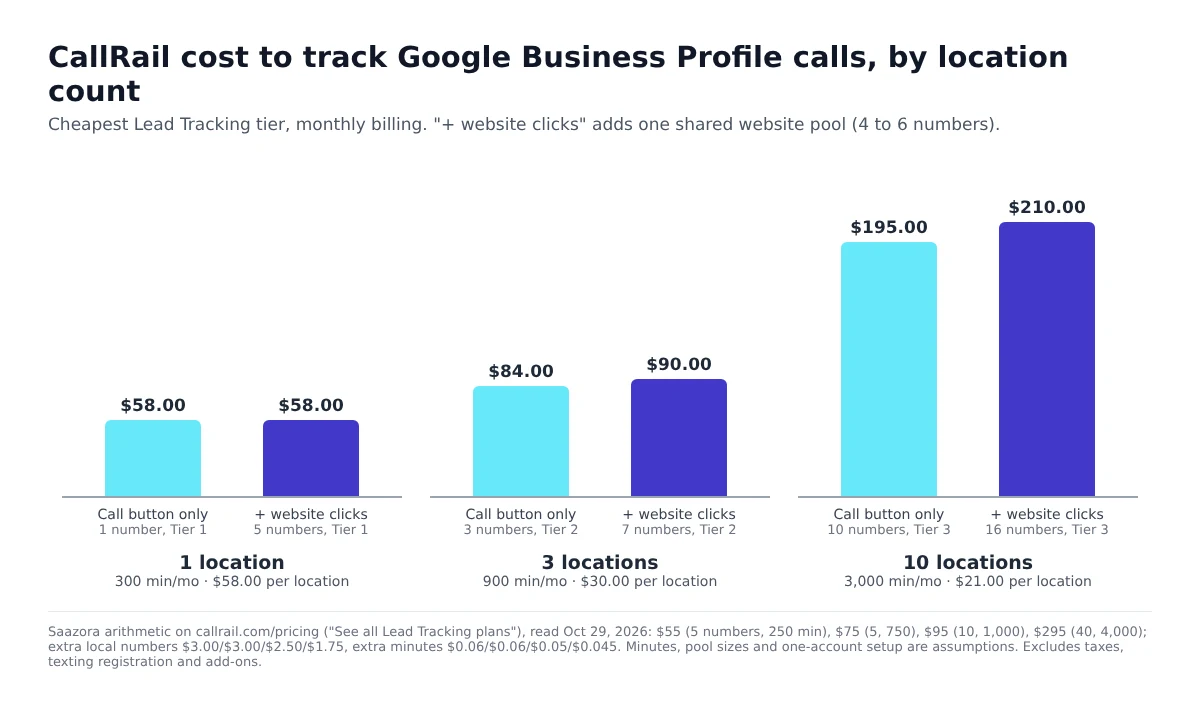
Four things stand out in the arithmetic:
- A single location should always add the website UTM. One profile number plus a 4-number pool is exactly the five numbers Tier 1 includes, so crediting website-click calls costs $0 more.
- Minutes push you up a tier before numbers do. With five numbers, Tier 1 stays cheaper only up to 583 minutes; at 584 minutes Tier 2 ($75) wins. Three busy locations will usually pass that line.
- Tier 3 covers more than it looks. In the 10-location example, Tier 4 ($295 with 40 numbers and 4,000 minutes) only becomes cheaper than Tier 3 above roughly 11,000 minutes a month at 16 numbers. Even at 40 numbers and 3,000 minutes, Tier 3 works out to $270.
- Per-location cost falls fast. From $58 at one location to about $21 at ten, because the base fee and the website pool are shared.
The full plan list, including the Lead Conversion plans, toll-free rates and add-ons, is in our CallRail pricing breakdown. CallRail offers a 14-day trial with no credit card, which is long enough to connect one profile and compare CallRail's count with the Calls figure in Performance. You can start a CallRail trial (affiliate link), and current offers are on the CallRail deals page.
Six things that quietly break Google Business Profile call tracking
Most failures don't show up as errors. The calls keep ringing and the GBP line in CallRail just drops off. These are the cases the help pages describe, plus one that follows from Google's own documentation:
- A listing tool overwrites the number. CallRail warns that directory services such as Yext "can overwrite the tracking numbers in your listings," and that the integration then fails. Turn off phone sync for that location in the listing tool before connecting.
- All three phone slots are full. CallRail: "A GMB listing can only have three numbers per location." If the profile already has three, the integration won't activate until you remove one.
- Someone edits the website URL. Removing or changing the UTM (for example, while fixing a broken link) cuts the website-click credit. The integration flags it; a manual setup won't.
- You cancel and leave the number up. CallRail says that after you deactivate or close the account, "calls to a tracking number that remains listed will not connect to your business." Put the real number back in the primary slot first.
- Google itself calls the tracking number. Google says it "may occasionally reach out using automated messages via call, text, or WhatsApp to the verified phone number on your profile," and its scripted calls open with lines like "This is an automated service, so this call is recorded to help improve Google services." Those calls will reach your primary number, the tracking number, and count as GBP calls. Tag or exclude them so they don't inflate lead counts.
- Calls to the real number stay invisible. People who saved your old number, or found it on an old citation, bypass the tracking number entirely. CallRail's answer is to port the main number into CallRail (its "track all calls" method), although it notes that "Main line tracking numbers will not allow you to attribute calls to their exact marketing campaigns."
For service-area businesses with trucks, yard signs and Local Services Ads as well as a profile, our guide to call tracking for home services shows how the profile number fits next to the others without them crediting each other's calls.
Questions about tracking Google Business Profile calls
Does Google Business Profile show a list of calls?
No, not since July 31, 2024, when Google removed call history from Business Profiles. The Performance page shows a Calls count, which Google defines as clicks on the call button, with no caller details, duration or recordings.
Is a call tracking number allowed on a Google Business Profile?
Google's guidelines don't mention call tracking numbers at all. They require a number that connects to the individual location, prefer local numbers, ban premium-rate numbers and numbers that redirect to other businesses, and say the number must be under the business's direct control. A local tracking number that forwards to that location fits those words, but that is a reading of the rules, not a Google statement.
Why is the Calls number in Performance different from CallRail's count?
They measure different things. Google counts taps on the call button, including taps that never connect. CallRail counts calls that reached the tracking number, including people who typed the number in by hand and, with a UTM, people who called from your website. Expect the two to differ every month.
Will I lose my real number on the profile?
No. In CallRail's recommended setup the real number moves to an additional phone field and stays on the profile. Searchers see the primary number, which is the tracking number.
Do I need a website pool just for Google Business Profile?
Only if you want credit for people who click through to your site and then call. If you already run a CallRail pool for other sources, the UTM on the profile's website link is enough. At one location the pool costs nothing extra on CallRail's entry tier, because the five included numbers cover the profile number and a 4-number pool.
How we researched this
This is a research guide based on published documentation. Saazora did not set up a CallRail account or edit a live Business Profile for this page. Google's behaviour and rules come only from Google Business Profile Help (performance metrics, the 2024 call history change, the representation guidelines with every collapsed section expanded, editing your profile, the business links policy, automated calls from Google) and Google Analytics Help (the GBP link and URL builders), all read on October 30, 2026. The tracking-number setup comes from CallRail's help center articles on the Google Business Profile integration, multiple-location setup, troubleshooting, using CallRail with Google My Business, NAP consistency, common marketing sources and website pool sizing. CallRail prices are from callrail.com/pricing as rendered on October 29, 2026, with headline prices re-checked on October 30. Location counts, minutes and traffic peaks in the cost examples are Saazora assumptions; the dollar figures are arithmetic on the published rates.
Sources (plain links): Understand your Business Profile performance & insights · Changes to Business Profile chat and call history · Guidelines for representing your business on Google · Edit your Business Profile · Business links policies & guidelines · Help protect against fraudulent calls and texts · Connect Google Business Profile to Google Analytics · URL builders · CallRail Google Business Profile integration · CallRail multiple location setup · CallRail Google My Business troubleshooting · Using CallRail with Google My Business · CallRail pricing