
Prices on callrail.com, CallRail's Premium Conversation Intelligence page and its FAQ, and CallRail help center articles checked October 30, 2026 · Research guide based on CallRail's own documentation, not hands-on testing · US list prices
Saazora may earn a commission if you sign up for CallRail through links on this page, at no extra cost to you. Links to CallRail help center pages are plain links with no affiliate tag.
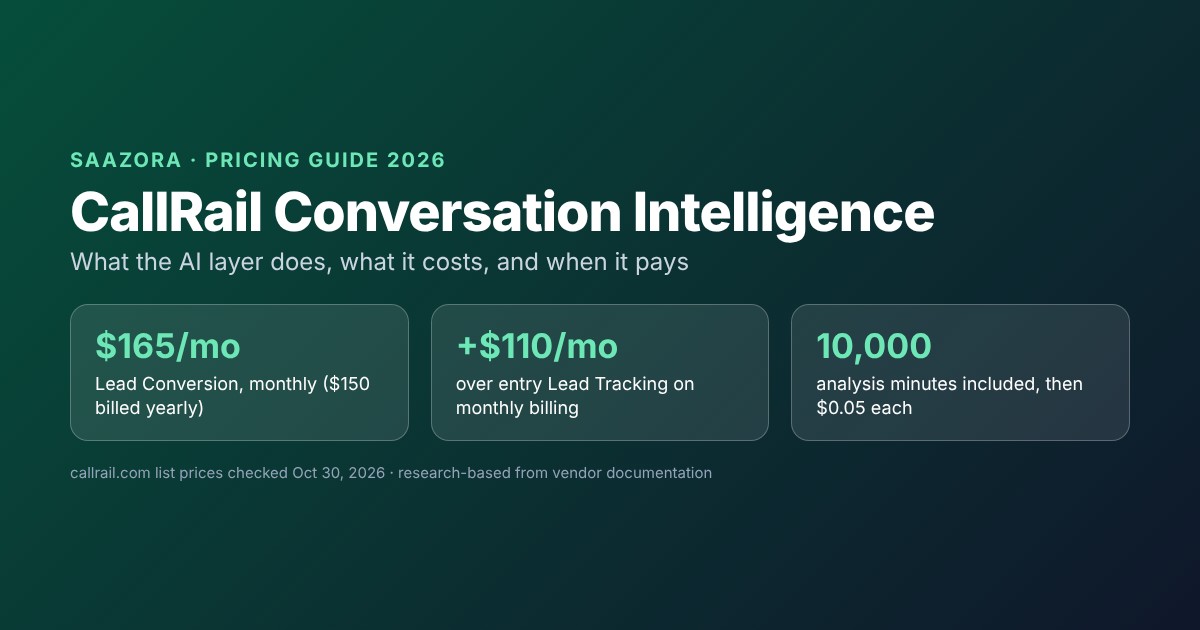
CallRail Conversation Intelligence, sold as Premium Conversation Intelligence, is the AI layer that reads your call transcripts and turns them into summaries, sentiment, outcome tags, lead scores, coaching notes and drafted follow-ups. You get it on the Lead Conversion plan, which costs $165 a month on monthly billing or $150 a month billed yearly and includes 10,000 analysis minutes, with $0.05 for each minute after that. On monthly billing that is $110 more than entry-level Lead Tracking, which already records and transcribes calls. Our arithmetic on CallRail's list prices puts the real gap between $110 and about $205 a month for a business taking 100 to 2,500 calls, because Lead Conversion is listed with the entry tier's 250 minutes and $0.06 overage rate. This guide separates what you already get without the upgrade from what the AI layer adds, prices it at five call volumes, and lists the settings and fine print that decide whether it is worth paying for.
If you want the whole CallRail price list, including the four hidden Lead Tracking tiers and add-ons, our CallRail pricing breakdown covers it. This page looks only at the conversation intelligence decision.
Two layers of "AI" on CallRail, and where the line falls
CallRail uses the word AI on almost every plan, which makes the upgrade hard to judge from the plan cards alone. The cleanest way to read it is as two layers.
The base layer comes with Lead Tracking. The pricing page describes Lead Tracking as call and text tracking "now with AI-powered conversation insights." Its card lists "Call transcription and analysis" and automation rules, and the plan table labels the included usage as "Local Minutes (includes transcription)." Call recording is free on every plan; the inbound recording article says "Call recording is included in the base price of all pricing plans." In CallRail's help center this base package is called Call Tracking Intelligence, described as "CallRail's base feature package." So a $55 account already gives you recordings, transcripts you can read in the app, call scoring and custom tags.
The premium layer is Premium Conversation Intelligence (PCI). The help center says the package "includes everything in Call Tracking Intelligence, plus extra insight and analysis tools for lead conversion." CallRail's product page sums it up as a tool that "summarizes and scores every call, jots down next steps, and spots trends for you." On the pricing page it is the difference between Lead Tracking and Lead Conversion: "Unlock richer insights with Premium Conversation Intelligence™ to attract and convert more leads."
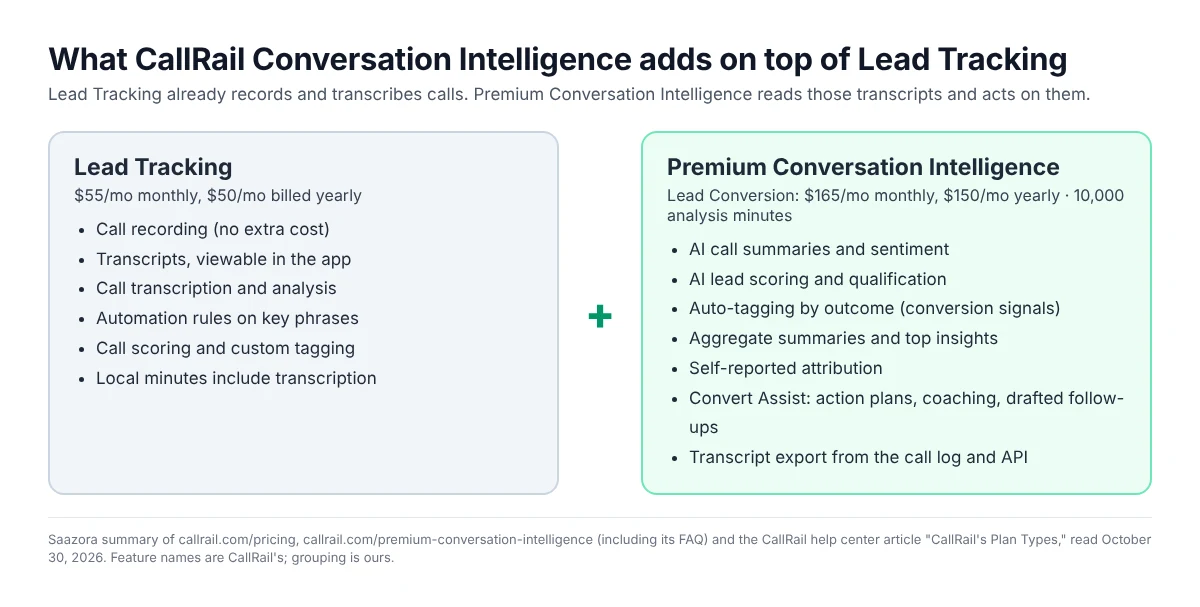
CallRail's own FAQ draws the same line: "While Call Tracking delivers transcripts and tools like automation rules, Premium Conversation Intelligence™ builds off of your transcribed calls to deliver even richer insights." In other words, nothing in PCI works on audio directly. It works on the transcript, which is why recording and transcription have to be switched on first (more on that below).
What Premium Conversation Intelligence does, feature by feature
CallRail's product page and its plan types article name the features. Here they are grouped by the job they do, with CallRail's own description and our note on who would actually use each one.
| Feature | What CallRail says it does | Who it helps most |
|---|---|---|
| Call summaries and sentiment | An "AI-generated summary of the call based on the provided transcript" and sentiment as "a review of the transcript to determine call quality and how the conversation went" | Owners or managers who currently listen back to calls to find out what happened |
| AI lead scoring and qualification | "Our AI automatically analyzes intent and separates tire-kickers from the leads most likely to convert." | Businesses where many calls are price shoppers, wrong numbers or existing customers |
| Auto-tagging and sales outcomes (conversion signals) | Tags calls by outcome, "like appointment scheduled or new lead"; the help center says conversion signals "use CallRail's generated transcripts and artificial intelligence to determine if an action occurs" | Advertisers who want booked appointments, not just calls, counted as conversions |
| Aggregate summaries and top insights | "We roll up hundreds of conversations into one simple summary." Also surfaces recurring questions, sentiment shifts and coaching opportunities | Multi-location or multi-agent teams looking for patterns, not single calls |
| Self-reported attribution | "Our AI listens for how leads heard about you" and reports it next to tracking data | Anyone who gets referral or offline calls that tracking numbers cannot attribute |
| Convert Assist: coaching, action plans, smart follow-up | "With Convert Assist, users get next steps, follow-up messaging, and coaching on every lead with a recorded call in CallRail." | Front-desk or sales staff who call leads back |
| Transcript export and API access | "The ability to export transcripts via the call log or API" | Teams feeding transcripts into a CRM, data warehouse or their own AI tools |
Sources: callrail.com/premium-conversation-intelligence and CallRail help center, "CallRail's Plan Types." Read October 30, 2026. The help center also lists beta access to CallRail Labs as part of the package.
One feature on that list is easy to miss and may matter more than the AI itself: transcript export. CallRail's FAQ is explicit that lower plans keep transcripts inside the app: "Customers on Call Tracking Intelligence plans can still view transcripts inside the CallRail app, but will need to upgrade to PCI to access transcripts outside of it." If your real goal is to pipe transcripts into HubSpot, a spreadsheet or another analysis tool, that alone puts you on Lead Conversion.
CallRail also publishes outcome figures on the product page: 50% less time spent reviewing and analyzing calls, 60% less time spent qualifying leads and a 10% increase in leads. The page does not say how they were measured; CallRail's separate AI page says its figures are "Based on an independent analysis of real CallRail customers." Treat them as vendor claims, not as a forecast for your account.
CallRail conversation intelligence pricing at five call volumes
The headline difference is simple. On monthly billing, Lead Tracking costs $55 and Lead Conversion costs $165, a $110 gap. Billed yearly they cost $50 and $150, a $100 gap. Both include 5 local numbers, 250 local minutes and 25 texts; only Lead Conversion includes 10,000 analysis minutes.
| Plan | Monthly billing | Billed yearly | Analysis minutes | Extra analysis minute |
|---|---|---|---|---|
| Lead Tracking | $55/mo | $50/mo | None | Not available |
| Lead Tracking Complete (adds form tracking) | $105/mo | $95/mo | None | Not available |
| Lead Conversion (adds PCI) | $165/mo | $150/mo | 10,000 | $0.05 |
| Lead Conversion Complete (forms + PCI) | $215/mo | $195/mo | 10,000 | $0.05 |
Source: callrail.com/pricing, Yearly and Monthly views, checked October 30, 2026. All four plans add usage on top: $3 per extra local number, $0.06 per extra local minute, $5 per toll-free number, $0.08 per toll-free minute, $0.03 per text.
The headline gap understates the cost for busier accounts. Lead Tracking has four usage tiers behind its "See all Lead Tracking plans" link, and the higher ones cut the per-minute rate: $75 for 750 minutes, $95 for 10 numbers and 1,000 minutes at $0.05 per extra minute, and $295 for 40 numbers and 4,000 minutes at $0.045. Lead Conversion, as listed in the comparison table, carries the entry allowances: 250 minutes and $0.06 per extra minute. So as call volume grows, the Lead Tracking bill falls behind the Lead Conversion bill on two counts, the AI layer and the minute rate.
To see what that means in dollars, we priced five call volumes. Assumptions: 5 local numbers, calls averaging 4 minutes, local numbers only, no texts or add-ons, and one analysis minute counted per minute of analyzed call (CallRail's pages do not define the unit; see the caveats below). For Lead Tracking we picked whichever tier is cheapest at that volume.
| Calls per month (minutes) | Cheapest Lead Tracking tier | Lead Tracking bill | Lead Conversion bill | Cost of the AI layer | Per call |
|---|---|---|---|---|---|
| 100 (400) | Entry, $55 | $64 | $174 | $110 | $1.10 |
| 300 (1,200) | 750-minute, $75 | $102 | $222 | $120 | $0.40 |
| 600 (2,400) | 10-number, $95 | $165 | $294 | $129 | $0.22 |
| 1,200 (4,800) | 10-number, $95 | $285 | $438 | $153 | $0.13 |
| 2,500 (10,000) | 10-number, $95 | $545 | $750 | $205 | $0.08 |
Saazora arithmetic on callrail.com/pricing, monthly billing, October 30, 2026. On yearly billing the cost of the AI layer is $100, $112, $124, $148 and $200 at the same volumes. Before tax.
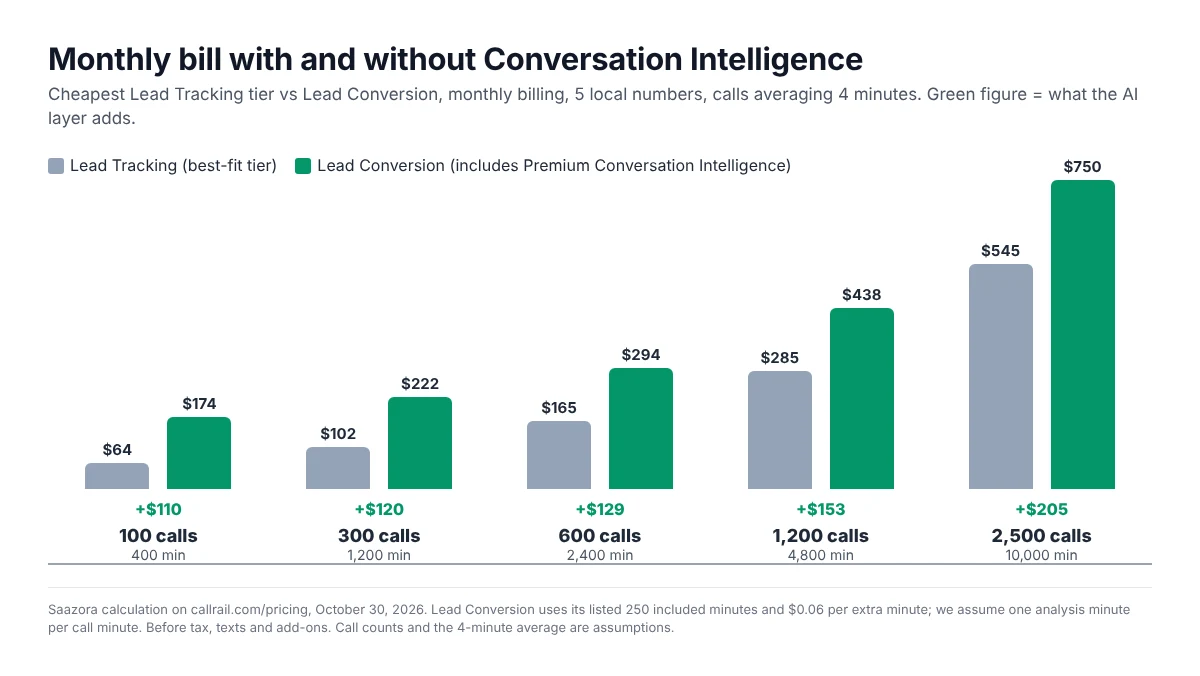
There is a question worth asking CallRail before you sign: whether Lead Conversion can be combined with one of the higher-volume Lead Tracking tiers. The public table does not show that option. If it is available for your account, the cost of the AI layer stays much closer to the flat $110, and the bigger numbers in the table above would shrink.
Analysis minutes: the unit you are actually buying
The help center says that features included in Premium Conversation Intelligence "will be billed as" analysis minutes. Beyond that, neither the pricing page nor the plan types article spells out how an analysis minute is counted, for example whether a 4-minute call uses 4 analysis minutes or whether each feature run counts separately. Our model assumes the first, which is the most natural reading; confirm it with CallRail before relying on the numbers.
On that reading, 10,000 analysis minutes is a generous allowance for a small business. It covers about 2,500 calls a month at a 4-minute average, 3,333 at 3 minutes and 1,666 at 6 minutes. Above it, CallRail keeps going: "We'll continue to transcribe and analyze your calls so that your insights and reports stay up-to-date." Extra minutes are billed at the $0.05 rate. At 3,000 calls of 4 minutes, that adds $100 for the 2,000 extra analysis minutes, and the cost of the AI layer jumps to about $325 a month in our model. For bigger volumes the FAQ points to a negotiation: "If you'd like to discuss custom pricing for high-volume analysis minutes, please reach out to your account manager."
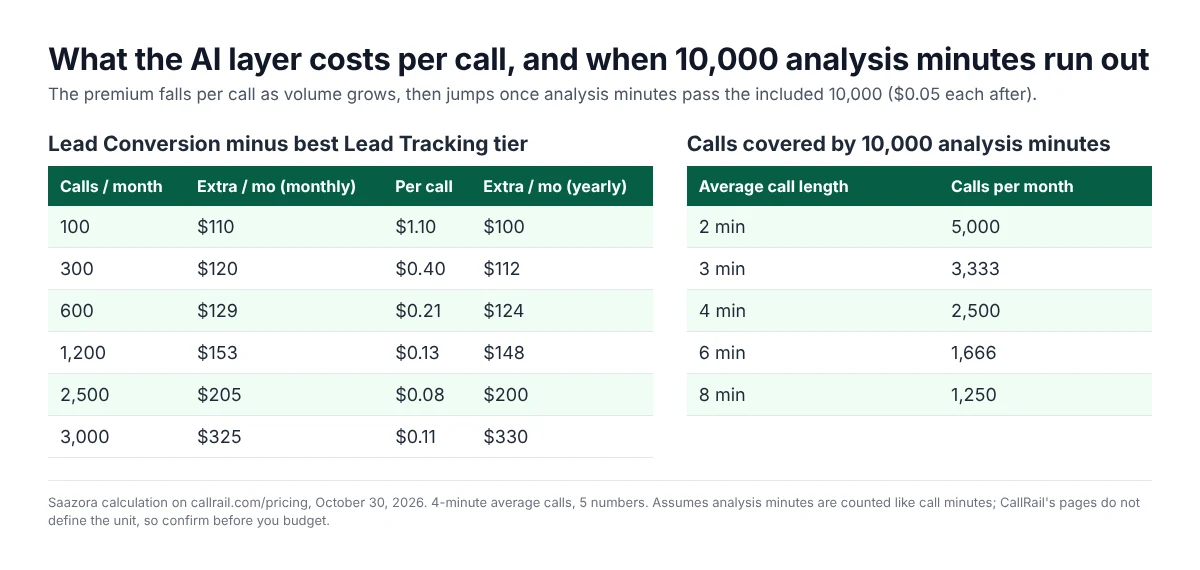
Two billing rules from the pricing FAQ apply here as well. "Minutes are calculated by rounding each call up to the nearest minute," so many short calls use more minutes than their real talk time. And overage charges, once billed, are not refundable.
Is Lead Conversion worth it? A simple break-even test
Because the AI layer has a fixed monthly price, the test is whether it saves or earns more than that price. Two ways to frame it, using only your own numbers:
- Time saved. If someone on your team listens to calls to sort leads, multiply the hours they spend a month by what that hour costs you. At $110 a month, the upgrade pays for itself once it replaces a little over 4 hours of work valued at $25 an hour. If nobody listens to calls today, this side of the test is zero.
- Jobs won. If one extra booked job a month is worth more than $110 in profit, the question becomes whether faster follow-up and coaching could plausibly win one. For a roofer or a law firm, one job usually clears it; for a business selling $40 tickets, it takes several.
On the other side, some businesses get little from it. A two-person shop taking 60 calls a month can read the free transcripts in the app. A company that only needs to count calls by ad source is already covered by Lead Tracking. And if you only advertise on Google, our guide to tracking phone calls from Google Ads shows how much Google reports for free.
| Your situation | Lean toward | Why |
|---|---|---|
| Under about 100 calls a month, owner answers most of them | Lead Tracking | Transcripts are already readable in the app; the AI layer costs over $1 per call at this volume |
| Front desk or sales staff who follow up on leads | Lead Conversion | Convert Assist, action plans and drafted follow-ups are aimed at this job |
| Paid ads where you want appointments, not calls, as the conversion | Lead Conversion | Outcome tagging separates booked jobs from tire-kickers |
| You need transcripts in a CRM or your own tools | Lead Conversion | Export and API access to transcripts are PCI-only |
| Calls and web forms both matter | Lead Conversion Complete ($215 / $195) | Adds form tracking; only $50 a month above Lead Conversion |
| Well over 2,500 calls a month | Ask for a quote | Analysis-minute overage and the entry-tier minute rate both add up |
CallRail's product page talks about winning "the job" and quotes a moving company, so home-service firms are the obvious audience; our guide to call tracking for HVAC, plumbers and home services covers the tracking side of that setup.
Turning it on without losing data
CallRail's FAQ lays out the order: "Premium Conversation Intelligence requires a CallRail Call Tracking account." After subscribing, "you'll turn on call recording and transcriptions for the tracking phone numbers where you'd like to gather insight," then set automation rules for key phrases or turn on automatic conversion signals.
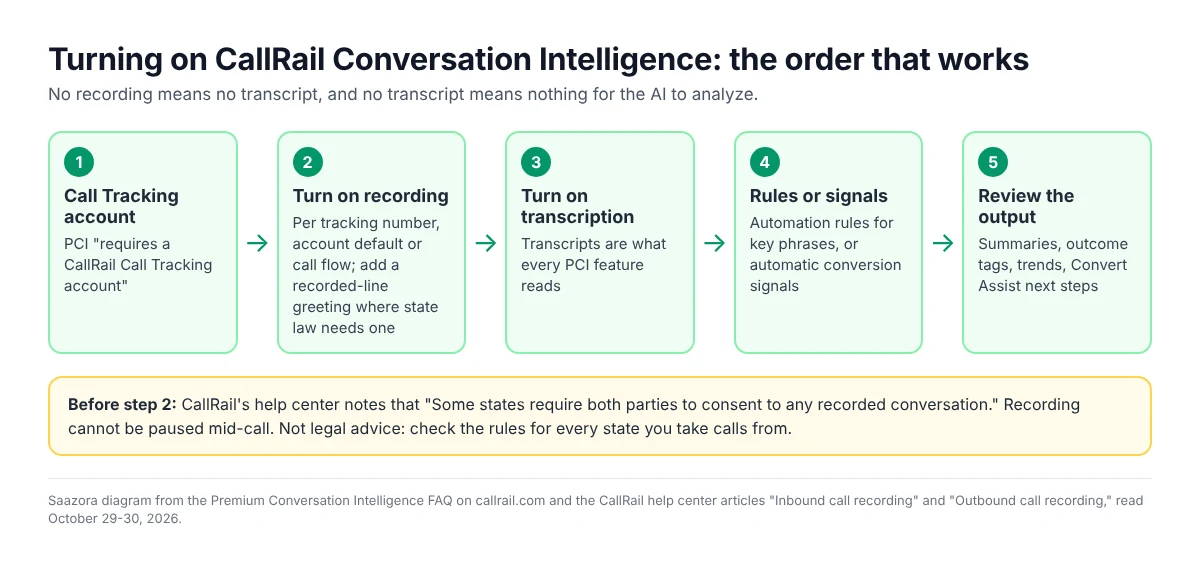
The step that trips people up is recording. CallRail lets you turn it on per tracking number, at the account level as a default for new numbers, or per call flow, and outbound calls have their own setting that an admin must enable. A number you forgot to switch on will produce no transcript and no analysis. Recording also carries legal weight. CallRail's help center warns that "Some states require both parties to consent to any recorded conversation," and offers an automated greeting to tell callers the line is recorded. It also notes "it is not possible to pause call recording in the middle of a call," so a recorded number records the whole call. This is not legal advice; if you take calls from several states, check each one, and healthcare businesses should note that CallRail says it signs a business associate agreement (BAA) for HIPAA accounts.
Contract details that affect the decision
- Try it before you pay. Every account starts with a 14-day trial with no credit card, and the Lead Conversion card has its own trial button. Turn recording and transcription on from day one so the trial has calls to analyze.
- Yearly billing saves about 9% on Lead Conversion ($1,800 a year against $1,980 on monthly billing) but CallRail's annual plan article is blunt: "Annual plans are nonrefundable." Stay monthly until you know you will keep using the AI features.
- Usage is billed monthly either way. Extra local minutes and analysis minutes are invoiced each month on top of the base fee, even on a yearly plan.
- Prices can change. The pricing FAQ says CallRail may change its fees by posting a new pricing structure or emailing you, so recheck the page before renewal.
If the upgrade fits, you can start a CallRail trial on Lead Conversion (affiliate link) or see current CallRail offers. For strengths and weaknesses beyond the AI layer, read our full CallRail review; if you want to compare vendors first, see the CallRail alternatives ranked by price per number or our best call tracking software for small business. If an enterprise platform is also on your list, our CallRail vs Invoca comparison sets Lead Conversion against Invoca's quote-based Signal AI add-on.
CallRail Conversation Intelligence questions
Does CallRail transcribe calls on the cheapest plan?
Yes. Lead Tracking lists "Call transcription and analysis," and its included minutes are labeled as including transcription. You can read transcripts in the app; exporting them or pulling them through the API requires Premium Conversation Intelligence.
How much does CallRail Premium Conversation Intelligence cost?
It is sold inside the Lead Conversion plan at $165 a month on monthly billing or $150 a month billed yearly, which is $110 or $100 above Lead Tracking. Lead Conversion Complete, which adds form tracking, is $215 or $195. Both include 10,000 analysis minutes, then $0.05 per minute.
Can I add conversation intelligence to Lead Tracking without changing plans?
CallRail's pricing page sells it only as part of the two Lead Conversion plans; it is not listed as a separate add-on. Adding it means changing plans, so ask CallRail how a mid-term change is billed before you switch.
What happens if I use more than 10,000 analysis minutes?
CallRail keeps analyzing calls and bills the extra at the plan's additional usage rate, listed as $0.05 per analysis minute. High-volume accounts can ask their account manager about custom pricing.
Is CallRail Conversation Intelligence the same as Voice Assist?
No. Voice Assist is CallRail's AI answering service, priced from $95 a month on top of Lead Tracking. Premium Conversation Intelligence analyzes calls your team or Voice Assist has already handled; CallRail's FAQ says it enhances both.
How we researched this
This is a research guide. Saazora did not run a CallRail account with Premium Conversation Intelligence for this page, and no feature was used or measured by us. Feature descriptions come from CallRail's Premium Conversation Intelligence page and its FAQ, CallRail's AI page, the pricing page in both its Yearly and Monthly views with the full Lead Tracking table expanded, and the help center articles "CallRail's Plan Types," "Inbound call recording," "Outbound call recording" and "Annual Plans." CallRail's own pages were read in a headless browser on October 30, 2026, and the list prices were cross-checked in a regular browser the same day; the recording articles were read on October 29, 2026, and the plan types article on October 30 through a text-extraction tool because the help center blocks automated browsers. Call volumes, the 4-minute average and the reading of analysis minutes as call minutes are Saazora assumptions; every dollar figure is arithmetic on CallRail's published list prices.
Sources (plain links): CallRail pricing · Premium Conversation Intelligence · CallRail AI · CallRail's Plan Types · Inbound call recording · Outbound call recording · Annual Plans